
Where do you see the yellow warning or red error flagged in Blocks?

sinh...@gmail.com

Enis
If you look at the bottom of the workspace, you'll see a button and two icons above it. This is the warning area. In the first shot, everything's OK and the warning signals in the screen blocks are hidden (when the button says "Show Warnings," they're hidden) and at this stage, there are no warnings.
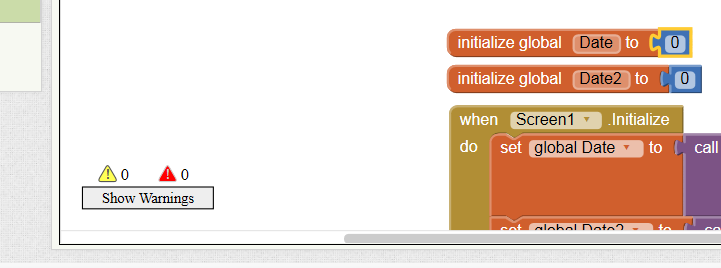
In the next screen shot, I've separated the number block from the global variable block for Date.
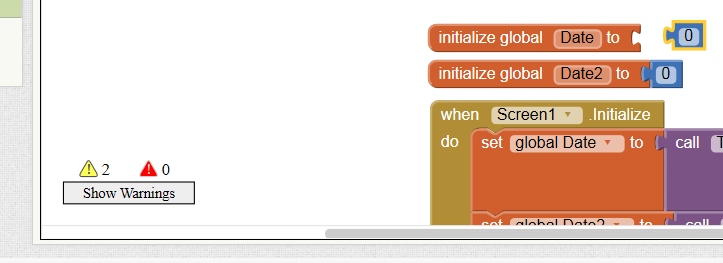
Notice how the count next to the warning triangle above the button now indicates that there are 2 warnings. But where IS the problem???
Well, now it's time to SHOW the warnings, so click on the button that says "Show Warnings." It's caption will change to "Hide Warnings," but warning triangles now appear in the blocks as shown int he shot below.

Now, when you click on one of those warning triangles in the upper left hand corner of your blocks, App Inventor will tell you what you need to do to rectify the problem! The reason there are TWO warnings is that each block has a warning about being disconnected. See below:

And that's it... Let AI tell you what you have to address when you have a compilation error! See how it looks below, with the error fixed. Once the two orphaned blocks are joined again, your warning counter will clear those two errors. Now, you can click on the button that now says "Hide Warnings. and you'll be back to where the screen shots started above!


katke...@gmail.com
I have a related problem. My program shows 16 warnings and 1 error at the bottom but no red or yellow triangles on the blocks themselves. Ideas on how to find them?
Enis
There is a known bug in AI right now that the counter doesn't flush itself correctly or completely all of the time when things are fixed.
katke...@gmail.com
> What does the button say? If it says "Show Warnings" then you have to click that button to have the warnings displayed.
>
> There is a known bug in AI right now that the counter doesn't flush itself correctly or completely all of the time when things are fixed.