
Companion Connection Error: See Connection Help
 Assigned to halatmi...@gmail.com by taifu...@gmail.com
Erin Elan
- I have the newest companion version 2.36 on my phone (Nexus 5X)
- I am on the same wifi network on my laptop and phone (I have tried at three different places with different networks, but always made sure phone and laptop were synced on this)
- I can scan the code (it's upside down, but captures correctly), but nothing happens on the phone. On my laptop, I just get the error.

Taifun
Trying to push the limits of App Inventor!
Snippets,
Tutorials and
Extensions from
Pura Vida Apps by
 Taifun.

Adam Tokarski
Taifun
Connecting over the Phone Over Wifi Troubleshooting
Try the following steps to troubleshoot your wireless connection.
1. Try to reach http://rendezvous.appinventor.mit.edu from your PC
2. Try to reach http://rendezvous.appinventor.mit.edu from your Android device
3. If the steps above both work, try using the "ping" command to ping to the IP Address of the phone (displayed by the MIT AICompanion in its startup window). If you are using windows, type "ping" + *IP address of the phone* in cmd.exe window, if you are using mac or linux, type type "ping" + *IP address of the phone* in terminal window. Detailed instruction see http://www.wikihow.com/Ping-an-IP-Address
4. If all of these steps succeed and Wireless App Inventor still doesn't work, then there may be a firewall between the computer and phone that is blocking ports 8001 and 9987. If you have a "telnet" program you can attempt to telnet from the computer to the phone on these ports. If the connection won't complete, then there is likely a firewall in place that is blocking connections to the phone
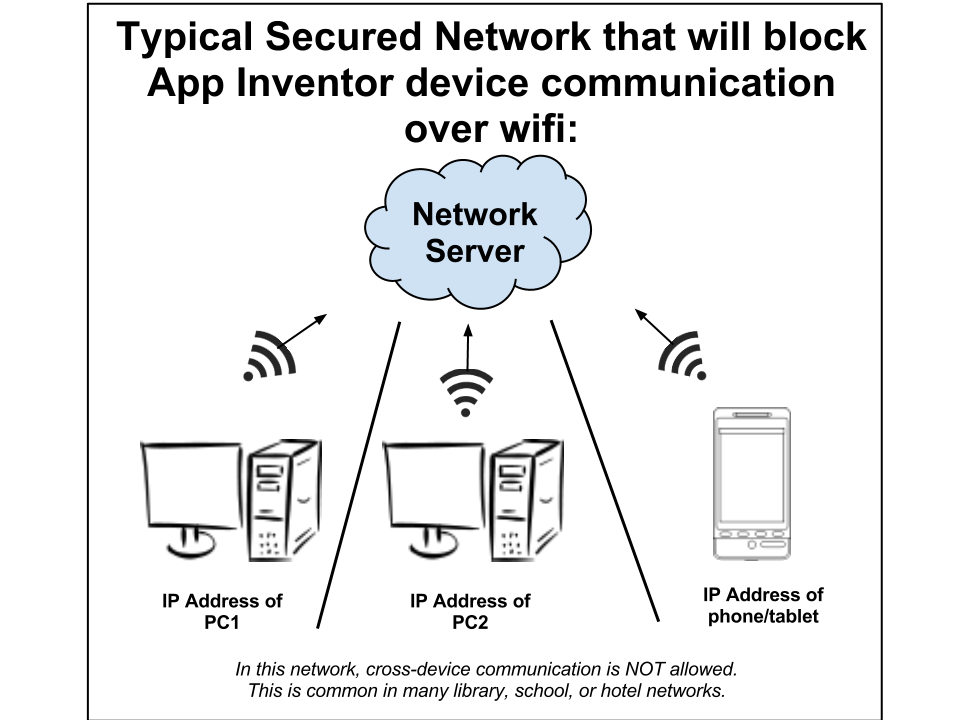
If you do not pass step 4, your network most likely looks like this.
Erin Elan
Taifun
My partner, who had been doing just fine with his phone and computer is now seeing the same error as me
Adam Tokarski
1. Can't reach this on my PC, it's redirecting me to AI main page with Unsafe connection pop-up.
Taifun

jis
Erin Elan
Taifun
I am now able to connect with no problems
Adam Tokarski

Italo
Adam Tokarski
Italo
Adam Tokarski
Rendezvous indicates correct connection in both cases. Switching off Avast doesn't help too.
Companion Connection Error pops-up all the time.
Update // It seems to be working properly after re-launching WiFI router
