control ac motor (arduino) with acceleraor

185 views
Skip to first unread message

raanan arbel

unread,
Dec 25, 2015, 8:17:32 AM12/25/15
to MIT App Inventor Forum
Hi,

Can anyone have an idea?
I did not find the way to control dc motors with the accelerator (android+bluetooth+arduino)

It works with servo.

Thanks

Ghica

unread,
Dec 25, 2015, 9:50:55 AM12/25/15
to MIT App Inventor Forum
The idea would be that you write a sketch for your Arduino where, upon receiving a character from the serial port (Bluetooth) you move the servo motor.
I have this working for a Sparki robot from Arcbotics, controlling it with an AI2 app, but yours may have a very different API.
So, maybe you could be more specific about what your Arduino expects to control its servo.
Cheers, Ghica.

raanan arbel

unread,
Dec 25, 2015, 11:17:41 AM12/25/15
to MIT App Inventor Forum
Thanks Ghica,

I could move the servo motor but could not move the dc motors.
I work with arduino and motor shield trying to control  this one:

I wrote a code in App inventor 2 for controling this car with bluetooth, but I did not find the way to do it with the android acceleretor.


This is my arduino code:

#include <SoftwareSerial.h>

#include <AFMotor.h>


//creates two objects to control the terminal 1 and 2 of motor shield 

AF_DCMotor motor1(1); 

AF_DCMotor motor2(2);


SoftwareSerial BT(0, 1); //TX, RX respetively

String readdata;

int delayVal = 250;


void setup() {

 BT.begin(9600);

 Serial.begin(9600);


}

//-----------------------------------------------------------------------// 

void loop() {

  while (BT.available()){  //Check if there is an available byte to read

  delay(10); //Delay added to make thing stable

  char c = BT.read(); //Conduct a serial read

  readdata += c; //build the string- "forward", "reverse", "left" and "right"

  } 

  if (readdata.length() > 0) {

    Serial.println(readdata);


  if(readdata == "forward")

  {

    motor1.setSpeed(255); //Define maximum velocity

    motor1.run(FORWARD); //rotate the motor clockwise

    motor2.setSpeed(255); //Define maximum velocity

    motor2.run(FORWARD); //rotate the motor clockwise

  }


  else if(readdata == "reverse")

  {

    motor1.setSpeed(255); 

    motor1.run(BACKWARD); //rotate the motor counterclockwise

    motor2.setSpeed(255); 

    motor2.run(BACKWARD); //rotate the motor counterclockwise

  }


  else if (readdata == "right")

  {

    motor1.setSpeed(255); //Define maximum velocity

    motor1.run(FORWARD); //rotate the motor clockwise

    motor2.setSpeed(0);

    motor2.run(RELEASE); //turn motor2 off


  }


 else if ( readdata == "left")

 {

    motor1.setSpeed(0);

    motor1.run(RELEASE); //turn motor1 off

    motor2.setSpeed(255); //Define maximum velocity

    motor2.run(FORWARD); //rotate the motor clockwise


 }


 else if (readdata == "stop")

 {

    motor1.setSpeed(0);

    motor1.run(RELEASE); //turn motor1 off

    motor2.setSpeed(0);

    motor2.run(RELEASE); //turn motor2 off

 }


readdata="";}} //Reset the variable


Tnx

Raanan


Ghica

unread,
Dec 25, 2015, 11:43:33 AM12/25/15
to MIT App Inventor Forum
Hi,
I am confused. What do you mean with: "android acceleretor"?
I think your program would become easier if the commmands you send are shorter. Here is the sketch from Sparki (partly):

#include <Sparki.h>  // include the sparki library
#define serial Serial1
void setup()
{
  serial.begin(9600); // necessary for the Bluetooth.
}


void loop()
{
  //Process the asyncronous events:
 // processEvents();
  
  //Receives commands from remote computer:
  if (serial.available()) 
  {
    int inByte = serial.read();
    serial.println((char)inByte);
    
    switch ((char)inByte)
    {
      //Actions:
      case 'w':
        sparki.moveForward();
        break;
      case 'd':
        sparki.moveRight();
        break;
      case 'a':
        sparki.moveLeft();
        break;
      case 'x':
        sparki.moveBackward();
        break;
      case 's':
        sparki.moveStop();
        break;
        
    }
  }
}

In what way are you able to control the car? Are you able to make the bluetooth connection with AI? If not, search this forum, there are several explanations on how to do that.
Cheers, Ghica.

raanan arbel

unread,
Dec 25, 2015, 2:51:17 PM12/25/15
to MIT App Inventor Forum
Hi

1. android acceleretor= control the car with the smartphone accelerator. 
I tried to write the code with AI2 with no success. 

2. Yes, I am able to make the bluetooth connection with AI and control the car with the app I wrote:

I hope I am more clear now 


Thanks a lot.....


Raanan


Ghica

unread,
Dec 25, 2015, 5:55:04 PM12/25/15
to MIT App Inventor Forum
Nice design! Nicer than mine :-(.

So, if I understand this well, this is not a problem with bluetooth or the Arduino, but with the Accelerometer.
Here is an .aia you could study.
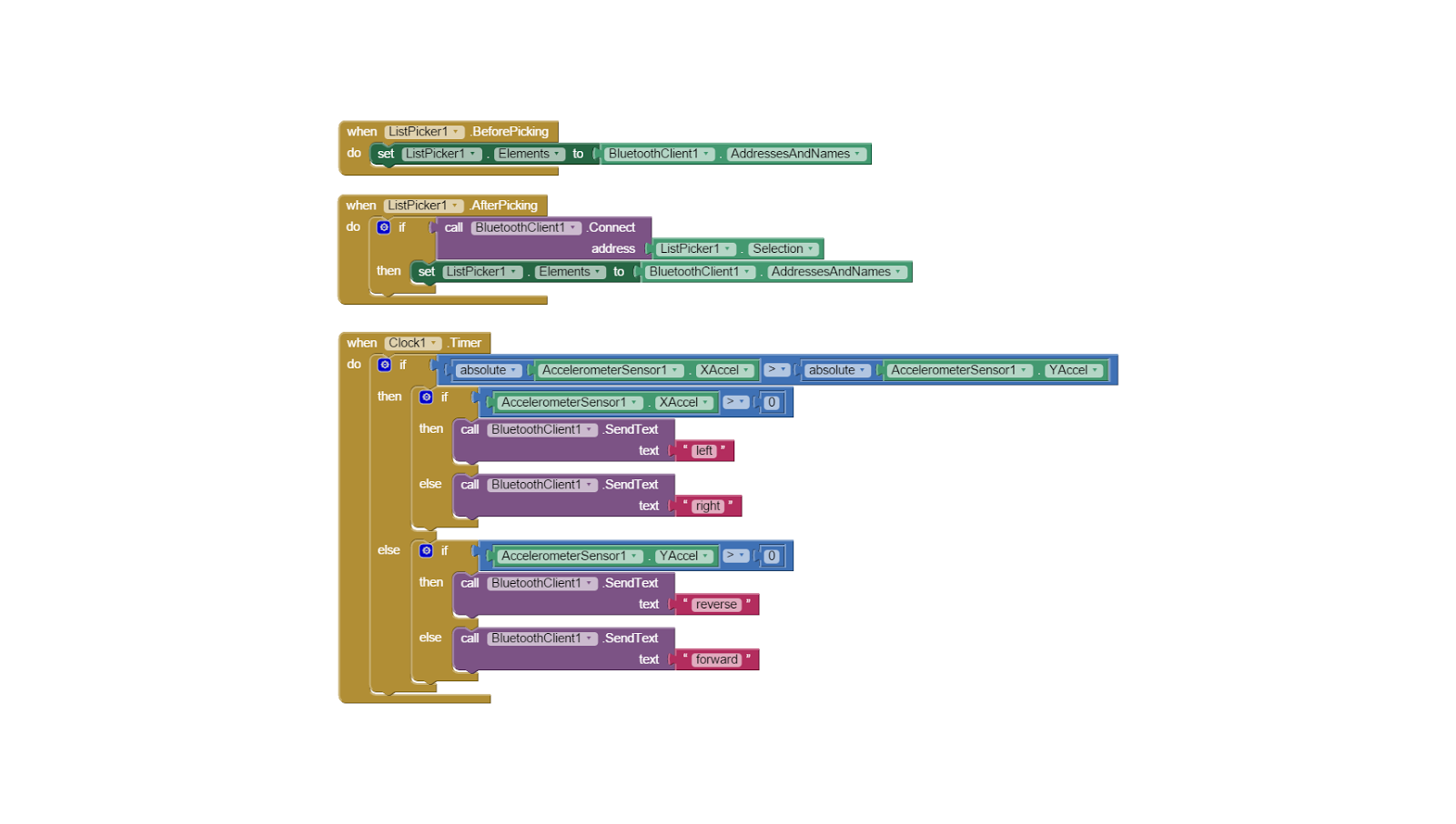
Here are the blocks: 

The trick is that you should not use AccelerometerSensor1.AccelerationChanged event, because that will make the Arduino crazy. Instead, use a clock (I used a 2 seconds timer here. Instead (or in addition to) of setting the label text, you could send a message to the Arduino with the desired direction. You may optimize this by only sending a message if the direction changes. And maybe you want to play a bit with the values used to determine the direction.

Actually, you could also use the orientation sensor, but calculating the direction is not easy in this case either.
Let us know how it goes. Cheers, Ghica.
accelarrow.aia

raanan arbel

unread,
Dec 26, 2015, 3:26:55 AM12/26/15
to MIT App Inventor Forum
Wow....

Hura....... 

Thats realy a trick and it works

Thank you very very much


Now I have to play with it and learn more.
It is very difficult to control the moves because it response after a second or two. Is it because of the timer?

Cheers
Raanan


Ghica

unread,
Dec 26, 2015, 4:50:07 AM12/26/15
to MIT App Inventor Forum
Glad it works!
You can make the timer interval shorter, I set it to 2000, which is 2 seconds. You can set it in the designer or also with blocks, which is easier to experiment with. (Use DoIt to execute a loose "set TimerInterval" block.
But you should not make it too fast, or the Arduino will not be able to handle the incoming messages.
Cheers, Ghica.

raanan arbel

unread,
Dec 26, 2015, 9:10:41 AM12/26/15
to MIT App Inventor Forum
Yes, you made my day (-:

I  set the timer interval to 100 and it worked great 
Now I have to add a button to stop the car.

Cheers, Raanan

raanan arbel

unread,
Dec 27, 2015, 10:04:39 AM12/27/15
to MIT App Inventor Forum
Ghica,

Please, last(?) question:

I try to add a button which will stop the motors

I do not understand why this works:

and this one don't:
Thanks 
Raanan

Ghica

unread,
Dec 27, 2015, 10:27:32 AM12/27/15
to MIT App Inventor Forum
This is because the timer stays running, it will fire and your car starts moving again.
So, disable the timer before you send the stop.
You will need something to restart the car. What you could do is something like:
When canvas2 touched
If timer enabled = true
Then
set timer enabled false
Send stop
Else
Set timer enabled true

In this way you restart the car when you press canvas2 again.
I hope this helps. Cheers, Ghica.

raanan arbel

unread,
Dec 27, 2015, 12:43:15 PM12/27/15
to MIT App Inventor Forum
Thanks so much

It realy works
I also had to solve the 515 Error by adding one more IF....Then
Cheers
Raanan


Ghica

unread,
Dec 27, 2015, 1:15:53 PM12/27/15
to MIT App Inventor Forum
The 515 error occurs when the car is not properly connected?
It would be better to move the stop command into the then part, because now you also send a stop when you are restarting the car, which is not really ok, although you won't notice.
Cheers, Ghica.

raanan arbel

unread,
Dec 27, 2015, 2:54:25 PM12/27/15
to MIT App Inventor Forum
Hi,

The 515 error occurs when I started the acceleroeter before bluetooth is connected, so I found somewhere in the forum the solution to add first:

IF bluetooth is connected AND accelerometer is enabled
Then all the rest

About the "stop", you are absolutley right. I dont need to click twice or more to "stop"

Thanks for it and for your pacient 

Raanan
Reply all
Reply to author
Forward
0 new messages