
Skip to first unread message

Caifa Caifa
May 5, 2014, 6:35:19 PM5/5/14
to mitappinv...@googlegroups.com
i tryed this instructions http://sites.google.com/site/theairepository/faq/how-to-s/uandd but the problem is i dont see the more actions any where i have the option to download or export as .aia but not zip im very confused please help

Enis
May 5, 2014, 6:53:59 PM5/5/14
to mitappinv...@googlegroups.com
To Export Your Project to an AIA file...
- Click on the My Projects link at the top of the UI:
- When the list of projects shows up, put a check mark by the project you want to export
- Then click on the Project link (notice that they're similarly named but not the same)
- Choose Export selected project (.aia) to my computer...

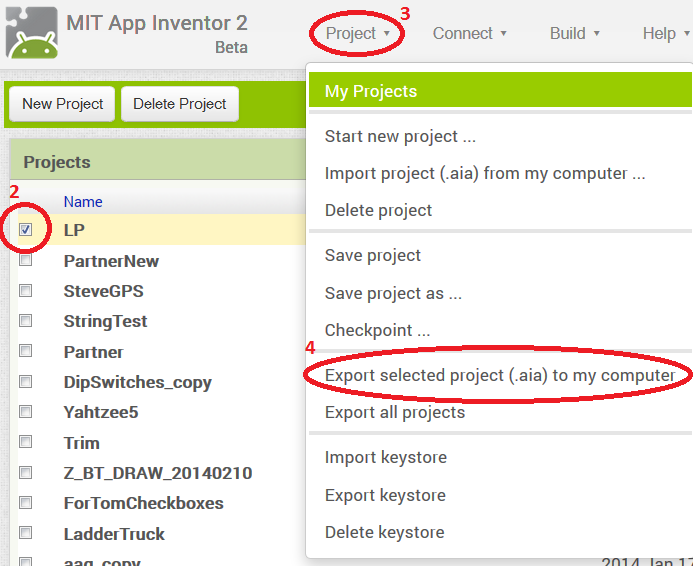
Caifa Caifa
May 5, 2014, 7:20:32 PM5/5/14
to mitappinv...@googlegroups.com
Thanks I know this already but I was looking to download the .zip as instructed by app inventor community gallery , so I guess I won't upload a .zip but instead the .AIA correct?
Also I tryed downloading one of the apps from app inventor community gallery and it downloaded as .zip I tryed importing it to my projects and it didn't work so I changed theextention from .zip to .AIA I was able to successfully import it but the apps blocks are missing .thanks for replying
Also I tryed downloading one of the apps from app inventor community gallery and it downloaded as .zip I tryed importing it to my projects and it didn't work so I changed theextention from .zip to .AIA I was able to successfully import it but the apps blocks are missing .thanks for replying
Enis
May 5, 2014, 7:26:17 PM5/5/14
to mitappinv...@googlegroups.com
Hi again... In AI Classic, it was a zip file. In AI2, it's an AIA file (which is really a zip file anyway).
An AI Classic app can't be imported into AI2 and there's no tool yet to do the conversion. You can't take an AI Classic zip file, rename it to an aia file, and import it.
The only way right now to do an app in AI2 is to start over from scratch.
Hope that gives you enough information...
Cheers!
An AI Classic app can't be imported into AI2 and there's no tool yet to do the conversion. You can't take an AI Classic zip file, rename it to an aia file, and import it.
The only way right now to do an app in AI2 is to start over from scratch.
Hope that gives you enough information...
Cheers!

SteveJG
May 5, 2014, 7:29:12 PM5/5/14
to mitappinv...@googlegroups.com
AI Classic apps (the original app inventor) source files are stored as zip files. AI2 apps source files are stored as aia files (a kind of zip files). You cannot load an AI Classic zip into AI2 load an aia source into AI Classic. You can not change the extensions...they will not work. sorry. If you want to try an example AI Classic app tutorial in AI 2, you have to convert all the blocks manually.
Regads,
Steve
Caifa Caifa
May 5, 2014, 7:41:27 PM5/5/14
to mitappinv...@googlegroups.com
Thanks that was very helpfull
Caifa Caifa
May 5, 2014, 7:43:46 PM5/5/14
to mitappinv...@googlegroups.com
Thanks that was very helpfull so I guess on app inventor community gallery I should upload my .aia then ? Also I submited my app to the MIT app contest I'm I save uploading it to the gallery?
Reply all
Reply to author
Forward
0 new messages