
Problem saving canvas
115 views
Skip to first unread message

bobonoinc
Nov 16, 2016, 10:28:45 AM11/16/16
to MIT App Inventor Forum
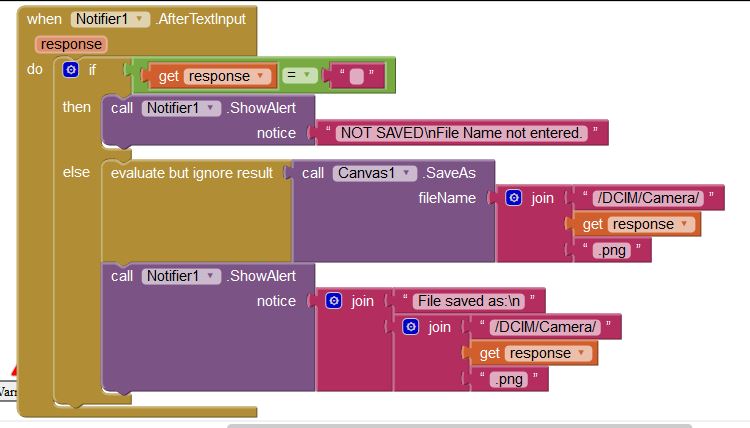
Thanks, Bob

Italo
Nov 16, 2016, 11:21:56 AM11/16/16
to MIT App Inventor Forum
Post your canvas component settings. Also if you can, please post the aia file. It may happen that the canvas save works differently in different devices. Did you try it in a different device?
By the way, you can optimize your blocks a little by doing this:


Abraham Getzler
Nov 16, 2016, 1:01:45 PM11/16/16
to MIT App Inventor Forum
Check for Screen1 extra real estate hogs like the Title Bar that might be throwing off size calculations.
They can be turned off.
ABG
bobonoinc
Nov 16, 2016, 3:01:40 PM11/16/16
to MIT App Inventor Forum
Italo -- thanks for the optimization suggestion -- I like it. BTW, I am not sure what the aia file you requested is.
Abraham -- thanks for your suggestions as well.
Before I do anything more, I plan to build the app and run it directly on my device to rule out network communication problems. I will post the results and if the problem is not solved, I will post the canvas component settings and the aia (if you will tell me where to find it.
Thanks, Bob
Abraham -- thanks for your suggestions as well.
Before I do anything more, I plan to build the app and run it directly on my device to rule out network communication problems. I will post the results and if the problem is not solved, I will post the canvas component settings and the aia (if you will tell me where to find it.
Thanks, Bob
Italo
Nov 16, 2016, 3:26:20 PM11/16/16
to MIT App Inventor Forum

bobonoinc
Nov 17, 2016, 6:00:15 PM11/17/16
to MIT App Inventor Forum
I tried building the app and running it directly on my device (Alcatel One-Touch Pixi Pulsar), but did not solve the problem.
I changed the screen orientation property from unspecified to portrait -- did not solve the problem.
I eliminated the "when notifier.after text input" block and put the "canvas.save" block into the "when save(button).click" block as shown below and this did work. The saved file has the correct aspect ratio but of course the image filename is hard coded. I cannot see how to capture the filename as a variable that can be provided to the canvas.save block without using "when notifier.after text input".

I get the wrong aspect ratio when implemented as below:

As requested, I am including a screen capture of the canvas properties and have enclosed the aia file. BTW, I was unable to open the aia -- what application do you use to view this file?

Sorry for this very long reply but I'd really appreciate your help.
Bob
I changed the screen orientation property from unspecified to portrait -- did not solve the problem.
I eliminated the "when notifier.after text input" block and put the "canvas.save" block into the "when save(button).click" block as shown below and this did work. The saved file has the correct aspect ratio but of course the image filename is hard coded. I cannot see how to capture the filename as a variable that can be provided to the canvas.save block without using "when notifier.after text input".
I get the wrong aspect ratio when implemented as below:
As requested, I am including a screen capture of the canvas properties and have enclosed the aia file. BTW, I was unable to open the aia -- what application do you use to view this file?
Sorry for this very long reply but I'd really appreciate your help.
Bob
Abraham Getzler
Nov 17, 2016, 8:20:52 PM11/17/16
to MIT App Inventor Forum
I think you are overloading Notifier1 with too many jobs.
Hire a new Notifier named NotifierFileName whose sole job is to ask for the file name,
and for its result event block build up the file name with a text JOIN then save the canvas
under the JOIN result.
This will reduce the number of rungs in your IF/THEN/ELSE ladder, a good thing.
ABG
bobonoinc
Nov 18, 2016, 9:52:44 AM11/18/16
to MIT App Inventor Forum
Thanks Abraham -- I tested your theory by eliminating the if-then structure from the "after text input" block, but the aspect ratio problem persists. I have enclosed the new code as I understood your suggestion. Did I misinterpret what you meant?
Is there any way of getting the filename input by the user in "notifier.shoe text dialog" other than from an "after text input" block?
Bob

Is there any way of getting the filename input by the user in "notifier.shoe text dialog" other than from an "after text input" block?
Bob
Abraham Getzler
Nov 18, 2016, 1:44:34 PM11/18/16
to MIT App Inventor Forum
the aspect ratio problem persists
I defer to others with more graphics experience that me on this.
Did I misinterpret what you meant?
I see you still call the Notifier by its generic name. This could lead to trouble if you need to ask for other input in a Notifier.
It's a simple thing to rename the Notifier in the Designer, and i propagates automatically to all its blocks.
I still suggest renaming it to include its purpose, for getting a File name for the Canvas Save.
It will save you trouble later.
Is there any way of getting the filename input by the user in "notifier.shoe text dialog" other than from an "after text input" block?
Not that I know of.
ABG
Abraham Getzler
Nov 18, 2016, 2:27:44 PM11/18/16
to MIT App Inventor Forum
I loaded your .aia file via the AI2 pulldown: Project->import a .aia
On closer examination, I see no harm in your original if/then/else tree in the Notifier1 text response event.
I mis-interpreted it as being meant to respond to different notification types,
instead of its coded effect of providing a cancel option for the save operation.
I apologize for the mistake.
However, I share blame for this mistake with the author who left the Notifier
without a specific component name alluding to its purpose.
ABG
Reply all
Reply to author
Forward
0 new messages