How do I form POST Request Body in JSON Format?

4,512 views
Skip to first unread message

alb

unread,
Sep 26, 2014, 10:33:40 PM9/26/14
to mitappinv...@googlegroups.com
I'm trying to connect to external API that requires me to set request header and request body according to "application/json" format
The request body requires me to form it as following:

{
   
"identityType" : "MSISDN",
   
"identityValue" : "6512345678"
}

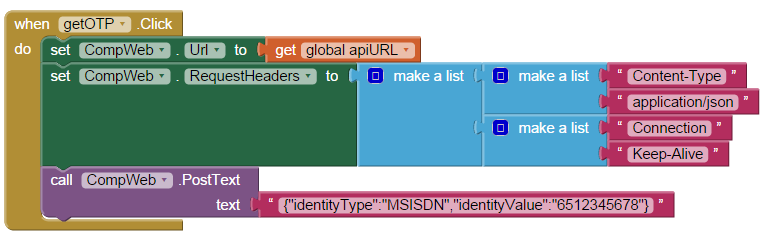
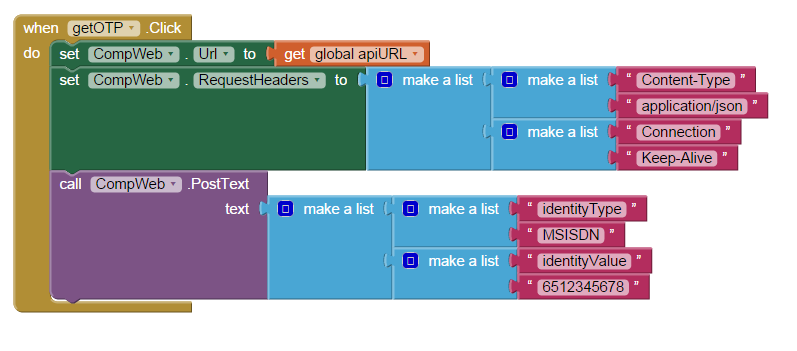
Following is what I've tried (but both failed):


 the error message received is

unable to post or put text with the specified URL

What is the correct way to achieve this? 

Charles168

unread,
Sep 26, 2014, 11:04:36 PM9/26/14
to
It looks like the specified URL is unable to accept POST or PUT. 
Try the specified URL  address with a sample  POST/PUT request body using the free Chrome Advanced REST client and see if it can get a correct response back 


alb

unread,
Sep 27, 2014, 7:57:32 AM9/27/14
to mitappinv...@googlegroups.com
I tried that - but Chrome does not allow me to set Connection Keep-Alive (another bug - Refused to set unsafe header "Connection") . As a result the API call is also failed using Chrome Advanced REST and Postman. 
I know the API works when I use APIGee console provided. Currently, my guess is that my API call fails because I do not format it properly on appinventor

richardvansoest

unread,
Sep 27, 2014, 8:22:37 AM9/27/14
to mitappinv...@googlegroups.com
i am currently struggling with the same to send json request to XBMC from an app.

when i use wget (from windows) it works perfectly.

wget -q --header="Accept: application/json" --header="Content-type: application/json" --post-data="{\"jsonrpc\": \"2.0\", \"method\": \"Player.PlayPause\", \"params\": { \"playerid\": 1 }, \"id\": 1}" http://192.168.2.4:80/jsonrpc

need to send this with appinventor2 (without the wget offcourse)

hope someone will answer this  :-)
TIA

Taifun

unread,
Sep 27, 2014, 10:18:40 AM9/27/14
to mitappinv...@googlegroups.com
@alb: the first screenshot looks fine
are you sure, you are using the correct URL?
probably you need an api key for that API?
do you want to reveal, which API you are using?

@richard: please start a new thread for your question and provide a screenshot of your relevant blocks
Taifun

Trying to push the limits of App Inventor! Snippets and Tutorials from Pura Vida Apps by Taifun.         

alb

unread,
Sep 27, 2014, 10:59:06 AM9/27/14
to mitappinv...@googlegroups.com
Yes, I actually removed the api from the screenshot so that my question is not api specific. 

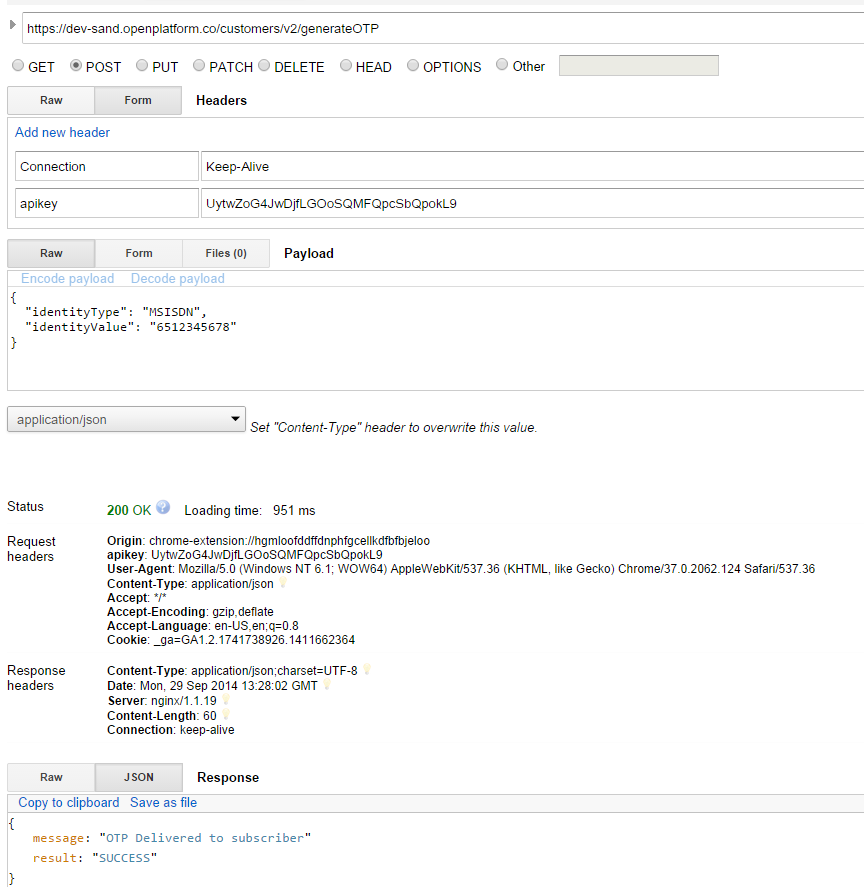
The screenshot from APIGee (working) :

and the screenshot from Advanced REST Client (not working)
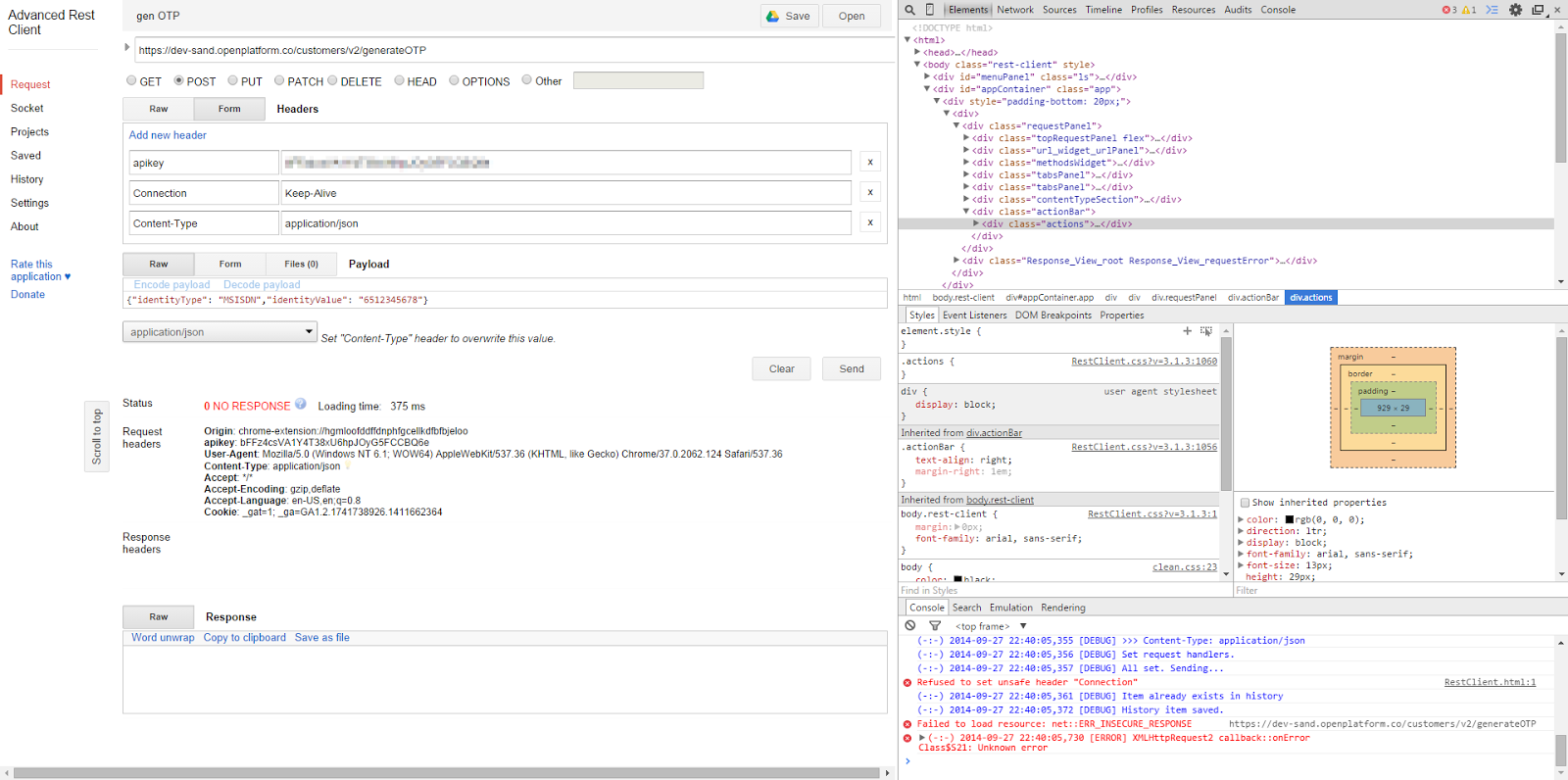
I'm quite sure that I've specified the Post body on Advanced REST client correctly as it works on another computer (but I don't have that computer again - thus unable to tell if the issue is really due to Chrome). What I've figured out then is that I need to specify Connection: keep-alive to make the call works though the API doc does not mention it as mandatory. Since it was blocked by my current chrome, I'm not surprised that the call failed. However, I expect it to work on appinventor given I've specified all fields required on Request Headers  (apikey, connection, and content-type). The only thing that I'm not sure is on the Post body, whether I use the correct appinventor components.

Anyway, I've setup testapp with following temporary apikey if you're interested to find out: UytwZoG4JwDjfLGOoSQMFQpcSbQpokL9 

Thanks! 


alb
unread,
Sep 27, 2014, 11:19:51 AM9/27/14
to mitappinv...@googlegroups.com
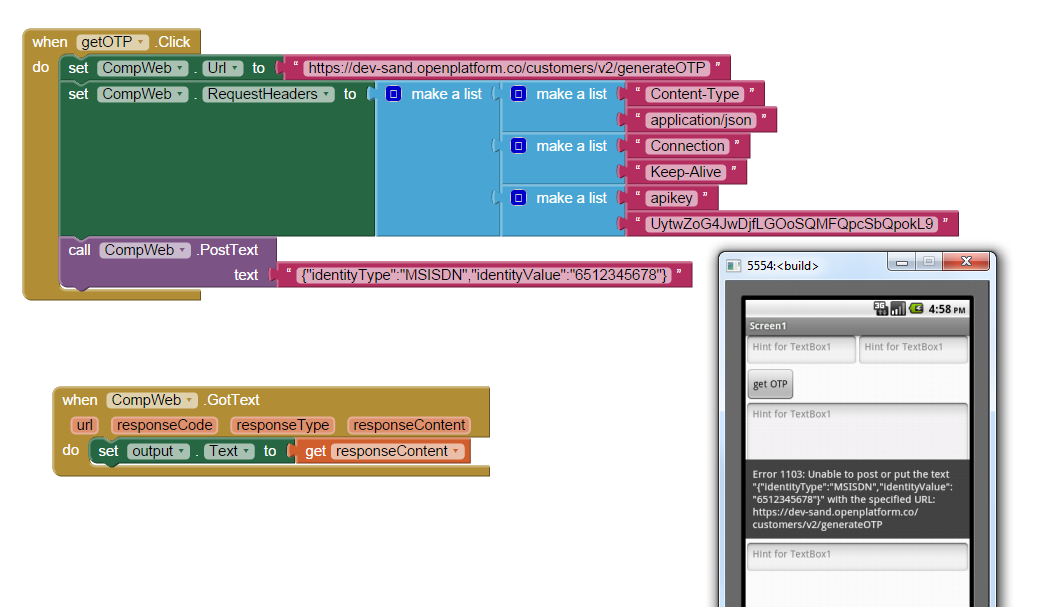
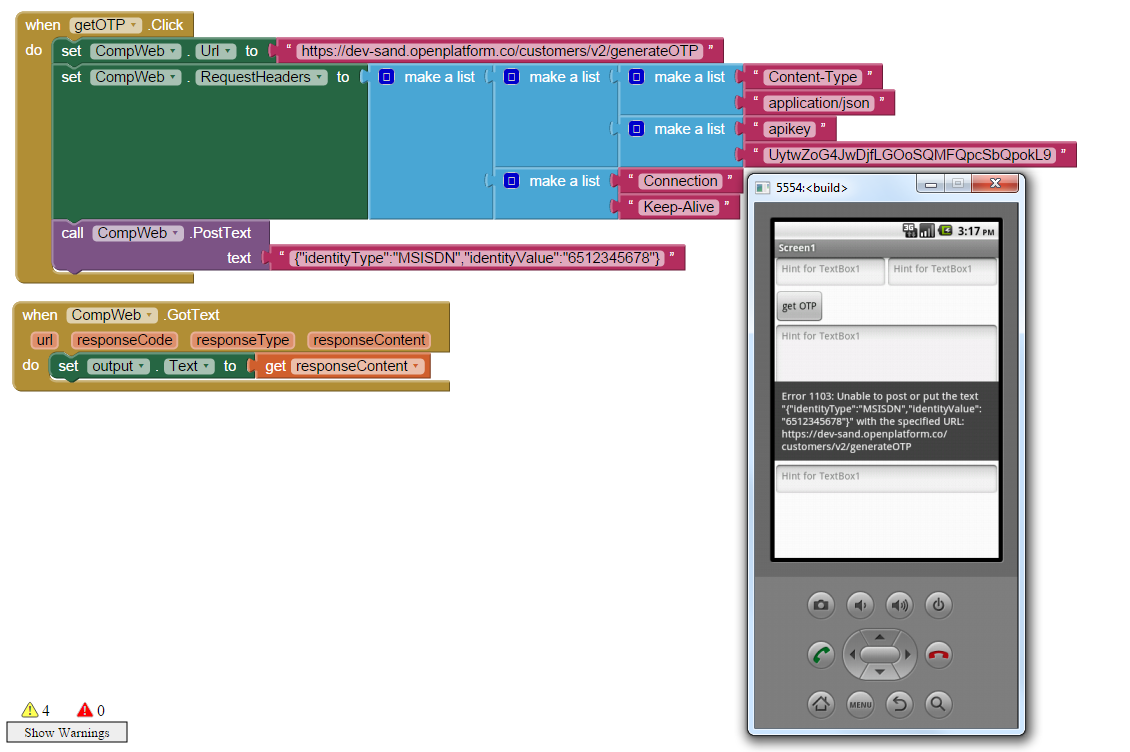
Following is the screenshot from appinventor: 


Taifun

unread,
Sep 27, 2014, 12:05:13 PM9/27/14
to mitappinv...@googlegroups.com
ok you forgot the api key in the first solution
your header is wrong, just use only one main list and add the sublists there
Taifun


alb

unread,
Sep 27, 2014, 1:04:45 PM9/27/14
to mitappinv...@googlegroups.com
I actually removed apikey before taking the screenshot :) 
Anyway, tried with one main list (Didn't realize about this feature until you mention it - thanks!) but still unsuccessful and still with the same error message :(


Taifun

unread,
Sep 27, 2014, 2:21:54 PM9/27/14
to mitappinv...@googlegroups.com
probably the Content-Length is mandatory?
just add it in the header, too
Taifun

Charles168

unread,
Sep 27, 2014, 2:51:29 PM9/27/14
to mitappinv...@googlegroups.com
Error 1103 may indicates no network connectivity. Do a search in this forum and you will see.

alb

unread,
Sep 29, 2014, 9:41:52 AM9/29/14
to mitappinv...@googlegroups.com

It may be caused by some certification issue - the domain does not match original certificate details. Suddenly my Advanced REST responded once I saved the certificate file. But still no luck on AppInventor. Searched on Error 1103, but have not found other troubleshooting suggestions beyond displaying the error message :( 
Not sure if I can bypass those security via appinventor / emulator / android browser


Reply all
Reply to author
Forward
0 new messages