
How to build app to download audio file from google drive
964 views
Skip to first unread message

rodo...@gmail.com
Apr 23, 2014, 12:53:59 AM4/23/14
to mitappinv...@googlegroups.com
Hello All,
I am a new user to App Inventor and still trying out the functions. I cant figure out most of the functions of the blocks but i think i can make some simple apps.
I am trying to create an app to download a public mp3 i have in google drive to a mobile phone. If i can specify the place to save it (like sdcard/folder/) that would be great.
I have tried both of the options below but they dont seem to work to download the file. Someone sent me some instructions they did on AI 1 but i tried to follow it and honestly, the blocks are different in AI2 from AI1 so it doesnt make that much sense to me.
Can anyone help me please. I just need to know what i am doing wrong, see images below.


Taifun
Apr 23, 2014, 9:57:06 AM4/23/14
to mitappinv...@googlegroups.com
you can do it with the web component, see an example here http://puravidaapps.com/filebyfile.php
Taifun

phantomfoot
Apr 23, 2014, 5:01:22 PM4/23/14
to mitappinv...@googlegroups.com
Your web URL needs to point to to the actual MP3 file e.g. https://drive.google.com/blah/blah/mysoundfile.mp3
Or it will not work. More here http://appinventor.mit.edu/explore/content/accessing-images-and-sounds.html
Also where is your web.GotFile event? Are you checking what sort of response your are getting?
rodo...@gmail.com
Apr 24, 2014, 12:22:48 AM4/24/14
to mitappinv...@googlegroups.com
Hery Taifun, I tried the guide and the files did not download. this brings a question, should the app work in the emulator or would i have to build and install the .apk to test the function?
rodo...@gmail.com
Apr 24, 2014, 12:29:52 AM4/24/14
to mitappinv...@googlegroups.com
phantomfoot, thanks for the info but is that a rule of app inventor? i can download the file using the same link in downloaders and browsers but it seems that app inventor doesnt do anything or i may not have done it correctly.
why would you need a web.GotFile if you already have a web.Get? keep in mind, i am still new to this tool and app creation in general but would like to learn. sending me to a website that has information on something similar but not what i am trying to achieve will more likely confuse me than help me.
but thanks for the info :)
Taifun
Apr 24, 2014, 9:59:37 AM4/24/14
to mitappinv...@googlegroups.com
Hery Taifun, I tried the guide and the files did not download. this brings a question, should the app work in the emulator or would i have to build and install the .apk to test the function?
I never tested this in the emulator, did you test the complete example?
why would you need a web.GotFile if you already have a web.Get?
the web component works asynchronously, which means, a web.Get only works together with a web.GotText or web.GotFile event
in the web.GotFile event the file is received
hope that helps
Taifun
rodo...@gmail.com
Apr 25, 2014, 9:09:48 PM4/25/14
to
Hello Taifun,
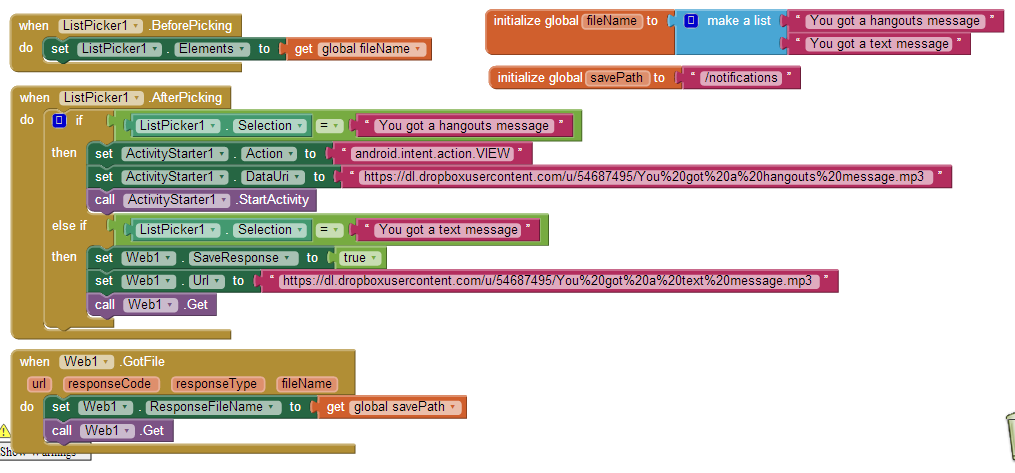
I was checking my phone (removing some folders) and came across the donotdelete/prefetch folder you had in your app. I guess the files did download in the phone without the notification bar showing the download. I guess thats what was a bit confusing.
is there a way (using your sample and making modifications) to download the files one by one (like you have to press a specific button to download a corresponding file) and have the android notification bar show the download? sort of like if you use your mobile browser to download an apk, you see the download notification appear in the bar.
i dont want to use the method you have of downloading all the files at once and i dont want the screen to show the progress bar.
I tried again and did the following code. the activity starter part worked perfectly in the emulator but when installed on the phone, the browser opens and closes without starting the download. the web.gotfile part doesnt work and you mentioned i need a web.got code to be added. I cant seem to figure out how to use it.
forgetting about my initial questions and using the example below, what am i doing wrong? how can i get it working correctly? how do i use the web.gotfile part correctly?

thanks for your help bro
phantomfoot
Apr 26, 2014, 7:40:40 AM4/26/14
to mitappinv...@googlegroups.com
"..is there a way (using your sample and making modifications) to download the files one by one (like you have to press a specific button to download a corresponding file) and have the android notification bar show the download?"
Yes you can download them one by one. But unfortunately AI2 does not have access to the notification bar so you could not use it to display progress.
rodo...@gmail.com
Apr 26, 2014, 11:23:25 AM4/26/14
to mitappinv...@googlegroups.com
ok. thanks
Reply all
Reply to author
Forward
0 new messages