
Skip to first unread message

Dave Everett
Apr 1, 2015, 4:08:26 AM4/1/15
to mitappinv...@googlegroups.com
Hi, I have a spinner I am populating with data from a list. I would also like to be able to "empty" the spinner of all data with a button when running. Is this possible?
I tried setting elements from string to an empty text block without success:
I tried setting elements from string to an empty text block without success:


Abraham Getzler
Apr 1, 2015, 9:22:10 AM4/1/15
to mitappinv...@googlegroups.com
Have you tried disabling the spinner until you have more elements?
ABG

Taifun
Apr 1, 2015, 9:49:42 AM4/1/15
to mitappinv...@googlegroups.com
see this example
Taifun
Trying to push the limits of App Inventor!
Snippets and
Tutorials from
Pura Vida Apps by
 Taifun.
Dave Everett
Apr 1, 2015, 9:49:52 AM4/1/15
to mitappinv...@googlegroups.com
Abraham, no I haven't, as that would still maintain the elements in the spinner. What I want to do is remove all items so it is empty.
This app interfaces with a robot over bluetooth. The robot holds a navigation database, which is reflected in the spinner. If I clear the database in the robot, I need the spinner to be cleared as well.
If I disable, when I create new navigation points in the robot (which will start again at 0, these would simply be added to the elements already in the spinner so if I had 0,1,2 in the spinner, cleared the robot database and created 2 new navigation points (0,1) then they would be added to the spinner and I would have 0,1,2,0,1. I know because that is what is happening :)
I'm sure there must be a way to empty the spinner, but it has eluded me so far.
This app interfaces with a robot over bluetooth. The robot holds a navigation database, which is reflected in the spinner. If I clear the database in the robot, I need the spinner to be cleared as well.
If I disable, when I create new navigation points in the robot (which will start again at 0, these would simply be added to the elements already in the spinner so if I had 0,1,2 in the spinner, cleared the robot database and created 2 new navigation points (0,1) then they would be added to the spinner and I would have 0,1,2,0,1. I know because that is what is happening :)
I'm sure there must be a way to empty the spinner, but it has eluded me so far.
Abraham Getzler
Apr 1, 2015, 10:10:07 AM4/1/15
to mitappinv...@googlegroups.com
The spinner control is usually meant to hold at least 1 element,
to act as a heading.
Maybe it would be easier to switch to a List Picker
(the most flexible) or a ListView?
Also consider assigning a Create Empty List block into the Set Elements
attribute of whatever control you use.
And finally, where are you emptying the global list you use to assign into
Elements?
ABG
Dave Everett
Apr 1, 2015, 6:12:16 PM4/1/15
to mitappinv...@googlegroups.com
Thanks Taifun, I had tried to use a number originally and it kept popping out when I tried to drop it in the connector. This morning, no problem at all.
Abraham, thanks for the advice, I'll check out the listpicker, the spinner when used does not look right anyway.
I was using "remove list index" in a "for each number" to empty the global list
Dave
Abraham, thanks for the advice, I'll check out the listpicker, the spinner when used does not look right anyway.
I was using "remove list index" in a "for each number" to empty the global list
Dave
Dave Everett
Apr 3, 2015, 5:59:18 AM4/3/15
to mitappinv...@googlegroups.com
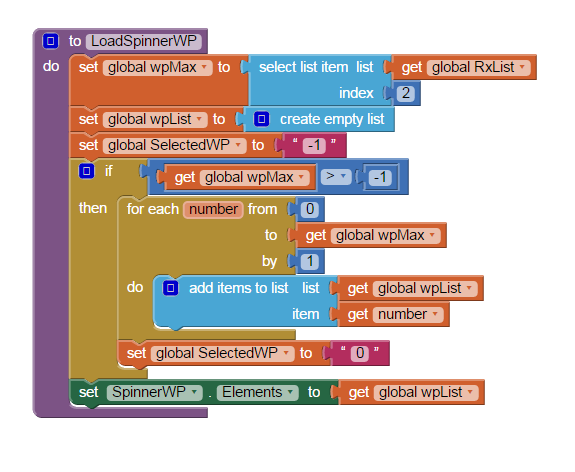
Setting the index didn't work. Turns out it is easy though.
![]()
When this procedure is called, RxList contains a list received via bluetooth, the fist item is the command and the following item is how many items to add to the spinner. I first empty the list wpList as seen, then build a new list with the number of elements from the 2nd index of the RxList, then assign that list to the spinner elements.
Works fine. I had tried using the create an empty list before but it kept popping out of the SET.
Dave
When this procedure is called, RxList contains a list received via bluetooth, the fist item is the command and the following item is how many items to add to the spinner. I first empty the list wpList as seen, then build a new list with the number of elements from the 2nd index of the RxList, then assign that list to the spinner elements.
Works fine. I had tried using the create an empty list before but it kept popping out of the SET.
Dave
Taifun
Apr 3, 2015, 10:16:05 AM4/3/15
to mitappinv...@googlegroups.com
Setting the index didn't work.
see again my example how to set the index to 1
Taifun
Dave Everett
Apr 4, 2015, 7:28:56 AM4/4/15
to mitappinv...@googlegroups.com
I did run your example, but that simply resets the index, I needed to completely change the contents of the spinner, which meant emptying the spinner and filling with new options, which I now have working.
Thanks,
Dave
Thanks,
Dave
Reply all
Reply to author
Forward
0 new messages