
Skip to first unread message

Donny S
Jan 23, 2015, 2:16:00 PM1/23/15
to mitappinv...@googlegroups.com
I know about the draw text call. What i am trying to do is:
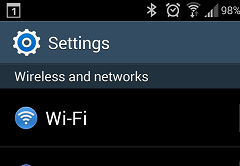
notice the text "Settings" next to the image. If I use canvas as the top bar, drawing text on it looks like a picture and not sharp as a label's text. a label can't be put right onto a canvas - i have no clue why not -
but how can I resolve that fuzzy text looking if I use canvas.DrawText.
THANKS :)

SteveJG
Jan 23, 2015, 3:00:14 PM1/23/15
to mitappinv...@googlegroups.com
You can not improve the fuzzy text. Increasing the font size 'helps' a little.
Donny S
Jan 23, 2015, 3:47:48 PM1/23/15
to mitappinv...@googlegroups.com
Will AI2 support labels on canvas anytime soon? There is a tremendous value to it. i.e. preparing menus.
SteveJG
Jan 23, 2015, 4:03:30 PM1/23/15
to mitappinv...@googlegroups.com
I do not think labels is a very high priority at the moment. There are efforts to improve Canvas displays and performance underway but do not know whether the Canvas text quality will be improved. General appearance of the Canvas will improve on Tablets and 7 and 10" devices when MIT implements the Android API 4 on AI2. Latest estimate is sometime in the first quarter 2015...perhaps.
In the mean time, you can make a png or jpg image of your text, put it in a Sprite and use the sprite as a 'label.' However, you can not change the text other than to create a new sprite image.
Regards,
Steve
Reply all
Reply to author
Forward
0 new messages