
Help with joystick controlled arduino robot (and app inventor delay)
126 views
Skip to first unread message

Otto Dufva
Mar 18, 2019, 9:33:43 AM3/18/19
to MIT App Inventor Forum
Hi,
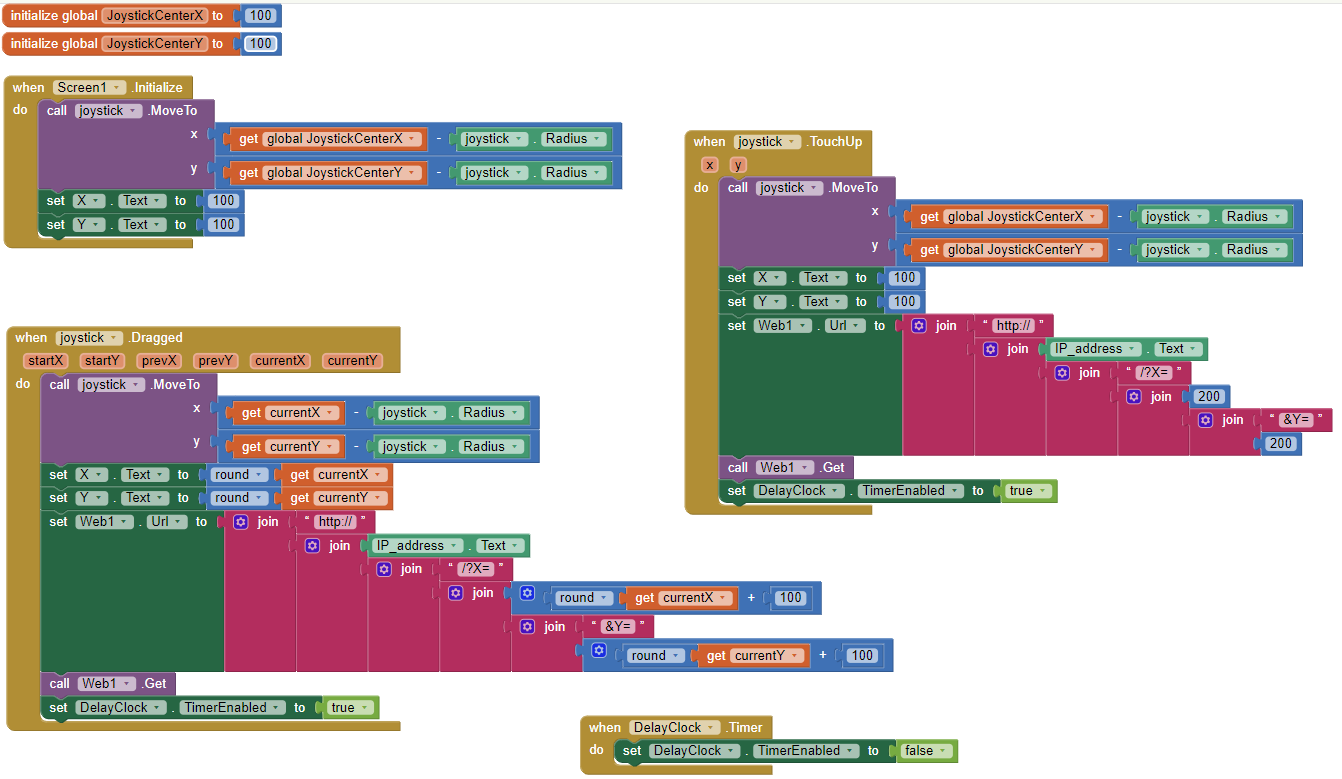
This setup works for about half a minute and then the app inventor will start saying its not receiving feedback for the requests its sending. And also the arduino sometimes stopped.
To basically this:
This pretty much crashed both the arduino and the app after a moment.
I've been working on an android controlled robot car. And been trying to get a joystick control to work.
My hardware used will be found at the bottom if needed.
But I'm having trouble to get a steady and working connection with android app joystick and arduino. I've been using wifi with passing simple http requests on other projects. And got it to sort of work with this. But both the arduino and the app crashes after a moment. I think the arduino can't keep up with the rate the app sends data. Where we come to the app intentor delay. Or another way to send the commands a little bit less frequently. To allow both sides to have time to handle every packet in time. Tried to add a delay into the 'when joystick .dragged' -event but didn't seem to do anything. Like this:
Is this the correct way to do this? Seemed to work when I tested it with a button. Found several different ways but this looked like the latest one. What I would like is to have a slower rate to send the data to the arduino. Even if the joystick is moved fast.
On the arduino side I read the data and pass it to serial monitor for troubleshooting for now. Like this:
void loop() {    server.handleClient();  delay(10); // tried changing this to different values and without}
void HTTP_handleRoot(void) {  if( server.hasArg("X") ){    char commandx100 = server.arg("X")[0];    char commandx10 = server.arg("X")[1];    char commandx1 = server.arg("X")[2];    int x100 = commandx100 -'0';    int x10 = commandx10 -'0';    int x1 = commandx1 -'0';    int x = x100*100 + x10*10 + x1;    Serial.println(x);  }  if( server.hasArg("Y") ){    char commandy100 = server.arg("Y")[0];    char commandy10 = server.arg("Y")[1];    char commandy1 = server.arg("Y")[2];    int y100 = commandy100 -'0';    int y10 = commandy10 -'0';    int y1 = commandy1 -'0';    int y = y100*100 + y10*10 + y1;    Serial.println(y);  }  server.send ( 200, "text/html", "" );}
This setup works for about half a minute and then the app inventor will start saying its not receiving feedback for the requests its sending. And also the arduino sometimes stopped.
Also played a bit with bluetooth and found an app by someone. In his version he is using a bluetooth module with arduino and passing x and y coordinates one after another with nothing to indicate which is which. But I couldn't get the arduino to keep track on which coordinate was which. Also have only 1 bluetooth capable arduino so would rather use wifi. But if theres a good bluetooth solution would be helpful also. This is what the bluetooth app side looked like. I think this is pretty much what I found on another project, but couldn't get it to work properly.

On arduino I tried reading the data as was done in the project I borrowed the app setup from. With changing the read formats to whats used on the board I use.
- // Code from the Arduino Robot Car
- // Read the incoming data from the Joystick, or the master Bluetooth device
- while (Serial.available() >= 2) {
- x = Serial.read();
- delay(10);
- y = Serial.read();
- }
To basically this:
if (ESP_BT.available()) //Check if we receive anything from Bluetooth  {    x = ESP_BT.read();
    delay(10);
    y = ESP_BT.read();  }
This pretty much crashed both the arduino and the app after a moment.
For wifi setup I've been using a Wemos D1 mini as the arduino board. https://wiki.wemos.cc/products:d1:d1_mini
For the bluetooth I tested it with an ESP32 dev board. Look pretty much like this: https://i1.wp.com/randomnerdtutorials.com/wp-content/uploads/2018/08/devkit-doit.jpg?w=700&ssl=1
The car itself is built out of legos to allow nephew and niece to build stuff on it. And maybe later add some other robotic parts. Steering is done by a servo. And two motors running the back wheels controlled by a L298 board.
Any help with the app inventor coding would be much appreciated (if there's a way to reduce the rate at which the data is sent). Or a better way to communicate with the two devices.
Sorry for the long post. Don't have a picture of a potato right now. :(
-Otto

TimAI2
Mar 18, 2019, 9:47:24 AM3/18/19
to MIT App Inventor Forum
For the delay, try with the Web1.Get block in the clock timer block, not in the canvas dragged block, this will delay the web call until after the clock has fired.
FWIW, AI2 will start to hit problems if your timer calls are @ 50ms or less, the app won't be able to keep up.
Otto Dufva
Mar 19, 2019, 2:21:49 AM3/19/19
to mitappinv...@googlegroups.com
Sounded very promising but now it will only send the touch up value (200). Or atleast the arduino reports only that.

Otto Dufva
Mar 19, 2019, 5:58:35 AM3/19/19
to MIT App Inventor Forum
Played a little bit more with bluetooth and got it to work on a rough scale test. Encapsulating both coordinates into a single 1 byte number. Giving a resolution of 0-9 to both.

Also tried with sending both values with larger scale with 2 byte number, and full scale with 4 byte number. But I think the arduino can only recognize int size numbers or even smaller from the bt inferface. Not sure. But seemed like the output to serial atleast was only 3 digits long at most.
Will try this method for now. Since the robot wont need the extra accuracy on movement anyways.
But if someone got a better way please point me towards it.
-otto
Reply all
Reply to author
Forward
0 new messages