
how to make button unclickable when textbox is empty or no text or white space?
752 views
Skip to first unread message

Xiaomy Redmii
Mar 29, 2019, 12:22:47 PM3/29/19
to MIT App Inventor Forum
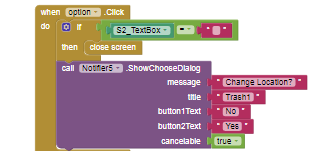
*1 button
*1 textbox
I don't know how to make that button unable to click if the text box is still no text
thank you :)

Taifun
Mar 29, 2019, 12:29:21 PM3/29/19
to MIT App Inventor Forum
set the button to enabled = false from the beginning
and by using the textbox extension https://puravidaapps.com/textbox.php and its AfterTextChanged event you could set the button to enabled = true in case some valid text has been entered
Taifun
Trying to push the limits of App Inventor!
Snippets,
Tutorials and
Extensions from
Pura Vida Apps by
 Taifun.
Xiaomy Redmii
Mar 29, 2019, 8:58:07 PM3/29/19
to mitappinv...@googlegroups.com
good morning sir :)
do I need to check the suppress warning?
do I need to check the suppress warning?
what is the purpose of get component?
I already set the button to true aftertextchanged but whenever I type on the text
the button is still disabled
I already set the button to true aftertextchanged but whenever I type on the text
the button is still disabled
Taifun
Mar 30, 2019, 10:15:37 AM3/30/19
to MIT App Inventor Forum
It would really help if you provided a screenshot of your relevant
blocks, so we can see what you are trying to do, and where the problem
may be.
Xiaomy Redmii
Mar 30, 2019, 10:50:28 AM3/30/19
to MIT App Inventor Forum
I deleted it because none works
I did
screen.Initialize
set button1.visible to false
*taifun.textbox
aftertext.changed
if get component = textbox 1
set button1 = true
Taifun
Mar 30, 2019, 12:57:13 PM3/30/19
to MIT App Inventor Forum
you might want to try it again and provide a sceenshot in case you get issues
also don't forget to start the listener... you might want to read the documentation of the textbox extension
Taifun

ABG
Mar 30, 2019, 10:04:01 PM3/30/19
to MIT App Inventor Forum
Here's an example from a recent project,
where I had to disable a Save Button for a mileage text box until
it held a bigger number than another text box
with a previous value.
The trick was to use a repeating Clock Timer to check if the
.Text contents were okay and set the button .Enable on that basis.
It is up to you to decide what okay means, some
combination of the is a ... blocks.
ABG
Xiaomy Redmii
Mar 30, 2019, 11:07:59 PM3/30/19
to MIT App Inventor Forum


Taifun
Mar 31, 2019, 9:33:28 AM3/31/19
to MIT App Inventor Forum
as far as I can see your screenshot looks fine
you did not say anything.. ist this your working solution or do you still have issues?
Taifun
Xiaomy Redmii
Mar 31, 2019, 9:39:44 AM3/31/19
to mitappinv...@googlegroups.com
I tried this block
whenever I type on the textbox
the button is activate
but when the text is clear the the button is not disabled
whenever I type on the textbox
the button is activate
but when the text is clear the the button is not disabled
I don't know why
maybe I need your enterpressed?
I want to disable the buttons once the textboxes are empty again


BodyMindPower
Mar 31, 2019, 2:25:19 PM3/31/19
to MIT App Inventor Forum
Maybe you are looking for something like that:
Anke
Taifun
Mar 31, 2019, 4:27:51 PM3/31/19
to MIT App Inventor Forum
but when the text is clear the the button is not disabled
which means, you have to adjust the AfterTextChanged event to consider this...
note: in programming nothing works automatically...
Taifun
Xiaomy Redmii
Mar 31, 2019, 6:05:51 PM3/31/19
to mitappinv...@googlegroups.com
good morning sir :)
I will try that
do I need to use the time?
do I need to use the time?

sir how about a WHITE SPACE or other character ?
I added TRIM after Is Empty!
thank you so much :) I got it working
thank you so much :) I got it working
I also learned from this post taifun https://groups.google.com/forum/#!topic/mitappinventortest/3-uRpY6g74Q
thank you so much guys
BodyMindPower
Apr 1, 2019, 8:55:53 AM4/1/19
to MIT App Inventor Forum
You should also disable the timer when it is not needed, otherwise it will always fire.
e.g. like this:
or you do not need to enable it again:
Anke
Xiaomy Redmii
Apr 1, 2019, 8:58:56 AM4/1/19
to mitappinv...@googlegroups.com
yeah it always fire during the test / ai2 companion
I choose the lost_focus
thank you sir
Xiaomy Redmii
Apr 2, 2019, 7:28:13 PM4/2/19
to MIT App Inventor Forum
sir can I use both?
Taifun
Apr 3, 2019, 11:26:12 AM4/3/19
to MIT App Inventor Forum
you might want to choose one of the options, else it would be redundant
and if you have 2 options to solve something, you might think about which solution needs less blocks to get what you want...
Taifun
Xiaomy Redmii
Apr 4, 2019, 12:44:34 AM4/4/19
to mitappinv...@googlegroups.com
good morning sir
I used both
my app works great
sir can I make 500 (in clock) like 100? so my problem whenever the user type on keyboard's phone can't bypass the button?
currently once the user type (white space = I already put "trim") and click (fast) the button the notifier still pop up
BodyMindPower
Apr 4, 2019, 1:37:41 AM4/4/19
to MIT App Inventor Forum
sir can I make 500 (in clock) like 100?
of course, but you should use only one option, as Taifun said
Anke
Reply all
Reply to author
Forward
0 new messages