
Skip to first unread message

Andrei
Jan 2, 2017, 7:09:53 AM1/2/17
to MIT App Inventor Forum
Hello, I would like to ask a question about a project I'm working on for college and I want to raise it to a higher level. I made a meteorological station based on an arduino mega which collects data by certain sensors then send them to me in the form of SMS. What I want to realize, it's an application for android that use the received SMS from the station and display them in an user friendly interface. I'm not good at programming and saw that App Inventor uses a drag and drop system which seems much simpler. How can I realize application, you can help me to establish its bases? I can handle the interface but the use of SMS is the most difficult. Thank you.

SteveJG
Jan 2, 2017, 8:35:17 AM1/2/17
to MIT App Inventor Forum
This MIT tutorial has features that you might modify to work in your app
No Text While Driving for AI2
Busy driving or in a meeting? Set this app to auto-respond to incoming texts by sending a reply text and also speaking the incoming text out loud.
What have you done so far?
Regards,
Steve
Andrei
Jan 2, 2017, 10:36:28 AM1/2/17
to mitappinv...@googlegroups.com
I saw the tutorial and I can use it. All I have to change is that depending on the message to change the data displayed. So far I've only made available interface and vectors for weather icon.
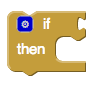
But I have another question. How can I create a control like : If ... then ... else do nothing. I am interested about else do nothing.


Taifun
Jan 2, 2017, 3:36:08 PM1/2/17
to MIT App Inventor Forum
If ... then ... else do nothing. I am interested about else do nothing.
just use an if - then block
Taifun
Trying to push the limits of App Inventor!
Snippets,
Tutorials and
Extensions from
Pura Vida Apps by
 Taifun.
Andrei
Jan 2, 2017, 3:57:10 PM1/2/17
to mitappinv...@googlegroups.com
Thank typhoon, I solved that problem but I encountered another problem ... I know maybe it's silly but how do you display the characters inside " ".

Taifun
Jan 2, 2017, 5:05:40 PM1/2/17
to MIT App Inventor Forum
t how do you display the characters inside " ".
unfortunately I don't understand, you might want to elaborate...
you might find the parse procedure helpful
Taifun
Andrei
Jan 3, 2017, 6:33:23 AM1/3/17
to MIT App Inventor Forum
I will try to elaborate what I want to do. Arduino through a GSM shield it send me a message like this "Temperature=12 Pressure=1 Humidity=14 WindSpeed=4 WindDirection=SE" and I want to select only the results. At Temperature=12, I want to display in my screen 12, at Temperature=-16 to display -16. Therefore I used "contains text" to identify for example where Pressure is in the SMS then with a "segment text" to extract only the value after the = . In the image bellow I tried to do that, but it does not displays anything from position 8, length 2. ( In that SMS Grade="12" ).


Andrei
Jan 3, 2017, 1:54:30 PM1/3/17
to MIT App Inventor Forum
Thank you ABG, I'm going to look at what you sent.
Reply all
Reply to author
Forward
0 new messages