
Need help! Runtime Error(Invaild destinationAddress)
468 views
Skip to first unread message

pc 1304p
Nov 9, 2014, 9:49:29 PM11/9/14
to mitappinv...@googlegroups.com
Hi guys, i need some help here.
Recently i create an app call a location tracker, is a combination of "Android, where's my car" & "Broadcast Hub" but mostly the main program is "Android, where's my car".
When i manually open the app, it will show a runtime error, which is "Invalid Destination Address" but when i used it with "SMS receiver". It doesn't have this issue as it will auto open the app itself(with trigger message).
It will attach some picture for you guys to see with the block diagram as well.

SteveJG
Nov 9, 2014, 10:31:14 PM11/9/14
to mitappinv...@googlegroups.com
You might put a dummy address in your TinyDB.GetValue valueIfTagNotThere . It is not clear from your code whether you have a valid default value for a location. When the app is first initialized, the lat / long takes five to 20 or more seconds to get a location from the GPS or network using the LocationSensor.
Try a dummy value and use AI2's debugger DoIt to find out what values are being passed.
Regards,
Steve
pc 1304p
Nov 16, 2014, 9:12:27 PM11/16/14
to mitappinv...@googlegroups.com
i have been busy lately so i just saw your replied. sorry about it. anyway, may i get an example for a dummy address you're talking about? for the TinyDB.GetValue valueIfTagNotThere block. for example i put "https://www.google.com.sg" on set "global tempAddress" to call up "tinyDB1.GetValue". Cause i kinda not understand your meaning.

Taifun
Nov 17, 2014, 8:24:05 AM11/17/14
to mitappinv...@googlegroups.com
a dummy address is for example the value 9.145825 for lat and the value -83.763199 for long instead of using empty text blocks in Screen.Initialize

Taifun
Trying to push the limits of App Inventor!
Snippets and
Tutorials from
Pura Vida Apps by
 Taifun.
pc 1304p
Nov 17, 2014, 11:31:54 PM11/17/14
to mitappinv...@googlegroups.com
alright, thanks! i will try it out & let you know whether it works.
pc 1304p
Nov 23, 2014, 8:04:41 PM11/23/14
to mitappinv...@googlegroups.com
hi Taifun, i have try your solution but still i get "invaild DestinationAddress".. it's not working for me..
Taifun
Nov 23, 2014, 8:37:29 PM11/23/14
to mitappinv...@googlegroups.com
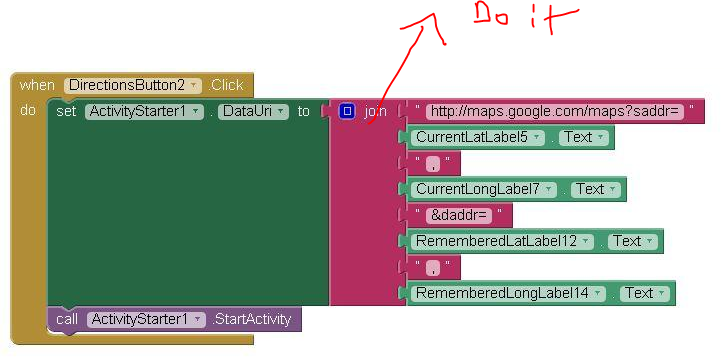
provide a screenshot incl. Do it result
Taifun


Enis
Nov 24, 2014, 1:18:59 AM11/24/14
to mitappinv...@googlegroups.com
You're not "doing" anything with that do statement.
Taifun was referring to "Do It." If you right click in the upper left corner of a block, on the drop down menu, you'll see Do it. If you click on that (as long as the app is running in the emulator) Do It, you'll get the result of the evaluation of the block in a yellow bubble.
Test your block like that, and you'll know what your blocks make or evaluate.
Taifun was referring to "Do It." If you right click in the upper left corner of a block, on the drop down menu, you'll see Do it. If you click on that (as long as the app is running in the emulator) Do It, you'll get the result of the evaluation of the block in a yellow bubble.
Test your block like that, and you'll know what your blocks make or evaluate.
____________________________________________________________________

For our App Inventor Tips, visit TwoDogApps.com
Reply all
Reply to author
Forward
0 new messages