
Skip to first unread message

Juan Antonio
Sep 29, 2018, 6:08:50 AM9/29/18
to MIT App Inventor Forum
Hello friends,
get frequency tone microphone.
- This extension is similar to SoundAnalysis http://appinventor.mit.edu/extensions/ ...
- ... but uses a new version of TARSOS library: TARSOS 2.X and a different code.
- This extension is an adaptation of this code: https://0110.be/posts/TarsosDSP_on_Android_-_Audio_Processing_in_Java_on_Android
- To try this extension you can go to this web: Online Tone Generator: http://www.szynalski.com/tone-generator/
- Set a tone and Play, this extension get frequency of that tone.
- With this app you can get level microphone and frequency tone, this app contains two extensions: one to obtain the microphone level and another to obtain the frequency.
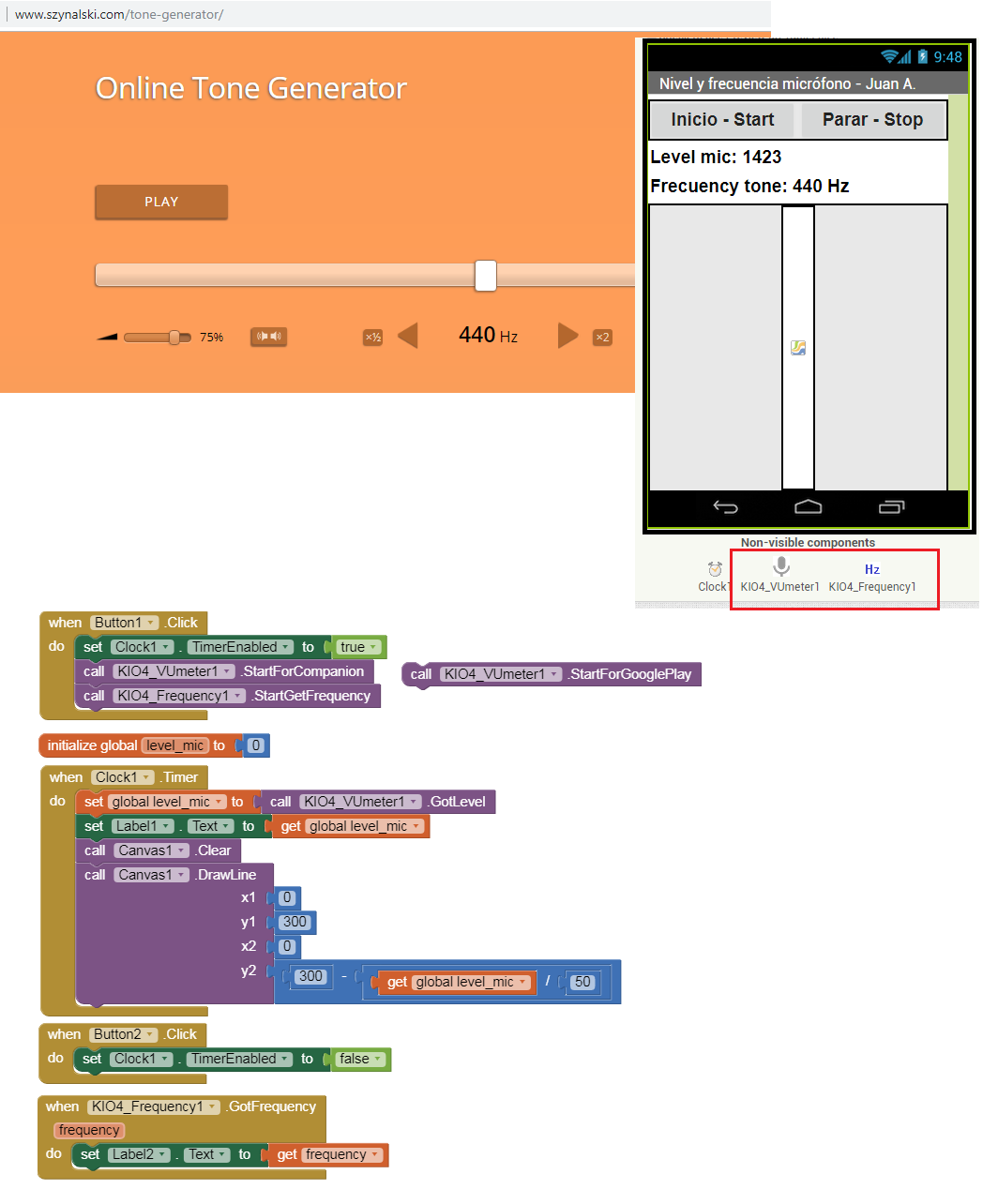
- I cann't upload app with extension to this forum, you can get extension: com.KIO4_Frequency.aix and app example p139C_Extension_Microfono_VU3.aia from this web page:
Regards,
Juan Antonio Villalpando.

TimAI2
Sep 29, 2018, 7:16:59 AM9/29/18
to MIT App Inventor Forum
Looks good Juan :)
Where is the microphone extension ?
TimAI2
Sep 29, 2018, 7:21:43 AM9/29/18
to mitappinv...@googlegroups.com
Juan Antonio
Sep 29, 2018, 7:55:40 AM9/29/18
to MIT App Inventor Forum
Thank you Tim.
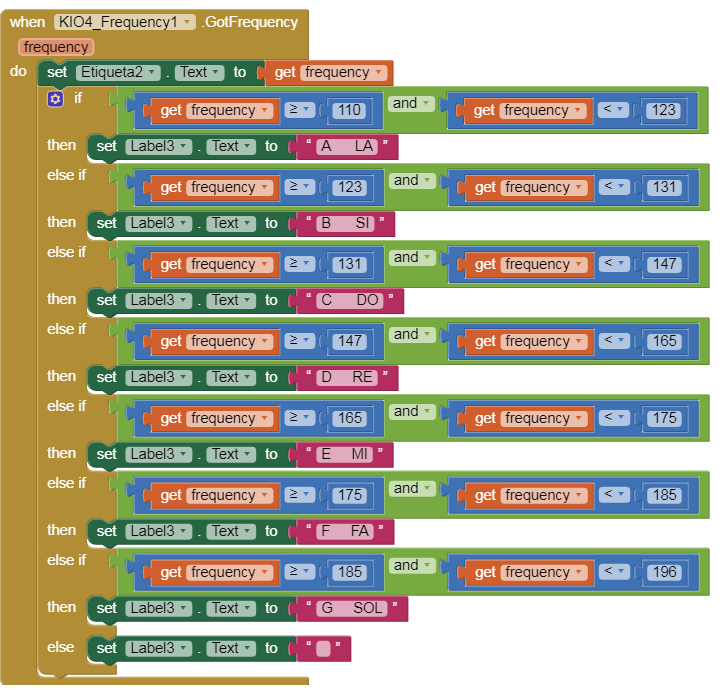
With this extension we can get music notes, example from 110 Hz to 196 Hz
TimAI2
Sep 29, 2018, 8:41:58 AM9/29/18
to MIT App Inventor Forum
Cool :)
Does the microphone level equate in any way to decibels ?
Juan Antonio
Sep 29, 2018, 10:23:30 AM9/29/18
to MIT App Inventor Forum
Hi Tim,
We can get level sound in mic from 0 to 32768, but we must calibrate each device (mic) individually.
amplitudeDb = 20 * Math.log10((amplitud) / 32768);
also the frequency range depends on each microphone
TimAI2
Sep 29, 2018, 11:27:25 AM9/29/18
to mitappinv...@googlegroups.com
Is that "ln" or "log" ? ;)

[EDIT] I see you put log10 in the formula :)
TimAI2
Sep 29, 2018, 11:55:36 AM9/29/18
to MIT App Inventor Forum
The formula is giving me dB in the 0.001 to 0.003 range.
Multiply by 1000 ?
Juan Antonio
Sep 30, 2018, 4:20:07 AM9/30/18
to MIT App Inventor Forum
Hi Tim,
that formula indicates the level of sound with respect to 32768 expressed in decibels, but it is not the typical way to measure a sound.
In this message the author explains quite well certain concepts:
To measure the level of sound captured by a mic, dB (spl) is used, this is a pressure measurement referenced to 20 μPa.
I have modified my extension and added the GetLeveldB block (I prefer to GetLevelDb), this block contains the adapted code that is at the end of:
public class NoiseRecorder {...}
You can download extension and example: p139C_Extension_Microfono_VU5.aia from this website:
Each microphone can be different and must be calibrated with a pattern.
In Play Store Google:
TimAI2
Sep 30, 2018, 7:26:02 AM9/30/18
to MIT App Inventor Forum
Many thanks Juan :)
Reply all
Reply to author
Forward
0 new messages