
Skip to first unread message

Lucrecio Borges
Aug 11, 2017, 2:42:32 PM8/11/17
to mitappinv...@googlegroups.com
Hi everbody!
I need a help to find the USB path,
on Android 4.4 and 5.0 the path is always the same, easy to select,
but on Android 6.0 the path always change,
how can I use the USB source on Android 6?

Taifun
Aug 11, 2017, 3:34:39 PM8/11/17
to MIT App Inventor Forum
are you trying to access an external storage via USB?
you might be able to get the path using the file extension and its AvailableStorageDirectories method
Taifun
Lucrecio Borges
Aug 11, 2017, 3:48:27 PM8/11/17
to MIT App Inventor Forum
Yes, I try using a external storage USB, its a Android tv box and use a pendrive.
the TaifunFile can locate the randon USB on Android 6?
Taifun
Aug 11, 2017, 4:02:22 PM8/11/17
to MIT App Inventor Forum
you might want to try it... let us know, if it works
Taifun
Lucrecio Borges
Aug 14, 2017, 1:45:12 PM8/14/17
to mitappinv...@googlegroups.com
Hi Taifun,
I try to work with the AvailableStorageDirectories but its not find the path.
The project show a error, just a ) on the path.
How can I use the block? This is a correct?
I dont find examples on google :(

Lucrecio Borges
Aug 14, 2017, 2:38:08 PM8/14/17
to MIT App Inventor Forum
Hi again!!
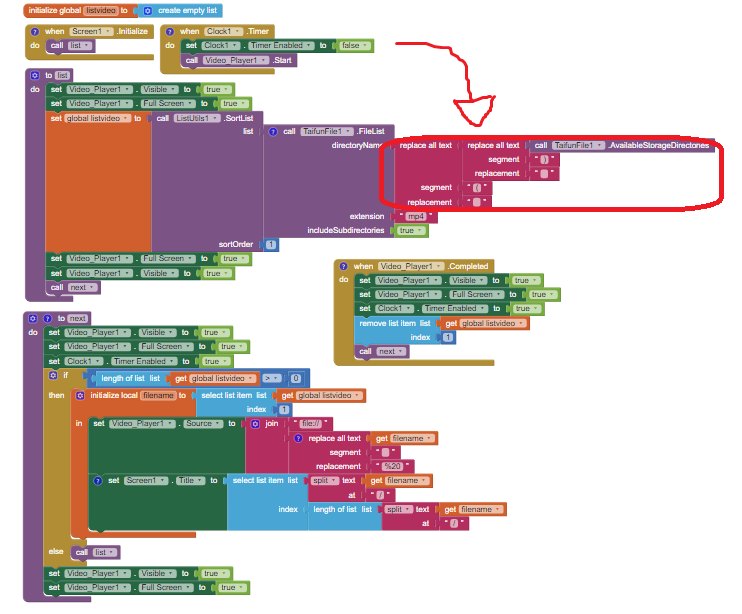
update, I suspected the ) on filename, and make some tests to remove the parentheses in path name.
Now the parentheses dont show and I think the path is correct, because now I can see the name of the first video.
But its show the filename without extension, example, I have the A.mp4 and the app show only the A, and say something about cant play the video.
For the first test I use Android 4.4 and 5.0, and works like a charm, the player on Android 6.0 is a different?
Or a blocks error?
Lucrecio Borges
Aug 14, 2017, 2:52:42 PM8/14/17
to MIT App Inventor Forum
I make test with the textbox and a buttom to see the path:

Taifun
Aug 14, 2017, 3:02:51 PM8/14/17
to MIT App Inventor Forum
it seems to be, you are not familiar with working with lists?
the AvailableStorageDirectories method will return a list
what about selecting the first item using the select list item block?
however if there is only one item available in the list, you only have an internal sdcard on the device...
so you could just use the generic path file:///mnt/sdcard/yourDirectory/yourFilename.mp4
Taifun
Lucrecio Borges
Aug 14, 2017, 3:25:29 PM8/14/17
to MIT App Inventor Forum
I'm understanding the list blocks better, but I need to read an external flash drive.
I'll keep trying, I believe I should continue to use the "available storage directories" block because it is the only way to read the external flash drive in android 6.0.
Taifun
Aug 14, 2017, 3:38:10 PM8/14/17
to MIT App Inventor Forum
what exactly does the method return?
use Do it to find it out
Taifun

Lucrecio Borges
Aug 16, 2017, 1:09:31 PM8/16/17
to MIT App Inventor Forum
Hi Taifun, I make some tests.
I post some results in few days.
Lucrecio Borges
Aug 21, 2017, 11:14:01 AM8/21/17
to MIT App Inventor Forum
Hi Taifun!
after some tests on

I finally understood what was happening.
This block give all the sources path on device, as the name itself says. :P
I put the textblock to start working from there.
Its show this:
/storage/82C3-E96C/
/storage/emulated/0/
The first path is external flash drive SERIAL NUMBER, and second is internal memory.
If i put the first path on any test, video or image, the blocks works, but only for this flash drive, because the SERIAL NUMBER changes for each flash drive.
I belive I need a variable to copy the path and paste on my blocks:
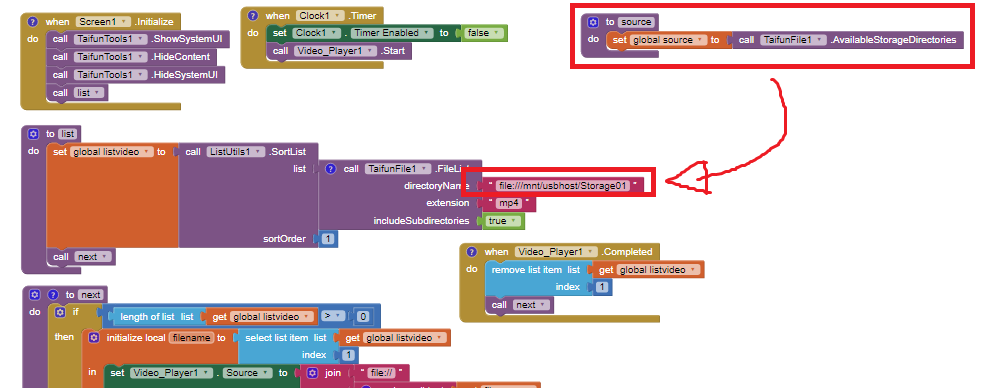
I search the way how to copy the external path, because the "availablestoragedirectories" show this: "/storage/82C3-E96C/ /storage/emulated/0/"
and I need only the first 19 letters.
Taifun
Aug 21, 2017, 11:18:38 AM8/21/17
to MIT App Inventor Forum
you might want to read this answer again
Taifun
Reply all
Reply to author
Forward
0 new messages