
gunicorn.conf gives ImportError: No module named wsgi
6,429 views
Skip to first unread message

dzne...@gmail.com
Sep 16, 2016, 3:21:23 PM9/16/16
to Mezzanine Users
Hi,
I'm trying to run mezzanine on gunicorn, but cannot configure the gunicorn.conf file correctly, I tried to change the path to .sock and to wsgi:application without success.
I get the error "ImportError: No module named wsgi". Gunicorn does't find the wsgi file.
Development server works fine with nginx for static files.
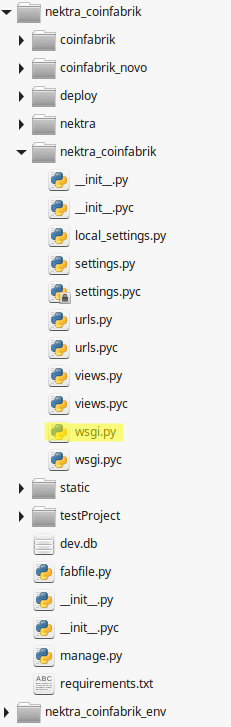
My file structure was created with the mezzanine-project command. It's a multi-tenancy project.
If I pull out the contents out of nektra_coinfabrik/nektra_coinfabrik into /nektra_coinfabrik it somehow works but the admin is broken (cannot login, no styles).
Is there a way to configure the gunicorn.conf so I don't have to change my file structure?
Find attached files.
Thanks!
David

Ryne Everett
Sep 16, 2016, 3:54:16 PM9/16/16
to Mezzanine Users
If I pull out the contents out of nektra_coinfabrik/nektra_coinfabrik into /nektra_coinfabrik it somehow works but the admin is broken (cannot login, no styles).
That's because the path is wrong. Gunicorn is trying to import `./nektra_coinfabrik/wsgi.py` from the current directory, but the correct relative path is `./nektra_coinfabrik/nektra_coinfabrik/wsgi.py`. However, simply changing the line to `nektra_coinfabrik.nektra_coinfabrik.wsgi:application` probably wont work because the outer nektra_coinfabrik directory is probably not a python package and regardless your application probably depends on the package directory being added to the python path. So I would try adding the to your gunicorn flags `--pythonpath="/home/david/nektra_coinfabrik/nektra_coinfabrik,"`.
As for the admin being broken, you're probably not doing anything to serve static assets. The django development server does this by default but you'll have to come up with your own solution in production. The ideal way is to serve them with your production server (e.g., nginx, apache, etc.) but the python package dj-static is probably sufficient to start with.
--
You received this message because you are subscribed to the Google Groups "Mezzanine Users" group.
To unsubscribe from this group and stop receiving emails from it, send an email to mezzanine-users+unsubscribe@googlegroups.com.
For more options, visit https://groups.google.com/d/optout.
dzne...@gmail.com
Sep 21, 2016, 1:47:22 PM9/21/16
to Mezzanine Users
Thanks for your help!
I'm able to serve the static files for nektra.dev/admin with nginx now, so the admin works.
But --pythonpath doesn't work in the gunicorn.conf file:
exec nektra_coinfabrik_env/bin/gunicorn --pythonpath="/home/david/nektra_coinfabrik/nektra_coinfabrik," --workers 3 --bind unix:/home/david/nektra_coinfabrik/nektra_coinfabrik.sock nektra_coinfabrik.wsgi:application
(I tried also --pythonpath /home/david/nektra_coinfabrik/nektra_coinfabrik)
I can start gunicorn with:
gunicorn -b 127.0.0.1:8000 -b 127.0.0.1:8001 nektra_coinfabrik.wsgi:application
and
gunicorn --bind unix:/home/david/nektra_coinfabrik/nektra_coinfabrik.sock nektra_coinfabrik.wsgi:application
Then nektra.dev works but coinfabrik.dev doesn't display the theme of coinfabrik as it should, it displays the theme of nektra, too.
I tried with settings such as:
settings.py:
ALLOWED_HOSTS = [
'nektra.dev',
'coinfabrik.dev.',
# "localhost:8000"
"*",
]
HOST_THEMES = [
# ('nektra.dev', 'nektra'),
# ('coinfabrik.dev', 'coinfabrik'),
('127.0.0.1:8000', 'nektra'),
('127.0.0.1:8001', 'coinfabrik')
# ('localhost:8000', 'coinfabrik')
]
nginx:
server {
listen 80;
server_name coinfabrik.dev;
location / {
include proxy_params;
# proxy_pass http://unix:/home/david/nektra_coinfabrik/nektra_coinfabrik.sock;
}
}
What am I missing?
To unsubscribe from this group and stop receiving emails from it, send an email to mezzanine-use...@googlegroups.com.
Reply all
Reply to author
Forward
0 new messages