
spritesheet from many to 1 row
261 views
Skip to first unread message

Nguyễn Văn Bộ
Oct 23, 2012, 2:04:24 AM10/23/12
to mel...@googlegroups.com

When i meet melonjs, i love it but almost sprite-sheets such as this one
have multi rows other than melonjs (spritesheet with 1 row).
So decide to write a tool(using html canvas) to convert to 1 row.
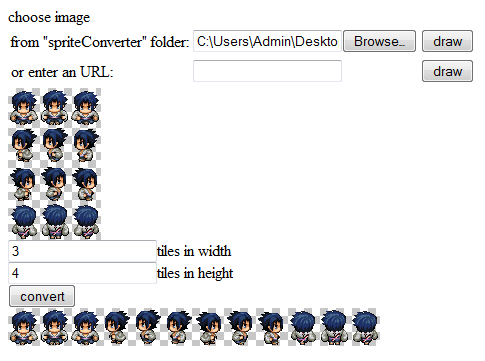

Look at my attachment.
Feel free to use.
Thanks

melonJS
Oct 23, 2012, 2:22:41 AM10/23/12
to mel...@googlegroups.com
Hi !
That's great, thank you very much, but how to tell you that ....
and unless I misunderstood what you wanted to acheive, melonJS does actually support mutli-line spritesheet
Check at the documentation for the addAnimcation function :
Nguyễn Văn Bộ
Oct 23, 2012, 2:38:26 AM10/23/12
to mel...@googlegroups.com
oh because of some tutorial, i dont know that melonJS does actually support mutli-line spritesheet.^^
Thanks
Nguyễn Văn Bộ
Oct 23, 2012, 2:53:17 AM10/23/12
to mel...@googlegroups.com
Sorry but the in the example http://www.melonjs.org/docs/symbols/me.AnimationSheet.html#addAnimation
i dont know how molonjs know that the spritesheet is multidimension.?
melonJS
Oct 23, 2012, 3:02:09 AM10/23/12
to mel...@googlegroups.com
it's automatically detected based on the sprite sheet size,and the specified spritewidth and spriteheight properties, you have nothing to do, except specifying the correct values.
it's actually the same principle that the one used for the tilemap, tilesets are also multi-line "tilesheet".
Nguyễn Văn Bộ
Oct 23, 2012, 3:28:12 AM10/23/12
to mel...@googlegroups.com
how can i solve this case
i want to use a spritesheet with 2x6 (each frame is a rectangle 16x32 pixel)
it can confuse with
a spritesheet with dimension 3x4 (each frame is a square 32x32 pixel)
i want to use a spritesheet with 2x6 (each frame is a rectangle 16x32 pixel)
it can confuse with
a spritesheet with dimension 3x4 (each frame is a square 32x32 pixel)
Nguyễn Văn Bộ
Oct 23, 2012, 3:32:01 AM10/23/12
to mel...@googlegroups.com
sorry but i answer my self when i look at the tutorial again
settings.spritewidth = 64;
settings.spritewidth = 64;
Reply all
Reply to author
Forward
0 new messages