MAPINFO.12.5 64 bit google earth export link tool

1,567 views
Skip to first unread message

Faruk çağlar

unread,
Jan 28, 2015, 1:52:21 PM1/28/15
to mapi...@googlegroups.com
Hi everybody.

After i load ge link tool, its okay, but it doesnt appear any ribbon, it says in the info that it is in themap tab ribbon .but i isnt .so i can t use this tool ,

I cant find anywhere

Thanks

Faruk CAGLAR
Infotech

diver

unread,
Jan 29, 2015, 3:23:16 AM1/29/15
to mapi...@googlegroups.com
it appears in the LEGACY tab

середа, 28 січня 2015 р. 20:52:21 UTC+2 користувач Faruk çağlar написав:

Faruk çağlar

unread,
Jan 29, 2015, 5:33:54 AM1/29/15
to mapi...@googlegroups.com

no itdoesnt appear in legacy tab

Laurent

unread,
Jan 29, 2015, 9:12:53 AM1/29/15
to mapi...@googlegroups.com
Hi Faruk

For me, just for use with its menu in the tools.

By

Laurent

unread,
Jan 29, 2015, 9:20:14 AM1/29/15
to mapi...@googlegroups.com
And where are Mapcad tools buttons


Le mercredi 28 janvier 2015 19:52:21 UTC+1, Faruk çağlar a écrit :

Laurent

unread,
Jan 29, 2015, 9:40:27 AM1/29/15
to mapi...@googlegroups.com
I think that the greater part of the tools were not suitable for release x64.NameView does not work on the map in the layout, MapCAD buttons.. missing

Le mercredi 28 janvier 2015 19:52:21 UTC+1, Faruk çağlar a écrit :

Faruk çağlar

unread,
Jan 29, 2015, 11:54:24 AM1/29/15
to mapi...@googlegroups.com


yeah u right 

i found in the home tab , tools menu ,

but it doesnt seem like icon ,
 in older version there was a icon , thats not

Peter Horsbøll Møller

unread,
Jan 30, 2015, 2:17:15 AM1/30/15
to mapi...@googlegroups.com
We have been thru a number of the MapBasic application that are installed with MapInfo Pro to make sure they work with the new 64 bit version. We haven't been trhu them all yet.

MapCAD
You'll now find the MapCAD tools on the SPATIAL tab. MapCAD integrates its tools into the new interface very nicely. It positions it tools next to similar MapInfo Pro tools

Google Earth Link
You'll find this tool only in the Tools window, either on the HOME tab or as a standalone floating tools window

NamedViews
This tool is now to be found in the Windows gallery on the Home tab. From here you can open the NamedView window.
I did make it work with maps in the layout, but you need to activate the map for it to work.

I wrote a small article on this topic in LinkedIn Pulse yesterday. The article basically says what I have written above.
You can read it here if you are interested: https://www.linkedin.com/pulse/where-do-i-find-my-tools-mapinfo-pro-125-64bit-peter-horsb%C3%B8ll-m%C3%B8ller

Peter Horsbøll Møller
Pitney Bowes Software


Date: Thu, 29 Jan 2015 06:40:27 -0800
From: laurent.m...@gmail.com
To: mapi...@googlegroups.com
Subject: [MI-L] Re: MAPINFO.12.5 64 bit google earth export link tool
--
--
You received this message because you are subscribed to the
Google Groups "MapInfo-L" group.To post a message to this group, send
email to mapi...@googlegroups.com
To unsubscribe from this group, go to:
http://groups.google.com/group/mapinfo-l/subscribe?hl=en
For more options, information and links to MapInfo resources (searching
archives, feature requests, to visit our Wiki, visit the Welcome page at
http://groups.google.com/group/mapinfo-l?hl=en

---
You received this message because you are subscribed to the Google Groups "MapInfo-L" group.
To unsubscribe from this group and stop receiving emails from it, send an email to mapinfo-l+...@googlegroups.com.
For more options, visit https://groups.google.com/d/optout.

Faruk çağlar

unread,
Jan 30, 2015, 5:29:35 AM1/30/15
to mapi...@googlegroups.com

Also i have a big problem with tool and ribbon customization save , when create or edit ribbon and quick access toollbar ,it doesnt appear next time i opened.

i saved workspace , and in the options i changed the settings but it didnt work , is it bug ?

or only i have this problem ,

can anyone know solving about this problem ?

Thanks for now 

Good Day

Faruk ÇAĞLAR

INFOTECH BILISIM SISTEMLERI

Peter Horsbøll Møller

unread,
Jan 30, 2015, 6:28:03 AM1/30/15
to mapi...@googlegroups.com
Hi

The customization of the ribbon is not stored in a workspace.
It's stored as a preference.

What changes do you make?

Have you tried basically adding a new group on the HOME tab and adding two standard controls to this group?
This works on my computer.
But I seem to remember that if I was adding any controls from a custom application things wasn't stored

Peter Horsbøll Møller
Pitney Bowes Software


Date: Fri, 30 Jan 2015 02:29:35 -0800
From: fak...@gmail.com
To: mapi...@googlegroups.com
Subject: Re: [MI-L] Re: MAPINFO.12.5 64 bit google earth export link tool

Faruk çağlar

unread,
Jan 30, 2015, 6:51:35 AM1/30/15
to mapi...@googlegroups.com

for example , i created a custom group into the TABLE tab and e few application . and also i added lotsof things to the quick acess toolbar .

.
u said about preferences.
icant find which menü is in it ?

Thanks 

Faruk çağlar

unread,
Jan 30, 2015, 7:00:27 AM1/30/15
to mapi...@googlegroups.com


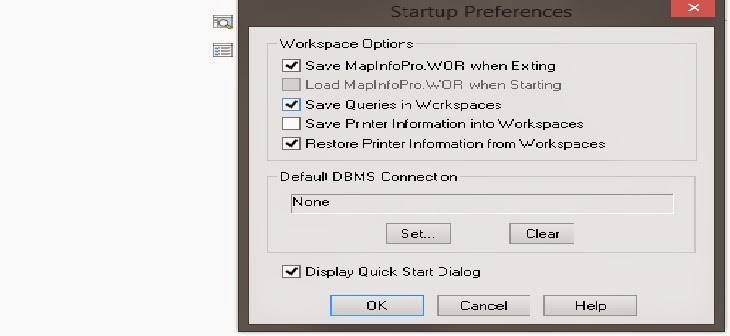
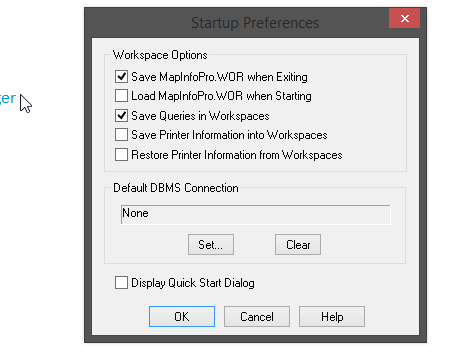
 i found preferences , u mean "startup preferences"and the settings in it like this 

Peter Horsbøll Møller

unread,
Jan 30, 2015, 9:12:47 AM1/30/15
to mapi...@googlegroups.com
You don't need to do anything specific to save them.
They are saved by default.

Can you try creating a basic new group and adding just one standard MapInfo Pro control to, end MapInfo Pro and start it again


Peter Horsbøll Møller
Pitney Bowes Software


Date: Fri, 30 Jan 2015 03:51:35 -0800

From: fak...@gmail.com
To: mapi...@googlegroups.com
Subject: Re: [MI-L] Re: MAPINFO.12.5 64 bit google earth export link tool

Faruk çağlar

unread,
Jan 30, 2015, 9:20:39 AM1/30/15
to mapi...@googlegroups.com

k u peter now its fixed ,

Theproblemispreferencessettings , i changed tihs settings.


and this 


Peter Horsbøll Møller

unread,
Jan 30, 2015, 9:30:45 AM1/30/15
to mapi...@googlegroups.com
Glad to hear it's working now.
Not really sure exactly what you changed


Peter Horsbøll Møller
Pitney Bowes Software


Date: Fri, 30 Jan 2015 06:20:39 -0800

From: fak...@gmail.com
To: mapi...@googlegroups.com
Subject: Re: [MI-L] Re: MAPINFO.12.5 64 bit google earth export link tool

Ross Cameron

unread,
Aug 9, 2016, 1:41:09 AM8/9/16
to MapInfo-L
Hi all, the GE link tool doesnt have its own icon nor does it float.(tools windows says its "autoloaded". 
Here is how to use it.

From the Tools option under the Home tab you can select the tool but you have to right click on the tool to get the "export map window" or "export selected objects" dialogue window. very confusing. i just happened onto the right click to select by accident.
i hope this helps someone else.
64bit MI is not friend yet...
Ross

Sancarn

unread,
Aug 9, 2016, 3:57:12 AM8/9/16
to MapInfo-L
Peter?

Is it possible to create an MBX which creates a ribbon toolbar for other applications (like google earth tool)?

Peter Horsbøll Møller

unread,
Aug 9, 2016, 4:25:49 AM8/9/16
to mapi...@googlegroups.com

That should be doable.


First you can use the MapBasicApplications property on the IMapInfoPro instance to get a list of running applications.

If you loop thru this list you can check the application name of each and when you find the GELink tool, you can use the CallMapBasicSubroutine method on the IMapBasicApplication to execute a subroutine in that application.


Something along these lines (untested)


Dim theMapInfoApplication As This

Dim theMBApplications As This

Dim theMBApplication As This

Dim numMBApplications As Integer

Dim parameters(0) As String


'Get MIPro interface

theMapInfoApplication = SystemInfo(SYS_INFO_IMAPINFOAPPLICATION)

'Get list of MapBasic applications

theMBApplications     = GetMapBasicApplications (theMapInfoApplication)


numMBApplications     = GetIListCount(theMBApplications)

For i = 0 To (numMBApplications- 1)

   theMBApplication = GetIListItem(i)

   If GetIMBXName(theMBApplication) = “GELink” Then

      Call CallMBXSub(theMBApplication, “PromptUser”, parameters())

   End if

Loop


Peter Horsbøll Møller

Pitney Bowes


Reply all
Reply to author
Forward
0 new messages