
Isometric Map Tutorial Needed
1,002 views
Skip to first unread message

Nosher Khan
Apr 3, 2013, 10:14:34 PM4/3/13
to mape...@googlegroups.com
Hello all.
I am a senior college student working on my final year project. We're making an Android game with an isometric perspective, and I came across the Tiled Map Editor when setting out to design maps. So far, I have found plenty of material related to designing orthogonal maps, but very little content in the way of working with the isometric perspective. Is there any tutorial or reference material that I could be guided to so that I may have a clearer understanding on designing isometric maps? Any help would be highly appreciated.
Cheers!
I am a senior college student working on my final year project. We're making an Android game with an isometric perspective, and I came across the Tiled Map Editor when setting out to design maps. So far, I have found plenty of material related to designing orthogonal maps, but very little content in the way of working with the isometric perspective. Is there any tutorial or reference material that I could be guided to so that I may have a clearer understanding on designing isometric maps? Any help would be highly appreciated.
Cheers!

Thorbjørn Lindeijer
Apr 16, 2013, 4:04:55 PM4/16/13
to mape...@googlegroups.com
http://www.tonypa.pri.ee/tbw/tut16.html
You can also look at Tiled's source code to see how I implemented its
isometric renderer.
Eventually I'd like to get around to writing a Tiled manual in which
I'd cover such things, but my spare time is very limited and usually
it's more interesting to work on a new feature or fix a bug than
working on a manual. When I would have more financial support from
sponsors and donations (for example at https://www.gittip.com/bjorn/),
I could start working part-time and would have more time for doing
such things as well.
Best regards,
Bjørn

xpressi...@gmail.com
Jan 5, 2014, 7:06:28 AM1/5/14
to mape...@googlegroups.com
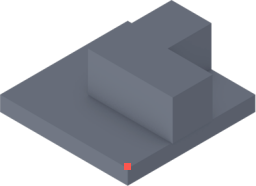
We started to create an isometric tile game using TileEd, but we quickly ran into several problems -perhaps someone could help us:
1. Our tiles are of different height (some are plain squares, some have grass on it, some with walls etc.), which means we can't use a uniform sized tile sheet. So we either need to load each image individually -or place them on a tile sheet as non-uniformly sized tiles. Could both be done using TileEd -and which method sould be preferred?
2. Our iso tiles have a "tickness" (floor tiles, for example) as shown in the attached example image. Due to their "thickness", the tiles must not be aligned at the image's bottom but use a reference point (shown as a red square in the example image) which is shifted up a little bit. Is it possible to specify such a reference point to properly align isometric tiles with a thickness?
If you study the attached image, you'll quickly realize what kind of tiles we'd like to use (different heights, thickness etc.)
Is this possible with TileEd? And if not, is it planned to be added soon?
Thanks,
Mike
Thorbjørn Lindeijer
Jan 5, 2014, 8:15:05 AM1/5/14
to mape...@googlegroups.com
On Sun, Jan 5, 2014 at 1:06 PM, <xpressi...@gmail.com> wrote:
We started to create an isometric tile game using TileEd, but we quickly ran into several problems -perhaps someone could help us:
1. Our tiles are of different height (some are plain squares, some have grass on it, some with walls etc.), which means we can't use a uniform sized tile sheet. So we either need to load each image individually -or place them on a tile sheet as non-uniformly sized tiles. Could both be done using TileEd -and which method sould be preferred?
There's three options here that could be helpful:
* Add the same tileset image multiple times, but with different tile sizes. This can work assuming the tiles align on the different grids correctly.
* Use several tileset images, one for each different tile size.
* Use a Tiled daily build and choose "Collection of Images" when creating a new tileset. Then add each of your tiles as individual images. This is the only way to have complete flexibility, and it assumes you would probably pack your tiles together using some automated tool and that your engine can map the file names to the right place on the packed texture (so this part is left outside the scope of Tiled).
2. Our iso tiles have a "tickness" (floor tiles, for example) as shown in the attached example image. Due to their "thickness", the tiles must not be aligned at the image's bottom but use a reference point (shown as a red square in the example image) which is shifted up a little bit. Is it possible to specify such a reference point to properly align isometric tiles with a thickness?
Tiled can't currently stack layers with a height on top of each other (that's issue https://github.com/bjorn/tiled/issues/4). However, you can change the reference point for a given tileset using the "tile offset". In 0.9.1 this is an offset that you specify when adding a tileset, while in the Tiled daily build this setting is found in the tileset properties and can be changed more comfortably while seeing the effect.
Best regards,
Bjørn
Best regards,
Bjørn

bdebe...@gmail.com
Jan 20, 2014, 3:03:27 PM1/20/14
to mape...@googlegroups.com
Op donderdag 4 april 2013 04:14:34 UTC+2 schreef Nosher Khan:
Hello all.
I am a senior college student working on my final year project. We're making an Android game with an isometric perspective, and I came across the Tiled Map Editor when setting out to design maps. So far, I have found plenty of material related to designing orthogonal maps, but very little content in the way of working with the isometric perspective. Is there any tutorial or reference material that I could be guided to so that I may have a clearer understanding on designing isometric maps? Any help would be highly appreciated.
Cheers!
Ive been playing a lot of isometric games. I gues you start understanding how it works by looking at it. This information might be useful to you: http://trac.bookofhook.com/bookofhook/trac.cgi/wiki/OverviewOfIsometricEngineDevelopment
Basicly, you can lower the 'camera' view by increasing the width of the grid. As you can see, Ultima Online uses a 1:1 ratio. So the view is top down. Games like diablo 2 use tiles with a larger width. See the difference.
The easiest way to create isometric tiles ( 1:1 ratio) is to create a square of lets say 66 by 66 px in microsoft paint (each side of the square has 1 px padding). Give the square any color or texture you like. And then rotate it by 45 degrees in photoshop or gimp.
Then cut out the image and scale it to 66 by 66 px again. Now you have a basic tile which you could use as a template for future tiles. Creating walls and other vertical looking stuff is also easy. Just remember you always have to use 45 degrees lines when drawing horizontaly.
Reply all
Reply to author
Forward
0 new messages