
A few Replicator 2 questions
334 views
Skip to first unread message

Daniel Whitfield
Mar 12, 2014, 11:10:01 PM3/12/14
to make...@googlegroups.com
Hello everyone!
I have a few questions regarding the Makerbot Replicator 2.
Question 1
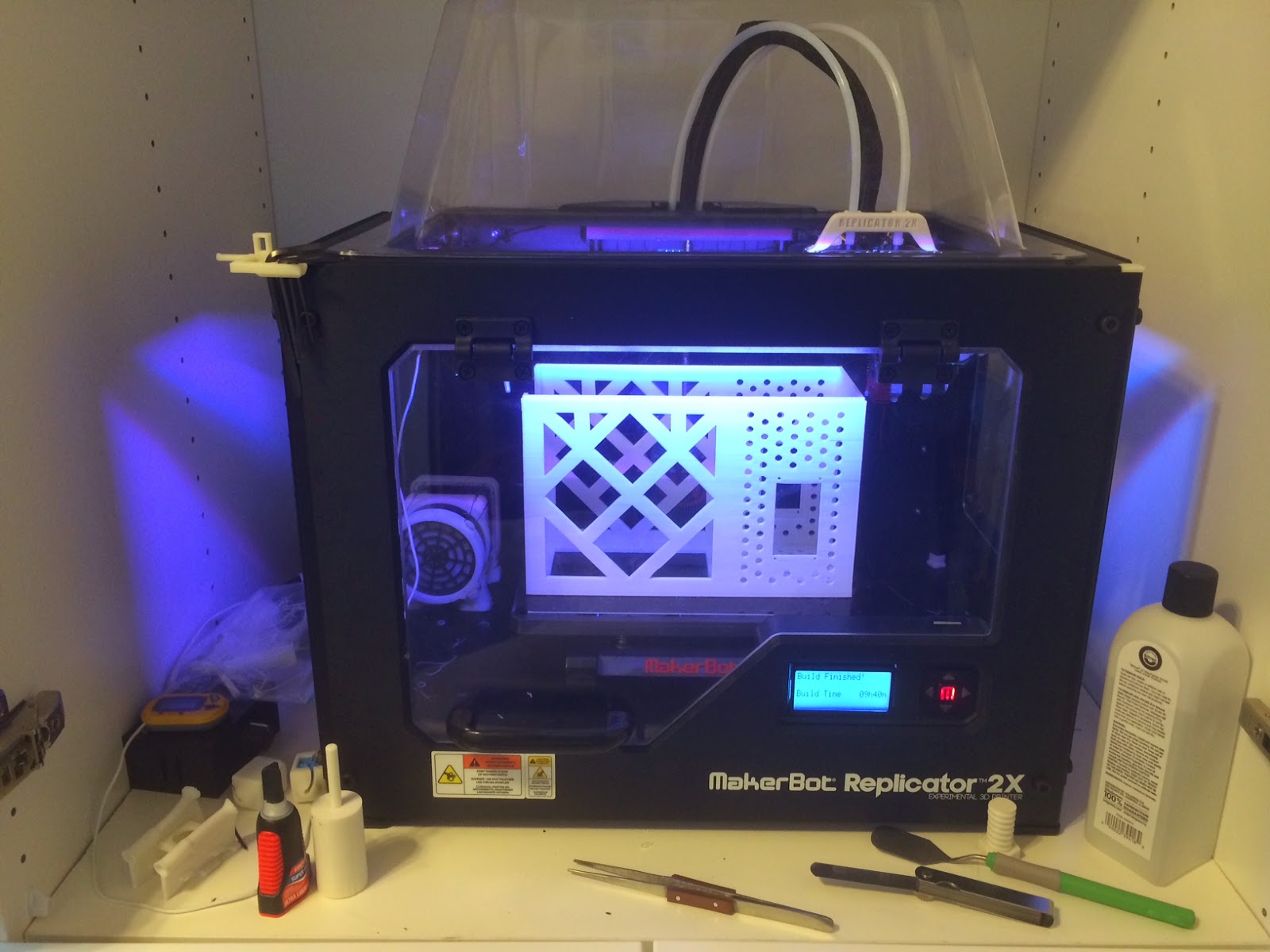
Has anyone enclosed their Replicator 2? If so, how would you go about doing so? I've thought about enclosing it using Lexan sheets on top of the removable side panels but I'm at a loss with the holes in the rear, the top, and the best way to hinge the front doors (single door opening up/down, two doors opening left and right) and how to latch them closed (magnets?). After I enclose it I thought about adding a temperature/humidity sensor connected to an exhaust fan with an input air hole with a filter on it (is this overkill, what should be changed, or how did you do it?).
Question 2
Has anyone installed an LED to the extruder on their Replicator 2? I've thought about adding one, or two SMD LEDs to light up the extrusions so I can monitor the process without running my flashlight down on every print. ): I'm not certain where to add the LEDs on the extruder nor where to power it from. I thought about powering my RGB LEDs I have available (that I could use) to the original RGB LED port on the MightyBoard or powering just my standard white LEDs from the fan power or via external power (would really like to avoid this).
Any help or tips would be great!! Thank you! :)

Au Groups
Mar 13, 2014, 9:33:38 AM3/13/14
to make...@googlegroups.com
I use window heat shrink film for the side and build a paper front panel and paper box top cover.
--
You received this message because you are subscribed to the Google Groups "MakerBot Operators" group.
To unsubscribe from this group and stop receiving emails from it, send an email to makerbot+u...@googlegroups.com.
For more options, visit https://groups.google.com/d/optout.
--
Mike D., Au Group Electronics, www.AuElectronics.com

Jetguy
Mar 13, 2014, 11:46:45 AM3/13/14
to make...@googlegroups.com
Do NOT power RGB leds from the motherboard port. It barely can drive the current LED strip and will blow the FETS
Also, the bot is 24V system. Most LED strips are 12V.
Truth be told, it's best to use an external power source for LEDs. Sure, some guys will tell yu can can cut a 12V rated LED strip in half and then run the strings in series. This causes 2 issues. First, every time the heaters kick on, the voltage will sag but it causes a noticeable dimming in the LEDS connected in series. Second, if any single LED fails, the voltage becomes unbalanced and LEDs will begin blowing in both strips.
Finally, you genreally cannot use a standard 7812 linear regulator because most LED strips will draw enough current to overheat said regulator. Simply put, linear regulators DUMP 50% of power as heat.
In the end, using a dedicated 12V power supply to power the strip is far easier and far safer long term.

Ryan Carlyle
Mar 13, 2014, 1:35:45 PM3/13/14
to make...@googlegroups.com
R2 enclosure -- search Thingiverse. Lots of designs out there. You can put the entire printer inside an oven bag (like for cooking turkeys) if you want a quick fix. There are a bunch of designs that use lasercut acrylic. Ordering a set of R2x panels & hood is an option but it will be idiotically expensive.
Extruder lighting -- Some people have used Ikea Dioder strips mounted inside the frame for lighting. Easy and cheap. Also on Thingiverse.
Don't push the printer's power supply. You should assume there is ZERO safety factor on anything build by MBI. The older printers had many electrical components being used ABOVE their rated capacity.
External power supplies are not hard to make from an old "wall wart" or whatever you have handy. (I'm assuming you have some basic electrical competence here, or you shouldn't be modifying your printer.) Personally, I have an old desktop computer ATX PSU set up as a bench power supply specifically for my printer accessories -- it powers a fume fan right now, but I have a ton of heating/cooling accessories planned that it will eventually run. You can get >20A off the 12v rail of a computer power supply if you put some planning into the wire gauges and connectors. Nice thing about a computer power supply as opposed to a simple power brick is that it can also provide regulated 3.3v, 5v, -5v, and -12v rails. These can come in handy if you need to bench test a 24v fan or 5v microcontroller or something.


Daniel Whitfield
Mar 13, 2014, 4:17:05 PM3/13/14
to make...@googlegroups.com
I had a feeling that the printer's voltage and amperage would be running at capacity (or over) after reading folks who have installed a HBP had to swap the power supply to the Rep 2x's because the lack of amperage. Ahh well, I'll put an external power connector on my eagle design. Oddly enough, I've been putting off designing the hookup ports/available voltages on a brand new psu I purchased for a benchtop power source from amazon, link here. I'll have to get creative to decide where I want my LED power connect to come out of the machine. I've got barrel jacks I can use To create an incoming power port.
Ryan Carlyle
Mar 13, 2014, 4:32:09 PM3/13/14
to make...@googlegroups.com
Yeah, I thought about buying a dedicated DC supply or just using my nice adjustable bench test supply, but I had this ATX PSU lying around and it gives you all the major voltages. Worked for me. YMMV
Reply all
Reply to author
Forward
0 new messages