
Makerbot Mini
892 views
Skip to first unread message

Brian33433
Feb 25, 2014, 7:43:29 PM2/25/14
to make...@googlegroups.com
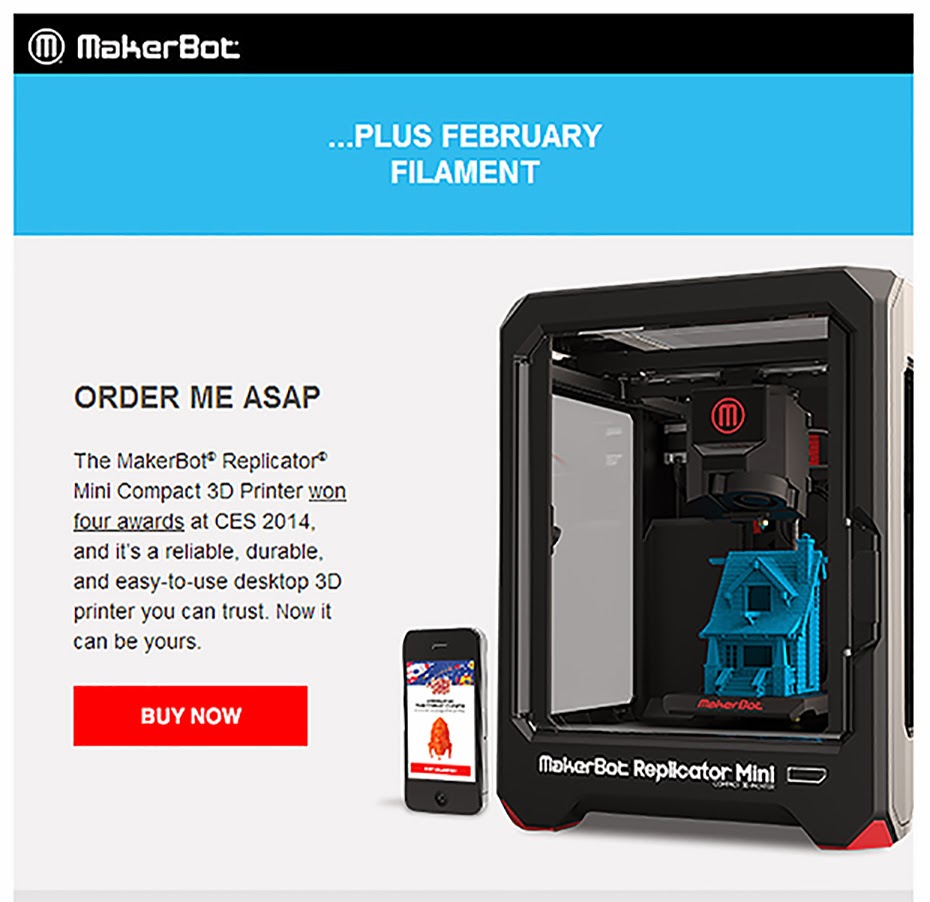
So I guess everyone got this email, but how is it that the mini won 4 awards at CES as stated in this email and yet none of us can see any of the new systems actually printing?

Dan Newman
Feb 25, 2014, 8:12:06 PM2/25/14
to make...@googlegroups.com
and the trade rags, show organizers, oooh and ahhhh over your stuff and give
you awards despite the fact that they've never used them or even seen them
operate. It's a bit of a disservice to naive buyers, but it's how the system
has worked for decades or longer. (I used to have to buy advertising
in trade rags and pay the bills for booths at trade shows.) When Consumer
Reports talks about not being beholden to advertisers or suppliers of free
samples for testing, this is partially why: so they won't be biased by their
advertisers.
Dan

jason carlisle
Feb 26, 2014, 1:00:30 AM2/26/14
to make...@googlegroups.com
It's the same as movies that are rated the best movie of the year or have a zillion awards before it ever actually shows. it's bogus advertising.

Jan Christensen
Feb 26, 2014, 8:37:11 AM2/26/14
to make...@googlegroups.com
I would really like to know if the Mini only prints Makerbot's own spools... I have kilos of PLA on other spools and this would be a bit unfortunate.
Brian33433
Feb 26, 2014, 9:56:15 AM2/26/14
to make...@googlegroups.com
I'm pretty sure if it doesn't, it wouldn't be to hard to hack it. Being there not chipping the spools, its just a matter of routing it

Jeremy Rosser
Feb 26, 2014, 1:18:12 PM2/26/14
to make...@googlegroups.com
Per makerbot it will. There are two feeds for the filiment in the extruded. So you can put in a manual feed into the side of the extruded.
So yes you can use your stock of pla.
Jeremy Rosser
Feb 26, 2014, 2:09:37 PM2/26/14
to make...@googlegroups.com
So is the Mini really just 3.9" x 3.9"? So you cannot even print out a iphone case. I really wanted to get this printer, but I think I need at least 5x5 or 6x6.

Tim McMorrow
Feb 26, 2014, 3:12:16 PM2/26/14
to make...@googlegroups.com
Why couldn't you stand the i phone case upright?
NOTICE: This email may contain information that is confidential or attorney-client privileged and may constitute inside information or trade secrets. The contents of this email are intended only for the recipient(s) listed above. If you are not the intended recipient, you are directed not to read, disclose, distribute or otherwise use this transmission. If you have received this email in error, please notify the sender immediately and delete the transmission. Delivery of this message is not intended to waive any applicable privileges.

Jay
Feb 26, 2014, 3:18:30 PM2/26/14
to make...@googlegroups.com
I know...one of the reasons I'm sitting on the fence. I had a 3D Cube (about same size) and I remember when I switched to the R2X....I was like "Dayum! that's some big printing area!"....actually no I didn't but it sounded good.
I can't understand why they didn't make it a hair bigger so it COULD print iphone size cases...
Jay
Brian33433
Feb 26, 2014, 3:58:10 PM2/26/14
to make...@googlegroups.com
The mini is more to get consumers who want to jump in and learn 3d printing at a reasonable price point (although from a business point of view I would of (A) priced it in the sub 1000 category or (B) offer a trade in allowance to a larger model) Remember it is only rated to print at 200 microns, so for the money there is much better on the market for size and print quality (personally I would tell you to go with a flash forge over a mini any day), but most newbies will look for Makerbots name recognition as much as you do when you choose a name brand over a store brand in the supermarket. But the real test is how the new models preform and if they can truly live up to out of the box hassle free printing (or at the least resolve some of the issues of old).
B.

3DwannaB
Feb 27, 2014, 12:16:26 AM2/27/14
to make...@googlegroups.com
So... rumor has it that the next gen bots will have the ARM processor and will be running a version of Linux. Awesome. If they print well and they get good reviews I will consider buying... but... With the big push to make these next gen machines LAN capable one needs to keep security in mind. An article appeared just a bit ago about how easy it is to get into a very often used linux based video security system which goes by a host of labels including SWANN. One can get direct access into a LAN via these "security" DVRs and wreak havoc. I sure hope these new machines are not in the same boat.

Jetguy
Feb 27, 2014, 12:41:58 AM2/27/14
to make...@googlegroups.com
Shock and horror, a small Linux PC likely wide open to hacks on the Ethernet with a webcam. What could go wrong there?
Nobody would ever spy on users right?
Dan Newman
Feb 27, 2014, 1:03:25 AM2/27/14
to make...@googlegroups.com
On 26/02/2014, 9:41 PM, Jetguy wrote:
> Shock and horror, a small Linux PC likely wide open to hacks on the
> Ethernet with a webcam. What could go wrong there?
How about the security hole which had been in 2012 Samsung "smart TV's".
> Shock and horror, a small Linux PC likely wide open to hacks on the
> Ethernet with a webcam. What could go wrong there?
The one which could allow a malicious website to plant bad ju-ju on the
TV which could do things like activate the front-facing camera and feed
it back to the internet. I don't recall this malware being spotted
in the wild: it was the result of security researchers investigating
the security -- lack of security -- in the latest crop of "smart"
home appliances.
Dan
3DwannaB
Feb 27, 2014, 1:20:42 AM2/27/14
to make...@googlegroups.com
Really... all I want is a SOLID, reliable 3D Printer at a fair price. Why is this such a hard thing? I do not need bells and whistles.
Wanna get the price down? Stop making them in hipsterville!
Wanna get the price down? Stop making them in hipsterville!

Bryon Miller
Feb 27, 2014, 12:10:55 PM2/27/14
to make...@googlegroups.com
No kidding, I'd like the option to buy a bot without the "look at me" useless webcam feature. I am also apparently one of the few that doesn't need to put my bot on a wireless network, give me a wifi free version! With the overvaluation MBI gives themselves, I would expect that would drop the price by over $650 or more.
Dan Newman
Feb 27, 2014, 2:44:31 PM2/27/14
to make...@googlegroups.com
On 27/02/2014, 9:10 AM, Bryon Miller wrote:
> No kidding, I'd like the option to buy a bot without the "look at me"
> useless webcam feature.
Black electrical tape. Same thing you put on the car dashboard to cover
> No kidding, I'd like the option to buy a bot without the "look at me"
> useless webcam feature.
the Check Engine light ;)
> I am also apparently one of the few that doesn't
> need to put my bot on a wireless network, give me a wifi free version!
is for stationary equipment. So, I'm with you on that one.
Dan

Ryan Carlyle
Feb 27, 2014, 3:46:06 PM2/27/14
to make...@googlegroups.com
The best wifi setup in the world still has shit latency and bandwidth compared to late-1990s wired technology. If you live in a high-EMR-noise area like an apartment building or business with mediocre IT staff, wireless connectivity is horrible for this sort of application.

Joseph Chiu
Feb 27, 2014, 4:35:05 PM2/27/14
to make...@googlegroups.com
I just saw this article: http://ct.zdnet.com/clicks?t=1380378885-a1ad052a468fe412e29f56e4d907ba81-bf
So it seems it's a reality in some respects...
--
You received this message because you are subscribed to the Google Groups "MakerBot Operators" group.
To unsubscribe from this group and stop receiving emails from it, send an email to makerbot+unsubscribe@googlegroups.com.
For more options, visit https://groups.google.com/groups/opt_out.
Dan Newman
Feb 27, 2014, 4:36:45 PM2/27/14
to make...@googlegroups.com
On 27/02/2014, 12:46 PM, Ryan Carlyle wrote:
> The best wifi setup in the world still has shit latency and bandwidth
> compared to late-1990s wired technology. If you live in a high-EMR-noise
> area like an apartment building or business with mediocre IT staff,
> wireless connectivity is horrible for this sort of application.
We can go on and on about the issues. How about when your print fails
> The best wifi setup in the world still has shit latency and bandwidth
> compared to late-1990s wired technology. If you live in a high-EMR-noise
> area like an apartment building or business with mediocre IT staff,
> wireless connectivity is horrible for this sort of application.
because your spouse turned on the microwave and it happens to be roughly
between your access point and printer? No, no, no, no popcorn until
after the 5 hour print finishes!!!! (I hope that you can at least
mount a 32 GB card in the bot and write over the net to the card and
then have the bot print from the card.)
Dan
Joseph Chiu
Feb 27, 2014, 4:40:02 PM2/27/14
to make...@googlegroups.com
I volunteered at a robotics competition (FIRST Tech Challenge) where the machines were controlled via WiFi. The tournament was having major comms failures shortly after the starting the event. Turned out that the wireless mic that the emcee was using was swamping the access point and causing it to shut the radio off every minute or so.
Dan
Ryan Carlyle
Feb 27, 2014, 4:41:15 PM2/27/14
to make...@googlegroups.com
If the bot has a decent cache or print buffer or whatever you want to call it, then it's not such a big deal. If you can load the next X minutes of print steps then poor connectivity becomes less of a problem. But if you can cache X minutes of print steps, why not up the capacity for the entire print?
In the long run, 3d printers need to remote-print just as reliably as 2d printers do.
Dan Newman
Feb 27, 2014, 4:47:16 PM2/27/14
to make...@googlegroups.com
On 27/02/2014, 1:41 PM, Ryan Carlyle wrote:
> If the bot has a decent cache or print buffer or whatever you want to call
> it, then it's not such a big deal. If you can load the next X minutes of
> print steps then poor connectivity becomes less of a problem. But if you
> can cache X minutes of print steps, why not up the capacity for the entire
> print?
>
> In the long run, 3d printers need to remote-print just as reliably as 2d
> printers do.
Well, I remember the early $10K laser printers which had HDD's built into
> If the bot has a decent cache or print buffer or whatever you want to call
> it, then it's not such a big deal. If you can load the next X minutes of
> print steps then poor connectivity becomes less of a problem. But if you
> can cache X minutes of print steps, why not up the capacity for the entire
> print?
>
> In the long run, 3d printers need to remote-print just as reliably as 2d
> printers do.
them. Yes, memory is dirt cheap these days. And there's really no reason
for the bot to not have an onboard 64GB SD card which it read/writes to
in addition to a slot for a removable SD card. Or some form of large
capacity, volatile memory which can buffer an entire large print. (My
darn, EOL'd Cisco router from the late 90's had such.) However, MBI's
not done this based upon my questions at the Burbank 3D printing show:
just the single SD card slot. I do not know if you can send the print
over the wire for storage on the card, but suspect that you can. The
sales droid I asked on the show floor in Burbank did not know.
Dan

AL M
Feb 27, 2014, 5:13:41 PM2/27/14
to make...@googlegroups.com
I f you dont mind me askin what was the reason you could not save a file from your computer to sd over usb to the bot i have not used the sd card yet
Dan Newman
Feb 27, 2014, 5:39:08 PM2/27/14
to make...@googlegroups.com
On 27/02/2014, 2:13 PM, AL M wrote:
> I f you dont mind me askin what was the reason you could not save a file
> from your computer to sd over usb to the bot i have not used the sd card
> yet
Because it isn't supported on current Makerbots.... They removed the
> I f you dont mind me askin what was the reason you could not save a file
> from your computer to sd over usb to the bot i have not used the sd card
> yet
functionality back in RepG 27 or thereabouts. (I tracked down the
commit once in the past and it was definitely in the ToM days.)
Given the nature of the s3g protocol with it's strict command/response
behavior and 32 byte command payload length, sending a file to the bot
for storage on SD card was very time expensive and prone to failing
midway.
Yes, RepRaps have this and it works much better. But MBI, for better
or worse, ditched it in 2011. Not clear if they added it back on the
Gen 5 bots or not: the sales person I asked did not know with
confidence.
Dan

Scottbee
Feb 27, 2014, 6:07:17 PM2/27/14
to make...@googlegroups.com
Well, this is going to throw a wrinkle in things.
On my 2X I can upload a file to the SD card using Simplify3D, and via the Machine Control Panel I can select a file on the SD card and issue a print request......
Dan Newman
Feb 27, 2014, 7:10:58 PM2/27/14
to make...@googlegroups.com
of RepG. When they made MakerWare, they didn't put the functionality into it.
But, MBI doesn't control S3D or other third-party software so they cannot
prevent others from using the existing protocol/firmware functionality to
send the stuff to bots.
Dan
Scottbee
Feb 27, 2014, 7:20:52 PM2/27/14
to make...@googlegroups.com
OK... I misunderstood your comment. I thought you were saying that the bot itself (firmware) doesn't support it.
AL M
Feb 27, 2014, 7:35:40 PM2/27/14
to make...@googlegroups.com
TY guys that just answered it all for me i got S3D few weeks back just no time to check it out yet once im back on the air i dont think USB will a good idea to use any more
Jay
Feb 28, 2014, 4:22:06 PM2/28/14
to make...@googlegroups.com
Totally agree...but I think they're pushing the WiFi for they're new control and design app for tablets and smart phones...
I really like the Mini but I think it's about $200-$300 overpriced. Jetguy was pumping me up but 3Dwannabe (I think) said the extruder was NOT metal...well, the filament gear and heater bar is...but all the rest is plastic. So now we're back to heat deformation problems of the molded parts?
Jay
Jetguy
Feb 28, 2014, 5:56:09 PM2/28/14
to make...@googlegroups.com
Maybe the plastic could be a problem but remember, they have a radial blower dedicated just for the cold end cooling. No low quality 40mm fan junk like we have now, it's designed right.
I'm not ready to give up on this design yet.

Eric Albert
Feb 28, 2014, 7:24:12 PM2/28/14
to make...@googlegroups.com, tim.mc...@makerbot.com
Works for me! And I have one on order... ;-)
Brian33433
Feb 28, 2014, 7:49:46 PM2/28/14
to make...@googlegroups.com
As I just posted in the other topic
"It seems they promised to much, tried to rush it for CES and now are a victim of there own politics. But I have to say, I'm sure it will be an improvement over the past but come with a host of new issues none of us R2 or R2x owners have en counted. But those of you who bought this thing without them even willing to show the machine printing are either crazy (I have a machine that will print gold bars from water send me the money and i'll send you the machine) or have money to blow. Reminds me of the people who paid a crazy amount for the failure of a scanner they shipped out before slashing the price and trying to give it away. Just my 2 cents, I really actually hope it works out for you, just a little strange there now selling the new rep and the mini and not a single video of it printing... "
B
Eric Albert
Mar 1, 2014, 8:45:01 AM3/1/14
to make...@googlegroups.com
Something tells me this is a much safer bet than anything on crowdfunding - and don't forget, Stratasys is behind this company so I doubt they are "selling bridges in Brooklyn" even if there are some bumps along the way.
Jay
Mar 1, 2014, 11:30:21 AM3/1/14
to make...@googlegroups.com
On Saturday, March 1, 2014 8:45:01 AM UTC-5, Eric Albert wrote:
Something tells me this is a much safer bet than anything on crowdfunding - and don't forget, Stratasys is behind this company so I doubt they are "selling bridges in Brooklyn" even if there are some bumps along the way
Not to stray too far off topic...but Eric has a point...I"m STILL waiting for my Makibox 3D Printer and my Matterform 3D Scanner...both crowdfunded and both crazy late...
Jay
Joseph Chiu
Mar 1, 2014, 11:36:17 AM3/1/14
to make...@googlegroups.com
FWIW, I'm feeling pretty good about the prospects for the Matterform. They've been posting updated that show them taking the right set of steps that I've seen happen with other consumer-market products. They were at CES to show it off, and Andy Cohen (TobyCWood) has seen it in operation - apparently, it's does take really nice scans, just slowly.
--
You received this message because you are subscribed to the Google Groups "MakerBot Operators" group.
To unsubscribe from this group and stop receiving emails from it, send an email to makerbot+u...@googlegroups.com.
Jay
Mar 1, 2014, 1:54:16 PM3/1/14
to make...@googlegroups.com, joe...@joechiu.com
Hope so...the MBI scanner is so soft a scan that squares come out looking like ice cubes left on the counter...
Jay
Jay
3DwannaB
Mar 2, 2014, 12:35:06 PM3/2/14
to make...@googlegroups.com
Assuming there's no gotyas that they did not anticipate (which in my experience ALWAYS happens in the development of a new product for any market) I would say that 100% success will be purely for PLA. Other types of filament that do not fit the specification envelope of PLA will likely be a problem.... i.e., filaments that need more then 230C to get a good layer bond such as XT.
My reqs for my clients is to be able to prototype in PLA and produce in nylon and XT. My close up look at these machines told me that there will be less opportunity for modification. I hope the 5th Gen machines work out.
My reqs for my clients is to be able to prototype in PLA and produce in nylon and XT. My close up look at these machines told me that there will be less opportunity for modification. I hope the 5th Gen machines work out.
Eric Albert
Mar 2, 2014, 3:06:35 PM3/2/14
to make...@googlegroups.com
My own anticipated use is along the same lines... but I'm hoping that with the new extruder design that maybe Makerbot will offer different models in the future - for example, one more capable of higher temps for ABS or whatever. They claim they are easy to replace (the new 5th gen manual says they are held in with magnets!).

Laird Popkin
Mar 2, 2014, 7:36:53 PM3/2/14
to make...@googlegroups.com
I'd hope that it should be able to print anything that doesn't require a heated print bed and not too much hotter than the Rep2. If so, it should be able to print Nylon, PETT, (T-glase) and PLA,. I've been printing Nylon (Taulman 618, etc.) and PETT (Taulman T-glase) quite successfully on an unheated print bed.
Of course, MBI only supports PLA officially, but unless you can't configure your own profiles at all, those other materials should work if you're willing to experiment a bit.
What is XT?
On Sunday, March 2, 2014 12:35:06 PM UTC-5, 3DwannaB wrote:
3DwannaB
Mar 2, 2014, 7:54:30 PM3/2/14
to make...@googlegroups.com
http://www.printedsolid.com/product-category/xt/
Nylon, XT, Tglase... all need 240-250C. Yeah, the stuff melts at a lower temp, but it needs to be hot enough to melt on the previous layer also. AND you can't use downward cooling... hence MW was no longer usable since they started monkeying with the downward cooling fan speed. ABS parts WILL work at the higher temps... just not for long... then the parts will deform. I REALLY hope I am wrong on this... but... I posted a pic of the extruder cart and there's no obvious way I saw to take it apart. No tear down, no mods.

Eric Albert
Mar 3, 2014, 7:15:52 AM3/3/14
to make...@googlegroups.com
"If you can't take it apart you don't own it..." - where's my screwdriver??? There has to be a way...
Jay
Mar 4, 2014, 8:47:46 AM3/4/14
to make...@googlegroups.com
This is something I don't like...unless they're giving the heads away. Current gen uses hardware you CAN replace. On my R2X hot end everything but the steppers and the heater cartridge is 3rd party aluminum parts.
I can see this...
"MBI support, this is Jake, how can I help?"
"This is Mike...My 5th gen print head melted...the metal parts are loose"
"Ah..Mike...I can see by the embadded web cam and diagnostics you've been printing Nylon"
"(shocked) Why..yes I have!...It made some great ones at first but now everythings gone melty"
"Well Mike we warranty for PLA...so you're gonna have to buy a replacement head"
"(gulp!)...uh ok...how much?"
"Oh Mike they're cheap...only $119.99 but seems like everyone is having a problem so there's a 3 week back log....did you want to give me your CC info?"
Cheers!
Jay
On Sunday, March 2, 2014 7:54:30 PM UTC-5, 3DwannaB wrote:
Jay
Mar 4, 2014, 8:55:37 AM3/4/14
to make...@googlegroups.com
To be fair I DID HAVE this almost exact same conversation with 3D Systems about my Cube last year..head failed 2 times, which I sent back and they fixed, but claimed there was contamination from the area (?? It's in my house). The 3rd time they wanted $299 for the new head. Kept calling till I got a service guy with a soul who sent me one out to replace it on my own...I donated it to the local tech high school after I fixed it.
Jay
Reply all
Reply to author
Forward
0 new messages