Replicator 2X: Dramatic shift in print after a few layers (?)

3,049 views
Skip to first unread message

Rob R.

unread,
Oct 5, 2013, 10:11:05 AM10/5/13
to make...@googlegroups.com
Hi all,

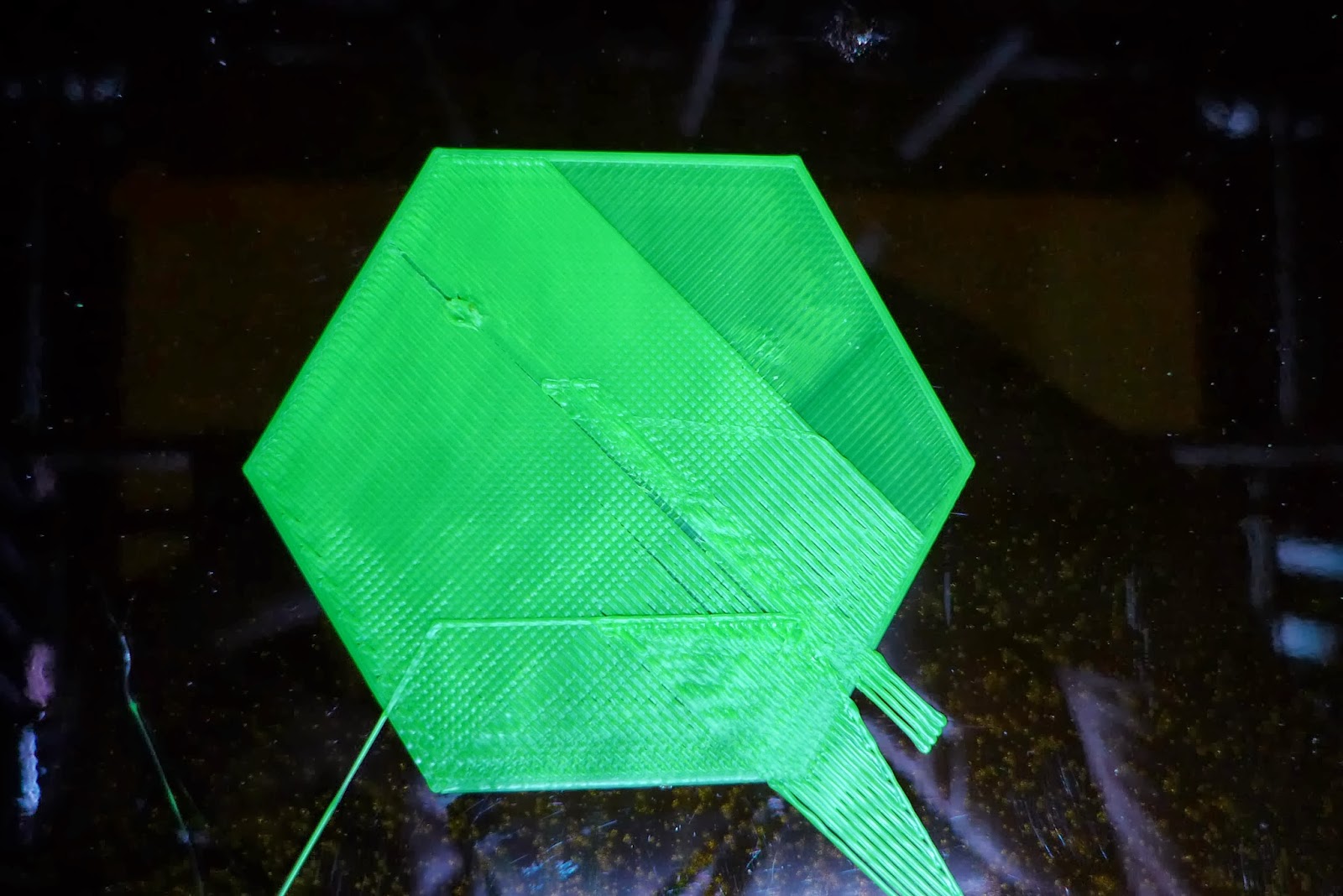
I've been playing with a 2X at work for some time now, just recently got one at home (~7 hours build time), and I'm getting an odd behavior with the new printer that I do not understand. I'm trying to print a spool holder (this model: http://www.thingiverse.com/thing:160836). I've printed some similar objects on this printer (successfully), but I'm consistently getting a shift in my prints now after a few layers:

I'm on the newest MBI firmware. I'm printing with MakerBot ABS at .3mm layers. I've seen this happen with MakerWare output (ran faster, shifted more) and ReplicatorG (what you're seeing here, attached gcode). I've seen discussion of y-axis belts being too tight causing problems, and mine are quite tight, but this doesn't look like what I've seen described there (i.e., it sounds like I would get wobbly prints in that case, not this dramatic shift?).

I don't think it's relevant, but for completeness the extruders have been upgraded with David Headrick's upgrade and the carriage with an Carl Raffle's AluCarriage Dual.

I do notice a greater degree of friction when I manually move the extruders towards the front of the printer, so perhaps the extruder is occasionally getting "stuck"? But as you can see from the images, when it isn't "stuck" it is printing rock solid.

Many thanks; I've been lurking a while and have already benefitted from this community's help.

Rob


octave-spool-abs.gcode
octave-spool-abs.stl

Joseph Chiu

unread,
Oct 5, 2013, 11:06:18 AM10/5/13
to make...@googlegroups.com
The two most common explanations for such shifts are failures in the stepper cables, or moving too fast (where moving too fast can either mean too fast for a normally functioning printer, or too fast because something broke and impedes motion like a problem with, e.g., belt tension, alignment, stepper drive strength, ...)  I've also seen problems where the nozzle has crashed into a protrusion in prints - although usually the result of that is the part lifting off the bed, I've had the printer lose its position from that.

You said that various prints are all shifting after a few layers -- from looking at the picture, the first thing I notice is that the layer misalignment happened between the last solid layer and the first infilled layer that followed.  That may be a clue -- do you know if the same has happened with your other failed prints?     

One possibility that I think is worth checking for is that the gantry may be not square - possibly having skipped a tooth or had a shifted drive gear on one of the Y axis (or, IIRC with R2's, some other slop in the drive chain that contributes to the two Y-sides not being in lock step) -- and that the diagonal motion with the infill is provoking some kind of binding that isn't happening when X-only or Y-only motion is occuring.


--
You received this message because you are subscribed to the Google Groups "MakerBot Operators" group.
To unsubscribe from this group and stop receiving emails from it, send an email to makerbot+u...@googlegroups.com.
For more options, visit https://groups.google.com/groups/opt_out.

Rob R.

unread,
Oct 5, 2013, 12:11:05 PM10/5/13
to make...@googlegroups.com, joe...@joechiu.com
Thanks for the suggestions. To answer your question, of the four failures of this sort, the first occurred much later in the build than the last three, approximately half way though the build. In that case I was actually printing a smaller (1lb spool) holder at the same time, which completed successfully (on the front half of the build plate), and the larger spool holder failed soon after. But in the last three I do think that was the case.

I'll try a few more prints to see if this is consistent.

I will need to do some searching on how best to assess the gantry; now I have some things to try. Thanks!

Rob

Count Spatula

unread,
Oct 5, 2013, 1:08:33 PM10/5/13
to make...@googlegroups.com, joe...@joechiu.com

Rob R.

unread,
Oct 5, 2013, 1:17:42 PM10/5/13
to make...@googlegroups.com, joe...@joechiu.com

A little more data. Different model (basically http://www.thingiverse.com/thing:150783), ReplicatorG, raft/support turned on. Appears to have failed while laying down support (?), and of course there's a bigger offset. I still need to look into assessing the gantry.

Rob R.

unread,
Oct 5, 2013, 1:24:55 PM10/5/13
to make...@googlegroups.com, joe...@joechiu.com
Thanks. Failures are happening quickly enough that I think it's time to sit and observe.

Rob R.

unread,
Oct 5, 2013, 1:59:46 PM10/5/13
to make...@googlegroups.com, joe...@joechiu.com
Ok, I have observed the failure in action and can add some more information. Here's a picture (the hex tile again) stopped just after two failures:

The print was on the second layer, and it had started in the bottom left, laying down rows. You can see two sets of rows that are out of place, as well as the outline of the third layer. The thin strip of misplaced rows came first. I observed (heard) a grinding sound as the extruder moved to the left; presumably this was the y-axis stepper failing to shift towards the back. Same thing on the second failure: grinding noise and shaking as extruder successfully moved left but not back.

Other notes:

  • I am hearing scraping out of the RHS y-axis rod/bearing connection as it moves back and forth. Greasing with superlube didn't get rid of this.
  • I printed this via USB, rather than SD (which has been my standard practice).

So, do you all think that this is a binding issue, or does the grinding sound indicate something else? Thanks!

Eighty

unread,
Oct 5, 2013, 3:31:39 PM10/5/13
to make...@googlegroups.com
It depends on what your grinding noise is. Is there a mechanical grinding, as in something is binding up? Or is it from the stepper?
When my X axis ribbon cable failed, the noise could be described as grinding. Your issue is in the Y axis, but could be similar. Perhaps you have a bad cable, or the Y end stop switch is triggering. Can you print again, and watch the print closely, to see if the Y switch lights up at any point?

Rob R.

unread,
Oct 5, 2013, 5:04:39 PM10/5/13
to make...@googlegroups.com
I think that the grinding is coming from the stepper.

I've watched a couple more print failures. I'm not seeing the Y switch light up (top back left). I think I observed the y-axis stepper (in the back right) not turning during the grinding on the last failure (as opposed to turning and the belt slipping, but I'm not 100% sure.

I should also mention that of the 8+ failures of this type that I have observed so far, all of them have resulted in a shift in printing towards the front of the machine (i.e., a failure of the extruder to move towards the back at some point).

Thanks,

Rob

Brian33433

unread,
Oct 5, 2013, 5:13:57 PM10/5/13
to make...@googlegroups.com
Sounds like a bad XYZ motor cable, I'm on my third

Brian

Rob R.

unread,
Oct 5, 2013, 6:25:01 PM10/5/13
to make...@googlegroups.com
...and as soon as I say it only fails in one direction, I get a failure in the other (i.e., shift towards back).

On Saturday, October 5, 2013 4:04:39 PM UTC-5, Rob R. wrote:

[ snip ]
 
I should also mention that of the 8+ failures of this type that I have observed so far, all of them have resulted in a shift in printing towards the front of the machine (i.e., a failure of the extruder to move towards the back at some point).

[ snip ] 

Eighty

unread,
Oct 5, 2013, 9:50:25 PM10/5/13
to make...@googlegroups.com
Ok, I'm leaning towards a ribbon cable failure. But here's another check: slice a part that has failed before, but at half the speed. If you still get offsets, then you've definitely got a bad cable. If it prints fine, then I would chase down a mechanical binding issue.

Rob R.

unread,
Oct 5, 2013, 10:42:57 PM10/5/13
to make...@googlegroups.com
Not exactly what you are suggesting, but I've gotten failures at both 90mm/sec (MakerWare) and 50mm/sec (ReplicatorG). Can't seem to get the issue to occur when jogging the extruder around, which doesn't make a lot of sense to me. Noise is pretty similar to what I've heard out of videos since I've been searching on motor cable issues.

Were you thinking even slower than 50mm/sec?

Stan Velijev

unread,
Oct 6, 2013, 12:42:54 AM10/6/13
to make...@googlegroups.com
If I can run my Rep2 at 160mm/sec without this happening there's no reason it should happen at 50-90mm/sec for you.

95% it's the cable. You can try jogging while bending the cable manually and it'll likely malfunction on you. You should be able to see where the cable below the X motor has been folded repeatedly as it'll have an angled bend to it.
There's some small chance it could be something motherboard related, but fairly unlikely. 
I initially cut and re-soldered the cable where I found the breakage as a temp fix before MBI sent me a replacement.

Rob R.

unread,
Oct 6, 2013, 9:41:48 AM10/6/13
to make...@googlegroups.com
Thanks. To be clear, the issue I'm having occurs with stuttering in the y-axis direction, not the x-axis. My intuition tells me that a break in the cable to the x-axis stepper would result in issues with that stepper, yes?

Joseph Chiu

unread,
Oct 6, 2013, 10:44:25 AM10/6/13
to make...@googlegroups.com
Right -- the classic problem with these machines is the X-stepper cable failing because they flex as the gantry moves in the Y-direction.  It still could be a bad Y-stepper cable, but since the Y-stepper is not on a gantry, it's far less likely to happen because the cable doesn't flex and fatigue like the X.

Looking at the pictures again, it seems as if the print could be skewed - but it could just be an optical effect from the camera angle.  Have you verified that the gantry is not skewed by mismatched Y-positioning?

Another thing to check is to see if the stepper feels very hot.  A hot stepper can actually lose the ability to move properly.  Someone I know had problems with his extruder overheating -- he ultimately traced it to a failed/defective botstep that was not regulating the power correctly -- when the botstep was replaced, the problem went away - the stepper wasn't overheating anymore, and his extruder was able to push filament out normally again.


--

Rob R.

unread,
Oct 6, 2013, 11:54:32 AM10/6/13
to make...@googlegroups.com, joe...@joechiu.com
Gotcha.

I have not verified that the gantry is not skewed. I do recall the stepper being surprisingly hot, but to be honest, I did not compare to others.

I found some instructions for adjusting gantry for skew here: https://groups.google.com/forum/#!topic/makerbot/UBoJg8hRuIM

It sounds like the belt slipped over one of the syncing rod pulleys. If the bot was jerked around in shipping or unpacking, this sort of thing can happen. You can correct this by loosening the set screw on the two syncing rod pulleys responsible for one side of the machine, pushing the head to the back in the right part, and making sure the Y carriages are properly aligned. Tighten the set screws and you should be good.

...
 
Since the gantry is skewed the best solution in this case is to go the pulley method that Ben has mentioned. I would however add a couple of things. First thing to do is pop out your filament tubes so they don't create forward spring pressure. After you loosen the pulleys slide your extruder carriage all the way to the right so it engages with the limit switch. Once the carriage is all the way to the right you want to push the left Y axis injection molded part till it hits the limit switch. At this point you the system should be realigned. However more often then not the set screws are not going to be oriented in a manner that is going to let you tighten them back up.

What you want to do is move only the left side injection molded part slowly forward to the point where you can tighten the front pulley down. Once the front pulley is tight you can move the system forward and re tighten the rear pulley. After both pulleys are tight again you can verify the system is good by centering the extruder carriage, and bringing the Y axis to the maximum, followed by moving the X axis to its maximum. If everything is good the extruder carriage should move past the Y motor as intended. Clip your filament tubes back in place and your good to go.
 
Sounds like next steps are:
- Compare temp. of steppers (by hand) and see if there is a major difference.
- Try above gantry adjustment procedure to rule out skew.

Thanks Joseph, all.

Rob R.

unread,
Oct 6, 2013, 1:26:32 PM10/6/13
to make...@googlegroups.com, joe...@joechiu.com
To follow up, the gantry appears ok: both of the plastic parts holding the x-axis rods come into contact in the front at the same time. I don't think this is the issue.


On Sunday, October 6, 2013 10:54:32 AM UTC-5, Rob R. wrote:
Gotcha.

I have not verified that the gantry is not skewed. I do recall the stepper being surprisingly hot, but to be honest, I did not compare to others.

[ snip ] 

Jetguy

unread,
Oct 6, 2013, 2:29:31 PM10/6/13
to make...@googlegroups.com, joe...@joechiu.com
Heat on the stepper is not the problem. they can easily take enough heat to burn your hand before that is the issue. A cold stepper would be a problem as it indicates the botstep is not pushing enough current.
 
It's either speed, gcode problem from some slicing error, or friction from a hundred possible places.
 
I mean really, there are so many things that could be wrong, but the problem is you have hands on the bot and we don't.
You should be able to feel drag or binding in Y axis by ensuring the bot is unplugged, then unplug the stepper motor cable at the stepper motor for the Y axis. This way you can feel the drag without the motor acting as a generator when you move the axis.
Any sounds or rubbing of the belts should be more obvious in this free running test mode.
 
Problems could be anything from a pulley not tight on a shaft, to some belt misalignment that rubs the belt into the sides of the pulley causing friction, to even dirt or wrong lubricant on the linear rods making the bushings bind.
ONLY you can really figure this out since you have hands on the bot.
 
Again, I could go down a list of possible problems but the truth is you must find out when or if the axis is binding.
Since this is the Y axis, the cable is thee least likely culprit and you are saying you tried different gcode and the motor is hot to the touch which is GOOD as opposed to your impression that was bad.

Brian33433

unread,
Oct 6, 2013, 8:48:05 PM10/6/13
to make...@googlegroups.com
My guess is still the xyz cable, but you should also try switching the x and y botstep chips on the mighty board could be the chip. if the problem then starts to occur on the x axis that would be your issue. i find those to be the two most failing parts on the machine.


On Saturday, October 5, 2013 10:11:05 AM UTC-4, Rob R. wrote:

Joseph Chiu

unread,
Oct 7, 2013, 4:17:59 AM10/7/13
to make...@googlegroups.com
Visually comparing the botsteps might be sufficient to see if the Y-botstep may be overheating.  When a friend's extruder was not driving properly, replacing the extruder's botstep solved the problem.  The failed botstep looked as if was overheating -- in retrospect, it might have been that the driver chip was hitting thermal regulation shutdown, causing the Y steppers to not take the expected steps.  

I agree with Brian that switching botsteps would be a good test to check this.


Rob R.

unread,
Oct 8, 2013, 8:42:06 AM10/8/13
to make...@googlegroups.com, joe...@joechiu.com
I totally understand the frustration of remote debugging and really appreciate everyone's time and thoughts.

'Bot is back in action! My best guess is that I had some debris lodged under one of the bearings on the right y-axis bar that would cause binding when it was just in the wrong place. I seem to have worked it free, as the friction I originally reported when manually moving the extruder towards the front is gone. I've done about 10 hours of printing without any of these "shifted" failures, now.

There's a wealth of debugging information in just this one topic. Thanks again all!

Rob

Ken Hecker

unread,
Oct 14, 2013, 1:49:41 AM10/14/13
to make...@googlegroups.com, joe...@joechiu.com
Darn, and I was about to note my experiences along the same lines.

I started having shifting problems, where after a few layers the whole build would shift.  MakerBot support suggested I switch X and Y stepper motor control modules (botsteps) on the Mighty Board and see if that made a difference.  When it didn't he diagnosed the problem as a bad XYZ stepper motor cable.  MBI sent me a new one (with reference to a YouTube video that didn't show to the same design of cable, or the new added support parts, and so wasn't that helpful).  But then I had another problem.  I heard grinding when the gantry was moving, which I suspected was the Z axis grinding for some reason.  It turned out something had gone out of wack with the gantry when it moved to the far left position.  The X timing belt would suddenly force the idler pully way forward, and the gantry would bind up before it would get to the far left position.  This would throw the positioning off, and the next print would start way too far to the right.  I had recently installed the Alu Carriage Dual, and must have somehow tightened the small set screws that hold the bearings in place a bit too tightly.  Once I loosened those a quarter turn the problem went away.

Okay, I said it, and I'm glad!

Ken
Reply all
Reply to author
Forward
0 new messages