
How to get prints to propre scale with abs?
984 views
Skip to first unread message

Zak Kus
May 22, 2014, 10:53:47 PM5/22/14
to make...@googlegroups.com
I was making some parts in abs (for the swank inmoov robot on thingiverse), and I am having a huge problem with the resulting prints being several percent smaller than they should be. Historically i've not really cared (parts were not too far from each other, so not too bad), but since this incorporates a bunch of tight fitting electronics, it has to be perfect or near perfect.
Does anyone know how to deal with this on the printer side? I've never seen shrinkage this bad before (above 10% sometimes), but i am also using a new printer (duplicator 4x), new software (simplify3d) and a new filament vendor (toybuilderlabs), so I am not sure which can be adjusted to deal with this...

Scottbee
May 23, 2014, 12:21:54 AM5/23/14
to make...@googlegroups.com
ABS shrinkage is usually in the 1% range, and that can easily be compensated for via adjusting the scaling with S3D. I print with ABS all day and just set my scale to 101%.
If you're really seeing your resulting prints being up to 10% off, then you're not dealing with ABS shrinkage. That's an impossibility. I would suspect some other form of scaling issue.. perhaps using the incorrect machine profile (steps/mm) or something like that.

Dan Newman
May 23, 2014, 12:38:38 AM5/23/14
to make...@googlegroups.com
On 22/05/2014, 9:21 PM, Scottbee wrote:
> ABS shrinkage is usually in the 1% range, and that can easily be
> compensated for via adjusting the scaling with S3D. I print with ABS all
> day and just set my scale to 101%.
>
> If you're really seeing your resulting prints being up to 10% off, then
> you're not dealing with ABS shrinkage. That's an impossibility. I would
> suspect some other form of scaling issue.. perhaps using the incorrect
> machine profile (steps/mm) or something like that.
You get an automatic 6% error if you use a Rep 1 machine def for a Rep 2
> ABS shrinkage is usually in the 1% range, and that can easily be
> compensated for via adjusting the scaling with S3D. I print with ABS all
> day and just set my scale to 101%.
>
> If you're really seeing your resulting prints being up to 10% off, then
> you're not dealing with ABS shrinkage. That's an impossibility. I would
> suspect some other form of scaling issue.. perhaps using the incorrect
> machine profile (steps/mm) or something like that.
and vice versa.
Dan

Trent Shumay
May 23, 2014, 8:46:52 AM5/23/14
to make...@googlegroups.com
I 100% had this exact issue when I had my X3G firmware setting wrong in S3D. Go to Tools->Firmware Configuration->X3G tab and check your printer. We have both a MB2X and Rep1 Dual printer (FlashForge). I was forgetting to change the setting when exporting for the respective printers and that caused the exact issue you describe.

Enginwiz
May 23, 2014, 11:27:05 AM5/23/14
to make...@googlegroups.com
Change the steps-per-mm settings for X and Y to 88.95 in your slicing software.
On a Rep 2 this might improve the accuracy for ABS prints done at 230°C nozzle
temp and 100 °C HBP temp quite a bit. At least my ABS parts are now within +/- 0,2 mm
up to a part size of 120 mm after cooling to room temperature.
I use the same steps-per-mm settings for ABS and PLA. Both materials shrink
on a HBP during the cooling phase after the end of the print. Most of my PLA
prints are decorative items, that need no real world toughness and accuracy.
You can use this 110 mm calibration part to tune in your printer and your filament.
110 mm long, 10 mm square holes, 5 mm bars in both directions.
If you use Simplify3D the steps-per-mm conversion is done by GPX during postprocessing.
The X and Y settings are in the GPX.ini.

Zak Kus
May 23, 2014, 12:05:50 PM5/23/14
to make...@googlegroups.com
Thanks guys.
The shrinkage is definately beyond the usual 1%. The whole rep2-rep1 bit is interesting. I have been using the rep2x settings, since i thought the dup4x is of that lineage?
ill try those settings enginwiz, they look promising. Wish me luck!
On Thursday, May 22, 2014 7:53:47 PM UTC-7, Zak Kus wrote:
Enginwiz
May 23, 2014, 12:30:57 PM5/23/14
to make...@googlegroups.com
Good luck!
Let us know if the settings worked well for your Duplicator 4.
Zak Kus
May 23, 2014, 2:58:30 PM5/23/14
to make...@googlegroups.com
my test print came out 103mm (for 110) , 9mm (of 10) for each hole and 5.5 (of 5) for the stutes. So solidly off.
i tried the change you suggested, though it was too subtle (pretty close to the defaults) to do much. From what Dan said, I did however switch the machine firmware settings in s3d from Rep2x to rep1, and i think that worked (i measured the first layer, looked right, now printing the whole thing).
So that brings up a question; I thought the dup4x was a solid straight clone of the rep2x. Is that not the case?
Zak Kus
May 23, 2014, 3:04:29 PM5/23/14
to make...@googlegroups.com
As i think about it, I did install sailfish with the "duplicator" firmware/profile bit. I think thats probably of the rep1 lineage, so i guess from the firmwares perspective this is a rep1 machine. I dont suppose that will cause any (other) problems?
Dan Newman
May 23, 2014, 3:08:45 PM5/23/14
to make...@googlegroups.com
On 23/05/2014, 12:04 PM, Zak Kus wrote:
> As i think about it, I did install sailfish with the "duplicator"
> firmware/profile bit. I think thats probably of the rep1 lineage, so i
> guess from the firmwares perspective this is a rep1 machine. I dont suppose
> that will cause any (other) problems?
The real question is what pulleys did they use: 17 tooth like on the Rep 1
> As i think about it, I did install sailfish with the "duplicator"
> firmware/profile bit. I think thats probably of the rep1 lineage, so i
> guess from the firmwares perspective this is a rep1 machine. I dont suppose
> that will cause any (other) problems?
or 18 tooth like on the Rep 2 / 2X.
My understanding is that the Creator X is a Rep 1 clone but with a metal
frame and black panels. So, it looks more like a Rep 2 and 2X, but the
electronics are still a mightyboard revE clone making the bot require
Rep 1 firmware.
Dan
Zak Kus
May 23, 2014, 9:22:58 PM5/23/14
to make...@googlegroups.com
Well, for anyone else who sees this, setting it to Rep1 in toos>firmware config>x3g took care of the issue. now at a respectable 109.66 for a 110mm build.
now i just gotta redo everyuthing i've been doing for a few weeks....
Joe Soap
May 26, 2014, 6:27:48 AM5/26/14
to make...@googlegroups.com
Where do I find the GPX.INI file? I am an S3D user.

Jetguy
May 26, 2014, 9:53:59 AM5/26/14
to make...@googlegroups.com
It doesn't exist, you have to create it and further, make your own command to call that ini file with GPX. Aka read up on whpthomas GPX. Google it.
Joe Soap
May 26, 2014, 10:33:12 AM5/26/14
to make...@googlegroups.com
Gotcha, thanks. No wonder I couldn't find it on my hard disk :)
On 26/05/2014 14:53, Jetguy wrote:
> It doesn't exist, you have to create it and further, make your own command to call that ini file with GPX. Aka read up on whpthomas GPX. Google it.
>
---
This email is free from viruses and malware because avast! Antivirus protection is active.
http://www.avast.com
On 26/05/2014 14:53, Jetguy wrote:
> It doesn't exist, you have to create it and further, make your own command to call that ini file with GPX. Aka read up on whpthomas GPX. Google it.
>
This email is free from viruses and malware because avast! Antivirus protection is active.
http://www.avast.com
Dan Newman
May 26, 2014, 10:41:51 AM5/26/14
to make...@googlegroups.com
On 26/05/2014, 3:27 AM, Joe Soap wrote:
> Where do I find the GPX.INI file? I am an S3D user.
This may help,
> Where do I find the GPX.INI file? I am an S3D user.
http://www.forum.simplify3d.com/viewtopic.php?f=8&t=1071
And I believe the file name needs to be "gpx.ini" (all lowercase).
You have to put the file in the same directory as the gpx executable.
Dan
Joe Soap
May 26, 2014, 10:44:41 AM5/26/14
to make...@googlegroups.com
Thanks. I saw GPX.INI mentioned in a reply to another message and went
looking for the file.
looking for the file.
Zak Kus
May 26, 2014, 4:50:39 PM5/26/14
to make...@googlegroups.com, joe.s...@gmail.com
Im reasonably confident that file is just a special (and probably not officially supported) way of doing what you can through tools->firmware configuration->x3g
Jetguy
May 26, 2014, 9:09:39 PM5/26/14
to make...@googlegroups.com, joe.s...@gmail.com
NO , gpx.ini IS the official way of calibrating for MakerBot based firmware.
Already tested and proven, changing those values in the firmware options of S3D don't change the produced files.
There is ONLY one way, and that is via gpx.ini.
Dan Newman
May 26, 2014, 9:48:51 PM5/26/14
to make...@googlegroups.com, joe.s...@gmail.com
On 26/05/2014, 6:09 PM, Jetguy wrote:
> NO , gpx.ini IS the official way of calibrating for MakerBot based firmware.
> Already tested and proven, changing those values in the firmware options of
> S3D don't change the produced files.
The options in S3D are used by S3D when using its control panel. As Jetguy
> NO , gpx.ini IS the official way of calibrating for MakerBot based firmware.
> Already tested and proven, changing those values in the firmware options of
> S3D don't change the produced files.
wrote, they have no impact on the x3g files you generate with S3D. That's
done by gpx.ini and, short of writing a temporary gpx.ini file, there's no
way S3D can communicate those steps/mm values to GPX. GPX doesn't have a
command line option to specify them and S3D doesn't write a temporary gpx.ini
file either.
Dan
Enginwiz
May 28, 2014, 2:46:43 PM5/28/14
to make...@googlegroups.com, joe.s...@gmail.com
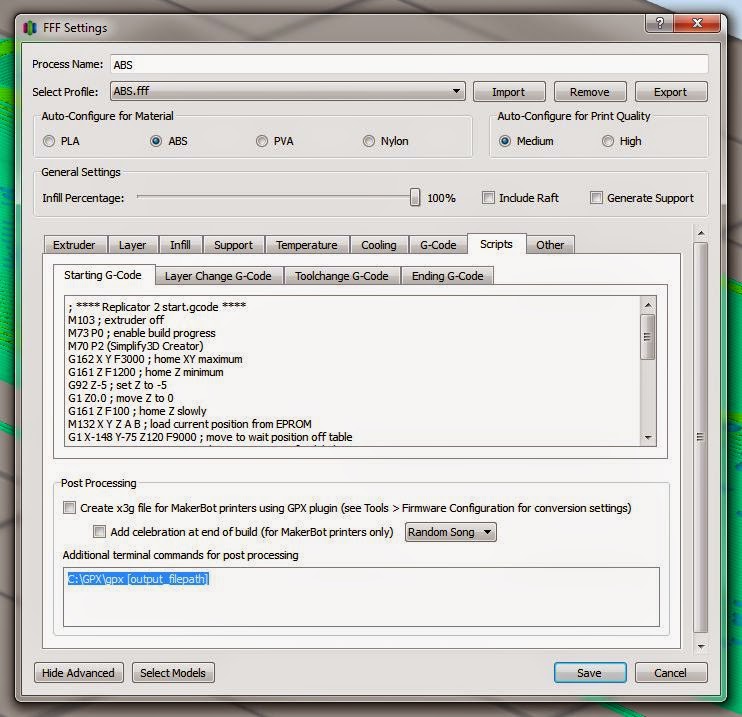
If you want to use only your custom GPX.ini settings for postprocessing
you should uncheck the "Create x3g file for Makerbot..." checkbox
in the script tab of Simplify3D and call GPX for postprocessing
with the blue postprocessing terminal command.
Then Simplify3D will not automatically add your printer model
to the command it uses to call GPX and you get full control
of all parameters via GPX.ini. You can also define the path
to GPX and use one version of GPX and GPX.ini for all your slicers.
Reply all
Reply to author
Forward
0 new messages