
How to post a tweet from website using PHP...
4 views
Skip to first unread message

Ludo informatique
Jun 30, 2018, 1:42:11 PM6/30/18
to ludo-inf...@googlegroups.com
How to post a tweet from website using PHP...
Cliquez içi pour LIRE cet article Maintenant

 Twitter has updated their API from 1 to 1.1 where we needed a code for posting tweets from our website. I searched lot of codes but finally came across this one here.
We first need to create a twitter application here. Sign in with your twitter account. After creating a application, you ll get your access token, access secret, consumer key and consumer secret. Make sure, that your application is on read and write permission.
Download the code from github here.
Posté le: 16-07-2013 (15:44)
Cliquez içi pour LIRE cet article Maintenant
How to post a tweet from website using PHP...
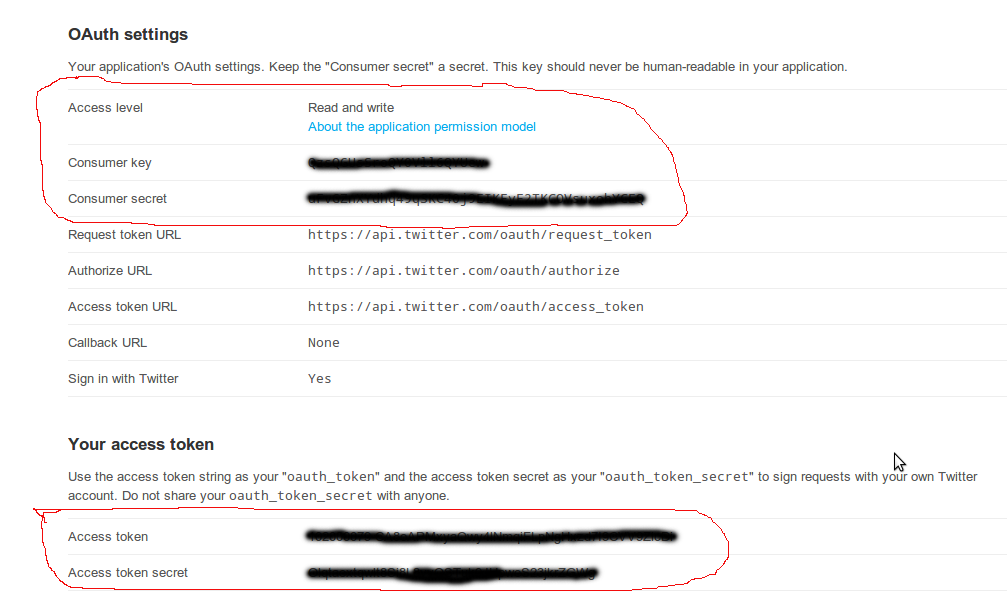
We first need to create a twitter application here. Sign in with your twitter account. After creating a application, you ll get your access token, access secret, consumer key and consumer secret. Make sure, that your application is on read and write permission.
ini_set('display_errors', 1);
require_once('TwitterAPIExchange.php');

/** Set access tokens here - see: https://dev.twitter.com/apps/ **/
$settings = array(
    'oauth_access_token' => "your app access token",
    'oauth_access_token_secret' => "your app access secret",
    'consumer_key' => "your app cons
 umer key",
    'consumer_secret' => "your app consumer secret"
);

/** URL for REST request, see: https://dev.twitter.com/docs/api/1.1/ **/
$url = 'https://api.twitter.com/1.1/statuses/update.json';
// $url = 'https%3A%2F%2Fapi.twitter.com%2F1.1%2Fstatuses%2Fupdate.json';
$requestMethod = 'POST';

/** POST fields required by the URL above. See relevant docs as above **/
$postfields = array(
    'status' => 'Maybe',
);

/** Perform a POST request and echo the response **/
$twitter = new TwitterAPIExchange($settings);
echo $twitter->buildOauth($url, $requestMethod)->setPostfields($postfields)->performRequest();
Download the code from github here.
Posté le: 16-07-2013 (15:44)

0 new messages