
Loxone lightning block with Shelly RGBW2 via MQTT
1,916 views
Skip to first unread message

Herman Nåheim
Mar 17, 2022, 2:36:36 PM3/17/22
to Loxone English
Hi all.

 Using the "switch" type now.
I'm running some Shelly devices via MQTT on Loxberry. Currently, I'm using on/off command via "Virtual outputs" from Loxone to Loxberry/MQTT.
I would like to have the shelly device as a dimmer in the Loxone lighting controller. How can this be achieved?
Current set-up:
Using the "switch" type now.Currently using:
shellies/shellyrgbw2-<deviceid>/white/<n>/command on
shellies/shellyrgbw2-<deviceid>/white/<n>/command off
But it seems like I can use something like:
shellies/shellyrgbw2-<deviceid>/white/<n>/set brightness 100
I have limited experience with MQTT and Loxberry. But the on/off commands are very basic. How can I implement this as dimmer?
I believe that my problem can be solved and that I have all the tools needed to do so, but I'm having a hard time connecting all the dots.
Best regards
Herman

Duncan
Mar 17, 2022, 2:48:35 PM3/17/22
to Loxone English
why not just go direct to the shellys instead of via mqtt/loxberry?
Herman Nåheim
Mar 17, 2022, 3:01:24 PM3/17/22
to Loxone English
Hi Duncan.
The whole point is integrating the shelly devices more or less seamlessly into Loxone. I'm aware that this also can be done directly via Shelly's integrated http server. I choose to use MQTT since it was better documented for the devices I'm using, and I have not faced any problems so far. Now I'm trying to expand the use of the RGBW2 which I have installed (Now running at constant brightness % and being turned on and off from Loxone)
If you know how to solve the issue I'm having (described in my post) via Shelly's integrated http server, please elaborate.
Herman
Duncan
Mar 17, 2022, 4:19:14 PM3/17/22
to Loxone English
the direct integration of shelly is via virtual outs so isnt that diffent to mqtt i dont think - im sure either way would work but ive only done it directly
for direct integration of rgbw2:
set up the shelly with a fixed ip address
create a loxone virtual output with the IP address
create 5 x virtual output commands for RGBW - turn off use as digital output
there are 4 rgbw channels and the gain needs to be set at 100 to ensure you get full brightness at 100% otherwise the default 0 means you wont see any light output
each one has the command for on:
/color/0?blue=<v>
/color/0?gain=<v>
/color/0?green=<v>
/color/0?red=<v>
/color/0?white=<v>
i attach the gain channel to a constant set to 100 and then leave alone
to split the combined output of a lighting controller you can either use a formula block (somewhere on the internet/forums) or else a RGB lighting controller block which i found much easier
you will need to use the correction values of the output commands because the input is either 0-100 from the light block/formula or 0-10 for the rgb lighting controller but the shelly is expecting 0-255
i also use the repeat function of the virtual output to overcome any risk of the wifi messages not getting through but this is optional
hope that helps


Herman Nåheim
Mar 21, 2022, 5:16:25 AM3/21/22
to Loxone English
Hi Duncan. Thanks for the information. I'm only using the RGBW2 in "white mode" and only using one channel, this simplifies some.
The Config set-up looked quite complicated. It seems like AQ3-AQ6 is used to control 1x RGBW2 via rbg controller, multiply and formula blocks. What is the AQ outputs of the lightning controller set- as? Switch, dimmer 0-100, dimmer 0-10V, dimmer 1-10V, RGB lumitech or smart actuator?
My only goal is to turn the 1x channel I'm using on the RGBW2 on/off (I'm currently able to do so) and adjust the brightness/dimming from 0-100% through Loxone.
BR
Duncan
Mar 21, 2022, 8:34:20 AM3/21/22
to Loxone English
sorry i didnt pick up you were using white mode, so ignore the rest of my config - thats overly complicated due to a global rgb colour changing program (disco mode) that overrides local lighting controllers when enabled
you would simply use 1 loxone lighting controller output eg AQ1 to connect to a single VO for the rgbw2 controller, no need to decode loxones compound rgb output to separate colours
looking at the shelly api for white mode , it doesnt have the gain requirements, just the brightness of the 0-3 channels, ive not tried it but looks like:
/white/0?brightness=<v>
/white/1?brightness=<v>
etc
try this in a browser eg http://shelly_ip/white/0?brightness=50 to confirm before putting in your loxone config
the shelly needs to be 'on' for the brightness changes to take effect
i think you can combine the on/off with brightness:
/white/0?turn=on&brightness=<v>
Herman
Apr 21, 2022, 7:58:17 AM4/21/22
to Loxone English
Hi Duncan, thanks for the reply.
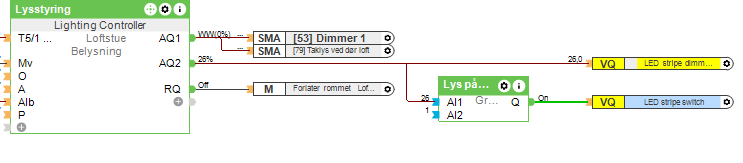


I have tried the commands in the web browser and it seems to work.
However, I have tried to integrate this into Loxone and have not be able to do so.
Current set-up:
One command for switching on and off (workes fine) and one command to adjust brightness if brightness is over 1%.
From API documentations:
I can't seem to get the brightness adjustment to work.
Herman
Duncan
Apr 21, 2022, 2:57:34 PM4/21/22
to Loxone English
Herman
Apr 24, 2022, 11:46:33 AM4/24/22
to Loxone English
Thanks again Duncan. This solved the problem, and a learned alot!
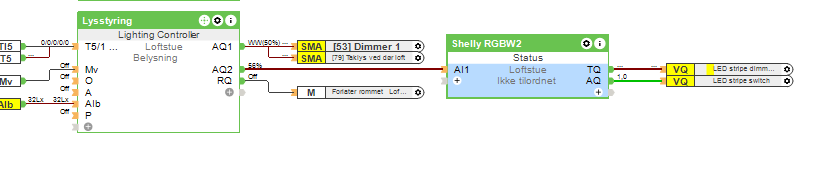


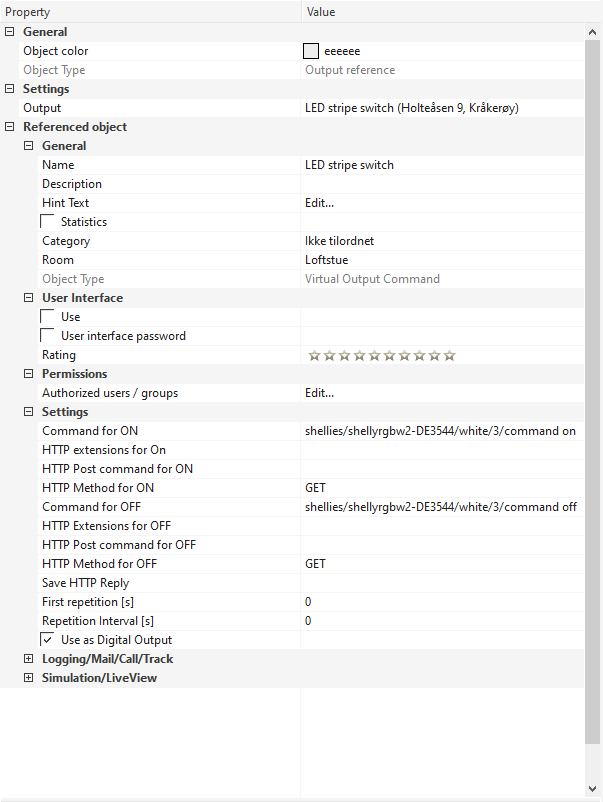
For anyone else, this is how it was solved (in English):
Set the output from dimmer block to status block that communicates with MQTT/Shelly.
Duncan
Aug 7, 2022, 6:01:49 PM8/7/22
to Loxone English
you can do the same directly without mqtt if desired, then you dont need the status block or the mqtt server
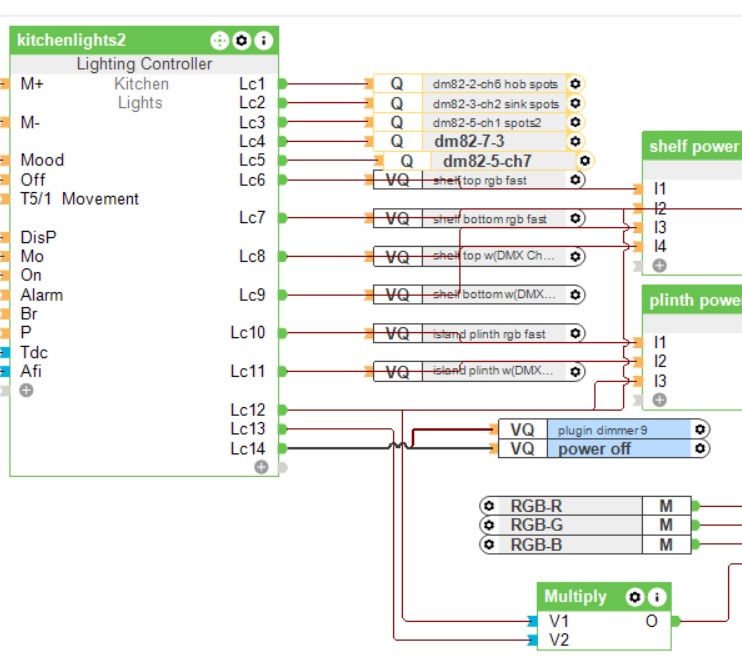
for each shelly dimmer you need to create a virtual output with the ip address and then create 2 virtual output commands
1st to turn on and set the dimming level (analog)
2nd to turn off the dimmer when set to 0, as shelly ignores commands to dim to 0 (digital)
both virtual output commands are connected to the same output of the lighting controller:


Reply all
Reply to author
Forward
0 new messages