
Simple Timer in Hours to Pulse
600 views
Skip to first unread message

Jedi Tek'Unum
May 11, 2022, 10:28:43 AM5/11/22
to Loxone English
I know I can construct a pile of blocks to give me this functionality but I'm stunned that I can't find an existing block that does this.
I have some skylights that I use a Radio Button & Multiplier block to create an analog % open (driving a Virtual Output).
I would like to have a simple Timer where I set a value - in hours - until I want the skylights to close. Need a Pulse to Radio Button Reset.
Of course this can be kludged up with Delayed Pulse, a Radio Button for time in hours, Multiplier for hours to seconds to set parameter, and a Push Button to trigger the start. If indeed this is the only path then I continue to be very disappointed.
Thanks for pointers.

Duncan
May 11, 2022, 10:42:53 AM5/11/22
to Loxone English
lots of ways to do this
eg stairwell light switch and an analog input to set the TH on time
format the analog input in seconds as v.t and you can see the hours and mintues in the visu
trigger the switch from the window opening and use the output via push switch (off) to close it again
Jedi Tek'Unum
May 11, 2022, 11:32:38 AM5/11/22
to Loxone English
I saw that too but not really what I'm after. Normally I want the skylights to stay open where I set them until I tell it otherwise - sometimes days at a time.
Here is the kludge I just programmed. Path off the top goes to Resets.

Just the latest in hideous solutions to simple requirements. The UI for this is horrible. Something to select timer value. Two buttons to start and stop the timer. Another object to indicate if a timer is running.
They can't even create a Delayed Pulse block that is complete. Where is the output indicating the delay is active? Where is the UI that shows the timer counting down? Barring that, an output that contains the amount of time left until it fires?
On the one hand they force the use of so many (incomplete) primitives to do so many things. On the other hand there are the higher level blocks that are locked into a method of operation that only fit a subset of the possibilities. For example, the Skylight Block (one would think the obvious solution here) has no functionality for a timer (which would be acceptable if there was a useful Timer Block). Not only that, it presumes that every skylight in the world is a simple one (continues to open as power is applied to one wire or continues to close as power is applied to another). I have Velux skylights with controller that accepts http commands.
EVERY single time I try to do something with this product I'm shocked by the wasteland of missing or useless function blocks. And the constant struggle to fumble in the dark to figure out if something is a pulse or continuous.
The only thing more frustrating is that I know of no other product that is any better.
Duncan
May 11, 2022, 1:50:39 PM5/11/22
to Loxone English
im a little confused about your reply because in your first post you said you wanted a timer to close the skylight, but in your second you want the skylights to stay open until you close them.
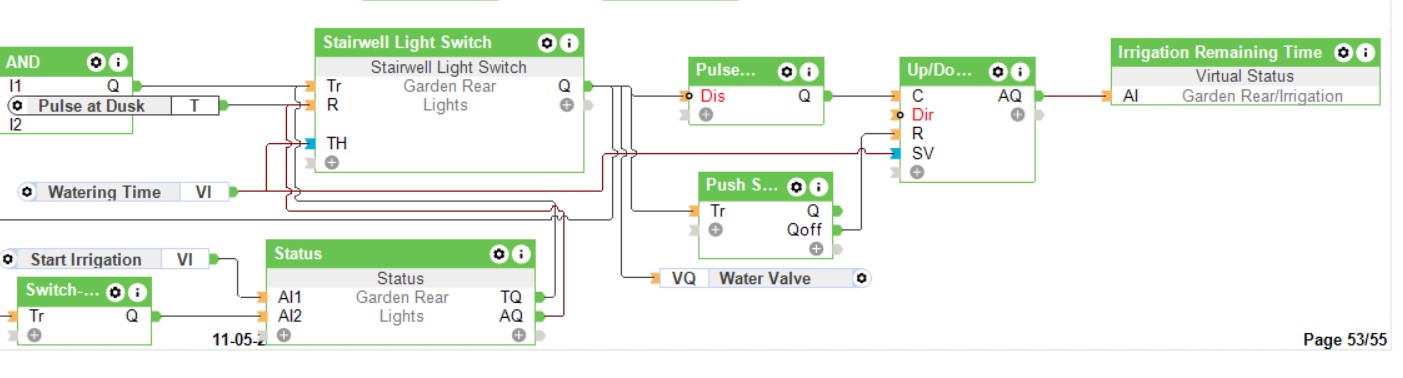
both the stairwell switch and multifunction switch offer timer blocks with a visu which shows the remaining time until they switch off/ time out, and an interface to turn on or off manually and can be triggered by external events such as the opening of your skylight via a switch
if you require just a visu of the countdown without any interoperable elements then you can use a virtual status with the units set to <v.t> driven by the output of an up/down counter
this is an example of a timer set by an analog in, doesnt show the stairwell switch and its controls, but shows the timeout from the up/down counter (set by the same analog input as the stairwell switch)
Jedi Tek'Unum
May 11, 2022, 4:09:30 PM5/11/22
to Loxone English
Sorry. Let me try again.
Normal operation is that the skylights are driven by my manual actions. I set the % open (ie On/Off is not enough control). I close whenever; possibly days later.
I have no environmental readings currently (haven't integrated Netatmo yet and I don't subscribe to the weather service). This time of year it is warm enough in my climate to have the skylights open but it gets cold enough at night that I don't want to leave them open all night. (For example, last evening was ~75degF when we went to bed and ~59degF by morning.) I'd like to -optionally- have them close after some number of hours, again with my manual action to trigger the countdown. The flow I posted does that - crudely. Obviously temperature-derived automation would be better.
I haven't looked at the multifunction switch recently but I know the Stairwell Switch is not a solution for this use case. I don't want them to close every time I open them after some interval.
Thanks for the Pulse-Up/Down-Status tip for visualization; I'll look into that. I will repeat my #1 complaint about Loxone here again - too many blocks to implement such a basic capability; another obvious need for macros. Reminds me of many moons ago when I worked with some software developers that copied and pasted big blocks of code over and over again - apparently couldn't understand what a "subroutine" was. Maybe they work at Loxone now :-)
I just noticed the bottom right of your diagram - 55 pages! Wow. If they're all as dense as this one... I have great respect for your patience! Because I know how painful much of it must have been.

Rob_in
May 12, 2022, 1:43:57 AM5/12/22
to Loxone English
On Wednesday, 11 May 2022 at 22:09:30 UTC+2 Jedi Tek'Unum wrote:
Obviously temperature-derived automation would be better.
Yes. Yes it would. Stop messing about trying to make a timer when that's not really what you want at all.
Robin
Jedi Tek'Unum
May 12, 2022, 4:07:23 PM5/12/22
to Loxone English
Getting outdoor temperature into my setup is not a trivial task. I'm not paying Loxone for their weather service in light of the pathetic problems with their product. Integrating with Netatmo is unlikely to be a simple task.
The functionality I was seeking has uses for other things. One would think it would be a fundamental part of the toolkit.
"Messing about" is the standard method for dealing with anything Loxone. All one has to do is read this forum. It's full of workarounds for lacking functionality and/or documentation. While it's a nice resource to have it's hardly a replacement for a good product/documentation.
I'm a retired software engineer/architect so my perspective isn't just as a hobbyist. There is so much Loxone could do to improve this product at a fundamental level. They show zero interest. Nothing but excuses and ignoring customers. While they march forward making meat thermometers.

Ewan Tait
May 12, 2022, 5:54:07 PM5/12/22
to Loxone English
Netamo functionality can be setup via a Raspberry Pi running Loxberry.
https://loxwiki.atlassian.net/wiki/spaces/LOXBERRY/pages/1201275072/Netatmo+Weather


You can also use the same to provide a weather service to Loxone.
https://loxwiki.atlassian.net/wiki/spaces/LOXBERRY/pages/1215135897/Weather4Loxone
In terms of your original problem, rather than using push buttons, you could use a virtual input with up/down arrows, a staircase light timer, and the skylight function. With "linked function blocks", it's easy to pull everything together into a single function block.
In terms of your original problem, rather than using push buttons, you could use a virtual input with up/down arrows, a staircase light timer, and the skylight function. With "linked function blocks", it's easy to pull everything together into a single function block.
I've set the VI for between 10 and 600 minutes with 10 minute intervals, so each up/down click moves by 10 minutes. The window defaults to launching a timer when it's opened, but you could set it to default to permanently on - you can click through the timer to change it from permanently on to time or vice-versa. When the window closes, it cancels the timer.
Cheers,
Ewan
Ewan Tait
May 12, 2022, 5:58:15 PM5/12/22
to Loxone English
And a short video.
Cheers,
Ewan
On Thursday, May 12, 2022 at 10:54:07 PM UTC+1 Ewan Tait wrote:
Netamo functionality can be setup via a Raspberry Pi running Loxberry.
https://loxwiki.atlassian.net/wiki/spaces/LOXBERRY/pages/1201275072/Netatmo+WeatherYou can also use the same to provide a weather service to Loxone.https://loxwiki.atlassian.net/wiki/spaces/LOXBERRY/pages/1215135897/Weather4Loxone
In terms of your original problem, rather than using push buttons, you could use a virtual input with up/down arrows, a staircase light timer, and the skylight function. With "linked function blocks", it's easy to pull everything together into a single function block.
I've set the VI for between 10 and 600 minutes with 10 minute intervals, so each up/down click moves by 10 minutes. The window defaults to launching a timer when it's opened, but you could set it to default to permanently on - you can click through the timer to change it from permanently on to time or vice-versa. When the window closes, it cancels the timer.
Cheers,Ewan
Rob_in
May 13, 2022, 1:59:22 AM5/13/22
to Loxone English
On Thursday, 12 May 2022 at 22:07:23 UTC+2 Jedi Tek'Unum wrote:
Getting outdoor temperature into my setup is not a trivial task. I'm not paying Loxone for their weather service in light of the pathetic problems with their product.
Loxone's weather service is for... erm... weather. Which is not the same as temperature.
But yes, why pay for weather forecasts? We use wunderground, integrated through an ioBroker instance. Works perfectly and has done for years. As a side note: we run some complex thermal modelling of the house (using weather forecast inputs of course) in ioBroker that could never be done in Loxone so using it is a win all round.
Integrating with Netatmo is unlikely to be a simple task.
I agree, Netatmo integration options are a joke, which is a real shame because if they had kept the ability to read sensor information locally without relying on their cloud I would certainly have bought one of their units by now.
But you should have some kind of outdoor temperature sensor in you system. It's practically a necessity for proper climate control. We have 1-Wire sensors and use the build in sensor on our external heat pump unit as a backup. There are many very inexpensive options.
I'm a retired software engineer/architect so my perspective isn't just as a hobbyist.
Same here :)
There is so much Loxone could do to improve this product at a fundamental level. They show zero interest. Nothing but excuses and ignoring customers. While they march forward making meat thermometers.
Loxone's business model is clearly to sell more hardware to their certified installers, who seem to focus on larger customers. This is at the expense of experienced and/or budget 'DIY' installers like you and I. It's a shame, but seems that's how it's going. However, we shouldn't beat them up too much because a company that follows a sustainable business model (albeit one that mostly ignores what must be a small percentage of their user base) and survives is much more useful than one with an unsustainable model that goes out of business.
We've had this conversation here before though - when you look at alternatives, Loxone isn't that bad in the scheme of things.
Robin
Jedi Tek'Unum
May 13, 2022, 4:20:43 PM5/13/22
to Loxone English
Thanks to Duncan and Ewan for the suggestions and examples. I've tweaked to the following. It's a long way from perfect but will do for now.
Oddly enough, the Up/Down block will not notice changes to SV requiring an explicit Reset at the start. So potentially the UI ends up showing one value in the Virtual Input and another in the Virtual Status until a start happens. I suppose further logic could detect any change in the value from the Virtual Input and immediately do a Reset on Up/Down.
Ewan, I can't use the Skylight Block directly because my skylights are "smart" - I send an http command to explicitly set the % open. As for temperature, I've resisted adding yet another SBC to my Frankenstein. I've already got one, a NanoPi NEO2, running my button concentrator. Maybe the Loxberry stuff could be added to it.

Reply all
Reply to author
Forward
0 new messages