Music server block with Bose soundtouch

1,150 views
Skip to first unread message

sk

unread,
Jan 6, 2016, 5:57:36 PM1/6/16
to Loxone English
Hi, does anyone have experience of making Bose soundtouch work with Loxone?

I have looked into the rest api and it seem feature rich enough to use. Once the presets are set I can make http calls via program blocks to play a preset (e.g. Spotify play list) However, for cleaner and tighter integration I'd like to define virtual http input and output commands but find the loxone documentation very confusing.

Are inputs designed for some loxone to go off and get some data from a url whilst I think outputs are designed to make calls on demand with post/put data?

Looking at the Samsung the presets in config it all seems simple enough but very intensive to configure manually, particularly if you have more than one speaker.

TomM

unread,
Jan 9, 2016, 5:36:32 PM1/9/16
to Loxone English
sk, you are correct with your assumptions about virtual inputs/outputs as far as I know.  I control a set of Denon AVR-X2000 receivers using this methodology and it is very reliable for the basics (power, volume, input select).  I have no specific experience with the Bose kit so can't advise anymore than this.

However, I do think this raises an interesting point as to how much you should be looking to achieve with the functionality provided by loxone, particularly when it comes to IP controllable AV gear.  Whilst I think that the Loxone app is incredibly clever in it's ability to produce a highly useable interface with absolutely minimal configuration and no actual interface design required, I wont be looking to control much AV or my home theatre using it, beyond the basics of power & volume.  I don't think the usability is good enough to be able to do that - and that's not a criticism of Loxone whatsoever, it's not designed to be a universal remote.

I am currently looking at 3rd party universal remote app solutions to control my theatre which will probably communicate directly with the AV gear as any solution will allow me a more intuitive interface than Loxone app can provide - purely because the interface will be user defined instead of the templating system used by Loxone.  That said, any 3rd party app will also have to integrate with the loxone to control infrastructure (heating/lighting/blinds etc) so it might be interesting to develop a control app layer and maybe with a view to replacing the loxone app entirely - this is unlikely to happen though due to time constraints.  I haven't got very far with research yet (HT is lowest priority in the house) however I will update when I start the search properly.

Daniel López

unread,
Jul 30, 2016, 11:31:51 AM7/30/16
to Loxone English
Did you find out something more about using loxone with bose soundtouch?

sk

unread,
Jul 31, 2016, 9:54:54 AM7/31/16
to Loxone English
Still no official loxone support in the tool, but I was able to get the Rest API working. I can switch up and down the volume, play presets from Spotify or perform groupings but I haven't yet tried to integrate it with the music block.

I also have it integrated with the intercom so when someone presses the bell all the speakers in the house play a ding dong sound available on Spotify.

Michaël G

unread,
Jul 31, 2016, 10:22:58 AM7/31/16
to Loxone English
I created a Node JS application that can be used to control the Bose SoundTouch.

I have configured some of the REST urls in my loxone and I can control my SoundTouch 20 via Loxone now.

Op zondag 31 juli 2016 15:54:54 UTC+2 schreef sk:

daniel lopez

unread,
Aug 7, 2016, 3:06:42 PM8/7/16
to Loxone English
Could you help me out I am new with this http calls, if you can send me some screenshots or something to help me start will be appreciated
thanks

sk

unread,
Aug 7, 2016, 4:30:35 PM8/7/16
to loxone-...@googlegroups.com
1. fix the ip of your bose sound touch on your router.
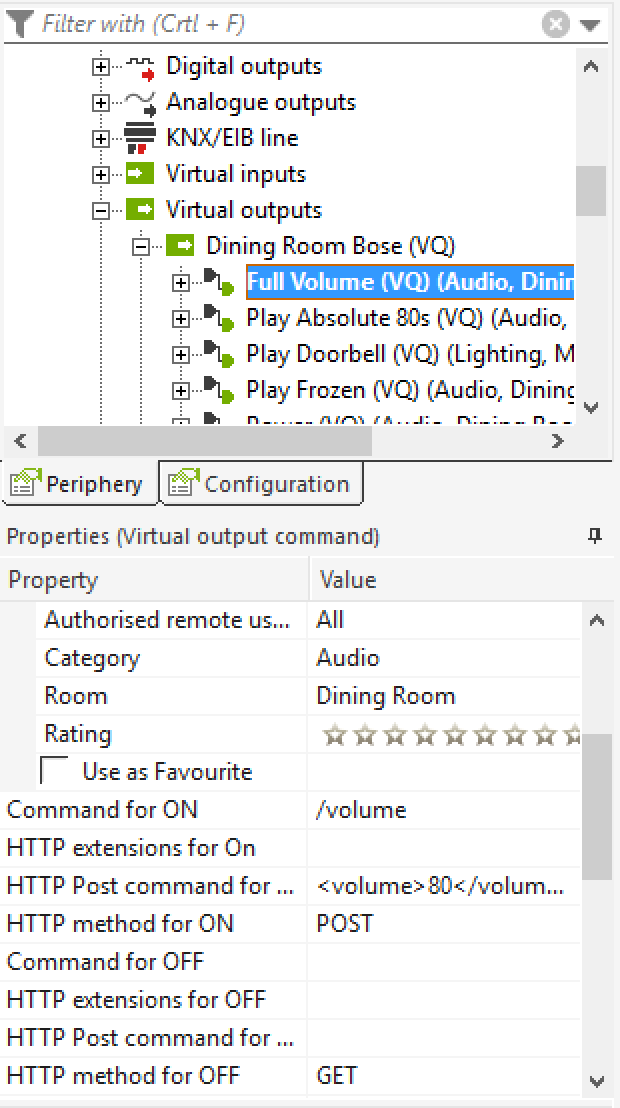
2. create a virtual out on loxone config as per screen shot 21:23.29.ong
3. Add any command you like with payload.
3.a. volume: volume.png  (set the command and a value)
3.b. select a preset (can actually be anything - you can reverse engineer these by setting it on the sound touch and doing a GET) 
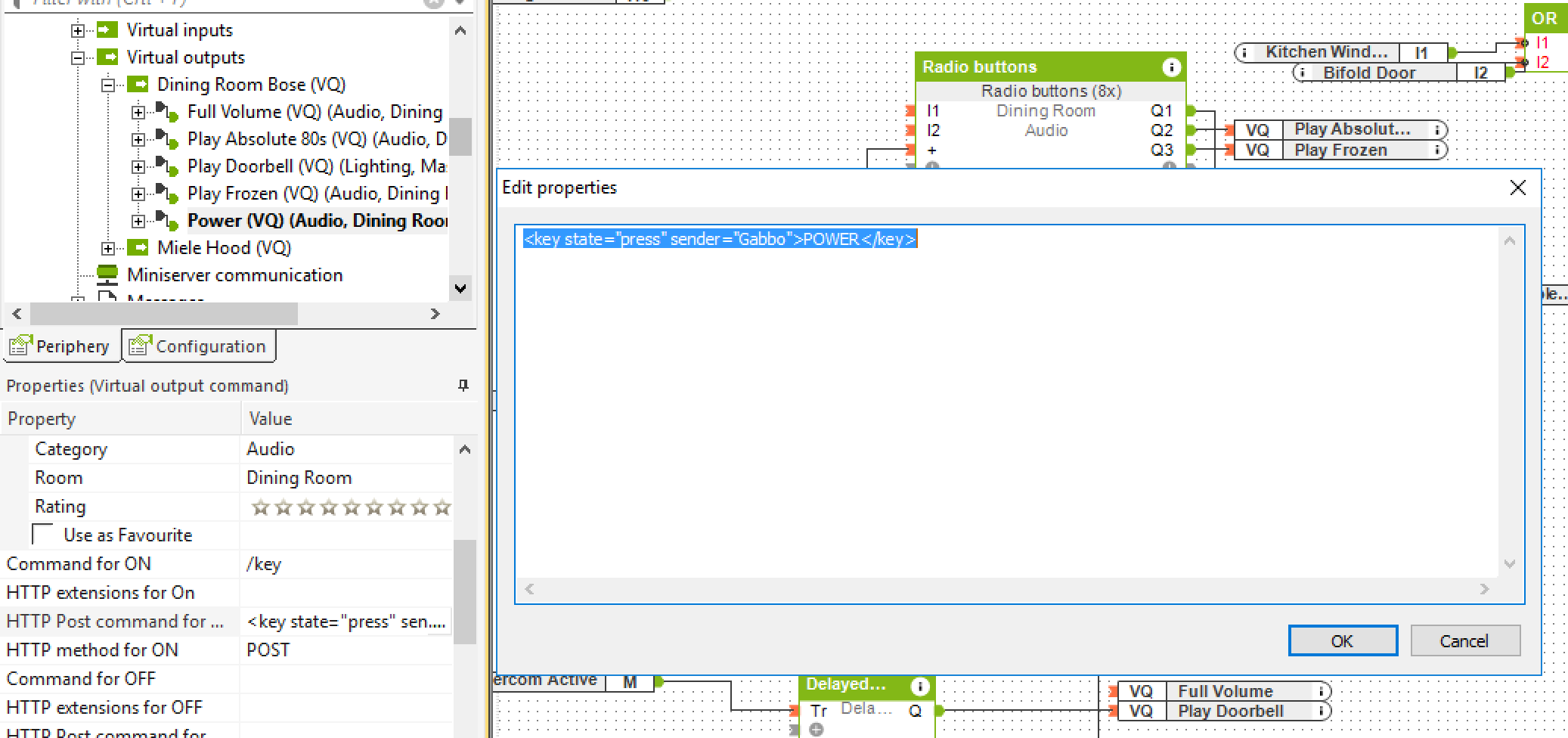
3.c. power off was more tricky, have to simulate a key press.
4. wire up to switch, logic or interface.


PS you can do other stuff. Grab the API docs from bose to figure the rest out.
Screen Shot 2016-08-07 at 21.23.29.png
volume.png
select a preset.png
power on or off.png

daniel lopez

unread,
Aug 15, 2016, 10:21:21 PM8/15/16
to Loxone English
Works really good thanks!

kg

unread,
Dec 4, 2016, 8:10:59 AM12/4/16
to Loxone English
How did you get the "power off" working? Volume and power are indeed not that difficult..

Op zondag 7 augustus 2016 22:30:35 UTC+2 schreef sk:

sk

unread,
Dec 4, 2016, 2:48:37 PM12/4/16
to Loxone English
There is no separate power on or power off command, just POWER in the post command... see attached pic to my previous post. What did you put in your post command?

Koen Geebelen

unread,
Dec 5, 2016, 3:26:30 AM12/5/16
to sk, Loxone English
I thought because you said "power off was tricky" that you found a solution for this, or didn't you?

> Op 4 dec. 2016 om 20:48 heeft sk <shara...@gmail.com> het volgende geschreven:
>
> There is no separate power on or power off command, just POWER in the post command... see attached pic to my previous post. What did you put in your post command?
>
> --
> You received this message because you are subscribed to a topic in the Google Groups "Loxone English" group.
> To unsubscribe from this topic, visit https://groups.google.com/d/topic/loxone-english/Rn4Ueh01bk0/unsubscribe.
> To unsubscribe from this group and all its topics, send an email to loxone-englis...@googlegroups.com.
> To view this discussion on the web visit https://groups.google.com/d/msgid/loxone-english/0ade4123-f373-4c0f-9607-3baa68a488db%40googlegroups.com.
> For more options, visit https://groups.google.com/d/optout.

sk

unread,
Dec 5, 2016, 3:44:01 AM12/5/16
to Loxone English
I have yes... simply send the POWER key when off and it will turn on. Send the POWER key when on and it will turn off. All it is doing is simulating the key press of the power button.

Have you tried it?

kg

unread,
Dec 6, 2016, 11:33:04 PM12/6/16
to Loxone English
How do you check if it is on or off before sending the power key tap?

I would like to power off the soundtouch with my "all off"-switch.

Thanks!

daniel lopez

unread,
Dec 6, 2016, 11:47:43 PM12/6/16
to Loxone English, kg
You could use a memory flag, i am not sure if there is a state need to check the API info

Daniel
--
You received this message because you are subscribed to a topic in the Google Groups "Loxone English" group.
To unsubscribe from this topic, visit https://groups.google.com/d/topic/loxone-english/Rn4Ueh01bk0/unsubscribe.
To unsubscribe from this group and all its topics, send an email to loxone-englis...@googlegroups.com.

kg

unread,
Dec 17, 2016, 2:46:32 AM12/17/16
to Loxone English
There is a state in "Source" but how do I check this and put this in a memory flag?

Source Has the following values:
- Standby
- internet_radio
- Aux
- Spotify
-...
How can I check if it is in standby mode and how can I put this in a memory flag so I can be sure to power to off the soundtouch?
I already sent the "power" button, but at that moment you don't know if the soundtouch is on or off. I also use the bose remote and the hardware button on the soundtouch.
So it is obligated to check if it is on or off.

Can you help me, especially with the correct syntax?

Thanx a lot!

kg

unread,
Apr 2, 2017, 3:10:12 PM4/2/17
to Loxone English
I got it working af few weeks ago:

1. Make an Http virtual input: http:// IP_ADRESS SOUNDTOUCH :8090/now_playing
2. Make a virtual HTTP input command in this input (mine is called "actual status" -> command recognition = source="\1
3. Make a virtual HTTP input command in this input (mine is called "Location" -> command recognition = location="\v

Connect these 2 input commands with a state block:
See attached

I have connected these states with a state value so I can compare them to check in which state the bose is in:
Standby, channel of internetradio, aux, ...
You just have to check what is the location value for the radio channels you listen to, when you use http:// IP_ADRESS SOUNDTOUCH :8090/now_playing in a browser while the radio channel is playing.

I hope this helps you!

Regards
Koen

Op zaterdag 17 december 2016 08:46:32 UTC+1 schreef kg:
Actual status.png
State.png

Jonathan Thursby

unread,
Oct 20, 2019, 11:05:40 AM10/20/19
to Loxone English
Hi has anyone come up with a definitive list and actions of what to do to get the Bose system working properly with Loxone. There seems to be snippets here and there but nothing where a good solution can be found?

Happy to pay someone as pulling my hair out!

J

Jonathan Thursby

unread,
Oct 20, 2019, 11:06:15 AM10/20/19
to Loxone English
Reply all
Reply to author
Forward
0 new messages