
Lighting controller behaviour
280 views
Skip to first unread message

Techdoctor
Feb 27, 2021, 10:32:46 AM2/27/21
to Loxone English
I have been redoing my bathroom lights. Now when I use the R input to switch off the tree spots, so when using a physical switch to turn them off, in the app it then says its been locked by logic, which means I can't control the lights via the app. When I switch the lights on via a physical momentary switch then I can control the spots via the app. Why does it do this what is the reasoning behind this. And is there an over ride to stop this behaviour.
I tried to send a momentary pulse to the R input but that didn't work, well it worked once, then the lights refuse to come on via the switch.
To over come this I have set up an Off mood and now use this to switch the lights off. And still give me control in the app.

Duncan
Feb 27, 2021, 10:45:48 AM2/27/21
to Loxone English
is the R input being held high instead of a pulse?
Techdoctor
Feb 27, 2021, 12:44:16 PM2/27/21
to Loxone English
I have tried both When held high I get the locked by logic message. When Its pulsed, I can only turn the lights on and off once. Then the physical switch doesn't appear to turn the lights on.
Duncan
Feb 27, 2021, 2:17:52 PM2/27/21
to Loxone English
can you post a screenshot of the config around this lighing controller
Techdoctor
Feb 27, 2021, 4:09:38 PM2/27/21
to Loxone English

This Gives me the Locked message when the lights are off using the R input to switch off the lights

And this is what works
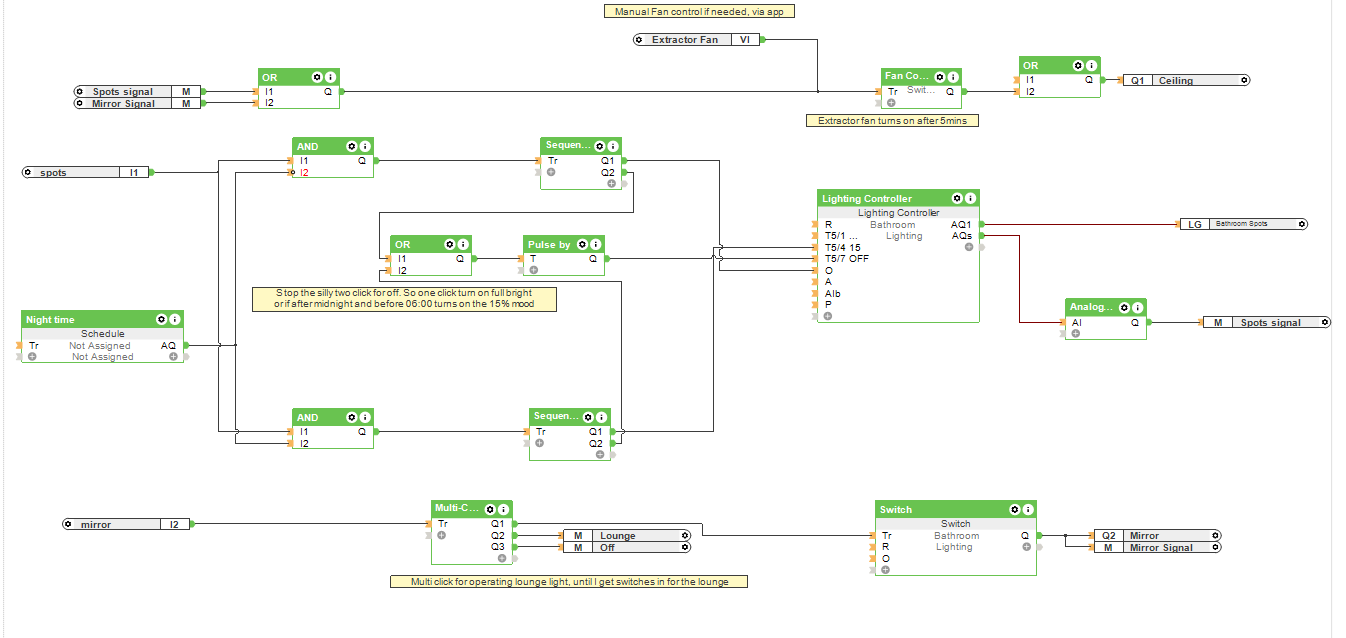
Techdoctor
Feb 27, 2021, 4:20:51 PM2/27/21
to Loxone English
Just realized the last screenshot is wrong. Here is the correct screenshot
Duncan
Feb 27, 2021, 6:34:22 PM2/27/21
to Loxone English
bit difficult to tell from the screen shot, but im guessing the problem is related to the sequencers - when the lighting block was reset by the R input, the sequencer still think the light is on so the next in the sequence is to turn of the lights, which does nothing cos they are already turned off
if you reconnect the OR block back to the R input then apply some feedback from the light controller, so if AQs =0 creates a pulse which resets both sequencers then does it work?
Duncan
Feb 28, 2021, 2:08:04 PM2/28/21
to Loxone English
this will achieve the same - during the day the switch inpulses alternate between off and full (mood 99)
when night is active the switch alternates between dimmed (scene 1) and off

Rydens
Mar 1, 2021, 3:34:57 AM3/1/21
to Loxone English
Very neat Duncan. Just one minor change - if anyone manually changes the dimming levels the scene (AQs / AI3) becomes negative.
May be better to test for the off condition by using not equal zero .
Cheers David
Duncan
Mar 1, 2021, 3:39:30 AM3/1/21
to Loxone English
thanks, i forgot about that, i never use the app for light control only buttons!
Techdoctor
Mar 1, 2021, 6:50:23 AM3/1/21
to Loxone English
Many thanks Duncan. I actually woke up this morning thinking I need to use a status block. So have used your suggestion with the status block, and it seems to work. Will wait a whole day to make sure, and report back tomorrow.
I normally use buttons but when you have kids who sometimes forget to switch off the light, I can do it from my phone.
I did try your other suggestion but couldn't get that to work.
What I still don't understand is why would something that worked for about a year just suddenly stops working.
My only thought was that some form of update happened to the tree module.
Once again thanks for your help. Saved a few hours of head scratching.
Techdoctor
Mar 2, 2021, 4:44:26 AM3/2/21
to Loxone English
Tried it last night to see if the 15% on would work at night but it didn't. On further investigation the delayed trigger input was only connected to AI1 and needs to be connected to AI2 as well. Did this ran it in the simulation view and it appears to now work.

The Spots signal memory flag triggers a delayed on and off block for the fan.
Techdoctor
Mar 3, 2021, 8:13:01 AM3/3/21
to Loxone English
I can confirm everything now works as it should. :),so thanks again to Duncan, and to Rydens for the minor change in the status block.
Reply all
Reply to author
Forward
0 new messages