
using wheelchair motor - possible or not
464 views
Skip to first unread message

Alex
Apr 24, 2018, 1:52:47 AM4/24/18
to LINOROBOT
Hi,
I am planning to use the linorobot code for controlling the wheelchair motors. My question is whether it is possible to use them without encoders.
Moreover my problem is that the wheelchair base that I got has only one motor (24v) that transmits power to two wheels attached to the single motor.
In the front is a steering wheels that I plan to replace by a steering servo and use the ackerman model of linorobot.
Can you tell me whether it is possible to use your code or not and what changes do I need to make to make this project successful (changing motor controller etc.)
Thanks a lot.
alex

Dominic Schmidt
Apr 24, 2018, 9:55:24 AM4/24/18
to LINOROBOT
You could try using the sensor of a bicycle computer as a wheel encoder.

They are cheap and easy to mount. You can also make your own one with a simple hall effect sensor, preferably a dual channel one.
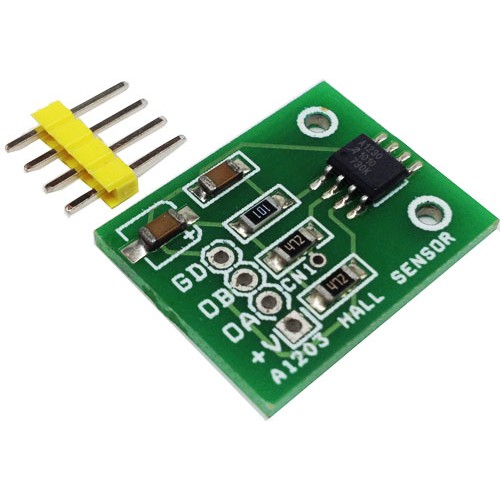
Mount it close to one of the wheels and then glue some neodymium magnets along the rim. I made my own encoders this way and they are very reliable.

Juan Miguel Jimeno
Apr 24, 2018, 10:11:51 AM4/24/18
to LINOROBOT
Hi Alex,
May I know how is the wheelchair currently controlled? If it is an electric wheelchair, how does the user manoeuvre it?
To support your idea - you can follow Dominic’s approach in setting up your motor feedback. Steering wise, you can use high-torque servos like this: https://m.youtube.com/watch?v=GwRxrp4nzDA. Just bought a pair recently and it works like a charm. You can actuate the servo using Arduino’s standard Servo library.
May I know how is the wheelchair currently controlled? If it is an electric wheelchair, how does the user manoeuvre it?
To support your idea - you can follow Dominic’s approach in setting up your motor feedback. Steering wise, you can use high-torque servos like this: https://m.youtube.com/watch?v=GwRxrp4nzDA. Just bought a pair recently and it works like a charm. You can actuate the servo using Arduino’s standard Servo library.
Alex
Apr 25, 2018, 1:57:47 AM4/25/18
to LINOROBOT
Hi,

The wheelchair is actually the senior car (similar to pic below) with four wheels (hand steering in front wheels). It has its own controller but I do not have the manual as its very old car.
The controllers work well but I plan to strip it off to bare minimum and put my own sensors for outdoor use.
The back two wheels are controlled by a single 24v dc motor. (A gear shaft transmits power to the other wheel. Basically both wheel moves at same speed.)
From what I remember Juan, you created a minimalist branch earlier for controlling dc motors without encoders with Linorobot firmware.
Can I use that to just control the vehicle for joystick control. I can always generate odometry using IMU at later stage.
Please let me know if this is feasible. Also, you controlled two motors for the ackerman model. So can a single motor be adapted for the same model.
I need to run this machine using ROS and found Linorobot to be easy to use and follow. Thank you.
Alex
Juan Miguel Jimeno
Apr 25, 2018, 10:31:57 AM4/25/18
to LINOROBOT
Hi Alex,
Yes this is definitely feasible. The two wheels on Linorobot's Ackermann stack has the same RPM and is designed to only work on a single axis (forward and reverse). This means, controlling just one motor will suffice as long as both wheels are geared to spin at the same rate. To do this, just connect your motor driver on one of the 2WD pins and ignore the rest.
Although you can run the robot without the encoders, you should consider a few trade-offs and potential setbacks with this set-up. You can either use a camera (visual odometry) or use the lidar (scan matching) to estimate the robot's velocity and use this as a feedback for the PID controller to control the robot's whole-body motion. Do take note that results can be inconsistent depending on your robot's environment. For instance, lighting conditions might affect the visual odometry's performance. For LIDARS, determining the robot's velocity would be more difficult in environments that has lesser reference points like corridors, and huge halls/rooms.
Can you post a photo of your motor? Usually, mobility devices like this use brushless motors similar to the ones used in hoverboards which comes with a built-in encoders.
Hope these clear things up. ;) Cheers!

Christopher Coballes
Apr 29, 2018, 8:14:28 AM4/29/18
to LINOROBOT
Hi Sir Alex,
Good day.
Yes it is possible , in fact you can just modify a bit this hypha ROS race car robot.
But take note , with encoder will make your robot in a more precise movement.
Thanks
-Christopher

Ali Abdelmoneim
Apr 29, 2018, 10:17:53 PM4/29/18
to LINOROBOT
Hi Sir Christopher,
How can i modify on linorobot project to use without encoder?.
Thanks.
-Ali Abdelmoneim.
How can i modify on linorobot project to use without encoder?.
Thanks.
-Ali Abdelmoneim.
Alex
Apr 30, 2018, 8:15:16 AM4/30/18
to LINOROBOT
Hi Juan,
So when using the linorobot config, should I comment out the pin configuration for the second motor and use just one motor pin configuration. Same for the encoder. Basically are you suggesting to ignore everything for the second motor in the pin out diagram for the ackerman robot?
I will post the info about the motor soon. I need to open the scooter up to look at the specs.
Thanks
Alex
Alex
Apr 30, 2018, 8:15:58 AM4/30/18
to LINOROBOT
Hi Chirstopher,
Can you post more details about the project and how can I modify Linorobot code to work with ?
Thanks
Alex
Juan Miguel Jimeno
May 1, 2018, 1:57:32 AM5/1/18
to LINOROBOT
Hi Alex,
You don't have to comment out anything on the config file. Just connect your motor driver on one of the 2WD pins.
Since you don't have an encoder, comment out the odometry node on the launch file:
If you need the IMU data, just subscribe to "imu/data".
You'll need to tweak the control code as well since you can't use the PID controller without feedback. Your moveBase function will look something like this instead:
motor1.spin(req_rpm.motor1);
motor2.spin(req_rpm.motor2);
motor3.spin(req_rpm.motor3);
motor4.spin(req_rpm.motor4);
Ali Abdelmoneim
May 1, 2018, 4:13:50 AM5/1/18
to LINOROBOT
Hi sir Juan,
Can you check out "rf2o laser odometry" to see if we can use it instead of encoders?. I also need to add sprayer to my robot that i control using a relay to turn it on and off. I don't Know how to add this function to linorobot. May you help me to add this funchtion?. Another thing is don't you think that the connection to bts7960 should be like this:
#define MOTOR1_IN_A 20
#define MOTOR1_IN_B 1
#define MOTOR2_IN_A 8
#define MOTOR2_IN_B 6
Thanks.
Ali.
Can you check out "rf2o laser odometry" to see if we can use it instead of encoders?. I also need to add sprayer to my robot that i control using a relay to turn it on and off. I don't Know how to add this function to linorobot. May you help me to add this funchtion?. Another thing is don't you think that the connection to bts7960 should be like this:
#define MOTOR1_IN_A 20
#define MOTOR1_IN_B 1
#define MOTOR2_IN_A 8
#define MOTOR2_IN_B 6
Thanks.
Ali.
Alex
May 1, 2018, 10:56:18 PM5/1/18
to LINOROBOT
Hi Juan,
Thanks a lot.
Success!!! Following you guide, I was able to control the motor and servo. Thanks a tonne!! You have been a saviour.
I have several bottlenecks though.
1. The dc motor only turns one way and I am unable to figure out why restricting motion to only forward direction. (P.S. This happened with and without changing the motor1.spin code lines + commenting out odometry node in launch file.)
2. The servo at central position keeps tweaking slightly. Although it does not affect the steering.
3. I am not thinking of adding external encoder to get the best out of it. Do you have any suggestions for the kind of encoder I should go for.
4. I saw the pictures of your 4wd robot. Can you tell me what are the box like thing on the side through which the wires are coming out. Are they dc-dc converters?
5. I have a better IMU with ros compatibility (Bosch BN055), how do I integrate that into the linorobot?
Thanks a lot.
Alex
Juan Miguel Jimeno
May 2, 2018, 10:52:41 PM5/2/18
to lino...@googlegroups.com
Hi Ali,
I haven't used rf2o yet but it seems to be a good alternative.
Your application is beyond Linorobot's scope at the moment. Although you can definitely use Linorobot as a base for your application. You would probably have to use a separate microcontroller to actuate your sprayer and write your own drivers to expose your hardware through service or actionlib calls.
Juan Miguel Jimeno
May 2, 2018, 11:03:24 PM5/2/18
to lino...@googlegroups.com
Hi Alex,
Glad it worked.
1. I forgot that you should actually use getPWM function instead of getRPM on moveBase() function. It should look something like this.
    //Kinematics::pwm req_pwm; use this to declare req_rpm if you're using the most recent release
    Kinematics::output req_pwm;


    req_pwm = kinematics.getPWM(g_req_linear_vel_x, g_req_linear_vel_y, g_req_angular_vel_z);


    //the required rpm is capped at -/+ MAX_RPM to prevent the PID from having too much error
    //the PWM value sent to the motor driver is the calculated PID based on required RPM vs measured RPM
    motor1.spin(req_pwm.motor1);
    motor2.spin(req_pwm.motor2);
    motor3.spin(req_pwm.motor3);
    motor4.spin(req_pwm.motor4);
3. Dominic's suggestion on how to add encoder on your setup will work. Alternatively you can also follow the encoder suggestion on my wiki. It'll be good if you can post your motor and driver so we can have a look if it has a built-in encoder.
4. If you're referring to my mecanum robot on hackster.io - yes those are DC-DC converters (12, and 5V to be exact).
5. If you're running a different IMU, uncomment this line https://github.com/linorobot/linorobot/blob/master/launch/bringup.launch#L9 on bringup.launch (same for minimal.launch) and run your IMU's ROS driver. Since you disabled the odometry node, your IMU won't be connected to any Linorobot node unless you add an encoder and run Linorobot's odometry node again.
All the best!
Message has been deleted
Ali Abdelmoneim
May 3, 2018, 5:21:32 AM5/3/18
to LINOROBOT
Hi Juan,
I have used getPWM function on moveBase() function. I got the error: 'class Motor' has no member named 'getPWM'
Thanks.
Ali.
I have used getPWM function on moveBase() function. I got the error: 'class Motor' has no member named 'getPWM'
Thanks.
Ali.
Juan Miguel Jimeno
May 3, 2018, 1:53:22 PM5/3/18
to LINOROBOT
Hi Ali,
Check out the edited codes from my previous reply. Thanks
Juan Miguel Jimeno
May 3, 2018, 1:55:30 PM5/3/18
to LINOROBOT
Someone lodged an issue on the same bug. Please use the most recent commit to fix the problem. Thanks
Ali Abdelmoneim
May 3, 2018, 2:33:41 PM5/3/18
to LINOROBOT
Hi Juan,
Now its working.
Thanks.
Now its working.
Thanks.
Ali Abdelmoneim
May 3, 2018, 11:29:28 PM5/3/18
to LINOROBOT
Hi Juan,
By commenting out the odometry node and using getPWM function, will the robot be able to slam and autonomously navigate?. Also, How to set a specific pwm value like 100 for example, in both teleop mode and autonomous mode, so that the robot is not going to fast.
Thanks.
Ali.
By commenting out the odometry node and using getPWM function, will the robot be able to slam and autonomously navigate?. Also, How to set a specific pwm value like 100 for example, in both teleop mode and autonomous mode, so that the robot is not going to fast.
Thanks.
Ali.
Alex
May 4, 2018, 9:20:04 AM5/4/18
to LINOROBOT
Hi Juan,

Thanks for the reply. I will try the changes to the project soon.
The motor is given below. I am using BTS7960 currently with the project.
I checked the specifications but it does not have encoders. I am planning to put external encoder somewhere on the shaft to get the readings. I still need to figure out how to do that.
I will post the updates soon. Thanks a lot .
ALex
Dominic Schmidt
May 4, 2018, 10:01:34 AM5/4/18
to LINOROBOT
Are you planning on keeping the brake? Because if not it would be a good place for an encoder.
Alex
May 5, 2018, 12:39:43 AM5/5/18
to LINOROBOT
Hi Dominic,
We anticipated the same and removed the brake to install external encoder. But the wheel speed is regulated by the gear, while the brake shaft rotates at the true rpm.
Now we are thinking of installing a hollow shaft encoder on the shaft that is transmitting the power.
Thanks
Alex
Ali Abdelmoneim
May 5, 2018, 4:47:50 AM5/5/18
to LINOROBOT
Hi Juan,
I don't have an encoder so i comment out the odometry node. But when I do so my lidar doesnt slam.
Thanks.
Ali.
I don't have an encoder so i comment out the odometry node. But when I do so my lidar doesnt slam.
Thanks.
Ali.
Dominic Schmidt
May 5, 2018, 7:23:02 AM5/5/18
to LINOROBOT
@Alex,
If the gearbox has a fixed ratio you can just adjust for it in the firmware. For example if your encoder has 10 counts per revolution and your gear ratio is 1:10 set COUNTS_PER_REV to 100. Works well for me.
Alex
May 6, 2018, 9:37:28 AM5/6/18
to LINOROBOT
@Dominic,
You mean I can put the encoder at the brake shaft (rotating at different speed than actual wheel) and still be able to control the motor speed by changing the parameter in the firmware? Can you explain in detail. I cannot understand the logic. Thanks
Dominic Schmidt
May 6, 2018, 11:07:27 AM5/6/18
to LINOROBOT
Let's say you have a gearbox with the gear ratio of 1:100, meaning that if your motor shaft spins 100 times your wheel axle will spin exactly once.
Now you buy an encoder that has a resolution of 300ppr for example, so that if you turn it once you will get 300 pulses which is roughly one pulse per degree.
If you decide to mount the encoder on the wheel axle and you rotate the wheel 10 times your robot will detect 3000 pulses.
If you however mount the encoder on the motor shaft your robot will detect 300000 pulses if the wheel is turned 10 times.
Your code would look like this:
#define COUNTS_PER_REV 300 // wheel encoder's no of ticks per rev when mounted on the wheel shaft
or
#define COUNTS_PER_REV 30000 // wheel encoder's no of ticks per rev when mounted on the motor shaft
Keep in mind that you also have to adjust MAX_RPM if you're mounting the encoder on the wheel shaft because the firmware assumes that the motor rpm and the wheel rpm are the same.
I would also like to add that judging by the pictures you posted you are using a go-go elite traveler scooter. These scooters look like they use differential gear trains for their power transmission (according to this video) which means that both powered wheels won't always spin at the same speed or in some edge cases even the same direction. In that case if you want to mount the encoder on the axle, you would have to use one encoder for each wheel and change the firmware to calculate the average of both encoders to get an accurate result.
Alex
May 7, 2018, 12:58:53 AM5/7/18
to LINOROBOT
@Dominic,
Thanks for the eloborate answer. It makes sense to put the encoder at the motor shaft. That clears my doubt. One question though, how do I figure out the gear ratio that the motor is using. There is no information about that whatsoever. And yes the motor is go go mobility scooter type.
Thanks for the eloborate answer. It makes sense to put the encoder at the motor shaft. That clears my doubt. One question though, how do I figure out the gear ratio that the motor is using. There is no information about that whatsoever. And yes the motor is go go mobility scooter type.
Thanks
Alex
Juan Miguel Jimeno
May 7, 2018, 3:17:02 AM5/7/18
to LINOROBOT
Hi Alex,
You don’t actually need the gear ratio. As Dominic has mentioned on the earlier thread, you can just mount the encoder and count the no of steps per rev. I would usually spin the wheel 2 - 5 times and get the average to confirm the readings. Just get the motor specifications and encoder’s constant right and let the PID do the job. I forgot to mention that if you’re only using 1 encoder, you have to tweak the code so that motor2 would also have an encoder reading since the firmware assumes you have two motors when it calculates the robot’s linear velocity. You can do that by changing https://github.com/linorobot/linorobot/blob/master/teensy/firmware/src/firmware.ino/#L208 from encoder2 to (-1 * encoder1).
You don’t actually need the gear ratio. As Dominic has mentioned on the earlier thread, you can just mount the encoder and count the no of steps per rev. I would usually spin the wheel 2 - 5 times and get the average to confirm the readings. Just get the motor specifications and encoder’s constant right and let the PID do the job. I forgot to mention that if you’re only using 1 encoder, you have to tweak the code so that motor2 would also have an encoder reading since the firmware assumes you have two motors when it calculates the robot’s linear velocity. You can do that by changing https://github.com/linorobot/linorobot/blob/master/teensy/firmware/src/firmware.ino/#L208 from encoder2 to (-1 * encoder1).
Alex
May 7, 2018, 9:29:16 PM5/7/18
to LINOROBOT
Hi Juan,
Ok got it. I am going to check that over the weekend and report back the progress soon.
Thanks
ALex
Reply all
Reply to author
Forward
0 new messages