
Skip to first unread message

Mathieu
Feb 6, 2014, 6:58:47 PM2/6/14
to
At last!
...color palette management, color transitions with any number of points, easy way to sync hue, saturation and intensity attributes to give the desired colors, specify RGB colors... But what is it?
Let's start with the color palette, allowing to manage all your project's colors in one place. You can create solid colors and complex gradients. Update something here and all linked hue, saturation and intensity attributes are updated immediately.
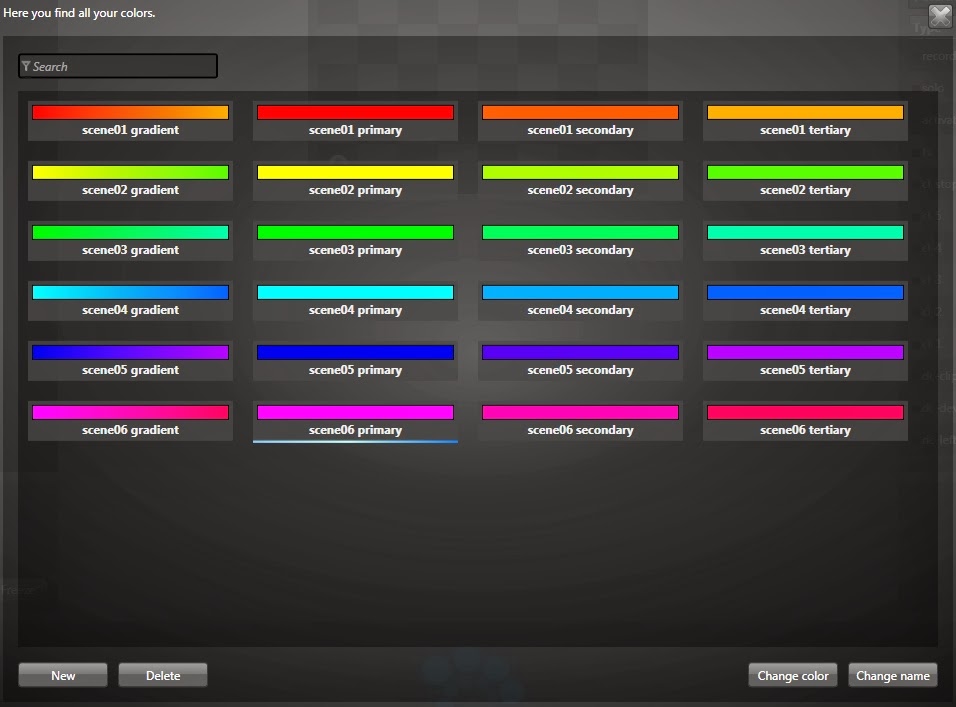
Here's the color editor. Yes you can specify a pure red easily with the RGB controls! You'll also be able to explore the HSI/RGB mapping and hopefully, better understand what's going on. When creating a gradient, you see the preview right here and your lights are also updated as you make your changes. Live preview!

Finally, you can select all your color attributes at the same time (hue, saturation, intensity) and simply select a color in your palette. One click! When selecting a solid color, the result is easy to guess. When selecting a gradient, the source's power will generate the transition from 0% to 100%. You can control the color transition very precisely and avoid turning around the whole color wheel!

This is coming soon in the new beta. I can't wait to get some feedback!
Cheers,
Mathieu

Jack
Feb 7, 2014, 4:44:52 AM2/7/14
to ligh...@googlegroups.com
I have a very good feeling about this. The screenshots look promising.
On the other hand, I'v never used the hue shift stuff and so before.
Looks like you can define a path that makes up a color palette. That would be very cool.
I'm thinking of an orange mood that can turn to pink. Valentine's day is coming.

Nick @ Union Garage Productions
Feb 7, 2014, 12:47:12 PM2/7/14
to ligh...@googlegroups.com
Mathieu,
This looks AWESOME, can't wait to get my hands on it! I hope this comes from some of my suggestions... as always, THANK YOU!
The only thing I don't see in it is adding capability for RGBW, RGBA, RGBAW etc... lights. I personally LOVE having access to my white LED's. I often randomly strobe them for flare or flash type of effects. Or just want a pure COOL white for specific effects.
Any word on when this will be out?!
Can't wait to see what's next!!!!!!
Keep up the good work!
Nick
(I posted before, but it would be great if everyone posted what area in the US or WORLD that they are in. We can start some LJ meetups! I'm in Brooklyn, NYC)
Mathieu
Feb 7, 2014, 1:11:33 PM2/7/14
to ligh...@googlegroups.com
Hi Nick,
For RGBW, Lightjams takes care of the white channel the best as it can. The closest the saturation is to 0%, the higher is the white level. If you want to control it manually, you can just patch a RGB fixture followed by a dimmer attribute for the white.
For RGBA, Lightjams doesn't handle the amber automatically right now, due to calibration issue across manufacturers. So you need to control it with another attribute.
The new beta is coming in the next few days.
Mathieu
Feb 9, 2014, 1:27:23 PM2/9/14
to ligh...@googlegroups.com
The new beta is available:
Download 64 bits: http://www.lightjams.com/app/lightjams64_test.zip
Download 32 bits: http://www.lightjams.com/app/lightjams32_test.zip
Jack
Feb 9, 2014, 5:37:41 PM2/9/14
to ligh...@googlegroups.com
Very nice !!
This makes it so easy to create palette's. Compared to the relatively static palette before, this gives many options.
Great job and well done. A big improvement in color handling.

Derek
Feb 10, 2014, 7:02:05 PM2/10/14
to ligh...@googlegroups.com
Hi Mathieu,
This is really cool and I like it a lot. You've just sentenced me to putting in the RGB values of all my favorite gels. :-) I do have a question, how do you fade them on and off? I tried making a gradient black to red. With the Source's Power at 0% it is black, at 1% it's dim white/pink. As I work up to 100% it turns more red but there's never a point where the red stays red as the power goes up and down. If I have a single color, turning the Source's Power up or down does nothing. Is there a way to fade it to black?
Great job on this, it'll really save a lot of time.
Thanks,
Derek
Mathieu
Feb 17, 2014, 10:04:32 PM2/17/14
to ligh...@googlegroups.com
Hi Derek,
To fade one color to black, just don't link the intensity attribute to the color palette. Let it go from 0% to 100% and control it with a source.
Mathieu
Feb 17, 2014, 10:15:19 PM2/17/14
to
I've uploaded a new beta. There's now an easy way to create a loop when using multiple colors. Also, I've added a function: grid.colorGradient.loop(x,y,goNext). It loops through all colors of the gradient of the attribute at the specified position (x,y).
For example, you put a source just under a hue attribute and use this power formula: transition.circular(0.5, grid.colorGradient.loop(x,y,pulse(1))). Each second, this will go to the next color, doing a 0.5s fade. Using the transition.circular makes sure that when we're starting over (going from 100% to 0%), we're not doing a fade out but just going straight to 0%.
By the way, the formula used in the 3rd screenshot to map all colors of the gradient is just: px. Using the shader mode, only one source is needed. The px variable returns the percent corresponding to the current horizontal position.
Cheers,
Mathieu
Derek
Feb 17, 2014, 11:43:10 PM2/17/14
to ligh...@googlegroups.com
Hi Mathieu,
Ahh, I thought all 3 (HSL) had to be selected and run off a single Source. Doing it as you described...yup...there it is, working.
My kitchen is now RoscoSun 85. Ooh! One click, now it's Bastard Amber.
Very cool.
Thanks again.
Derek
Message has been deleted

treezius monocle
Feb 28, 2014, 4:00:33 AM2/28/14
to ligh...@googlegroups.com
The link doesnt seem to be working :((( I'd love to download and try out
these new easier to work with gradients!! looks like it could be the
perfect tool for my upcoming show. any chance of getting it back up??
Mathieu
Feb 28, 2014, 9:07:10 AM2/28/14
to ligh...@googlegroups.com
It's now the official release. So you can get it directly here: http://www.lightjams.com/getIt.html
Reply all
Reply to author
Forward
0 new messages