
Configuring lc0 the right way
1,670 views
Skip to first unread message

Cardinalem
Sep 4, 2019, 6:47:56 PM9/4/19
to LCZero
Hi all..
I'm trying to configure Lc0 in the best way possible. I'm at the point that i'm able to use it as an UCI-engine in a Fritz GUI. I've made some engine matches. But i don't know if "my" lc0-Engine uses my Graphiccard (RTX 2080) in the right way. How can i see/test it? And can someone tell me the optimal settings for my PC?
Some information about my System:
AMD TR 1950X @ 3,7 GHz
32 GB Ram
Some information about my System:
AMD TR 1950X @ 3,7 GHz
32 GB Ram
Geforce RTX 2080
The first picture shows the Files i've downloaded....hope that these are complete and i haven't forgotten to download additional needed files.
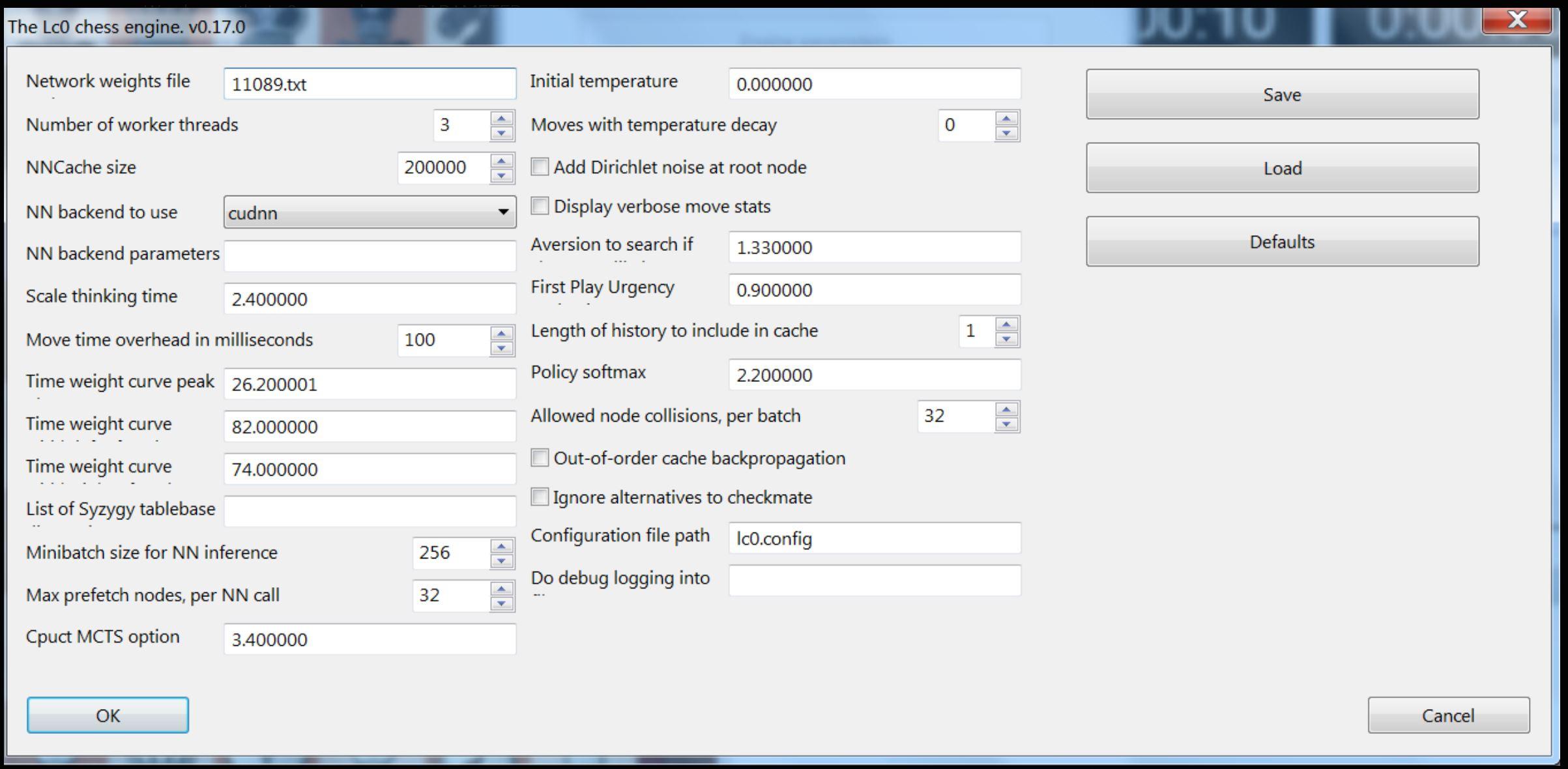
The second picture shows my current configuration of Lc0. Are there some improvements possible?


Greetings to all Chess players here.
Cardinalem
Message has been deleted
Message has been deleted

glbchess64
Sep 4, 2019, 7:39:26 PM9/4/19
to LCZero
Threads is a bit high. It must be 1 or 2. The best is probably 2. Unlike AB engines to many threads does not give a better play when you use lc0 with a GPU. More than 2 threads is needed for several GPU.
Weights file extension is not .txt but .pb.gz but the name is not a problem (you can name it as you want).
Some parameters depends of TC used.
For matches the best is not using a GUI but using cutechess-CLI.
Cardinalem
Sep 5, 2019, 10:55:36 AM9/5/19
to LCZero
Hi glbchess64
thanks for the Information. The extension of the weights-file..... in an example for the version 0.17 of Lc0 they named it as i've done.
And this file should be in the same directory as the lc0-file. Or am i wrong? And can I somehow check if Lc0 uses this file too?
glbchess64
Sep 5, 2019, 5:04:21 PM9/5/19
to LCZero
At the beginning of the leela project weights were in text format. I don't remember exactly when this has changed but now the format is proto buffer (.pb) and compression (.gz)

Jesse Jordache
Sep 20, 2019, 3:47:26 PM9/20/19
to LCZero
You can just download the compressed weights file - there's no need to dezip it. Plus, as far is I remember the name of the weights file without the extension is good enough in any configuration, but it's been a while for me since I've been using nibbler lately and changing the net is just two clicks.
Anyway, no file extension simplifies things if you've downloaded a whole bunch and decompressed some but not others. But double-check this first.

Steve C.
Sep 20, 2019, 4:22:04 PM9/20/19
to LCZero
You are correct about having no file extension. After I download a weights file (e.g weights_run1_60605.pb.gz) I just rename it to 60605 (not file extension) and in the configuration just point to the file using the full path name (e.g. c:\engines\lco\weights\60605).

Anil Dharan
Oct 7, 2019, 12:57:29 AM10/7/19
to LCZero
No need to type in anything. <autodetect> is good enough.

Markus Domanski
Nov 27, 2019, 1:46:00 AM11/27/19
to LCZero
What about this: https://en.chessbase.com/post/optimizing-fat-fritz
Does anyone know how it influences Leela?
Message has been deleted
Jesse Jordache
Nov 27, 2019, 4:16:07 AM11/27/19
to LCZero
If you look closely, the the pictures of the configs say "Fat Fritz(in lc0)". It's just their proprietary net running in Lc0.
Reply all
Reply to author
Forward
0 new messages