Assigning Boundary Conditions to Aluminium & Glass Facade pertaining to Indian climatic conditions (Ext. temperature 37, internal 22 degrees Celsius

239 views
Skip to first unread message

DS vas

unread,
Oct 17, 2015, 6:10:10 AM10/17/15
to THERM
Hi,

Am new to THERM software, could anyone assist me in assigning the Boundary Conditions to the Aluminium & Glass for the curtainwall transom location. Since the above project pertaining to India climate (Asian country), provided NFRC100-2010 Exterior/ Interior boundary conditions are to the European countries (where outside temperature is lower than the Inside room temperature) are not workable for the given unit. After assigning the India – Exterior & Interior conditions to both Aluminium and Glass, I received a message showing “Model geometry and Boundary Conditions need to be properly defined before a Calculation can be performed.” (Attached below a Snapshot of the report and Therm model file. Please assist me, where my entries gone wrong for U-factor calculation.


Is there any video clip showing the Therm modelling of a Façade for U-factor calculation assigning the boundary conditions? please share any Link for my understanding in assigning the boundary conditions.


regards, DS Vas


W1C-Mid transom1.THM

Robin Mitchell/LBNL

unread,
Oct 19, 2015, 3:51:20 PM10/19/15
to THERM
When I try to run this file, I am getting an error saying that there are objects outside the boundary conditions. I will try to figure out what the problem is. I don't think it has anything to do with the way you have defined the boundary conditions. It is rather to do with the geometry. 

Robin 

Robin Mitchell/LBNL

unread,
Oct 19, 2015, 7:11:29 PM10/19/15
to THERM
When I delete the upper glazing system, the error message about objects outside the model disappears, and the file simluates. Normally I could recreate that glazing system and reinsert it but both layers are special layers that you have created. If you want to email me your window database (a small Project database which can be zipped and emailed) I can try reimporting the upper glazing system and see what the problem is. Or you can try doing that yourself, making sure that there are no overlapping polygons places in the model where the glazing system isn't connected to the other polygons. If you want to send me a project database with your glazing system in it, follow these instructions, which makes a much smaller database because it only copies the relevant files, not all the glass layer library, etc. 


You can email it directly to me (RDMit...@lbl.gov)

Robin 

On Saturday, October 17, 2015 at 3:10:10 AM UTC-7, DS vas wrote:

Robin Mitchell/LBNL
unread,
Oct 19, 2015, 7:37:30 PM10/19/15
to THERM
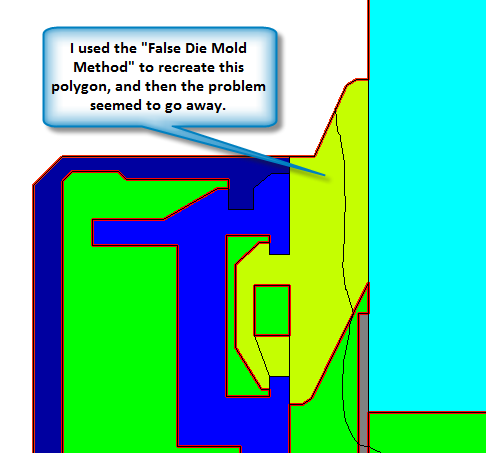
I used the False Die Mold Method described in the THERM Drawing Tips document (https://windows.lbl.gov/software/therm/Docs/Chapter10.pdf) to delete and recreate one of the polygons in the model (the outside glazing clip) and that seemed to solve the problem. 


The program then complained about the mesh parameter, which I set to 9 (Options/ Preferences/Therm File Options)
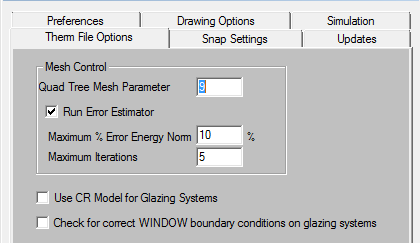


And then the model would run.


I also set the Boundary Condition for the interior of the glazing system to that from WINDOW, which is set to 24C and HC = 20 W/m2-K


I am attaching the final file

Robin 

On Saturday, October 17, 2015 at 3:10:10 AM UTC-7, DS vas wrote:
W1C-Mid transom1-rm.THM

DS vas

unread,
Oct 20, 2015, 3:19:16 AM10/20/15
to THERM
Thank you Mr. Robin for your instant response and valuable information.

Refer to my previous Therm model file, I tried and checked my model finally found minor errors got rectified. I shall mail you separately.

regards,
DS Vas
Reply all
Reply to author
Forward
0 new messages