Boundary Calculation Issues

83 views
Skip to first unread message

Ben Larsen

unread,
Dec 16, 2015, 2:13:02 PM12/16/15
to THERM
I am having big problems making this therm model work.  I've build models of this complexity before with no problems.  almost every object was created with the fill tool by creating box outlines and filling in the voids.  All like materials were combined into single objects, and STILL the boundary will not calculate.  Please help.  Thanks.
4521.THM

Robin Mitchell/LBNL

unread,
Dec 16, 2015, 2:26:05 PM12/16/15
to THERM
Ben 

I will take a look at your file -- what version of THERM are you running? 

Robin 

Robin Mitchell/LBNL

unread,
Dec 16, 2015, 2:53:46 PM12/16/15
to THERM
Ben 

It looks like you have overlapping polygons. You can sort of see this by using the View/Show Voids/Overlaps


Here are some screenshots -- there are overlapping polygons everywhere. Here I clicked on the extrusion


Then I clicked on the polyboard (yellow polygon) -- you can see it overlaps the extrusion

Here I clicked on another extrusion polygon

Then I clicked on the frame cavity and it overlaps the extrusion

Here I clicked on another extrusion

Here I click on the polygon next to it (pink) and you can see it overlaps the frame cavity


You can see the underlying polygon lines, so I think the technique is to move the points rather than deleting and trying to refill. I have done that on some of them and gotten rid of the error for those polygons.


Robin


On Wednesday, December 16, 2015 at 11:13:02 AM UTC-8, Ben Larsen wrote:

Robin Mitchell/LBNL

unread,
Dec 16, 2015, 3:01:03 PM12/16/15
to THERM
Ben

I just looked at the scale, and I think maybe you imported a DXF underlay in SI units but it was actually in IP units? The thickess of this extrusion is 0.0625 mm, when it seems like maybe it should be 0.0625 inches?

I think the program is automatically merging points because they are so close together, thus causing the overlapping polygons. 


You can reset the scale of your drawing using the Draw/Set Drawing Scale -- this causes a tape measure icon to appear, so that you can measure a distance, and then set it to the correct width, and the program will rescale all the other polygons based on the new width of that polygon


On Wednesday, December 16, 2015 at 11:13:02 AM UTC-8, Ben Larsen wrote:

Robin Mitchell/LBNL
unread,
Dec 16, 2015, 3:20:03 PM12/16/15
to THERM
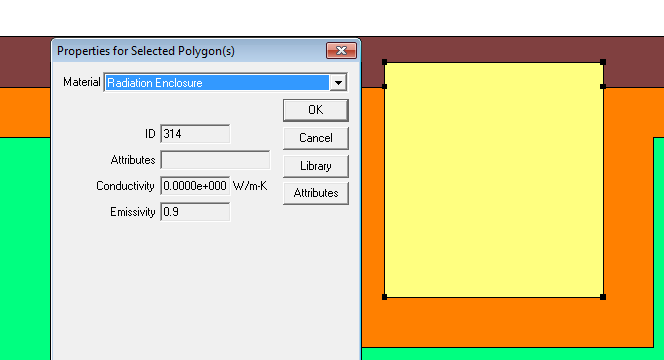
Also, you are modeling a radiation enclosure where you shouldn't be. The program will model the radiation between the surfaces of this enclosure, so you can set it to a frame cavity. Then the file will run (after you fix the overlapping polygons). I have attached a model that runs.


On Wednesday, December 16, 2015 at 11:13:02 AM UTC-8, Ben Larsen wrote:
4521-Rm.THM
Reply all
Reply to author
Forward
0 new messages