
Regarding table caption and cell alignment
789 views
Skip to first unread message

Sam
May 23, 2011, 7:48:37 AM5/23/11
to LaTeX Users Group
Dear all,
I am facing two different issues:
1. I am not able to place the content of a cell of a table in
vertically centered position. I am using usual syntax for tsble
creation - starting with \begin{tabular}[c]... kind of stuff. Please
suggest how I can render vertically-centered content in a cell?
2. Secondly, I am using \caption{table caption} to create a caption
for the table. But in the PDF, the caption is appearing vertically
i.e. the words are wrapped down. I am finding no reason for this
behavior. Please help me.
I am using texlive kile 2.1 beta ubuntu.
Regards,
Samiran
I am facing two different issues:
1. I am not able to place the content of a cell of a table in
vertically centered position. I am using usual syntax for tsble
creation - starting with \begin{tabular}[c]... kind of stuff. Please
suggest how I can render vertically-centered content in a cell?
2. Secondly, I am using \caption{table caption} to create a caption
for the table. But in the PDF, the caption is appearing vertically
i.e. the words are wrapped down. I am finding no reason for this
behavior. Please help me.
I am using texlive kile 2.1 beta ubuntu.
Regards,
Samiran

Peter Flynn
May 23, 2011, 9:40:09 AM5/23/11
to latexus...@googlegroups.com
On Mon, May 23, 2011 at 12:48 PM, Sam <samir...@gmail.com> wrote:
Dear all,
I am facing two different issues:
1. I am not able to place the content of a cell of a table in
vertically centered position. I am using usual syntax for tsble
creation - starting with \begin{tabular}[c]... kind of stuff. Please
suggest how I can render vertically-centered content in a cell?
The l/r/c format only accepts 1-line entries so the concept of vertical centering does not arise.
Can you provide a minimal example of what you are trying to do?
2. Secondly, I am using \caption{table caption} to create a caption
for the table. But in the PDF, the caption is appearing vertically
i.e. the words are wrapped down. I am finding no reason for this
behavior. Please help me.
Please provide a minimal example we can test.
///Peter
Sam
May 24, 2011, 10:38:10 AM5/24/11
to latexus...@googlegroups.com
Code:
\begin{table}[h]\small
\caption{Table Caption}
\centering
\begin{tabular}{| l | c | c | } \hline
\textbf{Column1} & \textbf{Column2} & \textbf{Column3} \\ \hline
$Row1$ & R1C2 & R1C3 \\ \hline
$Row2$ & R2C2 & R2C3 \\ \hline
$Row3$ & R3C2 & R3C3 \\ \hline
\end{tabular}
\label{tab:label}
\end{table}
Output:
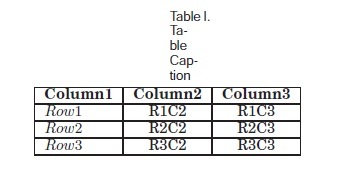
Could you please check now?
Peter Flynn
May 24, 2011, 6:27:05 PM5/24/11
to latexus...@googlegroups.com
On Tue, May 24, 2011 at 3:38 PM, Sam <samir...@gmail.com> wrote:
Code:\begin{table}[h]\small\caption{Table Caption}\centering\begin{tabular}{| l | c | c | } \hline\textbf{Column1} & \textbf{Column2} & \textbf{Column3} \\ \hline$Row1$ & R1C2 & R1C3 \\ \hline$Row2$ & R2C2 & R2C3 \\ \hline$Row3$ & R3C2 & R3C3 \\ \hline\end{tabular}\label{tab:label}\end{table}
That works fine here. You must be using packages or settings that you haven't told us about.
A Miminal Working Example means a complete LaTeX document starting with \documentclass and ending with \end{document} that contains only the absolute minimum to show the error.
There is no error in what you give above, eg
\documentclass{article}
\pagestyle{empty}
\begin{document}
\pagestyle{empty}
\begin{document}
\begin{table}[h]\small
\caption{Table Caption}
\centering
\begin{tabular}{|l|c|c|}\hline
\textbf{Column1}&\textbf{Column2}&\textbf{Column3}\\\hline
$Row1$ & R1C2 & R1C3 \\ \hline
$Row2$ & R2C2 & R2C3 \\ \hline
$Row3$ & R3C2 & R3C3 \\ \hline
\end{tabular}
\label{tab:label}
\end{table}
\end{document}
Output:
See attached.
///Peter
Sam
May 25, 2011, 1:45:06 AM5/25/11
to latexus...@googlegroups.com
Sorry for that.
Here is the complete one:
\documentclass[prodmode,acmtecs]{acmsmall}
\pagestyle{empty}
\begin{document}
\pagestyle{empty}
\begin{document}
\begin{table}[h]\small
\caption{Table Caption}
\centering
\begin{tabular}{|l|c|c|}\hline
\textbf{Column1}&\textbf{Column2}&\textbf{Column3}\\\hline
$Row1$ & R1C2 & R1C3 \\ \hline
$Row2$ & R2C2 & R2C3 \\ \hline
$Row3$ & R3C2 & R3C3 \\ \hline
\end{tabular}
\label{tab:label}
\end{table}
\caption{Table Caption}
\centering
\begin{tabular}{|l|c|c|}\hline
\textbf{Column1}&\textbf{Column2}&\textbf{Column3}\\\hline
$Row1$ & R1C2 & R1C3 \\ \hline
$Row2$ & R2C2 & R2C3 \\ \hline
$Row3$ & R3C2 & R3C3 \\ \hline
\end{tabular}
\label{tab:label}
\end{table}
Attached is the .cls file.
regards
Sam
Peter Flynn
May 25, 2011, 4:16:26 PM5/25/11
to latexus...@googlegroups.com
OK, that shows the same problem. I downloaded acm-small-v1-1.zip from http://www.acm.org/publications/latex_style/
But have you read the documentation (acmsmall-guide.pdf)? It says in section 4.2. Tables (p1:9):
The standard LaTeX table environment can be used to create a table, but the user should add formatting commands to match with the ACM style. acmsmall provides a command called \tbl{}{}, which should be used inside the table environment. The first argument of \tbl command is the caption and the second argument is the table body coded inside standard LaTeX tabular environment. This command automatically calculates the width of the table and fits the caption and table notes accordingly.
This means:
\documentclass[prodmode,acmtecs]{acmsmall}
\pagestyle{empty}
\begin{document}
\begin{table}[h]
\pagestyle{empty}
\begin{document}
\begin{table}[h]
\tbl{Table Caption}{%
\begin{tabular}{|l|c|c|}\hline
\textbf{Column1}&\textbf{Column2}&\textbf{Column3}\\\hline
$Row1$ & R1C2 & R1C3 \\ \hline
$Row2$ & R2C2 & R2C3 \\ \hline
$Row3$ & R3C2 & R3C3 \\ \hline
\end{tabular}
}
\label{tab:label}
\end{table}
\end{document}
///Peter
Sam
May 25, 2011, 11:53:53 PM5/25/11
to latexus...@googlegroups.com
Thanks Peter. I should have read. :)
Reply all
Reply to author
Forward
0 new messages