
GUI button not working.
330 views
Skip to first unread message

mkm1...@gmail.com
Aug 16, 2018, 10:03:05 AM8/16/18
to LAStools - efficient tools for LiDAR processing
Hi,
Just installed LAStools on a Windows 10 machine with an NVIDIA GTX1060 and having trouble with the buttons. When I open the app the LAStools display appears normal until I try to click on "Browse". Then the size of the left tool bar expands and the mouse pointer locations are shifted. I read a post about assigning the graphics card to the LAStools app and tried but still have the issue. Any Ideas how to resolve? Thanks for the help.


Martin Isenburg
Aug 17, 2018, 2:51:07 PM8/17/18
to LAStools - efficient command line tools for LIDAR processing
Hello,
so far issues with Windows 10 and miss-having LAStools GUIs have all been solved by following the instructions here:
Other possibilities are to avoid the GUI by
(a) working in the commend line
(b) by writing batch scripts
(c) by using the LAStools toolboxes in QGIS 2.6 - 2.18
(d) by using the LAStools toolboxes in ArghGIS 9.3 - 10.8
(e) by using the LAStools toolboxes ERDAS IMAGINE
Regards,
Martin @rapidlasso
--
Download LAStools at
http://lastools.org
http://rapidlasso.com
Be social with LAStools at
http://facebook.com/LAStools
http://twitter.com/LAStools
http://linkedin.com/groups/LAStools-4408378
Manage your settings at
http://groups.google.com/group/lastools/subscribe

Jack J.
Oct 2, 2018, 1:58:39 PM10/2/18
to LAStools - efficient tools for LiDAR processing
I'm having the exact same issue. Tried assigning my NVIDIA graphics card to the the LAStools app and disabling my on-board graphics card but I'm still having the same issue. Let me know if you find a solution.
Martin Isenburg
Oct 3, 2018, 8:35:03 AM10/3/18
to LAStools - efficient command line tools for LIDAR processing
Hello,
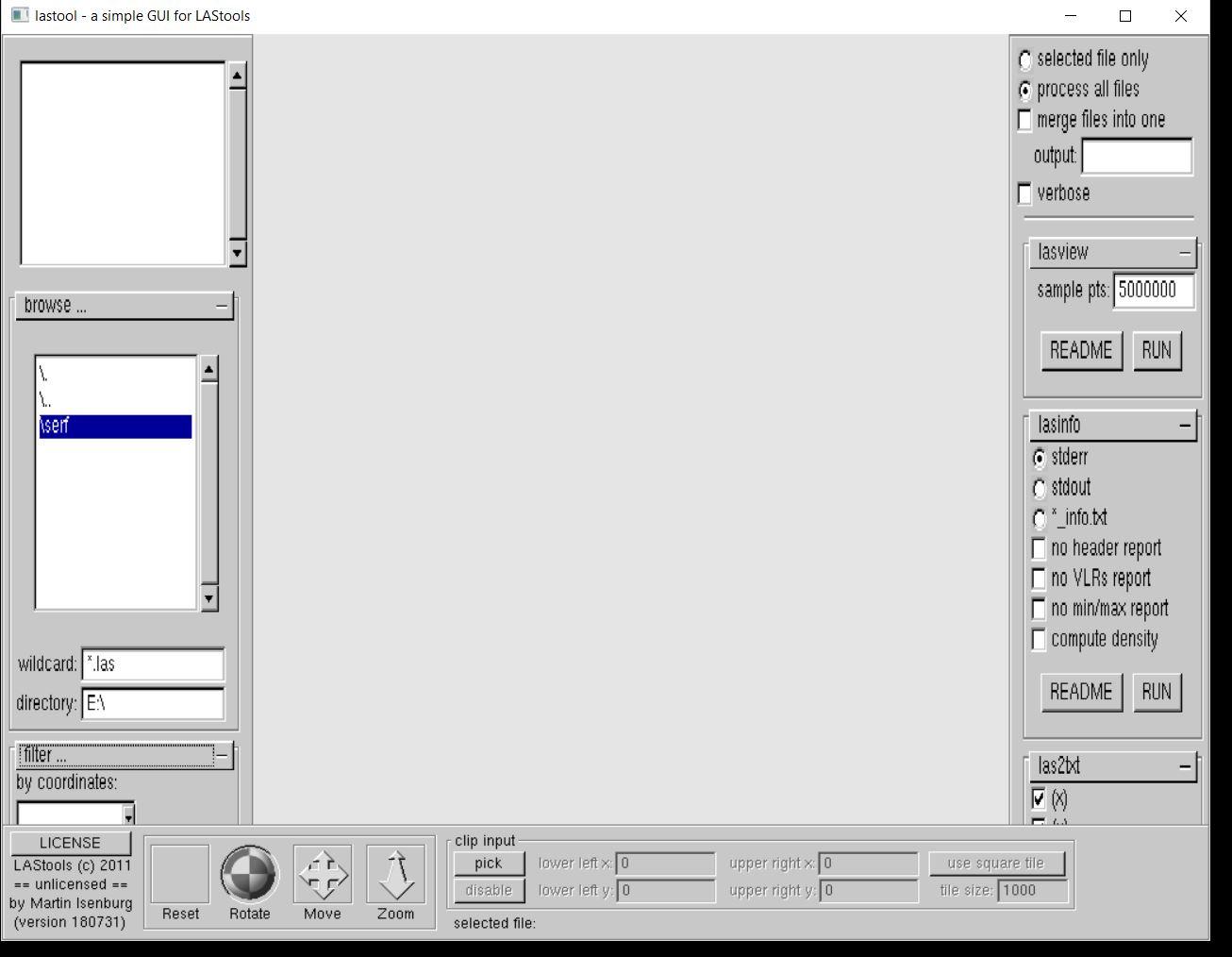
the attached image does not show any issue to me. In case of hopeless Windows / Graphics driver combinations one can always revert back to either use of the command line or to use LAStools via the new and improved QGIS toolbox for QGIS 3.2 that you can download via the plugin browser or directly here:
Regards.
Martin
--
Martin Isenburg
Feb 21, 2019, 10:34:01 PM2/21/19
to LAStools - efficient command line tools for LIDAR processing
Hello,
someone suggested to simply "maximize" the GUI window as this also gets around the graphics driver problem on certain combinations of Windows 10 operating systems and some particular graphics cards. I confirmed that recently when on-site with a client.
Regards.
Martin @rapidlasso

Mel Gingras
Sep 9, 2019, 3:55:28 PM9/9/19
to LAStools - efficient tools for LiDAR processing
Hi, I am having the same issue with distortion/GUI offset. I have tried the graphics card fix suggested here https://groups.google.com/d/topic/lastools/se7vub8NV2Q/discussion but that did not resolve the issue. Maximizing the window only allows me to navigate to the file but, as soon as I click another button, the GUI distortion offset returns. Is the GUI fundamentally broken so that the only solution is to use command line or another software's plugin? I've attached a PDF depicting the offsets in las2las for clarity.

Michal Gallay
Sep 11, 2019, 3:10:47 AM9/11/19
to last...@googlegroups.com
Dear Mel,
I have the same issue, in such a case, you need to be careful, first to close the previously opened window and only then open another one.
In your case, it is the "browse" window. There can be only one such window opened, otherwise, your text becomes elongated and you experience the same issue as reported.
I hope it helps.
Michal
po 9. 9. 2019 o 21:55 Mel Gingras <mging...@gmail.com> napísal(a):
---
You received this message because you are subscribed to the Google Groups "LAStools - efficient tools for LiDAR processing" group.
To unsubscribe from this group and stop receiving emails from it, send an email to lastools+u...@googlegroups.com.
To view this discussion on the web visit https://groups.google.com/d/msgid/lastools/552ce6dc-7898-4484-b4e8-27aa3009f078%40googlegroups.com.
--
doc. Mgr. Michal Gallay, PhD.
prodekan pre vonkašie vzťahy
Prírodovedecká fakulta
Univerzita Pavla Jozefa Šafárika v Košiciach
Šrobárova 2, 041 80 Košice
--
Ústav geografie
Prírodovedecká fakulta
Univerzita Pavla Jozefa Šafárika v Košiciach
Jesenná 5, 040 01 Košice, Slovakia
michal...@upjs.sk
+421 (0) 55 234 2453
https://geo.ics.upjs.sk/index.php/publikacie-gallay
https://orcid.org/0000-0002-0075-4991
https://researcherid.com/rid/K-3656-2015
https://publons.com/a/1172158/
prodekan pre vonkašie vzťahy
Prírodovedecká fakulta
Univerzita Pavla Jozefa Šafárika v Košiciach
Šrobárova 2, 041 80 Košice
--
Ústav geografie
Prírodovedecká fakulta
Univerzita Pavla Jozefa Šafárika v Košiciach
Jesenná 5, 040 01 Košice, Slovakia
michal...@upjs.sk
+421 (0) 55 234 2453
https://geo.ics.upjs.sk/index.php/publikacie-gallay
https://orcid.org/0000-0002-0075-4991
https://researcherid.com/rid/K-3656-2015
https://publons.com/a/1172158/


C M
Nov 1, 2019, 1:16:48 PM11/1/19
to LAStools - efficient tools for LiDAR processing
I found that going to "Device Manager" -> "Display Adapter" -> right-clicking on "NVIDIA GeForce GTX 1080", and selecting "Update Driver" solved this issue for me.
Windows 10 Pro (version 1709) (os build 16299.1087)
Reply all
Reply to author
Forward
0 new messages