
Reading extended classification 0-255 in LAS 1.2 using the withheld, overlap, keypoint flags
1,342 views
Skip to first unread message

Andrew Hewitt
May 5, 2016, 11:12:47 AM5/5/16
to LAStools - efficient tools for LiDAR processing
Hey folks,
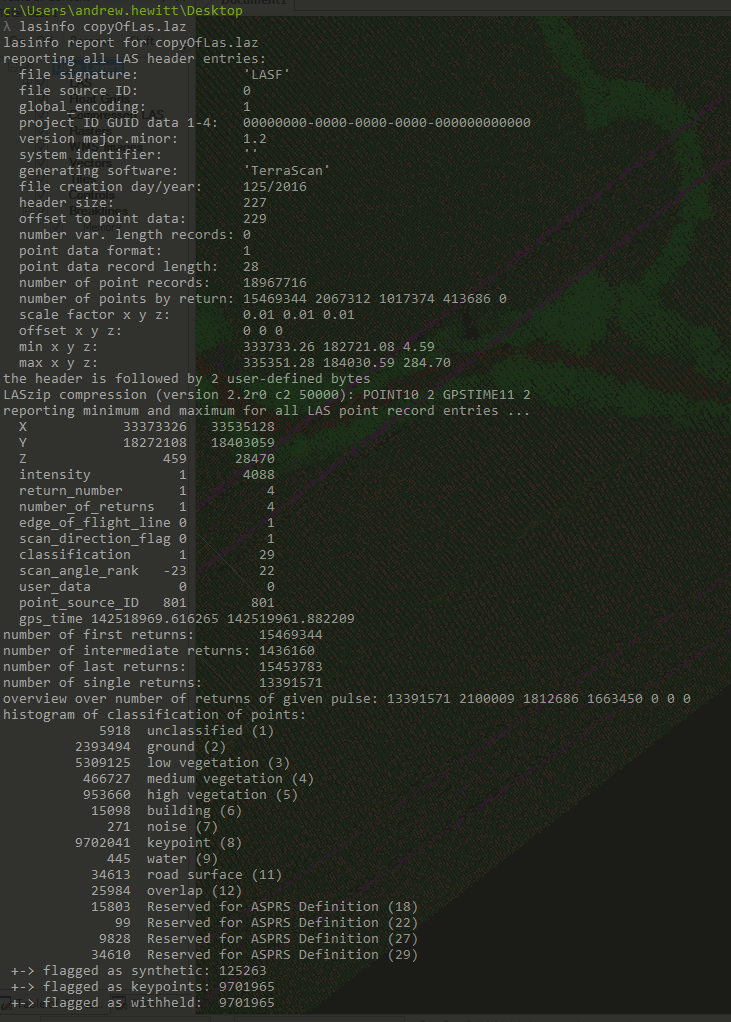
I have some LAS 1.2 files that have already been classified using TerraScan in Microstation using a variety of classes ranging though 0 - 255
Is there any way to easily read in the extended classification (TerraScan abuses the LAS standard to re purpose the 3 withheld, keypoint and synthetic bits to allow classification >32)
I'm willing to upgrade these to LAS 1.4 files to abide by the standard, but currently there is no easy way to map the old classes to the new file.
I understand if you keep the class with with the relevant flags you can decipher the classes and merge them back again - but this seems like taking the long way round.
Any ideas?
I've attached a lasinfo of an example las file if that helps.
Many thanks,
Andy

Martin Isenburg
Jun 6, 2016, 10:57:19 PM6/6/16
to LAStools - efficient command line tools for LIDAR processing
Hello,
this functionality was added to the latest release of LAStools (160606). You can now do this now in two step by following the example below.
Regards,
Martin @rapidlasso
==========================================
creating fake ancient file
D:\LAStools\bin>las2las -i ..\data\fusa.laz ^
-set_keypoint_flag 1 ^
-set_withheld_flag 1 ^
-o fusa_ancient.laz
D:\LAStools\bin>lasinfo -i fusa_ancient.laz
lasinfo (160606) report for fusa_ancient.laz
reporting all LAS header entries:
file signature: 'LASF'
file source ID: 0
global_encoding: 0
project ID GUID data 1-4: 00000000-0000-0000-0000-000000000000
version major.minor: 1.1
system identifier: 'LAStools (c) by rapidlasso GmbH'
generating software: 'las2las (version 160606)'
file creation day/year: 40/2010
header size: 227
offset to point data: 321
number var. length records: 1
point data format: 1
point data record length: 28
number of point records: 277573
number of points by return: 263413 13879 281 0 0
scale factor x y z: 0.01 0.01 0.01
offset x y z: 0 0 0
min x y z: 277750.00 6122250.00 42.21
max x y z: 277999.99 6122499.99 64.35
variable length header record 1 of 1:
reserved 43707
user ID 'LASF_Projection'
record ID 34735
length after header 40
description 'by LAStools of Martin Isenburg'
GeoKeyDirectoryTag version 1.1.0 number of keys 4
key 1024 tiff_tag_location 0 count 1 value_offset 1 - GTModelTypeGeoKey: ModelTypeProjected
key 3072 tiff_tag_location 0 count 1 value_offset 32754 - ProjectedCSTypeGeoKey: WGS 84 / UTM 54S
key 3076 tiff_tag_location 0 count 1 value_offset 9001 - ProjLinearUnitsGeoKey: Linear_Meter
key 4099 tiff_tag_location 0 count 1 value_offset 9001 - VerticalUnitsGeoKey: Linear_Meter
LASzip compression (version 2.4r2 c2 50000): POINT10 2 GPSTIME11 2
reporting minimum and maximum for all LAS point record entries ...
X 27775000 27799999
Y 612225000 612249999
Z 4221 6435
intensity 10 62293
return_number 1 3
number_of_returns 1 3
edge_of_flight_line 0 0
scan_direction_flag 0 0
classification 1 6
scan_angle_rank 79 103
user_data 0 197
point_source_ID 1 1
gps_time 5880.963028 5886.739738
number of first returns: 263413
number of intermediate returns: 283
number of last returns: 263370
number of single returns: 249493
overview over number of returns of given pulse: 249493 27232 848 0 0 0 0
histogram of classification of points:
17553 unclassified (1)
180868 ground (2)
37030 high vegetation (5)
42122 building (6)
+-> flagged as keypoints: 277573
+-> flagged as withheld: 277573
==========================================
converting fake ancient file to LAS 1.4 in two steps
D:\LAStools\bin>las2las -i fusa_ancient.laz ^
-set_version 1.4 ^
-set_point_type 6 -o fusa_extended.las
D:\LAStools\bin>lasinfo -i fusa_extended.las
lasinfo (160606) report for fusa_extended.las
reporting all LAS header entries:
file signature: 'LASF'
file source ID: 0
global_encoding: 0
project ID GUID data 1-4: 00000000-0000-0000-0000-000000000000
version major.minor: 1.4
system identifier: 'LAStools (c) by rapidlasso GmbH'
generating software: 'las2las (version 160606)'
file creation day/year: 40/2010
header size: 375
offset to point data: 469
number var. length records: 1
point data format: 6
point data record length: 30
number of point records: 0
number of points by return: 0 0 0 0 0
scale factor x y z: 0.01 0.01 0.01
offset x y z: 0 0 0
min x y z: 277750.00 6122250.00 42.21
max x y z: 277999.99 6122499.99 64.35
start of waveform data packet record: 0
start of first extended variable length record: 0
number of extended_variable length records: 0
extended number of point records: 277573
extended number of points by return: 263413 13879 281 0 0 0 0 0 0 0 0 0 0 0 0
variable length header record 1 of 1:
reserved 43707
user ID 'LASF_Projection'
record ID 34735
length after header 40
description 'by LAStools of Martin Isenburg'
GeoKeyDirectoryTag version 1.1.0 number of keys 4
key 1024 tiff_tag_location 0 count 1 value_offset 1 - GTModelTypeGeoKey: ModelTypeProjected
key 3072 tiff_tag_location 0 count 1 value_offset 32754 - ProjectedCSTypeGeoKey: WGS 84 / UTM 54S
key 3076 tiff_tag_location 0 count 1 value_offset 9001 - ProjLinearUnitsGeoKey: Linear_Meter
key 4099 tiff_tag_location 0 count 1 value_offset 9001 - VerticalUnitsGeoKey: Linear_Meter
reporting minimum and maximum for all LAS point record entries ...
X 27775000 27799999
Y 612225000 612249999
Z 4221 6435
intensity 10 62293
return_number 1 3
number_of_returns 1 3
edge_of_flight_line 0 0
scan_direction_flag 0 0
classification 1 6
scan_angle_rank 79 103
user_data 0 197
point_source_ID 1 1
gps_time 5880.963028 5886.739738
extended_return_number 1 3
extended_number_of_returns 1 3
extended_classification 1 6
extended_scan_angle 13167 17167
extended_scanner_channel 0 0
number of first returns: 263413
number of intermediate returns: 283
number of last returns: 263370
number of single returns: 249493
overview over extended number of returns of given pulse: 249493 27232 848 0 0 0 0 0 0 0 0 0 0 0 0
histogram of classification of points:
17553 unclassified (1)
180868 ground (2)
37030 high vegetation (5)
42122 building (6)
+-> flagged as keypoints: 277573
+-> flagged as withheld: 277573
D:\LAStools\bin>las2las -i fusa_extended.las ^
-move_ancient_to_extended_classification ^
-o fusa_extended_fixed.las
D:\LAStools\bin>lasinfo -i fusa_extended_fixed.las
lasinfo (160606) report for fusa_extended_fixed.las
reporting all LAS header entries:
file signature: 'LASF'
file source ID: 0
global_encoding: 0
project ID GUID data 1-4: 00000000-0000-0000-0000-000000000000
version major.minor: 1.4
system identifier: 'LAStools (c) by rapidlasso GmbH'
generating software: 'las2las (version 160606)'
file creation day/year: 40/2010
header size: 375
offset to point data: 469
number var. length records: 1
point data format: 6
point data record length: 30
number of point records: 0
number of points by return: 0 0 0 0 0
scale factor x y z: 0.01 0.01 0.01
offset x y z: 0 0 0
min x y z: 277750.00 6122250.00 42.21
max x y z: 277999.99 6122499.99 64.35
start of waveform data packet record: 0
start of first extended variable length record: 0
number of extended_variable length records: 0
extended number of point records: 277573
extended number of points by return: 263413 13879 281 0 0 0 0 0 0 0 0 0 0 0 0
variable length header record 1 of 1:
reserved 43707
user ID 'LASF_Projection'
record ID 34735
length after header 40
description 'by LAStools of Martin Isenburg'
GeoKeyDirectoryTag version 1.1.0 number of keys 4
key 1024 tiff_tag_location 0 count 1 value_offset 1 - GTModelTypeGeoKey: ModelTypeProjected
key 3072 tiff_tag_location 0 count 1 value_offset 32754 - ProjectedCSTypeGeoKey: WGS 84 / UTM 54S
key 3076 tiff_tag_location 0 count 1 value_offset 9001 - ProjLinearUnitsGeoKey: Linear_Meter
key 4099 tiff_tag_location 0 count 1 value_offset 9001 - VerticalUnitsGeoKey: Linear_Meter
reporting minimum and maximum for all LAS point record entries ...
X 27775000 27799999
Y 612225000 612249999
Z 4221 6435
intensity 10 62293
return_number 1 3
number_of_returns 1 3
edge_of_flight_line 0 0
scan_direction_flag 0 0
classification 0 0
scan_angle_rank 79 103
user_data 0 197
point_source_ID 1 1
gps_time 5880.963028 5886.739738
extended_return_number 1 3
extended_number_of_returns 1 3
extended_classification 193 198
extended_scan_angle 13167 17167
extended_scanner_channel 0 0
number of first returns: 263413
number of intermediate returns: 283
number of last returns: 263370
number of single returns: 249493
overview over extended number of returns of given pulse: 249493 27232 848 0 0 0 0 0 0 0 0 0 0 0 0
histogram of classification of points:
277573 never classified (0)
histogram of extended classification of points:
17553 extended classification (193)
180868 extended classification (194)
37030 extended classification (197)
42122 extended classification (198)
--
Download LAStools at
http://lastools.org
http://rapidlasso.com
Be social with LAStools at
http://facebook.com/LAStools
http://twitter.com/LAStools
http://linkedin.com/groups/LAStools-4408378
Manage your settings at
http://groups.google.com/group/lastools/subscribe

Sophie Davison
Jun 9, 2016, 10:54:54 AM6/9/16
to LAStools - efficient tools for LiDAR processing
Hi,
Thanks for that quick fix, I was suffering from the same problem and this works great when writing to las. I am, however, having issues when writing to .laz using this process:
las2las -i "D:\tests\*.las" -set_version 1.4 -point_type 6 -cores 7 -olaz -odir "D:\test\out"
ERROR: could not open laswriter
ERROR: point type 6 of size 30 not supported (with LASzip)
Not a huge deal as I can use .las but it would be great to work out where I'm going wrong/find a solution.
Thanks,
Sophie Davison
Durham University
Martin Isenburg
Jun 10, 2016, 3:35:40 AM6/10/16
to LAStools - efficient command line tools for LIDAR processing
Hello,
currently you can *only* compress LAS 1.4 files with the new point types 6 to 10 with the laszip.exe tool. It will first use the "compatibility mode" that is not implemented with on-the-fly compression in all of the LAStools yet (unlike LASzip for LAS 1.3).
So simply first use las2las to go to LAS. And then use laszip to go to LAZ. But read up on what the "compatibility mode" means:
Regards,
Martin @rapidlasso

Jason West
May 4, 2017, 3:05:37 PM5/4/17
to LAStools - efficient tools for LiDAR processing
Is there a way to perform these classification conversion steps in way that results in LAS file version 1.3 instead of 1.4?
Thanks,
Jason
Jason
Martin Isenburg
May 4, 2017, 10:03:38 PM5/4/17
to LAStools - efficient command line tools for LIDAR processing
Jason,
I am not able to reconstruct what you may mean with "these classification conversion steps". Please give us *MUCH* more detail (and maybe a lasinfo report on your current LAS/LAZ file) of what you currently have, how it relates to the discussion in this thread, and what output *exactly* you are trying to produce.
Regards.
Martin @rapidlasso
Jason West
May 5, 2017, 12:09:14 PM5/5/17
to LAStools - efficient tools for LiDAR processing
Sorry, I know this thread is super old but since it applies exactly to my situation I thought I could get away with being brief :)
The first post from Andrew refers to the situation of having LAS 1.2 files produced by TerraScan that have classifications ranging through 0 - 255 with extended classes stored in a non standard way by using the withheld, keypoint, and synthetic bits (I'm quite new to working with LAS files so I don't understand a lot of the technicals and terminology... please bare with me). His posted image of the lasinfo output is exactly my situation. Andrew then asks if there is a way to read these extended classes with LAStools. Your response Martin works perfectly... By running the following two commands, the TerraScan 1.2 files are converted to 1.4 files with the extended classes translated correctly:
las2las -i fusa_ancient.laz -set_version 1.4 -set_point_type 6 -o fusa_extended.las
And then...
las2las -i fusa_extended.las -move_ancient_to_extended_classification -o fusa_extended_fixed.las
My problem now is that I wish to view the resulting 1.4 files with CloudCompare, however that software uses Liblas for loading LAS files which does not support LAS versions greater than 1.3. So my question is simply about if there is a way to use the above two las2las commands for re mapping the extended classes into the standard format but modified so that the resulting LAS file version is something less than 1.4. I have tried simply changing "-set_version 1.4" to "-set_version 1.3" but it does not work and unfortunately the details of the different LAS versions and point types are beyond my understanding so at this point I am at a loss of what to try next.
Does this explanation make sense?
Thanks,
Jason
Jason
Martin Isenburg
May 5, 2017, 1:11:53 PM5/5/17
to LAStools - efficient command line tools for LIDAR processing
Hello,
Yep. Got it. What you could do is compress the resulting LAS 1.4 file in "compatibility mode" to a compressed LAS 1.2 file with the "extra classifications" hidden in the "extra bytes". Now the resulting "compatible" LAZ file can also not be read by libLAS (see [1]) but maybe the corresponding uncompressed file can. You can "remain in compatibility mode" during decompression by adding '-remain_compatible' to the command line. Here an example:
:: create an 'ancient example' by turning on the synthetic flag
:: for all returns classified as veggie (5) and building (6)
las2las -i ..\data\fusa.laz ^
-keep_class 5 6 ^
-filtered_transform ^
-set_synthetic_flag 1 ^
-o fusa_ancient.laz
lasinfo -i fusa_ancient.laz -odix _info -otxt
:: convert from ancient LAS 1.2 to uncompressed LAS 1.4
las2las -i fusa_ancient.laz ^
-set_version 1.4 ^
-set_point_type 6 ^
-o fusa_extended.las
lasinfo -i fusa_extended.las -odix _info -otxt
:: map the ancient classification consistent of the 5 bit classification plus
:: three bits that should really be flags to the extended classification
las2las -i fusa_extended.las ^
-move_ancient_to_extended_classification ^
-o fusa_fixed.las
lasinfo -i fusa_fixed.las -odix _info -otxt
:: compress the LAS 1.4 file into compatibly mode LAS 1.2 with "extra bytes"
laszip -i fusa_fixed.las -o fusa_compatible.laz
:: decompress while remaining compatible
laszip -i fusa_compatible.laz -remain_compatible
lasinfo -i fusa_compatible.las -odix _info -otxt
Now the extended classification is inside the "extra bytes" section of a regular LAS 1.2 file. Of the 5 extra bytes there are it is the fourth byte. Of the 4 additional attributes that are encoded as extra bytes it is the third. However, I am not sure if you can access the "extra bytes" in CloudCompare.
But you can copy the third additional attribute (it has index 2) into the z coordinate with '-copy_attribute_into_z 2'
lasinfo -i fusa_compatible.las ^
-nh -nv -nr -nmm ^
-copy_attribute_into_z 2 ^
-histo z 1
[...]
z coordinate histogram with bin size 1
bin 0 has 198421
bin 37 has 37030
bin 38 has 42122
[...]
Maybe I could implement a copy of attributes into another field. Which point attribute in your LAS 1.2 files are you currently not using? The most likely candidate would be 'user data'?
Martin @rapidlasso
Jason West
May 9, 2017, 1:09:16 PM5/9/17
to LAStools - efficient tools for LiDAR processing
Martin,
Thank you for the reply. This approach does work and yes CloudCompare is able to read the 'extra bytes'. The only unfortunate part now is that points which have the extended classes contained in the 'extra bytes' appear as classification 0 in the normal 'Classification' attribute, and vice versa when utilizing the points which have a normal classification value appear as zero in the 'extra bytes' attribute.
As for your question... are you suggesting an option to merge the normal classifications with these extended classes into one attribute (user data)? That would definitely be helpful if it resolves the issue I just described above. Either the 'user data' attribute or this 'extra bytes' attribute that we're talking about now... doesn't really matter which one I guess.
Also, I am not sure what you mean by copying the 3rd attribute into the z coordinate... To me that sounds like overwriting the z coordinate which is of course detrimental to the z coordinate lol (I need to keep the z coordinates as they are).
Thanks again for your help,
Jason
Martin Isenburg
May 9, 2017, 9:26:22 PM5/9/17
to LAStools - efficient command line tools for LIDAR processing
Hello Jason,
indeed. This is how it is coded into the extra bytes. Simply add the "8 bit extra bytes classification" and the "5 bit legacy classification" and you get the correct 8 bit classification value.
classification = legacy + extra_bytes;
Or use the logic
classification = (legacy ? legacy : extra_bytes);
Copying attributes to the user_data field is currently not implemented. But apparently it would no solve your issue as the same math / logic described above would still be neeed. Maybe you need a transform that simply copies the 8 bit ancient or extended classification into the user data field?
Martin
Jason West
May 10, 2017, 5:33:32 PM5/10/17
to LAStools - efficient tools for LiDAR processing
Yeah, adding them together and storing the result in user data would do it.
Looks like I can do the same thing quite easily within CloudCompare though now that I have a better understanding of what's going on and am able to load all of the classes. Thanks for your help :)
Jason

gberard
Oct 5, 2017, 12:54:43 PM10/5/17
to LAStools - efficient tools for LiDAR processing
Hi Martin,
Apologies for reviving the old thread again. Would it be possible to add a "-use_raw_classification" argument or something similar to read these non-compliant classes without actually converting to 1.4?
We're working with Terra outputs like the original poster, but we don't actually need LAS that complies with the spec until the end of our workflows. It would be very helpful to be able to create highest hit rasters with lasgrid, for example, while filtering classes >32 and remaining in LAS 1.2.
Thank you,
Greg
Martin Isenburg
Oct 14, 2017, 7:55:57 AM10/14/17
to LAStools - efficient command line tools for LIDAR processing
Hi,
that's not possible directly. But you could use a pipe because that's the next best thing. But I had to make some fixes to las2las for this pipe to work properly so you will need to upgrade to the latest version of LAStools (171011) for this to work as shown below.
Let's first generate an example for an "ancient" 8-bit-classification in LAS 1.2 by setting some flags for all points that are higher than 50 meter in elevation:
las2las -i ..\data\fusa.laz ^
-keep_z_above 50 ^
-filtered_transform ^
-set_keypoint_flag 1 ^
-set_withheld_flag 1 ^
-o fusa_ancient.laz
See which points have keypoint and withheld flag set. Those are all returns above 50 meters (see attached pic).
lasview -i fusa_ancient.laz -keep_keypoint
lasview -i fusa_ancient.laz -keep_withheld
Now run a pipe that (1) upgrades to LAS 1.4 with las2las, (2) changes ancient to extended classification, and (3) uses the extended classification to filter out just a few points for gridding. We chose 198 which corresponds only to those points that are withheld / keypoint flagged building points. The result (see attached pic) is as expected.
las2las -i fusa_ancient.laz ^
-set_version 1.4 ^
-set_point_type 6 ^
-olas -stdout | ^
las2las -stdin ^
-move_ancient_to_extended_classification ^
-olas -stdout | ^
lasgrid -stdin ^
-keep_extended_classification 198 ^
-step 0.5 -subsample 3 -highest -false ^
-o fusa_ancient_pipe_test.png
Regards,
Martin @rapidlasso
PS: Want to meet rapidlasso GmbH in person and talk LiDAR, photogrammetry points and LAStools? See our upcoming event schedule here: http://rapidlasso.com/events


Reply all
Reply to author
Forward
0 new messages