From .xyz to .las [Newbie user]

2,741 views
Skip to first unread message

Massimiliano Moraca

unread,
Aug 6, 2015, 9:28:59 AM8/6/15
to LAStools - efficient tools for LiDAR processing
Hi, I'm a new user of lastools and my english is not perfect...then be patience!

I have some lidar file in .xyz (es. 000330.xyz) and I have need to convert in .las for create DTM, DSM and TIN. Can you give me a correct procedure for the conversion?
I use ArcGis 10.2 and QGis 2.10.

One of this file is in attachment
000330.xyz

Nicolas Cadieux

unread,
Aug 6, 2015, 10:35:38 AM8/6/15
to last...@googlegroups.com

Hi,
You can use txt2las.exe.  Go to the unzipped lastools folder.  Find txt2las.exe (probably in c:\some_folder\lastools\bin).  Double Click on the program txt2las.exe and an you will get a GUI (graphical interface).  It's the easiest way.  Your xyz file is a text .txt file. 

Nicolas Cadieux M.Sc.
Les Entreprises Archéotec inc. 
8548, rue Saint-Denis Montréal H2P 2H2
Téléphone: 514.381.5112  Fax: 514.381.4995
www.archeotec.ca

Massimiliano Moraca

unread,
Aug 6, 2015, 11:16:45 AM8/6/15
to LAStools - efficient tools for LiDAR processing, nicolas...@archeotec.ca
Hi!
Thank you for indication. I don't undestand why in ArcGis or QGis Lastools not running.
I used txt2las and now I have need to create a DTM from .las file. Is there a tutorial?

Nicolas Cadieux

unread,
Aug 6, 2015, 2:21:16 PM8/6/15
to Massimiliano Moraca, LAStools - efficient tools for LiDAR processing

Hi,
You can use QGIS to make a DTM or las2dem.exe (in the lastools).  Instead of using lastools for the DTM, I prefer using gdal_grid with a neerest neighbor interpolation.  I use a comma separated file and a .vrt file.  It's a bit complicated but necessary because I try to use only open source for my project.

What is your problem with lastools in QGIS?  Have you indicated where the lastools folder is to the processing plugin? If not, that is the first step.

Nicolas Cadieux M.Sc.
Les Entreprises Archéotec inc. 
8548, rue Saint-Denis Montréal H2P 2H2
Téléphone: 514.381.5112  Fax: 514.381.4995
www.archeotec.ca

Martin Isenburg

unread,
Aug 9, 2015, 5:37:31 AM8/9/15
to LAStools - efficient command line tools for LIDAR processing, Massimiliano Moraca
Hello,

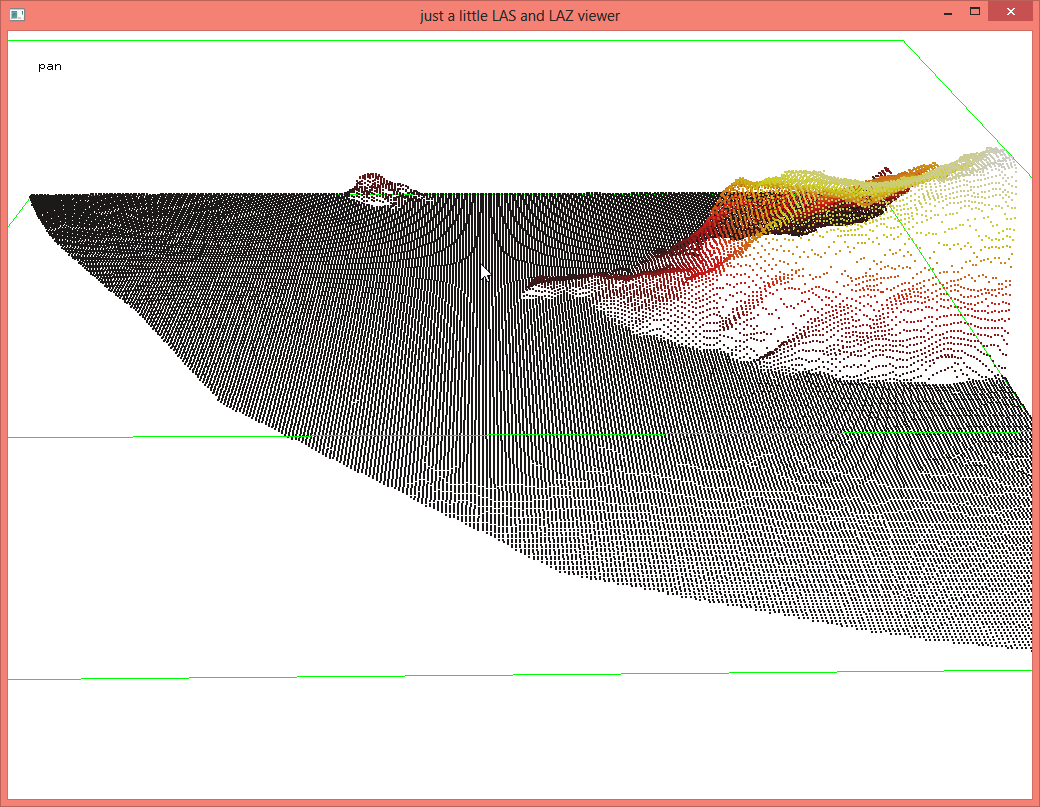
The sample file you send is already a raster. The *.xyz format is often used to store rasters as pseudo-point clouds where all the xyz coordinates are on a grid in the x/y plane. This is obviously here the case and your grid spacing is 1 meter.

D:\LAStools\bin>more 000330.xyz
429006.5  4516241.5  -0.26
429006.5  4516242.5  -0.26
429006.5  4516243.5  -0.27
429007.5  4516238.5  -0.2
429007.5  4516239.5  -0.26
429007.5  4516240.5  -0.27
429007.5  4516241.5  -0.28
429007.5  4516242.5  -0.29
429007.5  4516243.5  -0.3
429008.5  4516236.5  -0.17
429008.5  4516237.5  -0.26

This is also very obvious in the "aliasing" (or "moire") pattern that becomes visible immediately when inspecting the data with lasview (see attached screenshots). If your "LiDAR points" look like this then you do not actually have raw LiDAR points but maybe a gridded derivative:

lasview -i 000330.xyz

Note that XYZ is a very wasteful way to store a grid and it compresses incredibly well with LASzip at a compression ratio of 1 : 42.22 as you can see here:

D:\LAStools\bin>laszip -i 000330.xyz -o 000330.laz
D:\LAStools\bin>dir 00*
08/09/2015  11:27 AM            40,568 000330.laz
08/06/2015  03:33 PM         1,712,853 000330.xyz

Hence, you already have a DTM (or DSM) and all you need to do is convert it to another grid format 
lasgrid -i 000330.xyz -step 1 -o 000330.bil

Regards,

Martin @rapidlasso


Btw ... please do not send such large data in the future, send download links to data instead.
gridded_nature_of_xyz_file.png
Reply all
Reply to author
Forward
0 new messages