
5 Steps to Getting Started with FLEx Send/Receive with Language Forge

Christopher Hirt
Step 1 - Make sure your FLEx data is already on Language Depot
A prerequisite to using Language Forge Send/Receive with FLEx is that your data is already present on Language Depot. For this How To, you’ll need your Language Depot username and password handy.
Step 2 - Create a Language Forge account

Visit languageforge.org to get started
Step 3 - Login and Start a Language Forge project

Click Start a New Project, then Dictionary
Step 4 - Connect Project with Language Depot
Your project is already hosted on Language Depot. This step will create a Language Forge project that is linked to your FLEx project on Language Depot.
Click Get project from Language Depot

Enter you Language Depot username and password here, then select the FLEx project from the resulting dropdown list.
Note: you must be the manager of a project and the project must be a FLEx project (not a LIFT/WeSay project) or the sync will not work.

You’ll need to wait a few minutes for the project to be created and the initial send/receive to take place.
Step 5 - Start Using Language Forge to Collaborate!
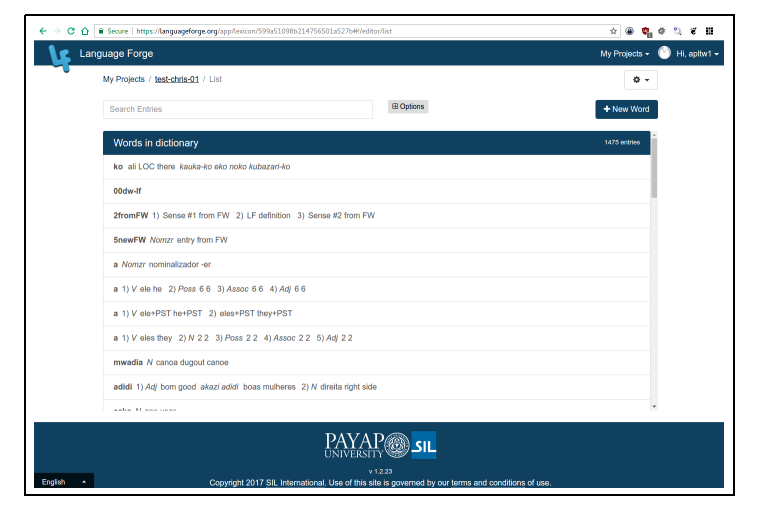
When the initial send/receive is finished, you’ll see the project’s list view. Congratulations, your project is ready to use!
You can add new users to your project and assign them a role by clicking User Management and initiate subsequent send/receives by clicking Synchronize


tim_k...@sil.org
Thanks for the helpful tutorial.
You mentioned that "The Language Forge Software Community site is the preferred place to interact with Language Forge users and developers". Does this replace the earlier advice that "The simplest and easiest way to give us suggestions, feedback on your experience, etc. is to use this Google Group list" or are there still reasons for us to post to this group?
I'm just trying to work out which group to use for a problem I've been having with searching for words in my project.
thanks
Tim
Christopher Hirt


--
You received this message because you are subscribed to the Google Groups "Language Forge Users" group.
To unsubscribe from this group and stop receiving emails from it, send an email to languageforge+unsubscribe@googlegroups.com.
For more options, visit https://groups.google.com/d/optout.