
The minimum internet upload speed in order to have a good video experience with the Tutorial 3
371 views
Skip to first unread message

Alexandre Verri
Oct 7, 2014, 3:51:22 PM10/7/14
to kur...@googlegroups.com
I would like to know the minimum internet upload speed in order to have a good video experience with the Tutorial 3 (one-to-many video broadcasting).
Maybe the poor video experiences reported in this forum could be related to low internet upload speeds.
Alexandre Verri
Oct 7, 2014, 9:55:10 PM10/7/14
to kur...@googlegroups.com
I've been running some tests, and here are the results:
- Master with 500Kbps of upload speed: impossible to broadcast the video.
- Master with 1Mbps of upload speed: slow video, freezing all the time.
- Master with 2Mbps of upload spees: excellent video experience.
So, the video question is related to the upload speed. I did a test with tutorial 3, where the master was in Canada and the viewers was in Brazil. It worked really nice.

LuLop
Oct 8, 2014, 2:25:09 AM10/8/14
to kur...@googlegroups.com
Alexandre,
In our testbed we're able to have a reasonable video experience with upload speeds of 300Kbps. During this week we're going to investigate why installations in EC2 cannot reproduce such behavior. We'll report our findings to this list.
In addition to this, it would be interesting to us to have a screen-shot of "chrome://webrtc-internals" showing the video statistics when you have slow video. I suspect that you may be having huge packet losses and that could explain why you have such bad experience and why you do require such high upstream bandwidth.
Best.
L.
--
You received this message because you are subscribed to the Google Groups "kurento" group.
To unsubscribe from this group and stop receiving emails from it, send an email to kurento+u...@googlegroups.com.
For more options, visit https://groups.google.com/d/optout.
Alexandre Verri
Oct 8, 2014, 8:21:57 AM10/8/14
to kur...@googlegroups.com
Hi Luis,
it's interesting to read about your good experience with videos using 300Kbps of upload link. Just for curiosity: which hosting provider have you used?
I'll run tutorial 3 again and collect the Chrome statistics with slow videos.
Your investigation about Kurento running on EC2 will be very valuable.
Regards,
Alexandre
LuLop
Oct 8, 2014, 8:31:58 AM10/8/14
to kur...@googlegroups.com
El 08/10/2014, a las 14:21, Alexandre Verri <alexand...@gmail.com> escribió:
Hi Luis,it's interesting to read about your good experience with videos using 300Kbps of upload link. Just for curiosity: which hosting provider have you used?
We use a physical machine.
I'll run tutorial 3 again and collect the Chrome statistics with slow videos.
Could you hare with me the IP address of your testbed (basically the URL where your tutorial installation can be accessed) - you can send it to me in private mail y you don't want to make it public in the list. If I'm able to connect with my browser and reproduce the behavior we could gain useful insight into the problem.
Your investigation about Kurento running on EC2 will be very valuable.
Two people are currently working on that. We hope to have a diagnose soon.
Ivan Gracia
Oct 8, 2014, 8:53:20 AM10/8/14
to Kurento Public
Alexandre,
Is this address http://54.94.41.47:8080/ still valid? I'm trying to access your demo there, but seems that there's nothing listening.
Ivan Gracia

Alexandre Verri
Oct 8, 2014, 9:19:10 AM10/8/14
to kur...@googlegroups.com
Hi Ivan,
no, that URL is no longer valid. I've just started again, please use the following URL:
Feel free to use it. No problem to share it, because the IP is renewed between each restarting.
Best,
Alexandre
Ivan Gracia
Oct 8, 2014, 9:44:14 AM10/8/14
to Kurento Public
Alex,
We are not able to see any video. Do you think you could give us access to that machine, so we can have a look at what's happening?
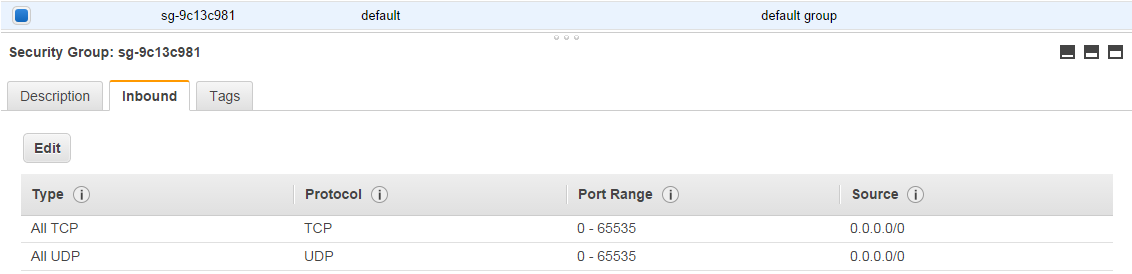
Also, could you please make sure that all UDP ports are open in the EC2 security group?
Ivan Gracia
Alexandre Verri
Oct 8, 2014, 9:54:20 AM10/8/14
to kur...@googlegroups.com
Sure, I'll send you the security cert in order to access.
Alexandre Verri
Oct 8, 2014, 10:06:42 AM10/8/14
to kur...@googlegroups.com
Hi Ivan, I've just sent you the private message with information to access the EC2.
For sure, all the UDP ports are open.
Alexandre Verri
Oct 8, 2014, 4:31:23 PM10/8/14
to kur...@googlegroups.com
Ivan,
I've just tested de demo on AWS, and I didn't see the video too. I am under a corporate firewall, but I think that it could not be a problem.
Have you found any issue?
--
You received this message because you are subscribed to a topic in the Google Groups "kurento" group.
To unsubscribe from this topic, visit https://groups.google.com/d/topic/kurento/edxdtUDovyc/unsubscribe.
To unsubscribe from this group and all its topics, send an email to kurento+u...@googlegroups.com.
Alexandre Verri
Oct 8, 2014, 8:46:41 PM10/8/14
to kur...@googlegroups.com
Hello Luis,
I've finished the test with tutorial 3 using "chrome://webrtc-internals". Please, check the results attached. It looks like I am experiencing packet losses, and I would like to know what can we do in order to reduce it.
Best,
Alexandre


Ivan Gracia
Oct 9, 2014, 6:32:27 AM10/9/14
to Kurento Public
Hi Alexandre,
As you can see from the graphs, the bandwidth consumed raises and then drops abruptly, never stabilising. We are in the process of including congestion control in our endpoint, so users would experience a similar behaviour when connecting two browsers.
For the moment, you could limit the bandwidth in the SDP negotiation, including the b=AS bandwidth modifier in the SDP answer from the server. This will limit the amount of video sent from the client to the server.
Ivan Gracia
Alexandre Verri
Oct 9, 2014, 9:46:35 AM10/9/14
to kur...@googlegroups.com
Hi Ivan,
could you please give me more details about how to limit the bandwidth? Do I need to change the 'sdp_pattern.txt' file or CallHandler Java class? I suspect that I must change the Java class, using string replace in the SdpAnswer in order to include the 'b=AS 150' modifier, bellow the 'm=video ...' parameter.
Thank you for the information about the congestion control. Is it scheduled to the next release?
--
You received this message because you are subscribed to a topic in the Google Groups "kurento" group.
To unsubscribe from this topic, visit https://groups.google.com/d/topic/kurento/edxdtUDovyc/unsubscribe.
To unsubscribe from this group and all its topics, send an email to kurento+u...@googlegroups.com.
Ivan Gracia
Oct 9, 2014, 10:01:32 AM10/9/14
to Kurento Public
Yes, you should change the CallHandler Java class, and just add the b=AS modifier in the SDP answer before sending it to the client. Here is a pice of code in Java that could help you
private void setBandwidth(String sdp) {
    sdp = sdp.replace(/a=mid:audio\r\n/g, 'a=mid:audio\r\nb=AS:50\r\n');
    sdp = sdp.replace(/a=mid:video\r\n/g, 'a=mid:video\r\nb=AS:400\r\n');
    return sdp;
}
Try that, and check that the video is now working as expected. You can check that in the chrome://webrtc-internals window
Ivan Gracia
Alexandre Verri
Oct 9, 2014, 10:57:54 AM10/9/14
to kur...@googlegroups.com
Hi Ivan,
I've noticed that you mentioned a Javascript code, but I got the idea. I've changed the CallHandler class, but it didn't work.
I didn't see the new 'b=AS:300' in the master/viewer console. Please check the CallHandler class bellow.
/*
 * (C) Copyright 2014 Kurento (http://kurento.org/)
 *
 * All rights reserved. This program and the accompanying materials
 * are made available under the terms of the GNU Lesser General Public License
 * (LGPL) version 2.1 which accompanies this distribution, and is available at
 * http://www.gnu.org/licenses/lgpl-2.1.html
 *
 * This library is distributed in the hope that it will be useful,
 * but WITHOUT ANY WARRANTY; without even the implied warranty of
 * MERCHANTABILITY or FITNESS FOR A PARTICULAR PURPOSE. See the GNU
 * Lesser General Public License for more details.
 *
 */
package org.kurento.tutorial.one2manycall;


import java.io.IOException;
import java.util.concurrent.ConcurrentHashMap;


import org.kurento.client.MediaPipeline;
import org.kurento.client.WebRtcEndpoint;
import org.kurento.client.factory.KurentoClient;
import org.slf4j.Logger;
import org.slf4j.LoggerFactory;
import org.springframework.beans.factory.annotation.Autowired;
import org.springframework.web.socket.CloseStatus;
import org.springframework.web.socket.TextMessage;
import org.springframework.web.socket.WebSocketSession;
import org.springframework.web.socket.handler.TextWebSocketHandler;


import com.google.gson.Gson;
import com.google.gson.GsonBuilder;
import com.google.gson.JsonObject;


/**
 * Protocol handler for 1 to N video call communication.
 *
 * @author Boni Garcia (bga...@gsyc.es)
 * @since 5.0.0
 */
public class CallHandler extends TextWebSocketHandler {


 private static final Logger log = LoggerFactory
 .getLogger(CallHandler.class);
 private static final Gson gson = new GsonBuilder().create();


 private ConcurrentHashMap<String, UserSession> viewers = new ConcurrentHashMap<String, UserSession>();


 @Autowired
 private KurentoClient kurento;


 private MediaPipeline pipeline;
 private UserSession masterUserSession;


        private String limitBandwidth(String sdp) {
           String sep = "\\r\\n";
           String audioMark = "a=mid:audio";
           String videoMark = "a=mid:video";
           return sdp
                .replace(audioMark, audioMark + sep + "b=AS:50")
                .replace(videoMark, videoMark + sep + "b=AS:300");
        }


 @Override
 public void handleTextMessage(WebSocketSession session, TextMessage message)
 throws Exception {
 JsonObject jsonMessage = gson.fromJson(message.getPayload(),
 JsonObject.class);
 log.debug("Incoming message from session '{}': {}", session.getId(),
 jsonMessage);


 switch (jsonMessage.get("id").getAsString()) {
 case "master":
 try {
 master(session, jsonMessage);
 } catch (Throwable t) {
 stop(session);
 log.error(t.getMessage(), t);
 JsonObject response = new JsonObject();
 response.addProperty("id", "masterResponse");
 response.addProperty("response", "rejected");
 response.addProperty("message", t.getMessage());
 session.sendMessage(new TextMessage(response.toString()));
 }
 break;
 case "viewer":
 try {
 viewer(session, jsonMessage);
 } catch (Throwable t) {
 stop(session);
 log.error(t.getMessage(), t);
 JsonObject response = new JsonObject();
 response.addProperty("id", "viewerResponse");
 response.addProperty("response", "rejected");
 response.addProperty("message", t.getMessage());
 session.sendMessage(new TextMessage(response.toString()));
 }
 break;
 case "stop":
 stop(session);
 break;
 default:
 break;
 }
 }


 private synchronized void master(WebSocketSession session,
 JsonObject jsonMessage) throws IOException {
 if (masterUserSession == null) {
 masterUserSession = new UserSession(session);


 pipeline = kurento.createMediaPipeline();
 masterUserSession.setWebRtcEndpoint(new WebRtcEndpoint.Builder(
 pipeline).build());


 WebRtcEndpoint masterWebRtc = masterUserSession.getWebRtcEndpoint();
 String sdpOffer = jsonMessage.getAsJsonPrimitive("sdpOffer")
 .getAsString();
 String sdpAnswer = masterWebRtc.processOffer(limitBandwidth(sdpOffer));


 JsonObject response = new JsonObject();
 response.addProperty("id", "masterResponse");
 response.addProperty("response", "accepted");
 response.addProperty("sdpAnswer", limitBandwidth(sdpAnswer));
 masterUserSession.sendMessage(response);


 } else {
 JsonObject response = new JsonObject();
 response.addProperty("id", "masterResponse");
 response.addProperty("response", "rejected");
 response.addProperty("message",
 "Another user is currently acting as sender. Try again later ...");
 session.sendMessage(new TextMessage(response.toString()));
 }
 }


 private synchronized void viewer(WebSocketSession session,
 JsonObject jsonMessage) throws IOException {
 if (masterUserSession == null
 || masterUserSession.getWebRtcEndpoint() == null) {
 JsonObject response = new JsonObject();
 response.addProperty("id", "viewerResponse");
 response.addProperty("response", "rejected");
 response.addProperty("message",
 "No active sender now. Become sender or . Try again later ...");
 session.sendMessage(new TextMessage(response.toString()));
 } else {
 if (viewers.containsKey(session.getId())) {
 JsonObject response = new JsonObject();
 response.addProperty("id", "viewerResponse");
 response.addProperty("response", "rejected");
 response.addProperty(
 "message",
 "You are already viewing in this session. Use a different browser to add additional viewers.");
 session.sendMessage(new TextMessage(response.toString()));
 return;
 }
 UserSession viewer = new UserSession(session);
 viewers.put(session.getId(), viewer);


 String sdpOffer = jsonMessage.getAsJsonPrimitive("sdpOffer")
 .getAsString();


 WebRtcEndpoint nextWebRtc = new WebRtcEndpoint.Builder(pipeline)
 .build();
 viewer.setWebRtcEndpoint(nextWebRtc);
 masterUserSession.getWebRtcEndpoint().connect(nextWebRtc);
 String sdpAnswer = nextWebRtc.processOffer(limitBandwidth(sdpOffer));


 JsonObject response = new JsonObject();
 response.addProperty("id", "viewerResponse");
 response.addProperty("response", "accepted");
 response.addProperty("sdpAnswer", limitBandwidth(sdpAnswer));
 viewer.sendMessage(response);
 }
 }


 private synchronized void stop(WebSocketSession session) throws IOException {
 String sessionId = session.getId();
 if (masterUserSession != null
 && masterUserSession.getSession().getId().equals(sessionId)) {
 for (UserSession viewer : viewers.values()) {
 JsonObject response = new JsonObject();
 response.addProperty("id", "stopCommunication");
 viewer.sendMessage(response);
 }


 log.info("Releasing media pipeline");
 if (pipeline != null) {
 pipeline.release();
 }
 pipeline = null;
 masterUserSession = null;
 } else if (viewers.containsKey(sessionId)) {
 if (viewers.get(sessionId).getWebRtcEndpoint() != null) {
 viewers.get(sessionId).getWebRtcEndpoint().release();
 }
 viewers.remove(sessionId);
 }
 }


 @Override
 public void afterConnectionClosed(WebSocketSession session,
 CloseStatus status) throws Exception {
 stop(session);
 }


}Alexandre Verri
Oct 9, 2014, 11:20:51 AM10/9/14
to kur...@googlegroups.com
Ivan,
now I see the 'b=AS:300' parameter in the sdpAnswer. But the video is still freezing.
Alexandre Verri
Oct 9, 2014, 11:55:22 AM10/9/14
to kur...@googlegroups.com
I suspect that the bandwidth limit is being ignored.
...
viewers.put(session<span style="color:#6
Ivan Gracia
Oct 9, 2014, 12:02:43 PM10/9/14
to Kurento Public
Hi Alexandre,
Sorry for the first clip. I did a mix between Java and JS that made little sense. This is what's working for me
Make sure that you can see the b=AS in the SDP answer that the client receives.
Ivan Gracia
--
Alexandre Verri
Oct 9, 2014, 12:59:47 PM10/9/14
to kur...@googlegroups.com
Ivan,
now it's working! Btw, I did a test with a friend, he as the master, and he has a 500kbps of upload bandwidth. In this case, his video was freezing.
Luis said that he had a test with 300kbps of upload bandwidth with reasonable quality, but I can't reproduce it.
...
LuLop
Oct 9, 2014, 1:05:59 PM10/9/14
to kur...@googlegroups.com
Alexandre,
We're working on having this up and running without workarounds. In the mid-time, you'll need to use the "b=" SDP line for limiting your max bandwidth. If you're working with a 500Kbps connection, you'll need to limit it to something below 500, for example 300. If you limit it to 300, you'll have your video with just 300Kbps.
Best.
L.
Alexandre Verri
Oct 9, 2014, 1:38:39 PM10/9/14
to kur...@googlegroups.com
Hi Luis,
thank you very much for the information.
I've setted the limit to 300kbps, because it's reasonable for all cases.
I am looking forward to the improvements. I think that Kurento is the best framework in terms of flexibility. It's quite impressive what could be done with it.
Reply all
Reply to author
Forward
0 new messages