
WebRTC -> rtmp -> nginx rtmp server
3,883 views
Skip to first unread message

Alexey Gabrusev
Jan 21, 2016, 2:50:23 AM1/21/16
to kurento
Hello guys.So my goal is to organize rtmp streaming server. But guess I'm missing a lot =) I've read a lot of posts in this group and found an example of creating rtp endpoint and negotiation between WebRtcEndpoint and RtpEndpoint.
So this is code:
var ws_uri ='wss://' + location.hostname + ':8433/kurento';var video;var webRtcPeer;var pipeline;var sdp_camera;var sdp_rtp;var rtp;var webrtc;window.addEventListener('load', function(event) {console = new Console()var startRecordButton = document.getElementById('start');startRecordButton.addEventListener('click', start);});function start() {//showSpinner(video);//webRtcPeer = kurentoUtils.WebRtcPeer.startSendOnly(video, onOffer, onError);var videoInput = document.getElementById("videoInput");var videoOutput = document.getElementById("videoOutput");var options = {localVideo: videoInput,remoteVideo: videoOutput};webRtcPeer = kurentoUtils.WebRtcPeer.WebRtcPeerSendrecv(options, function(error){if(error) return onError(error)this.generateOffer(onOffer)});}function onOffer(error, sdpOffer) {sdp_camera = sdpOffer;kurentoClient(ws_uri, onKurentoClientCreate);}function onKurentoClientCreate(error, kurentoClient) {if (error) return onError(error);kurentoClient.create('MediaPipeline', onCreateMediaPipeline);}function onCreateMediaPipeline(error, in_pipeline) {if (error) return onError(error);function release(event) {stop();video.src = "";}pipeline = in_pipeline;pipeline.create('WebRtcEndpoint', onCreateWebRtcEndpoint);}function onCreateWebRtcEndpoint(error, webRtc) {if (error) return onError(error);webrtc = webRtc;webrtc.processOffer(sdp_camera, onWebRtcProcessOffer);}function onWebRtcProcessOffer(error, sdpAnswer) {if (error) return onError(error);webRtcPeer.processAnswer(sdpAnswer);pipeline.create('RtpEndpoint', onCreateRtpEndpoint);}function onCreateRtpEndpoint(error, Rtp) {if (error) return onError(error);rtp = Rtp;sdp_rtp = '';sdp_rtp += 'v=0\n';sdp_rtp += 'o=- 2 2 IN IP4 192.168.11.4/big\n';sdp_rtp += 's=\n';sdp_rtp += 't=0 0\n';sdp_rtp += 'c=IN IP4 192.168.11.4/big\n';sdp_rtp += 'm=video 24230 RTP/AVP 100\n';sdp_rtp += 'a=rtpmap:100 H264/90000\n';sdp_rtp += 'a=recvonly\n';rtp.processOffer(sdp_rtp, onRtpProcessOffer);}function onRtpProcessOffer(error, sdpAnswer) {if (error) {return onError(error);}console.log("ANswer -------");//console.log(sdpAnswer);//webRtcPeer.processAnswer(sdpAnswer);webrtc.connect(rtp, onConnect);}function onConnect(error) {if (error) return onError(error);console.log('Loopback established...');}function stop() {if (webRtcPeer) {webRtcPeer.dispose();webRtcPeer = null;}if (pipeline) {pipeline.release();pipeline = null;}hideSpinner(video);}function onError(error) {if (error) console.error(error);stop();}
And I've configured nginx rtmp server:
rtmp {
server {
listen 1935;
chunk_size 4000;
# Transcoding (ffmpeg needed)
application big {
live on;
# On every pusblished stream run this command (ffmpeg)
# with substitutions: $app/${app}, $name/${name} for application & stream name.
#
# This ffmpeg call receives stream from this application &
# reduces the resolution down to 32x32. The stream is the published to
# 'small' application (see below) under the same name.
#
# ffmpeg can do anything with the stream like video/audio
# transcoding, resizing, altering container/codec params etc
#
# Multiple exec lines can be specified.
# exec /usr/local/bin/ffmpeg -re -i rtmp://localhost:1935/$app/$name -vcodec libx264 -threads 0 -r 25 -g 50 -b 500k -bt 500k -s 320x180 -acodec mp3 -ar 44100 -ab 64k -f flv rtmp://localhost:1935/small/${name};
exec /usr/local/bin/ffmpeg -re -i rtmp://localhost:1935/$app/$name -vcodec libx264 -threads 0 -r 25 -g 50 -b 500k -bt 500k -s 320x180 -acodec mp3 -ar 44100 -ab 64k -f flv rtmp://1.13577498.fme.ustream.tv/ustreamVideo/13577498/RrHUx94pJWjaEhPjnQYwUxcU2T2w8CaX;
# 2>>/tmp/ffmpeg.log;
# exec /usr/local/bin/ffmpeg -re -i rtmp://localhost:1935/$app/$name
# -vcodec libx264 -vprofile baseline -b:v 128k -b:a 32k -s 320x180 -acodec libvo_aacenc -ar 44100 -ac 1 -f flv rtmp://localhost:1935/small/${name}_low
# -vcodec libx264 -vprofile baseline -b:v 384k -b:a 64k -s 640x360 -acodec libvo_aacenc -ar 44100 -ac 1 -f flv rtmp://localhost:1935/small/${name}_mid
# -vcodec libx264 -vprofile baseline -b:v 1024k -b:a 128k -s 1280x720 -acodec libvo_aacenc -ar 44100 -ac 1 -f flv rtmp://localhost:1935/small/${name}_hi;
#hls
# exec /usr/local/bin/ffmpeg -re -i rtmp://localhost:1935/$app/$name
# -vcodec libx264 -vprofile baseline -b:v 128k -b:a 32k -s 320x180 -acodec libvo_aacenc -ar 44100 -ac 1 -f flv rtmp://localhost:1935/hls/${name}_low
# -vcodec libx264 -vprofile baseline -b:v 384k -b:a 64k -s 640x360 -acodec libvo_aacenc -ar 44100 -ac 1 -f flv rtmp://localhost:1935/hls/${name}_mid
# -vcodec libx264 -vprofile baseline -b:v 1024k -b:a 128k -s 1280x720 -acodec libvo_aacenc -ar 44100 -ac 1 -f flv rtmp://localhost:1935/hls/${name}_hi;
# 2>>/tmp/ffmpeg.log;
#hls
exec /usr/local/bin/ffmpeg -re -i rtmp://localhost:1935/$app/$name
-vcodec libx264 -vprofile baseline -acodec libvo_aacenc -ar 44100 -ac 1 -f flv rtmp://localhost:1935/hls/${name};
# record first 1K of stream
record all;
record_path /usr/local/nginx/html/video;
# record_max_size 1K;
# append current timestamp to each flv
record_unique on;
# push rtmp://1.13577498.fme.ustream.tv/ustreamVideo/13577498 name=RrHUx94pJWjaEhPjnQYwUxcU2T2w8CaX;
}
Alexey Gabrusev
Jan 21, 2016, 4:24:11 AM1/21/16
to kurento
Console log:
- chrome: {"audio":true,"video":{"optional":[{"minWidth":640},{"maxWidth":640},{"minFramerate":15},{"maxFramerate":15}]}}
- constraints: {"mandatory":{"OfferToReceiveAudio":false,"OfferToReceiveVideo":false},"optional":[{"DtlsSrtpKeyAgreement":true}]}
- Created SDP offer
- Local description set'v=0 o=- 8667315318968758103 2 IN IP4 127.0.0.1 s=- t=0 0 a=group:BUNDLE audio video a=msid-semantic: WMS ITWLRTDJxgthSdX9udmCmuEbJEKka80jKj3w m=audio 9 UDP/TLS/RTP/SAVPF 111 103 104 9 0 8 106 105 13 126 c=IN IP4 0.0.0.0 a=rtcp:9 IN IP4 0.0.0.0 a=ice-ufrag:l6iLy/Tu+nJiKpLY a=ice-pwd:Uf5eb6C+QH+gZdy8RX0s6pgz a=fingerprint:sha-256 4D:A2:30:43:CF:51:91:79:15:A0:5E:D8:D9:09:CA:20:E6:42:2A:58:32:35:DF:6D:A6:F6:08:5B:43:4B:77:AE a=setup:actpass a=mid:audio a=extmap:1 urn:ietf:params:rtp-hdrext:ssrc-audio-level a=extmap:3 http://www.webrtc.org/experiments/rtp-hdrext/abs-send-time a=sendonly a=rtcp-mux a=rtpmap:111 opus/48000/2 a=fmtp:111 minptime=10; useinbandfec=1 a=rtpmap:103 ISAC/16000 a=rtpmap:104 ISAC/32000 a=rtpmap:9 G722/8000 a=rtpmap:0 PCMU/8000 a=rtpmap:8 PCMA/8000 a=rtpmap:106 CN/32000 a=rtpmap:105 CN/16000 a=rtpmap:13 CN/8000 a=rtpmap:126 telephone-event/8000 a=maxptime:60 a=ssrc:1699459218 cname:WBX3moQguv4beeok a=ssrc:1699459218 msid:ITWLRTDJxgthSdX9udmCmuEbJEKka80jKj3w 0be7e1d0-4398-418f-9460-611333946786 a=ssrc:1699459218 mslabel:ITWLRTDJxgthSdX9udmCmuEbJEKka80jKj3w a=ssrc:1699459218 label:0be7e1d0-4398-418f-9460-611333946786 m=video 9 UDP/TLS/RTP/SAVPF 100 116 117 96 c=IN IP4 0.0.0.0 a=rtcp:9 IN IP4 0.0.0.0 a=ice-ufrag:l6iLy/Tu+nJiKpLY a=ice-pwd:Uf5eb6C+QH+gZdy8RX0s6pgz a=fingerprint:sha-256 4D:A2:30:43:CF:51:91:79:15:A0:5E:D8:D9:09:CA:20:E6:42:2A:58:32:35:DF:6D:A6:F6:08:5B:43:4B:77:AE a=setup:actpass a=mid:video a=extmap:2 urn:ietf:params:rtp-hdrext:toffset a=extmap:3 http://www.webrtc.org/experiments/rtp-hdrext/abs-send-time a=extmap:4 urn:3gpp:video-orientation a=sendonly a=rtcp-mux a=rtpmap:100 VP8/90000 a=rtcp-fb:100 ccm fir a=rtcp-fb:100 nack a=rtcp-fb:100 nack pli a=rtcp-fb:100 goog-remb a=rtpmap:116 red/90000 a=rtpmap:117 ulpfec/90000 a=rtpmap:96 rtx/90000 a=fmtp:96 apt=100 a=ssrc-group:FID 425631078 983977548 a=ssrc:425631078 cname:WBX3moQguv4beeok a=ssrc:425631078 msid:ITWLRTDJxgthSdX9udmCmuEbJEKka80jKj3w c4d4cda2-5985-46d3-9531-b6f5f6f4a9d0 a=ssrc:425631078 mslabel:ITWLRTDJxgthSdX9udmCmuEbJEKka80jKj3w a=ssrc:425631078 label:c4d4cda2-5985-46d3-9531-b6f5f6f4a9d0 a=ssrc:983977548 cname:WBX3moQguv4beeok a=ssrc:983977548 msid:ITWLRTDJxgthSdX9udmCmuEbJEKka80jKj3w c4d4cda2-5985-46d3-9531-b6f5f6f4a9d0 a=ssrc:983977548 mslabel:ITWLRTDJxgthSdX9udmCmuEbJEKka80jKj3w a=ssrc:983977548 label:c4d4cda2-5985-46d3-9531-b6f5f6f4a9d0 '
- SDP answer received, setting remote description
- Remote URL:'blob:https%3A//ssl.loc/5edb87d7-fbb6-437b-bffd-910c708a0909'
- onRtpProcessOffer Answer -------
- v=0 o=- 3662356993 3662356993 IN IP4 192.168.122.1 s=Kurento Media Server c=IN IP4 192.168.122.1 t=0 0 m=video 33832 RTP/AVP 100 a=rtpmap:100 H264/90000 a=sendonly a=ssrc:3308720659 cname:user2822732225@host-d4f3b5e7
- Loopback established...

Ivan Gracia
Jan 21, 2016, 5:17:08 AM1/21/16
to Kurento Public
I'm not sure what might be going wrong, but the code looks ok. Don't have any experience with nginx as RTMP proxy, though. Perhaps there's something in the logs from nginx that gives you a clue?
Ivan Gracia

--
You received this message because you are subscribed to the Google Groups "kurento" group.
To unsubscribe from this group and stop receiving emails from it, send an email to kurento+u...@googlegroups.com.
For more options, visit https://groups.google.com/d/optout.
Alexey Gabrusev
Jan 21, 2016, 5:29:09 AM1/21/16
to kurento
So for testing purpose I've used Adobe media live encoder and streamed to rtmp://192.168.11.4/big (where 'big' nginx rtmp application part) and it all worked perfect. But even in this case in nginx access.log there was no info about connections (maybe only http log is there stored). So in case of sending from kurento I have no idea how to manage sdp_rtp in rtp.processOffer(sdp_rtp, onRtpProcessOffer).
I think sdp_rtp += 'o=- 2 2 IN IP4 rtmp://192.168.11.4/src/\n'; wont work
четверг, 21 января 2016 г., 13:17:08 UTC+3 пользователь igracia написал:
четверг, 21 января 2016 г., 13:17:08 UTC+3 пользователь igracia написал:
Ivan Gracia
Jan 21, 2016, 5:36:35 AM1/21/16
to Kurento Public
Yes, I didn't spot that in the SDP, sorry! It should be only the IP, you don't need to set the scheme or the path (/big)
     sdp_rtp = 'v=0';
     sdp_rtp += 'o=- 2 2 IN IP4 192.168.11.4';
     sdp_rtp += 's=';
     sdp_rtp += 't=0 0';
     sdp_rtp += 'c=IN IP4 192.168.11.4';
     sdp_rtp += 'm=video 24230 RTP/AVP 100';
     sdp_rtp += 'a=rtpmap:100 H264/90000';
     sdp_rtp += 'a=recvonly';
In any case, the RTP in your code does not correspond with what you are sending in your logs
v=0
o=- 3662356993 3662356993 IN IP4 192.168.122.1
s=Kurento Media Server
c=IN IP4 192.168.122.1
t=0 0
m=video 33832 RTP/AVP 100
a=rtpmap:100 H264/90000
a=sendonly
a=ssrc:3308720659 cname:user2822732225@host-d4f3b5e7
That one is ok, but don't know where you got it from.
Ivan Gracia
Alexey Gabrusev
Jan 21, 2016, 5:49:14 AM1/21/16
to kurento
So in
function onRtpProcessOffer(error, sdpAnswer) {
if (error) {
return onError(error);
}
console.log("onRtpProcessOffer Answer -------");
console.log(sdpAnswer);
//webRtcPeer.processAnswer(sdpAnswer);
webrtc.connect(rtp, onConnect);
}
console.log(sdpAnswer); - I think its answer from KMS
And still can I send stream from kurento to rtmp server -> rtmp://192.168.11.4/src ?
четверг, 21 января 2016 г., 13:36:35 UTC+3 пользователь igracia написал:
Ivan Gracia
Jan 21, 2016, 5:56:10 AM1/21/16
to Kurento Public
Yes, with that SDP you should be able to send it.
Ivan Gracia
Alexey Gabrusev
Jan 21, 2016, 6:12:13 AM1/21/16
to kurento
v=0 o=- 3662363061 3662363061 IN IP4 192.168.122.1 s=Kurento Media Server c=IN IP4 192.168.122.1 t=0 0 m=audio 55844 RTP/AVP 0 a=rtpmap:0 PCMU/8000 a=ssrc:2707485542 cname:user536102620@host-c5557cbc m=video 49942 RTP/AVP 101 a=rtpmap:101 H264/90000Is this ok that - `sdpAnswer` (onRtpProcessOffer) looks always like this?
a=ssrc:4282645543 cname:user536102620@host-c5557cbc
Ivan Gracia
Jan 21, 2016, 8:41:40 AM1/21/16
to Kurento Public
If nginx is going to receive video only, you can discard that response as the nginx peer doesn't need to process anything. The ports should change from one request to another, but apart from that it should always look like that.
Ivan Gracia
--
Alexey Gabrusev
Jan 21, 2016, 8:50:09 AM1/21/16
to kurento
Is there any posibility to check if there is succesfull stream flow to ip that I've pointed in sdp. Cause I can't debug it.
четверг, 21 января 2016 г., 16:41:40 UTC+3 пользователь igracia написал:
четверг, 21 января 2016 г., 16:41:40 UTC+3 пользователь igracia написал:
Ivan Gracia
Jan 21, 2016, 8:52:41 AM1/21/16
to Kurento Public
Wireshark, tcpdump should see something being streamed, and maybe opening the sdp with VLC will work.
Ivan Gracia
Alexey Gabrusev
Jan 21, 2016, 9:26:55 AM1/21/16
to kurento
I think there is no streaming at all. Am I right? Method rtp.processOffer(sdp_rtp, onRtpProcessOffer) should init this proccess to sreaming the data to my nginx server?
четверг, 21 января 2016 г., 16:52:41 UTC+3 пользователь igracia написал:
четверг, 21 января 2016 г., 16:52:41 UTC+3 пользователь igracia написал:
Ivan Gracia
Jan 21, 2016, 9:37:34 AM1/21/16
to Kurento Public
Are you getting video in your webrtc endpoint? If the RTP is negotiated, and receiving media from the WebRTC, it should be sending.
Ivan Gracia
Alexey Gabrusev
Jan 21, 2016, 9:47:59 AM1/21/16
to kurento
Probably yes.
1) pipeline.create('WebRtcEndpoint ....
2) onCreateWebRtcEndpoint
3) webrtc.processOffer(
4) pipeline.create('RtpEndpoint' ...
5) sdp making
6) rtp.processOffer(sdp ....
четверг, 21 января 2016 г., 17:37:34 UTC+3 пользователь igracia написал:
Alexey Gabrusev
Jan 21, 2016, 9:53:37 AM1/21/16
to kurento
So the last part of negotiation I guess is these lines:
function onRtpProcessOffer(error, sdpAnswer) {
if (error) {
return onError(error);
}
webrtc.connect(rtp, onConnect);
}
Ivan Gracia
Jan 21, 2016, 10:01:58 AM1/21/16
to Kurento Public
I would recommend adding a loopback of the webrtc, so you are sure that you are getting the video in the media server. Just to be sure we are not barking at the wrong tree.
Ivan Gracia
--
Alexey Gabrusev
Jan 21, 2016, 10:23:47 AM1/21/16
to kurento
Do you mean loopback-stats tutorial in Kurento?
Ivan Gracia
Jan 21, 2016, 11:07:23 AM1/21/16
to Kurento Public
Yeah, use something like the hello world, for instance.
Also, with this command you can check if there is some traffic going on to that port in your SDP.
sudo tcpdump -i eth0 port 24230
Ivan Gracia
On Thu, Jan 21, 2016 at 4:23 PM, Alexey Gabrusev <alexga...@gmail.com> wrote:
Do you mean loopback-stats tutorial in Kurento?
--

Travis James
Jan 21, 2016, 6:05:22 PM1/21/16
to kurento
I am trying to do the same thing--stream from a camera to Nginx with RTMP module then use ffmpeg to create a feed for Kurento to distribute to WebRTC given an RTPEndpoint that pulls from FFMpeg.
Has this been solved yet?
Alexey Gabrusev
Jan 22, 2016, 2:06:38 AM1/22/16
to kurento
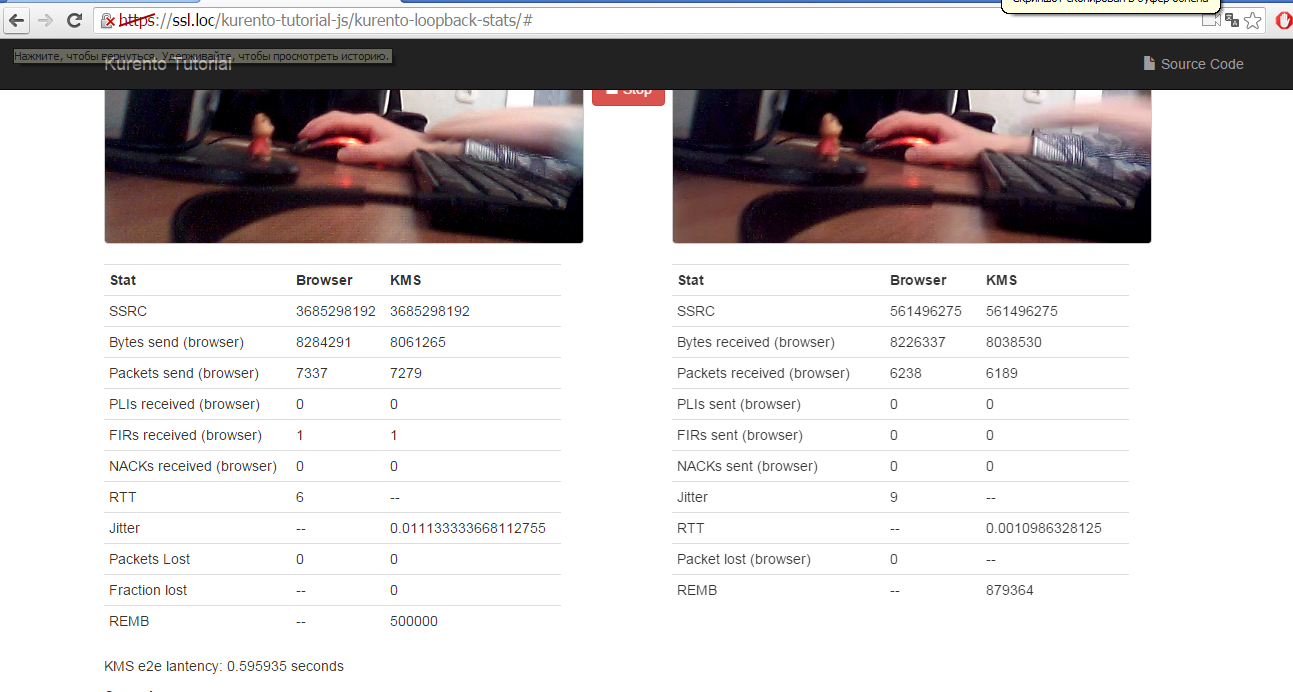
This is screenshot from example test
Alexey Gabrusev
Jan 22, 2016, 2:21:08 AM1/22/16
to kurento
And I've got nothing on port 24230


Ivan Gracia
Jan 22, 2016, 4:35:01 AM1/22/16
to Kurento Public
@Alexey In the second screenshot that you've sent, there is no video in the remote window (just over the console you have open), so it's normal that the RTPEndpoint is not sending anything. I did some tests yesterday, and if you have a negotiated webrtc endpoint receiving media, connected to a negotiated RTPEndpoint like you are doing, there is a flow of packages going, even if nothing is listening in the destination. Can you provide us with a test project?
@Travis I thought you were getting RTSP (not RTMP) from your IP cam.
Ivan Gracia
Ivan Gracia
Jan 22, 2016, 5:19:23 AM1/22/16
to Kurento Public
Can you provide a full project? Without that, it's hard to test.
Including the remote will help you debug problems, as you'll know if the issue is in the webrtc not being correctly negotiated or in the RTP. Once it's working for sure, you can remove that without any problem.
Ivan Gracia
On Fri, Jan 22, 2016 at 11:16 AM, Alexey Gabrusev <alexga...@gmail.com> wrote:
So I've attached js code (html the same as in any tutorial).P.S. I didnt use any remote data, cause I'm only sending stream to nginx server

Ivan Gracia
Jan 22, 2016, 5:41:57 AM1/22/16
to Kurento Public
Is the webrtc being disposed? Because that would explain why the video never gets there.
Ivan Gracia
Alexey Gabrusev
Jan 22, 2016, 7:29:58 AM1/22/16
to kurento
I started to recieve data when I've changed ip in my sdp:
sdp_rtp = '';
sdp_rtp += 'v=0\n';
sdp_rtp += 'o=- 2 2 IN IP4 192.168.11.1\n';
sdp_rtp += 's=\n';
sdp_rtp += 't=0 0\n';
sdp_rtp += 'a=sendrecvonly\n';
sdp_rtp += 'm=video 8083 RTP/AVP 100\n';
sdp_rtp += 'a=rtpmap:100 H264/90000\n';
But its strange, cause kms and nginx on ip 192.168.11.4 and when I use it (4) in tcpdump - silence.

Ivan Gracia
Jan 22, 2016, 7:33:38 AM1/22/16
to Kurento Public
Perhaps because it goes through the loopback interface? I thought you had them on different machines.
Ivan Gracia
Alexey Gabrusev
Jan 22, 2016, 7:36:19 AM1/22/16
to kurento
I use virtualbox with linux (192.168.11.4) and my browser on windows
Ivan Gracia
Jan 22, 2016, 7:44:46 AM1/22/16
to Kurento Public
That behaviour (going through the loopback interface) can be seen in th elocal route table
ip route show table local
All packets destinated to your local IPs would never go thru NICs since they are marked as local.
Now you just need to know why nginx is not showing the video :-)
Ivan Gracia
On Fri, Jan 22, 2016 at 1:36 PM, Alexey Gabrusev <alexga...@gmail.com> wrote:
I use virtualbox with linux (192.168.11.4) and my browser on windows
--
Alexey Gabrusev
Jan 22, 2016, 8:27:38 AM1/22/16
to kurento
So my nginx can accept rtmp at this point. And kms sending in rtp, right? So I should use some gstreamer? Can someone give me some advice for this case?
Alexey Gabrusev
Jan 22, 2016, 9:00:28 AM1/22/16
to kurento
I found something. Will it work?
1) Create sdp file on server side with the same data that I've specified in sdp on js file
2) On server side -> run this command -> ffmpeg -fflags +genpts -analyzeduration 2148M -probesize 2148M -i test.sdp -c:v libx264 -x264opts keyint=5:min-keyint=1 -c:a aac -strict -2 -f flv rtmp://192.168.11.4/src
Travis James
Jan 22, 2016, 1:11:49 PM1/22/16
to kurento
Putting the command below into the "rtmp" section of the Nginx configuration of the app would assure that as soon as the stream starts, it gets republished to the RTPEndpoint configured in Kurento. Cool stuff...
I just need to get the WebRTC endpoint working with it, so my clients can use WebRTC to receive the video stream.
Alexey Gabrusev
Jan 25, 2016, 4:31:47 AM1/25/16
to kurento
Hello, guys. I have a problem while using ffmpeg para streaming to nginx rtmp.
I use such command
ffmpeg -i stream.sdp -strict -2 -c:v libx264 -crf 23 -c:a aac -q:a 100 -f flv rtmp://192.168.11.4/src/
Content of stream.sdp:
v=0
o=CV-RTSPHandler 0 0 IN IP4 192.168.11.1
s=livestream
c=IN IP4 192.168.11.1
t=0 0
m=video 8089 RTP/AVP 96
a=rtpmap:96 H264/90000
m=audio 30000 RTP/AVP 0
a=sendrecvonly
(it's the same as I send via webrtc in sdp variable)
And I've got such error -

Ivan Gracia
Jan 25, 2016, 5:55:47 AM1/25/16
to Kurento Public
Hi Alexey,
No clue. I would try in an ffmpeg forum, too. They are bound to know what's happening.
Cheers,
Ivan Gracia
Alexey Gabrusev
Jan 25, 2016, 8:44:23 AM1/25/16
to kurento
So today I finally complete rtmp server. All working.
But now I upload on production on aws server and I think because of firewall of ports - I should build turn or stun server. Right?
Alexey Gabrusev
Jan 25, 2016, 8:46:15 AM1/25/16
to kurento
So should I do these steps https://www.kurento.org/docs/6.1.1/faq.html ? (it's turn) And I've read that in 6.3.0 turn functionality was dissabled
Alexey Gabrusev
Jan 25, 2016, 8:53:25 AM1/25/16
to kurento
In case If Turn is dissabled right now. For STUN case - its public ip and port. Will my RtpEndPoint work in this case?
Ivan Gracia
Jan 25, 2016, 10:19:46 AM1/25/16
to Kurento Public
Use internal AWS IPs for both servers, and you can ignore STUN between nginx and KMS. However, you'll need at least STUN inn order to get WebRTC in KMS.
Ivan Gracia
On Mon, Jan 25, 2016 at 2:53 PM, Alexey Gabrusev <alexga...@gmail.com> wrote:
In case If Turn is dissabled right now. For STUN case - its public ip and port. Will my RtpEndPoint work in this case?
--

mzie...@gmail.com
Jan 26, 2016, 10:12:41 AM1/26/16
to kurento
Hi Alexey, Hello Ivan,
@Alexey, congratulations - hope you are making further progress.
Could you send some more information on how it actually works on the remote server? What settings on RTMP config do you finally use?
Do you actually have video quality issues on KMS? I was trying a test/demo (ie 'Hello World') of KMS on a 1 vCore VPS remote server, streamed from Mozilla. Maybe it's a result of lack of server's resources, but the video stream was freezing from time to time: ~ every 15-30 seconds it freezes for a 1-3 seconds.
Testing a RTMP connection based on flash (client) and nginx/rtmp (server) on almost the same server is mostly working very well.
@Ivan, could the problems of freezing be server resources - dependent? Do such problems often happen in your projects / tests while streaming to a remote machine?
I'm planning to create a video multiperson chat (partly mobile users), and I think probably the safest choice will be to start with Adobe Air and then to gradually migrate to KMS / WebRtc.
Idea the Alexey provided - transcoding to RTMP, seemw to fit perfectly into this model.
What do you think? - would be a right choice for multiperson chat in your view?
Regards,
Piotr
@Alexey, congratulations - hope you are making further progress.
Could you send some more information on how it actually works on the remote server? What settings on RTMP config do you finally use?
Do you actually have video quality issues on KMS? I was trying a test/demo (ie 'Hello World') of KMS on a 1 vCore VPS remote server, streamed from Mozilla. Maybe it's a result of lack of server's resources, but the video stream was freezing from time to time: ~ every 15-30 seconds it freezes for a 1-3 seconds.
Testing a RTMP connection based on flash (client) and nginx/rtmp (server) on almost the same server is mostly working very well.
@Ivan, could the problems of freezing be server resources - dependent? Do such problems often happen in your projects / tests while streaming to a remote machine?
I'm planning to create a video multiperson chat (partly mobile users), and I think probably the safest choice will be to start with Adobe Air and then to gradually migrate to KMS / WebRtc.
Idea the Alexey provided - transcoding to RTMP, seemw to fit perfectly into this model.
What do you think? - would be a right choice for multiperson chat in your view?
Regards,
Piotr
Alexey Gabrusev
Jan 27, 2016, 3:29:41 AM1/27/16
to kurento
Right now the video stream is working fine. We're using scripts to control proccesses in ffmpeg for multi-stream. The only thing left is to set audio settings in sdp, cause there is no sound in stream.
P.S. maybe someone has some setting for m=audio ..... ?
вторник, 26 января 2016 г., 18:12:41 UTC+3 пользователь Piotr Karpiński написал:
вторник, 26 января 2016 г., 18:12:41 UTC+3 пользователь Piotr Karpiński написал:
Message has been deleted
Ivan Gracia
Jan 27, 2016, 5:54:47 AM1/27/16
to Kurento Public
You are sending both audio and video in the same port. Use 2430 for audio, and 2432 for video for instance.
Ivan Gracia
On Wed, Jan 27, 2016 at 11:52 AM, Alexey Gabrusev <alexga...@gmail.com> wrote:
How can I stream video and audio?In SDP:sdp_rtp = 'v=0\n'+'o=- 0 0 IN IP4 192.168.11.0\n'+'s=livestream\n'+'c=IN IP4 192.168.11.0\n'+'t=0 0\n'+'m=audio 2430 RTP/AVP 0\n' +'a=rtpmap:0 PCMU/8000\n''m=video 2430 RTP/AVP 100\n'+'a=rtpmap:100 H264/90000\n'+'a=recvonly';And I've got response from KMS only audio (cause first I guess)

Alexey Gabrusev
Jan 27, 2016, 6:03:47 AM1/27/16
to kurento
Also I've found a little error in sdp concatination:
среда, 27 января 2016 г., 13:54:47 UTC+3 пользователь igracia написал:
'a=rtpmap:0 PCMU/8000\n'
Thanks a lot.
Thanks a lot.
среда, 27 января 2016 г., 13:54:47 UTC+3 пользователь igracia написал:
Reply all
Reply to author
Forward
0 new messages