
PlayerEndpoint RTSP stream
1,878 views
Skip to first unread message

Denis Syroezhkin
Jan 7, 2015, 8:13:13 PM1/7/15
to kur...@googlegroups.com
Hello!
Please tell me how to implement such a scheme? (attached)
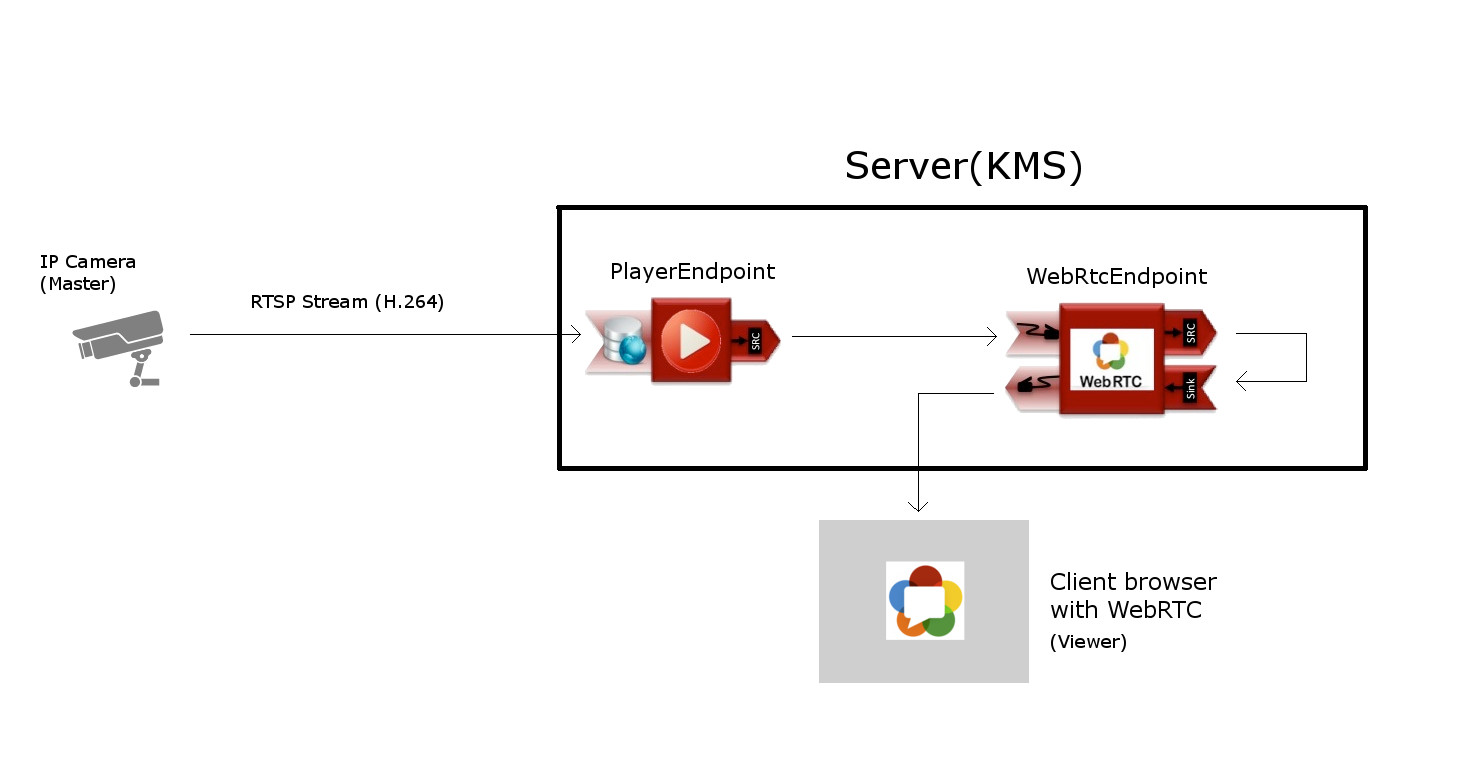
To help you answer my question, I will divide it into several small issues:
1. Where indicate the source for RTSP stream on PlayerEndpoint?
2. How to bridge the PlayerEndpoint WebRtcEndpoint?
3. How to use the module as a master PlayerEndpoynt?
Thank you very much!

Jose Antonio Santos Cadenas
Jan 9, 2015, 5:03:08 AM1/9/15
to kur...@googlegroups.com
Your application is as simple as your schema.
Just create a player and a WebRtcEndpoint. Assign rtsp URL to player and negotiate webrtc endpoint. Then execute play in player.
There are examples of all of this in demo projects.
--
You received this message because you are subscribed to the Google Groups "kurento" group.
To unsubscribe from this group and stop receiving emails from it, send an email to kurento+u...@googlegroups.com.
For more options, visit https://groups.google.com/d/optout.
Message has been deleted
Message has been deleted
Jose Antonio Santos Cadenas
Jan 10, 2015, 4:54:10 AM1/10/15
to kur...@googlegroups.com
I cannot write the code for you now, There is a lot of sample code in the repository, I think that there is a player example for java.
El sáb., 10 de enero de 2015 1:52, Denis Syroezhkin <kol...@gmail.com> escribió:
Okay, but how to do it? You can sample code using PlayerEndpoint? Where to indicate the source PlayerEndpoint?
пятница, 9 января 2015 г., 14:03:08 UTC+4 пользователь Jose Antonio Santos Cadenas написал:
Denis Syroezhkin
Jan 15, 2015, 2:10:06 AM1/15/15
to kur...@googlegroups.com
private synchronized void master(WebSocketSession session, JsonObject jsonMessage) throws IOException {
		if (masterUserSession == null) {			masterUserSession = new UserSession(session);
			pipeline = kurento.createMediaPipeline();						masterUserSession.setWebRtcEndpoint(new WebRtcEndpoint.Builder(pipeline).build());
			WebRtcEndpoint masterWebRtc = masterUserSession.getWebRtcEndpoint();			PlayerEndpoint player = new PlayerEndpoint.Builder(pipeline, "rtsp://user:pass...@192.168.1.6:554").build()); //Create piperline PlayerEndpoint and URL RTSP					 			 	player.connect(masterWebRtc); 			masterWebRtc.connect(player);   																							String sdpOffer = jsonMessage.getAsJsonPrimitive("sdpOffer").getAsString();			String sdpAnswer = masterWebRtc.processOffer(sdpOffer);
			JsonObject response = new JsonObject();			response.addProperty("id", "masterResponse");			response.addProperty("response", "accepted");			response.addProperty("sdpAnswer", sdpAnswer);			masterUserSession.sendMessage(response);
		}
		else {			JsonObject response = new JsonObject();			response.addProperty("id", "masterResponse");			response.addProperty("response", "rejected");			response.addProperty("message",					"Another user is currently acting as sender. Try again later ...");			session.sendMessage(new TextMessage(response.toString()));		}	}
Here we go?
суббота, 10 января 2015 г., 13:54:10 UTC+4 пользователь Jose Antonio Santos Cadenas написал:
Message has been deleted

wood...@gmail.com
Jan 18, 2015, 5:32:56 PM1/18/15
to kur...@googlegroups.com
Hi everyone, Trying to do the same for Node.js.
I've been trying to play around with a modified version the one-2-many tutorial example to establish a PlayerPipeline with RTSP stream and WebSocket Pipeline with no luck so far. I am pretty sure my js code is fine as I can see a stream from my IP Camera to Kurento Media Server but whatever is sent to Chrome from KMS does not seem to display on playback. All SDP exchange is complete and connection between KMS and Chrome seems fine.
Here is my code: https://gist.github.com/WooDzu/6c9ab9bada7572abcdc4
and SDP which comes back to Chrome:
I would be great if anyone could point me into right direction or provide an alternative working sample.
WooDzu
I've been trying to play around with a modified version the one-2-many tutorial example to establish a PlayerPipeline with RTSP stream and WebSocket Pipeline with no luck so far. I am pretty sure my js code is fine as I can see a stream from my IP Camera to Kurento Media Server but whatever is sent to Chrome from KMS does not seem to display on playback. All SDP exchange is complete and connection between KMS and Chrome seems fine.
Here is my code: https://gist.github.com/WooDzu/6c9ab9bada7572abcdc4
and SDP which comes back to Chrome:
Received message: {"id":"viewerResponse","response":"accepted","sdpAnswer":"v=0
o=- 4703690930233602263 0 IN IP4 0.0.0.0
s=TestSession
c=IN IP4 0.0.0.0
t=0 0
a=group:BUNDLE audio video
m=audio 57339 RTP/SAVPF 0
c=IN IP4 192.168.1.74
a=rtpmap:0 PCMU/8000
a=sendonly
a=rtcp:57339 IN IP4 192.168.1.74
a=ice-ufrag:Pebg
a=ice-pwd:gBaz2VNNan2mTJbQ8Tdf/S
a=fingerprint:sha-256 ...trunc...
a=rtcp-mux
a=candidate:1 1 UDP 2013266431 192.168.1.74 57339 typ host
a=ssrc:1383035648 cname:user3936730632@host-2fb7e75f
m=video 57339 RTP/SAVPF 100
c=IN IP4 192.168.1.74
a=rtpmap:100 VP8/90000
a=sendonly
a=rtcp-fb:100 ccm fir
a=rtcp-fb:100 nack
a=rtcp-fb:100 nack pli
a=rtcp:57339 IN IP4 192.168.1.74
a=ice-ufrag:Pebg
a=ice-pwd:gBaz2VNNan2mTJbQ8Tdf/S
a=fingerprint:sha-256 ...trunc...
a=rtcp-mux
a=candidate:1 1 UDP 2013266431 192.168.1.74 57339 typ host
a=ssrc:97106667 cname:user3936730632@host-2fb7e75f
"}
SDP answer received, setting remote description
I would be great if anyone could point me into right direction or provide an alternative working sample.
WooDzu

piotr.ga...@editshare.co.uk
Jan 24, 2015, 6:50:51 AM1/24/15
to kur...@googlegroups.com
Thanks to the tip in another thread https://groups.google.com/forum/#!topic/kurento/nbjQQIpuIxA
I figured out that I was connecting WebRTC pipeline to itself. Silly me!
Gist Updated.
Keep up the the great work!
I figured out that I was connecting WebRTC pipeline to itself. Silly me!
Gist Updated.
Keep up the the great work!
Ivan Gracia
Jan 25, 2015, 11:23:47 AM1/25/15
to Kurento Public
WooDzu, could you describe your setup? Is your KMS behind a NAT? You might need a STUN server.
Ivan Gracia

--
wood...@gmail.com
Jan 25, 2015, 12:25:52 PM1/25/15
to kur...@googlegroups.com
Hi Ivan,
I have already figured out I was connecting WebRTC pipeline to itself. That post above I did from another google account
Thanks anyway!
WooDzu
I have already figured out I was connecting WebRTC pipeline to itself. That post above I did from another google account
Thanks anyway!
WooDzu
Ivan Gracia
Jan 25, 2015, 12:26:33 PM1/25/15
to kur...@googlegroups.com
Ok, thanks!
--
Reply all
Reply to author
Forward
0 new messages