
[URGENT] Security Advisory for Zoom on macOS

Christoph Blecker
TL;DR: If you run Zoom on macOS, you need to review this entire e-mail to understand potential security risks to your system and privacy.
Please feel free to forward this advisory as necessary.
-----
It was publicly announced yesterday by a security researcher that there are vulnerabilities and insecure default settings in the Zoom web conferencing client for macOS.
1. Persistent local web server
A process called the “ZoomOpener” is installed with Zoom, and runs as a persistent local web server on your system. This web server allows you to join meetings when you click a zoom link (e.g. https: //zoom.us/j/123456789).
This process had some flaws that were fixed, but you can still be forced to join a meeting without confirmation by a malicious website that embeds an iframe.
This web server persists if you uninstall the Zoom client, and will re-download, install, and launch the Zoom client if you visit a zoom.us link like the above example.
The only current workaround is disabling and removing this web server, followed by clearing your browser cache.
A complete set of commands to run is available here: https://gist.github.com/cblecker/8af229ff143512529544a945b4e43f72
2. Auto-joining calls with video/audio enabled
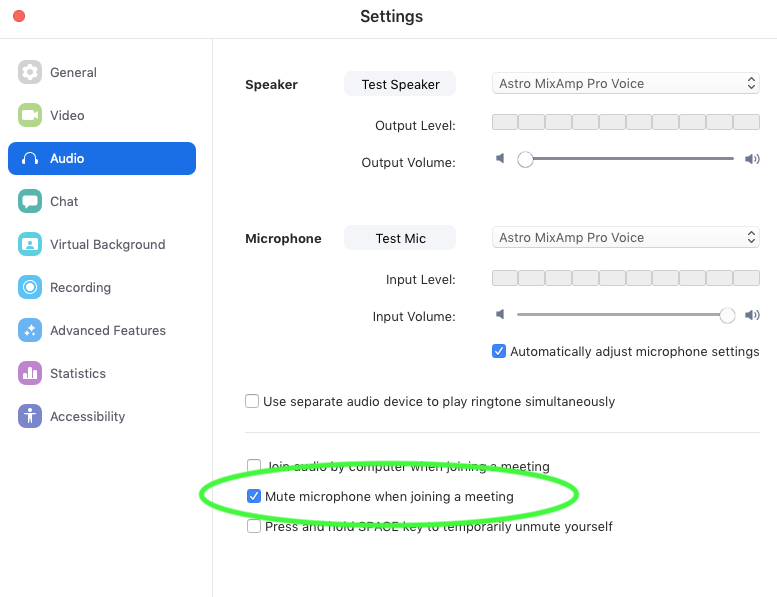
By default, the Zoom client permitted the host of a meeting to force participants to join a meeting with their video/audio enabled immediately. This, paired with the previous security flaw meant a malicious user could via a maliciously crafted webpage, force a user to join a zoom meeting with video and audio instantly enabled.
To ensure that your Zoom client doesn’t auto join calls with audio/video enabled, please ensure the following two checkboxes are checked, and that you are running the latest Zoom client:

Contributor Experience continues to monitor the situation and will provide more information if and when it becomes available.
Thank you for your assistance in keeping our community safe and secure.
- Christoph (on behalf of Kubernetes SIG Contributor Experience)