
Will kubeedge run on ARM devices like RaspberryPi?
567 views
Skip to first unread message

Vipin Krishna
Dec 4, 2019, 12:36:33 AM12/4/19
to KubeEdge
Hi everyone,
I'm Vipin Krishna. I have been trying to install kubeedge on RaspberryPi using this link.
But when i do the make command i'm getting about make file.
I'm using RaspberryPi 3b with Ubuntu mate installed in it. So when checked about i got this link saying
https://github.com/kubeedge/kubeedge/issues/883Later i used gobuild command to build the binary and the binary was made successfully. but when i did keadm join it showed some syntax error.
Please can any one help.
And also there is one more thing now i'm also installing kubeedge on my laptop(Ubuntu 1.04LTS ) which is considered as my master/cloud side. so when i do keadm init command after successfully cloning from the same link that i used for edge i am gettin this error.
COPIED FROM TERMINAL
************************************
al027@k8-master:/usr/local/go/src/github.com/kubeedge/kubeedge/keadm$ sudo ./keadm init
Same version of docker already installed in this host
Same version of kubeadm already installed in this hostExpected or Default KubeEdge version 0.3.0 is already downloaded
kubeedge/
kubeedge/edge/
kubeedge/edge/conf/
kubeedge/edge/conf/logging.yaml
kubeedge/edge/conf/modules.yaml
kubeedge/edge/conf/edge.yaml
kubeedge/edge/edge_core
kubeedge/version
kubeedge/cloud/
kubeedge/cloud/edgecontroller
kubeedge/cloud/conf/
kubeedge/cloud/conf/logging.yaml
kubeedge/cloud/conf/controller.yaml
kubeedge/cloud/conf/modules.yaml
+ readonly caPath=/etc/kubeedge/ca
+ caPath=/etc/kubeedge/ca
+ readonly caSubject=/C=CN/ST=Zhejiang/L=Hangzhou/O=KubeEdge/CN=kubeedge.io
+ caSubject=/C=CN/ST=Zhejiang/L=Hangzhou/O=KubeEdge/CN=kubeedge.io
+ readonly certPath=/etc/kubeedge/certs
+ certPath=/etc/kubeedge/certs
+ readonly subject=/C=CN/ST=Zhejiang/L=Hangzhou/O=KubeEdge/CN=kubeedge.io
+ subject=/C=CN/ST=Zhejiang/L=Hangzhou/O=KubeEdge/CN=kubeedge.io
+ genCertAndKey edge
+ ensureFolder
+ '[' '!' -d /etc/kubeedge/ca ']'
+ '[' '!' -d /etc/kubeedge/certs ']'
+ ensureCA
+ '[' '!' -e /etc/kubeedge/ca/rootCA.key ']'
+ '[' '!' -e /etc/kubeedge/ca/rootCA.crt ']'
+ local name=edge
+ openssl genrsa -out /etc/kubeedge/certs/edge.key 2048
Generating RSA private key, 2048 bit long modulus (2 primes)
........................................................................+++++
..+++++
e is 65537 (0x010001)
+ openssl req -new -key /etc/kubeedge/certs/edge.key -subj /C=CN/ST=Zhejiang/L=Hangzhou/O=KubeEdge/CN=kubeedge.io -out /etc/kubeedge/certs/edge.csr
Can't load /home/al027/.rnd into RNG
140418073567680:error:2406F079:random number generator:RAND_load_file:Cannot open file:../crypto/rand/randfile.c:88:Filename=/home/al027/.rnd
+ openssl x509 -req -in /etc/kubeedge/certs/edge.csr -CA /etc/kubeedge/ca/rootCA.crt -CAkey /etc/kubeedge/ca/rootCA.key -CAcreateserial -passin pass:kubeedge.io -out /etc/kubeedge/certs/edge.crt -days 365 -sha256
Signature ok
subject=C = CN, ST = Zhejiang, L = Hangzhou, O = KubeEdge, CN = kubeedge.io
Getting CA Private Key
Certificates got generated at: /etc/kubeedge/ ca and /etc/kubeedge/ certs
certs/
certs/edge.key
certs/edge.csr
certs/edge.crt
Certificates got tared at: /etc/kubeedge/ path, Please copy it to desired edge node (at /etc/kubeedge/ path)
I1204 10:41:30.920790 22667 version.go:240] remote version is much newer: v1.16.3; falling back to: stable-1.14
[init] Using Kubernetes version: v1.14.9
[preflight] Running pre-flight checks
error execution phase preflight: [preflight] Some fatal errors occurred:
[ERROR Port-6443]: Port 6443 is in use
[ERROR Port-10251]: Port 10251 is in use
[ERROR Port-10252]: Port 10252 is in use
[ERROR Port-10250]: Port 10250 is in use
[ERROR Port-2379]: Port 2379 is in use
[ERROR Port-2380]: Port 2380 is in use
[ERROR DirAvailable--var-lib-etcd]: /var/lib/etcd is not empty
[preflight] If you know what you are doing, you can make a check non-fatal with `--ignore-preflight-errors=...`
Error: failed to run 'sh -c swapoff -a && kubeadm init --image-repository "k8s.gcr.io" --pod-network-cidr=100.64.0.0/10' because of error : exit status 1
Usage:
keadm init [flags]
Examples:
keadm init
- This command will download and install the default version of pre-requisites and KubeEdge
keadm init --kubeedge-version=0.2.1 --kubernetes-version=1.14.1 --docker-version=18.06.3 --kube-config=/root/.kube/config
- In case, any flag is used in a format like "--docker-version" or "--docker-version=" (without a value)
then default versions shown in help will be chosen.
The versions for "--docker-version", "--kubernetes-version" and "--kubeedge-version" flags should be in the
format "18.06.3", "1.14.0" and "0.2.1" respectively
- kube-config is the absolute path of kubeconfig which used to secure connectivity between cloudcore and kube-apiserver
Flags:
--docker-version string[="18.06.0"] Use this key to download and use the required Docker version (default "18.06.0")
-h, --help help for init
--image-repository string[="k8s.gcr.io"] Use this key to set the Kubernetes docker image repository (default "k8s.gcr.io")
--kube-config string Use this key to set kube-config path, eg: $HOME/.kube/config
--kubeedge-version string[="0.3.0"] Use this key to download and use the required KubeEdge version (default "0.3.0")
--kubernetes-version string[="1.14.1"] Use this key to download and use the required Kubernetes version (default "1.14.1")
--pod-network-cidr string[="100.64.0.0/10"] Use this key to set the Kubernetes pod Network cidr (default "100.64.0.0/10")
error: failed to run 'sh -c swapoff -a && kubeadm init --image-repository "k8s.gcr.io" --pod-network-cidr=100.64.0.0/10' because of error : exit status 1
al027@k8-master:/usr/local/go/src/github.com/kubeedge/kubeedge/keadm$
*************************************
Any tips would be helpful.
Thanks in advance.
Vipin Krishna
Dec 6, 2019, 11:14:53 PM12/6/19
to KubeEdge
Can anyone reply

Hock Chye Teoh
Dec 17, 2019, 1:52:56 AM12/17/19
to KubeEdge
Hi Vipin,
I am also trying to run kubeedge on RaspberryPi. However, I am using Raspberry Pi 4.
What I did was recompile kubeedge/edge on the RaspberryPi, using "go" version go1.12.14.
My setup is:
1. Running cloudcore on Google Cloud Platform. Referring to https://kubeedge.readthedocs.io/en/latest/setup/installer_setup.html
2. Running edgecore on Raspberry Pi 4. Also following https://github.com/kubeedge/kubeedge/issues/883 and https://docs.kubeedge.io/en/latest/setup/setup.html.
I got as far as this and now figuring out how to make use of this further.
What I intend to do:
1. Raspberry Pi 4 attached to:
i) dual camera
- To detect drowsiness and trigger alarm by sending sound to the local speaker
ii) speaker
2. Control from the cloud to activate or deactivate the drowsiness routine check
Hope this helps.
Vipin Krishna
Dec 17, 2019, 4:41:52 AM12/17/19
to KubeEdge
Hi Hock Chye Teoh
So what you are saying is Kubeedge can be installed on RaspberryPi or Cannot be installed on RaspberryPi?
Because i didnt clearly understand.
Sorry to bother you.

Teoh Hock Chye
Dec 17, 2019, 5:19:24 AM12/17/19
to Vipin Krishna, KubeEdge
Hi Vipin,
Kubeedge can be install on Raspberry Pi. Not using the kdeam install method. U need to install kubernetes first then compile kubeedge for edge on Raspberry Pi (I am assuming u r installing edge on the Raspberry Pi).
--
You received this message because you are subscribed to the Google Groups "KubeEdge" group.
To unsubscribe from this group and stop receiving emails from it, send an email to kubeedge+u...@googlegroups.com.
To view this discussion on the web visit https://groups.google.com/d/msgid/kubeedge/51bac8df-b08b-42ae-a4d8-e544f5a3a39f%40googlegroups.com.
Vipin Krishna
Dec 17, 2019, 5:21:57 AM12/17/19
to KubeEdge
To unsubscribe from this group and stop receiving emails from it, send an email to kube...@googlegroups.com.
To view this discussion on the web visit https://groups.google.com/d/msgid/kubeedge/51bac8df-b08b-42ae-a4d8-e544f5a3a39f%40googlegroups.com.
Hi Teoh Hock Chye
I would like to discuss about this
Vipin Krishna
Dec 17, 2019, 5:25:26 AM12/17/19
to KubeEdge
Yes i am trying to install edge part on kubeedge on RaspberryPi
So, i first need to install kubernetes on RaspberryPi right?
After installing kubernetes i need to compile the edge of kubeedge right?
How do i compile that? Can you give a brief description?
Or is there any means i could discuss this with you?
Teoh Hock Chye
Dec 17, 2019, 9:08:54 PM12/17/19
to Vipin Krishna, KubeEdge
Yes i am trying to install edge part on kubeedge on RaspberryPiSo, i first need to install kubernetes on RaspberryPi right?
Yes.
After installing kubernetes i need to compile the edge of kubeedge right?
Yes. Make sure to install the right "go" version on your RaspberryPi first. Mine uses version go1.12.14.
How do i compile that? Can you give a brief description?Or is there any means i could discuss this with you?
Follow guide on this link. https://docs.kubeedge.io/en/latest/setup/setup.html#setup-edge-side
For me, I just use this step.
1. cd $GOPATH/src/github.com/kubeedge/kubeedge
2. make all WHAT=edgecore
Also, if u need mosquitto installed. Please do that as well. My setup requires mqtt.
This forum sends me email notifications and its a good place for discussion as others can also refer to this. I will take a look at it when I am free from my tasks. On the other hand, I am not too sure if I am helpful cause I haven't fully setup the entire thing yet. Maybe other much more experience experts can shed better light after seeing our discussion.
I am now at the part where I have to prepare pods. At the moment, its just cloud talking to edge.
But if u have other side questions, u can pm me. (I am new to this forum features too so we shall have to explore it)
Vipin Krishna
Dec 18, 2019, 12:25:30 AM12/18/19
to KubeEdge
On Wednesday, December 18, 2019 at 7:38:54 AM UTC+5:30, Teoh Hock Chye wrote:
Yes i am trying to install edge part on kubeedge on RaspberryPiSo, i first need to install kubernetes on RaspberryPi right?Yes.After installing kubernetes i need to compile the edge of kubeedge right?Yes. Make sure to install the right "go" version on your RaspberryPi first. Mine uses version go1.12.14.
Can u please tell me how to compile because i did not clearly understood that.
How do i compile that? Can you give a brief description?Or is there any means i could discuss this with you?Follow guide on this link. https://docs.kubeedge.io/en/latest/setup/setup.html#setup-edge-side
I was also following this link.
For me, I just use this step.1. cd $GOPATH/src/github.com/kubeedge/kubeedge
This i did and is executed without error.
2. make all WHAT=edgecore
But when i do this... i am make file error. The go version i'm using is go1.12.5
Also, if u need mosquitto installed. Please do that as well. My setup requires mqtt.
This forum sends me email notifications and its a good place for discussion as others can also refer to this. I will take a look at it when I am free from my tasks. On the other hand, I am not too sure if I am helpful cause I haven't fully setup the entire thing yet. Maybe other much more experience experts can shed better light after seeing our discussion.
Yea i am hoping.
I'm not using mosquitto or mqtt now i just want to create a raspberrypi cluster using kubernetes and kubeedge's edge should be running on RaspberryPi.
Teoh Hock Chye
Dec 18, 2019, 8:19:07 AM12/18/19
to Vipin Krishna, KubeEdge
On Wed, Dec 18, 2019 at 1:25 PM Vipin Krishna <vipin....@altorumleren.com> wrote:
On Wednesday, December 18, 2019 at 7:38:54 AM UTC+5:30, Teoh Hock Chye wrote:Yes i am trying to install edge part on kubeedge on RaspberryPiSo, i first need to install kubernetes on RaspberryPi right?Yes.After installing kubernetes i need to compile the edge of kubeedge right?Yes. Make sure to install the right "go" version on your RaspberryPi first. Mine uses version go1.12.14.Can u please tell me how to compile because i did not clearly understood that.
The steps below is how to compile the "edge" on Raspberry Pi.
How do i compile that? Can you give a brief description?Or is there any means i could discuss this with you?Follow guide on this link. https://docs.kubeedge.io/en/latest/setup/setup.html#setup-edge-sideI was also following this link.For me, I just use this step.1. cd $GOPATH/src/github.com/kubeedge/kubeedgeThis i did and is executed without error.2. make all WHAT=edgecoreBut when i do this... i am make file error. The go version i'm using is go1.12.5
Can you provide a screenshot of the error or cut & paste the error here? Let's see if we can figure out what is missing. Hopefully, Raspberry Pi 3 & Raspberry Pi 4 don't have that much differences of libraries.
Vipin Krishna
Dec 19, 2019, 4:34:55 AM12/19/19
to KubeEdge
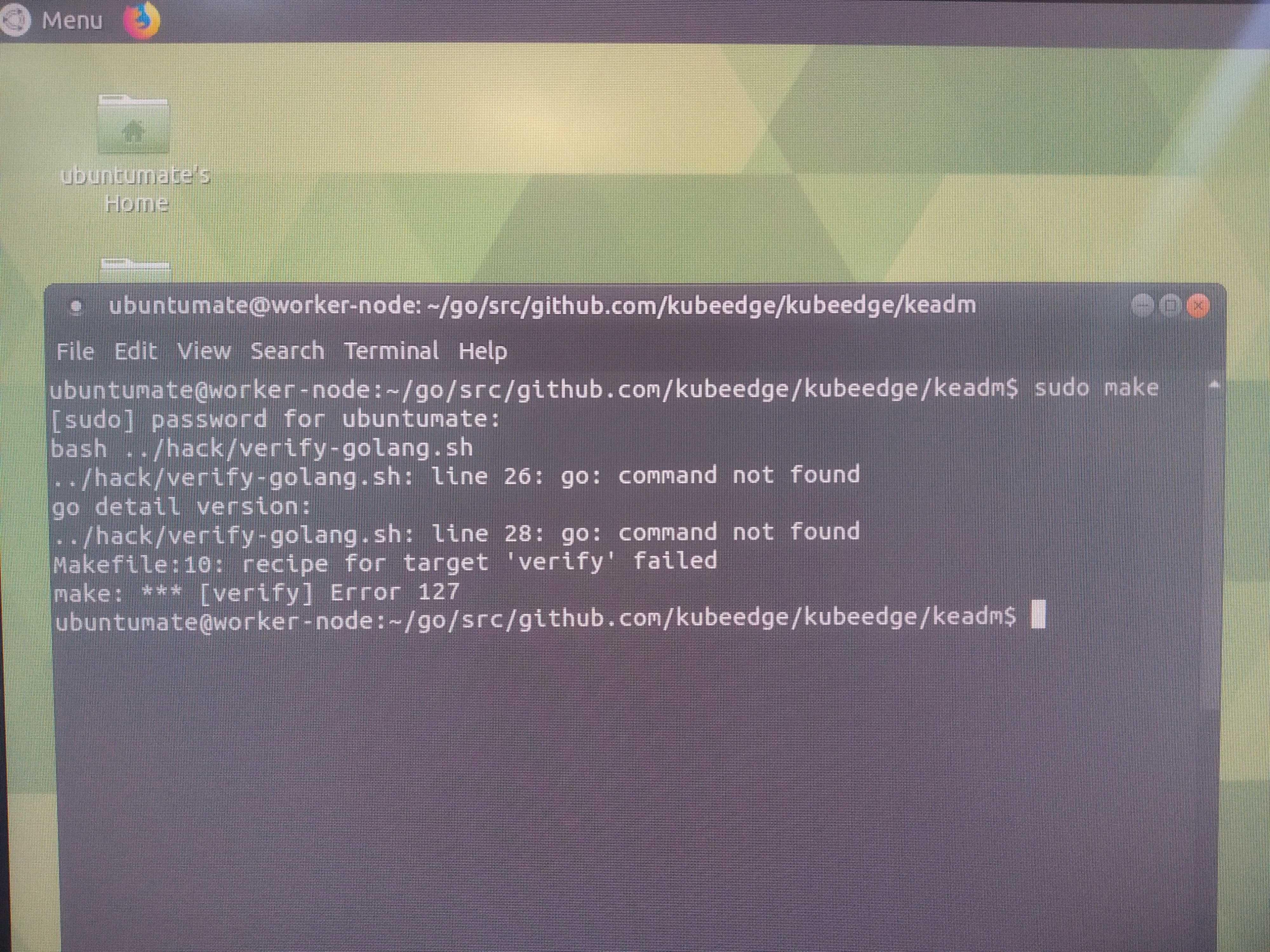
These are the makefile error i am getting
make: *** [verify] Error 127

sean wang
Dec 19, 2019, 11:00:29 AM12/19/19
to Vipin Krishna, KubeEdge
Hi Vipin,
I didn't follow the whole thread, but installing on raspberrypi is pretty straightforward, my suggestion is just follow the standard setup steps for now, it's very simple. I am in a hackathon down here and we've installed on multiple pi devices with no problem.
I am not sure about the state of the installer, it's probably good to avoid it for now.
Sean
--
You received this message because you are subscribed to the Google Groups "KubeEdge" group.
To unsubscribe from this group and stop receiving emails from it, send an email to kubeedge+u...@googlegroups.com.
To view this discussion on the web visit https://groups.google.com/d/msgid/kubeedge/6b299346-9be3-4443-bc57-2adb9c51fcd7%40googlegroups.com.
Sean
Dec 19, 2019, 3:35:00 PM12/19/19
to Vipin Krishna, KubeEdge
Yes i am trying to install edge part on kubeedge on RaspberryPiSo, i first need to install kubernetes on RaspberryPi right?
NO you do not need to install k8s on the pi device just follow the link : https://docs.kubeedge.io/en/latest/setup/setup.html#run-kubeedge
Start from ‘Deploy the edge node’
I am sorry it is such a mess, getting the installation better is the focus for us in the next two months.
Sean
Hock Chye Teoh
Dec 19, 2019, 9:02:02 PM12/19/19
to KubeEdge
This error is due to "go" is not in your PATH environment variable.
You can run this:
export PATH=$PATH:<"go" absolute path>
To test if it is working properly. Run this: which go
To test if it is working properly. Run this: which go
It should show u the go absolute path
After that you can repeat the make step again.
Vipin Krishna
Dec 19, 2019, 11:37:45 PM12/19/19
to KubeEdge
Hi Hock Chye Teoh
My which go and GOPATH are same still i'm getting error. I have installed Raspbian Buster lite OS in one Pi and ubuntu mate in another both are showing the same error.
My which go and GOPATH are same still i'm getting error. I have installed Raspbian Buster lite OS in one Pi and ubuntu mate in another both are showing the same error.
Vipin Krishna
Dec 19, 2019, 11:45:45 PM12/19/19
to KubeEdge
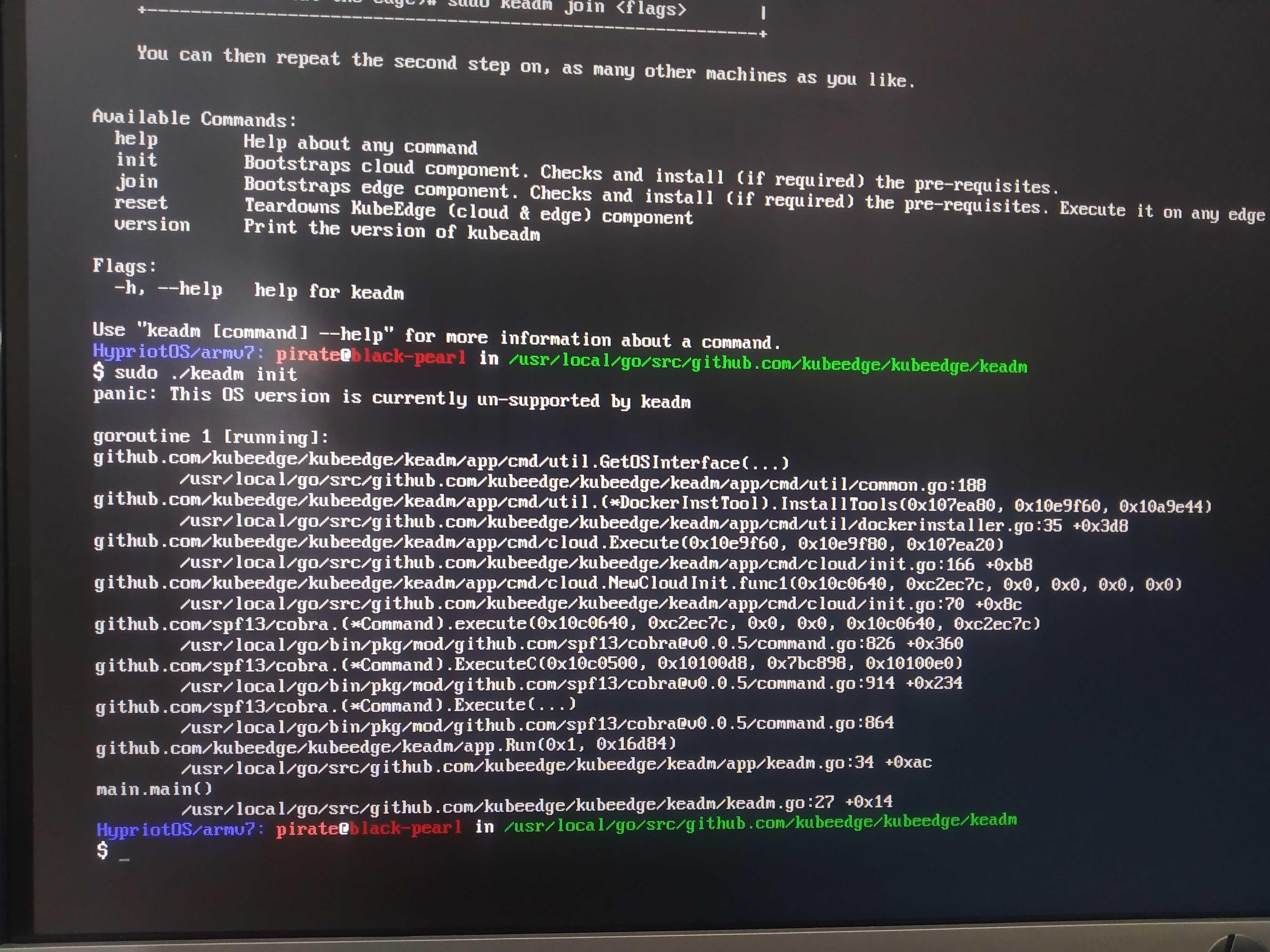
When i followed the deploy the edge and did the make command this is the error i am getting.
Hock Chye Teoh
Dec 30, 2019, 3:40:02 AM12/30/19
to KubeEdge
Are u using the arm version? I think you got the wrong binaries. For Raspbian, if not mistaken it is using arm version.
Hock Chye Teoh
Dec 30, 2019, 9:27:12 PM12/30/19
to KubeEdge
https://github.com/kubeedge/kubeedge/releases -kubeedge-v1.1.0-linux-arm.tar.gz (this is the binary that runs on Raspbian)
Reply all
Reply to author
Forward
0 new messages