
Connecting Power BI to KoBo
3,262 views
Skip to first unread message

Chris Habib
Feb 1, 2017, 9:12:06 AM2/1/17
to Kobo Users
The easiest way to connect Microsoft Power BI and view all non-public datasets in KoBo is by
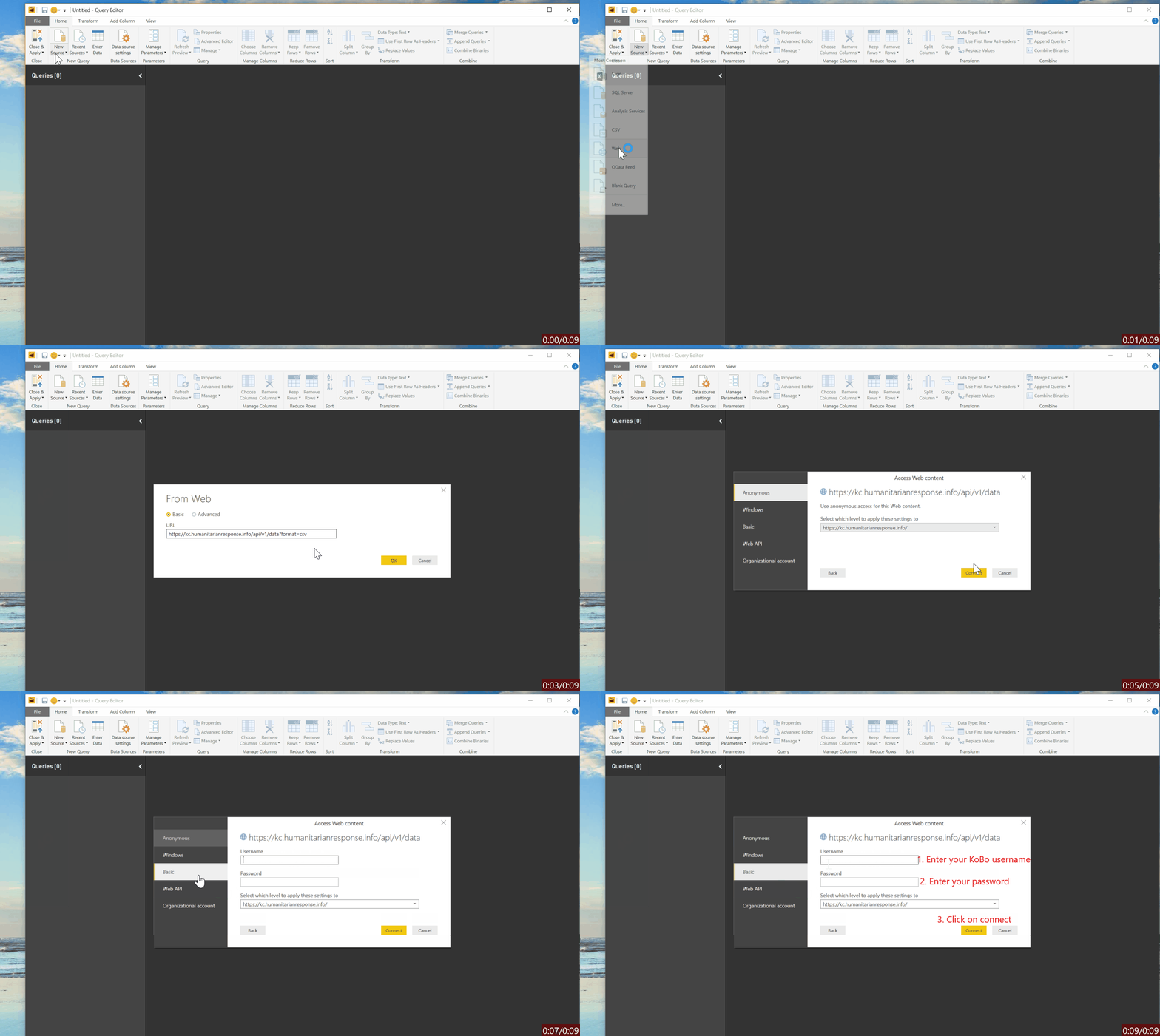
Step 1: Connecting to the following web url (https://kc.humanitarianresponse.info/api/v1/data?format=csv) then entering your KoBo username and password. You will receive a CSV file with a directory of all your datasets and their respective URL.
Step 2: Copy the URL of the dataset you need to connect to then add it again as a new Web source.
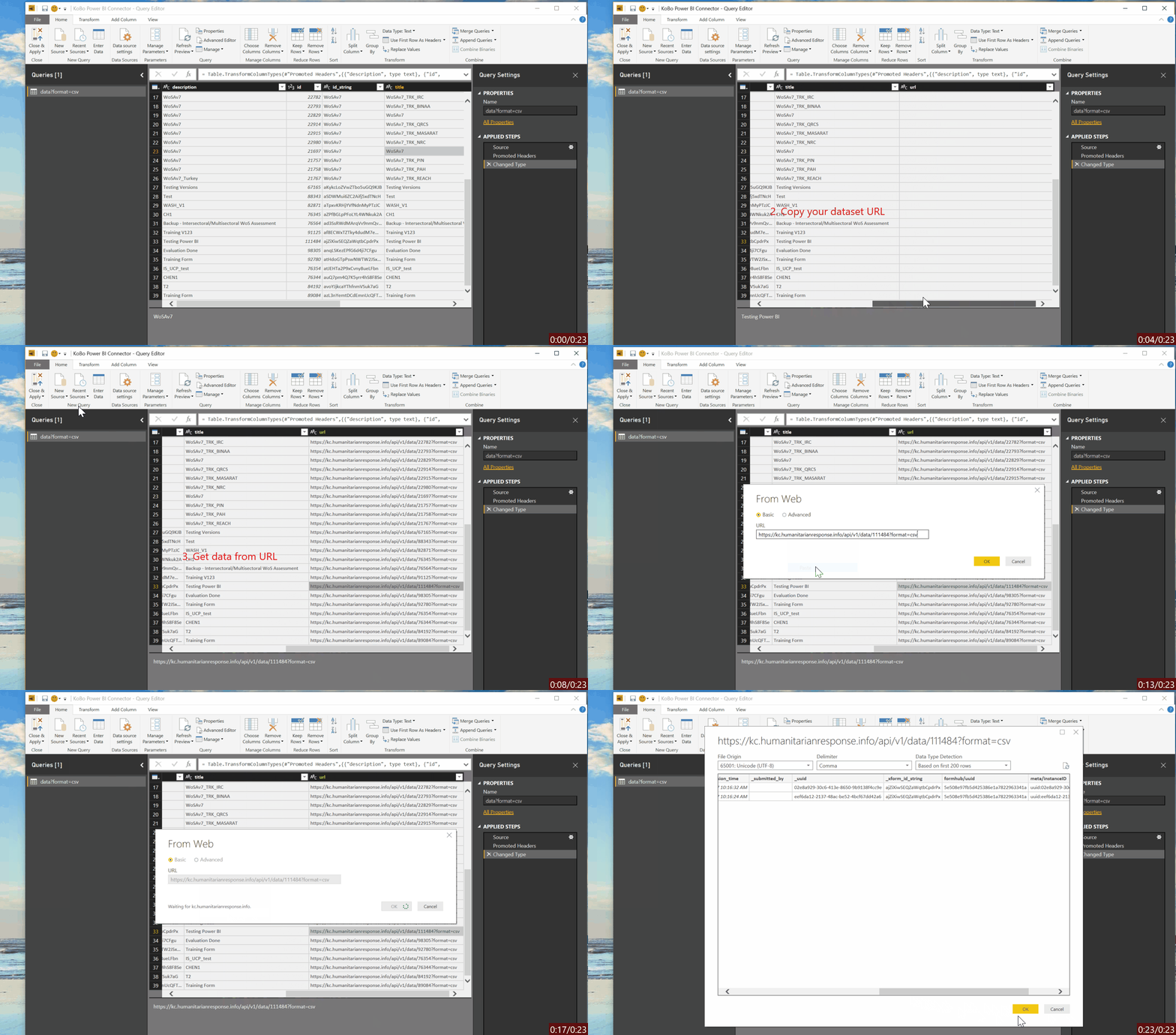
You can alternatively use the attached BI file to skip Step 1 - it will only prompt you to enter your username and password once when you access the query editor.

Hanan Aqilan
Apr 28, 2017, 11:59:03 AM4/28/17
to Kobo Users
Hello
Thanks for this nice blog. What if i need to connect to the file with codes replaced or choices replaced by english label. Is there a way to do so please. Because right now I only get to connect to the codes not labels.
Thanks, -Hanna

Shannon L
Sep 22, 2017, 6:12:05 AM9/22/17
to Kobo Users
Hi Chris! Thanks for this - it appears really straightforward. Question for you - are there settings that you need to change in Kobo prior to the connection being active? I keep getting the message that "we couldn't authenticate with the credentials provided" - as are my colleagues (all with different account names). Any advice?
Thanks!
Shannon
Shannon
Chris Habib
Sep 23, 2017, 11:47:50 AM9/23/17
to Kobo Users
Hi Shannon, yes you do need to change your data sharing setting to "Public". Also please find attached the updated version of the converter that links to KoBo to retrieve data labels rather than names. Make sure you read the readme file with it :) P.S: if you are using a different KoBo instance of humanitarianresponse.info then you will need to change the link manually

Loay Alsayed Mohammed
Apr 17, 2018, 9:56:46 AM4/17/18
to KoBoToolbox Users
Hi Chris,
after publishing the report on the web, and if there were new inputs. is there is any way to update the puplished dashboard automatically according to inputs
after publishing the report on the web, and if there were new inputs. is there is any way to update the puplished dashboard automatically according to inputs

Dan Kaigua
May 20, 2018, 9:53:28 AM5/20/18
to KoBoToolbox Users

I am using the KoBo to Power BI Connector v2. Getting the error below after I enter my credentials. Anyone who can assist, I would greatly appreciate. Thanks.

Meredith Mahachi
Jun 12, 2018, 11:15:59 AM6/12/18
to KoBoToolbox Users
HI chris,
Hoping you can help we are trying to connect, have followed all the steps but receiving error from power bi:
Details: "The credentials provided cannot be used for the Web source. Please update the credential type through a refresh or in the Data Source Settings dialog to continue. (Source at https://kf.kobotoolbox.org/.)"
I only used the base url https://kf.kobotoolbox.org do I need to grab more?
Many thanks,
Meredith
Meredith Mahachi
Jun 12, 2018, 11:21:39 AM6/12/18
to KoBoToolbox Users
HI Dan - I am also having this error now
Meredith Mahachi
Jun 13, 2018, 10:33:59 PM6/13/18
to KoBoToolbox Users
@dan did you ever find a solution to the JSON error?
On Sunday, May 20, 2018 at 9:53:28 AM UTC-4, Dan Kaigua wrote:
Chris Habib
Jun 13, 2018, 11:12:18 PM6/13/18
to KoBoToolbox Users
Hi everyone, sorry been missing in action :) what KoBo platform are you registered on Meredith/Dan?
Meredith Mahachi
Jun 13, 2018, 11:27:52 PM6/13/18
to KoBoToolbox Users
Meredith Mahachi
Jun 13, 2018, 11:30:03 PM6/13/18
to KoBoToolbox Users
Now I was finally able to connect but the file is not converting as clean when I use the web connection vs having the CSV downloaded. I've set all the same parameters as the CSV import. encoding, columns, delimiter but it ends up looking ugly when it comes through the web query, it will ahve extra characters on the header or compress everything into one column.
On Wednesday, June 13, 2018 at 11:12:18 PM UTC-4, Chris Habib wrote:


Mario Bastande
Sep 10, 2018, 8:29:19 AM9/10/18
to KoBoToolbox Users
Thanks to Chris Habib, it is very useful.
Regarding the permissions to share it publicly, if we are private organizations and we do not want our data to be public, does mean there is no way to access those data by this method? in that case, what other methods to use?
And second, when it comes to reading image URLs inside our survey, how do get that on PowerBI? I can only access the name.jpg field so impossible to display the image itself.
Thanks!
Reply all
Reply to author
Forward
Message has been deleted
0 new messages