
How to draw a border with text
355 views
Skip to first unread message

happybeej
Sep 19, 2013, 10:36:09 AM9/19/13
to kivy-...@googlegroups.com
Hello everyone,
Been wondering how to do this in Kivy. (See attached image). Its a common enough style that is useful for grouping options. All I can do so far in kivy is draw a border, but cannot figure out how to put a label within the border.
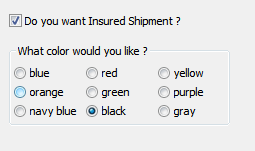
Regards,
Bernardo

Ben Rousch
Sep 19, 2013, 10:57:49 AM9/19/13
to kivy-...@googlegroups.com
I think you'd start with a FloatLayout. Inside of that, make another layout (maybe GridLayout) that's shorter in height than the FloatLayout, positioned at the bottom of the FloatLayout and give it a border. Then add a label inside of the FloatLayout with the text, positioned relative to the FloatLayout's upper left corner. If you add the Label after the GridLayout, it should be on top of the GridLayout.
--
You received this message because you are subscribed to the Google Groups "Kivy users support" group.
To unsubscribe from this group and stop receiving emails from it, send an email to kivy-users+...@googlegroups.com.
For more options, visit https://groups.google.com/groups/opt_out.
Ben Rousch
bro...@gmail.com
http://clusterbleep.net/

Gabriel Pettier
Sep 20, 2013, 7:33:01 AM9/20/13
to kivy-...@googlegroups.com
I would use a BorderImage for the border (duh :D), then indeed add a
Label with the text, if needed, i would add a Rectangle of the same
color as background under the text, to hide the border. Maybe some
drawing would be still necessary to cut the border around text "clean"
(rounded instead of straight), which would be slightly more complex but
still doable.
On Thu, Sep 19, 2013 at 10:57:49AM -0400, Ben Rousch wrote:
> I think you'd start with a FloatLayout. Inside of that, make another layout
> (maybe GridLayout) that's shorter in height than the FloatLayout,
> positioned at the bottom of the FloatLayout and give it a border. Then add
> a label inside of the FloatLayout with the text, positioned relative to the
> FloatLayout's upper left corner. If you add the Label after the GridLayout,
> it should be on top of the GridLayout.
>
>
> On Thu, Sep 19, 2013 at 10:36 AM, happybeej <happ...@gmail.com> wrote:
>
> > Hello everyone,
> >
> >
> > Been wondering how to do this in Kivy. (See attached image). Its a common
> > enough style that is useful for grouping options. All I can do so far in
> > kivy is draw a border, but cannot figure out how to put a label within the
> > border.
> >
> >
> >
> > <https://lh4.googleusercontent.com/-oNENRnpqZGY/UjsLcCAo4sI/AAAAAAAAABE/ePWBAoVltiM/s1600/border.PNG>
Label with the text, if needed, i would add a Rectangle of the same
color as background under the text, to hide the border. Maybe some
drawing would be still necessary to cut the border around text "clean"
(rounded instead of straight), which would be slightly more complex but
still doable.
On Thu, Sep 19, 2013 at 10:57:49AM -0400, Ben Rousch wrote:
> I think you'd start with a FloatLayout. Inside of that, make another layout
> (maybe GridLayout) that's shorter in height than the FloatLayout,
> positioned at the bottom of the FloatLayout and give it a border. Then add
> a label inside of the FloatLayout with the text, positioned relative to the
> FloatLayout's upper left corner. If you add the Label after the GridLayout,
> it should be on top of the GridLayout.
>
>
> On Thu, Sep 19, 2013 at 10:36 AM, happybeej <happ...@gmail.com> wrote:
>
> > Hello everyone,
> >
> >
> > Been wondering how to do this in Kivy. (See attached image). Its a common
> > enough style that is useful for grouping options. All I can do so far in
> > kivy is draw a border, but cannot figure out how to put a label within the
> > border.
> >
> >
> >
Reply all
Reply to author
Forward
0 new messages