
to over Kivy/KivMD position difference

berk berk
So, if i set up below pos_hint={"top":1}. But it working different layout in have different size mobile phone.
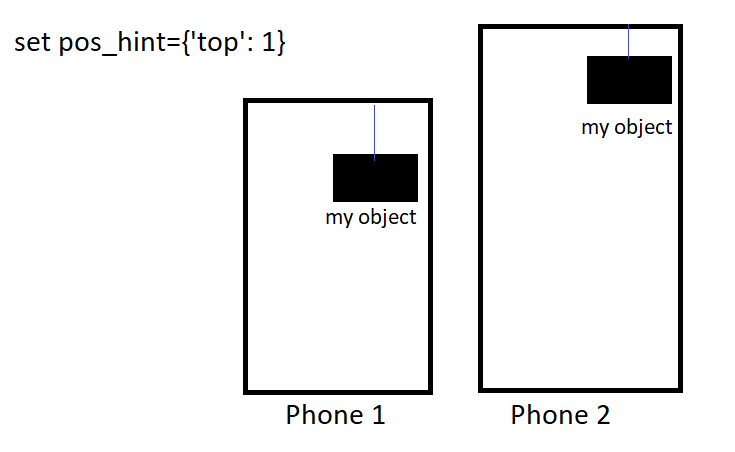
Why display different layout in there are different size mobile phone? (Phone-1 object far away but phone 2 object more close. But same pos_hint)
Best,

Elliot Garbus
On Aug 29, 2022, at 9:46 AM, berk berk <cing...@gmail.com> wrote:
Guys, I don't get clearly this subject: "positon so pos_hint" in Kivy/MD.
--
You received this message because you are subscribed to the Google Groups "Kivy users support" group.
To unsubscribe from this group and stop receiving emails from it, send an email to kivy-users+...@googlegroups.com.
To view this discussion on the web visit https://groups.google.com/d/msgid/kivy-users/f66d51f9-fe3d-4187-8198-8e3279eee9e7n%40googlegroups.com.

berk berk
Elliot Garbus
Share a minimal executable example.
From: berk berk
Sent: Monday, August 29, 2022 11:25 AM
To: Kivy users support
Subject: Re: [kivy-users] to over Kivy/KivMD position difference
I didn't use any space or padding actually
29 Ağustos 2022 Pazartesi tarihinde saat 20:11:58 UTC+3 itibarıyla ElliotG şunları yazdı:
Do you have padding set for the enclosing layout?
Make sure the padding is specified using density independent pixels. See: https://kivy.org/doc/stable/api-kivy.metrics.html?highlight=metrics#
Example: padding: dp(4)
Sent from my iPhone
On Aug 29, 2022, at 9:46 AM, berk berk <cing...@gmail.com> wrote:
Guys, I don't get clearly this subject: "positon so pos_hint" in Kivy/MD.
So, if i set up below pos_hint={"top":1}. But it working different layout in have different size mobile phone.
Why display different layout in there are different size mobile phone? (Phone-1 object far away but phone 2 object more close. But same pos_hint)
Best,
--
You received this message because you are subscribed to the Google Groups "Kivy users support" group.
To unsubscribe from this group and stop receiving emails from it, send an email to kivy-users+...@googlegroups.com.
To view this discussion on the web visit https://groups.google.com/d/msgid/kivy-users/f66d51f9-fe3d-4187-8198-8e3279eee9e7n%40googlegroups.com.
--
You received this message because you are subscribed to the Google Groups "Kivy users support" group.
To unsubscribe from this group and stop receiving emails from it, send an email to kivy-users+...@googlegroups.com.
To view this discussion on the web visit https://groups.google.com/d/msgid/kivy-users/f9d462ee-a48a-4ec0-a5ed-749b40981d31n%40googlegroups.com.
berk berk
md_bg_color: 1, 1, 1, 1
MDBoxLayout:
id:box_layout
orientation:'vertical'
pos_hint: {"top": 1}
adaptive_height:True
md_bg_color: 1, 1, 1, 1
MDTopAppBar:
id:toolbar
title: "Main"
anchor_title:'center'
opposite_colors:True
elevation: 10
left_action_items: [["back"]]
right_action_items:[["menu",lambda x: nav_drawer.set_state("open")]]
md_bg_color: get_color_from_hex("#7A89EC")
.........
MDBoxLayout:
adaptive_height:True
orientation:'horizontal'
AnchorLayout:
anchor_x:'left'
pos_hint:{"top": -0.8 }
Label:
id:lbl0
text:'' "
color:'black'
font_name:'ascii.ttf'
font_size:'14dp'
size_hint_x:None
text_size:None,None
size:self.texture_size
markup:True
Elliot Garbus
On Aug 31, 2022, at 3:35 PM, berk berk <cing...@gmail.com> wrote:
MDScreen:
To view this discussion on the web visit https://groups.google.com/d/msgid/kivy-users/3cc19622-b21b-4b6a-a823-6d8e748c9c21n%40googlegroups.com.
berk berk
adaptive_height:True
orientation:'horizontal'
AnchorLayout:
anchor_x:'left'
pos_hint:{"top": -0.8 }
Label:
id:lbl0
text:'' "
color:'black'
font_name:'ascii.ttf'
font_size:'14dp'
size_hint_x:None
text_size:None,None
size:self.texture_size
markup:True
I looked metrics in Kivy then used dp(-0.8) it is pretty no mor difference but still a bit have.
Elliot Garbus
You may also want to try the value of 0.8 instead of -0.8
On Aug 31, 2022, at 4:07 PM, berk berk <cing...@gmail.com> wrote:
MDBoxLayout:
To view this discussion on the web visit https://groups.google.com/d/msgid/kivy-users/d9506cc7-9ecd-48a1-bfcb-24aefda4e259n%40googlegroups.com.
berk berk
Example:
import kivy
from kivymd.app import MDApp
from kivy.lang.builder import Builder
kivyy=("""
MDBoxLayout:
orientation:'vertical'
pos_hint: {"top": 1}
adaptive_height:True
id:txt1
text:""
multiline:True
font_size:'22dp'
MDLabel:
id:lbl
text:"example"
size_hint:None,None
font_size:'20dp'
valign:'center' #does not work even choose size_hint:None
MDBoxLayout:
orientation:'vertical'
adaptive_height:True
pos_hint:{'top':0.2}
MDRoundFlatButton:
id:btn
text:'positon'
size_hint_y:None
""")
class exampleApp(MDApp):
def build(self):
return Builder.load_string(kivyy)
kv=exampleApp().run()
[OUT]:

berk berk

Elliot Garbus
You are in a BoxLayout. IF you want a space between Item-2 and BoxLayout-2, you can create an object to put in-between, and give it a fixed height. You can use a Label without text or a Widget. Set the height to be the desired space.
BoxLayout:
Toolbar
Item-1
Item-2
# Spacer, widget with a fixed height.
Widget: # spacer
size_hint_y: None
height: dp(10) # use the value you need for the space between Item-2 and boxlayout-2
BoxLayout:
Item-3
Item-4
If you have not used the inspector, I suggest you give it a try. You can use it to explore your widgets and Layouts. Read: https://kivy.org/doc/stable/api-kivy.modules.html#module-kivy.modules
From the command line:
>python mycode.py -m inspector
Then type cntrl-e and click on the area you are interested in… you can see the size.
From: berk berk
Sent: Wednesday, August 31, 2022 6:31 PM
To: Kivy users support
Subject: Re: [kivy-users] to over Kivy/KivMD position difference
what i mean actually;
To view this discussion on the web visit https://groups.google.com/d/msgid/kivy-users/9216252b-ea14-4942-aa33-7d92f3801266n%40googlegroups.com.

berk berk

Please look at this; same code structure and same given position but output a bit different. If i use dp('position value') output gives more pretty layout but still a bit not equal same layout.
Elliot Garbus
Here is an example that positions widgets as in your example. I used a BoxLayout as the root widget and used Widget as a spacer. Alternatively, you could use the spacing parameter of the BoxLayout.
I used a RelativeLayout to create the rounded rectangle that holds items-3 and item-4. The objects in a relativelayout honor the position hints of the children, and used position hints to position the 2 “items”.
Finally there is a Label at the bottom. This fills up the space remaining in the main boxlayout and pushes all the widgets to the top.
If you run this on a laptop you will see the spacing of the top items does not change as you change the height of the window. I expect it will also show consistent height across different size phones. Let me know how this works out.
from kivy.app import App
from kivy.lang import Builder

kv = """
<Spacer@Widget>:
    size_hint_y: None
    height: dp(10)

<FixedHeightButton@Button>:
    size_hint_y: None
    height: dp(48)

BoxLayout:
    orientation: 'vertical'
    FixedHeightButton:
        text: 'Toolbar'
    Spacer:
    Button:
        text: 'Item-2'
        size_hint: None, None
        size: dp(100), dp(48)
        pos_hint: {'right': 1}
    Spacer:
    RelativeLayout:
        size_hint_y: None
        height: dp(200)
        canvas.before:
            Color:
                rgb: .8, .8, .8
            RoundedRectangle:
                size: self.size
        FixedHeightButton:
            text: 'item-3'
            pos_hint: {'top': .8}
        FixedHeightButton:
            text: 'item-4'
            pos_hint: {'y': 0.2 }
    Label:
        text: 'size_hint: 1, 1 to fill space at bottom'


"""


class PositionApp(App):
    def build(self):
        return Builder.load_string(kv)


PositionApp().run()
From: berk berk
Sent: Thursday, September 1, 2022 4:29 AM
To: Kivy users support
Subject: Re: [kivy-users] to over Kivy/KivMD position difference
Yes I using spacing material sometimes. But pay attention my discussion is "same code structure and same given position" has different layout on mobile phone that has different size.
Please look at this; same code structure and same given position but output a bit different. If i use dp('position value') output gives more pretty layout but still a bit not equal same layout.
1 Eylül 2022 Perşembe tarihinde saat 06:58:22 UTC+3 itibarıyla ElliotG şunları yazdı:
You are in a BoxLayout. IF you want a space between Item-2 and BoxLayout-2, you can create an object to put in-between, and give it a fixed height. You can use a Label without text or a Widget. Set the height to be the desired space.
BoxLayout:
Toolbar
Item-1
Item-2
# Spacer, widget with a fixed height.
Widget: # spacer
size_hint_y: None
height: dp(10) # use the value you need for the space between Item-2 and boxlayout-2
BoxLayout:
Item-3
Item-4
If you have not used the inspector, I suggest you give it a try. You can use it to explore your widgets and Layouts. Read: https://kivy.org/doc/stable/api-kivy.modules.html#module-kivy.modules
From the command line:
>python mycode.py -m inspector
Then type cntrl-e and click on the area you are interested in… you can see the size.
From: berk berk
Sent: Wednesday, August 31, 2022 6:31 PM
To: Kivy users support
Subject: Re: [kivy-users] to over Kivy/KivMD position difference
what i mean actually;
1 Eylül 2022 Perşembe tarihinde saat 03:42:37 UTC+3 itibarıyla berk berk şunları yazdı:
To view this discussion on the web visit https://groups.google.com/d/msgid/kivy-users/9e65b2ba-3c5b-44ea-93f2-7701f297b840n%40googlegroups.com.

berk berk
just i did it ;
Widget:
size_hint_y:None