
Skip to first unread message

KarelG
Mar 2, 2016, 12:05:16 PM3/2/16
to Kaa project
Hi all
From my previous issue (script in wrong location), i could now work with the sandbox Kaa. I'm using the tutorial here to understand how you can deploy a client to communicate with the server.
I have downloaded the SDK, extracted it... but the tutorial doesn't explain what i should do with it.
After searching around, i found this: http://docs.kaaproject.org/display/KAA/Windows
It is useful, however it is for C++ i think. There, it mentions about a batch file,
I suppose that it would be same at C SDK. But it's not true. After the extraction, the tools folder only contains "pub_key_generator.jar". It could be that it's in a different folder, so i issued a search on " .bat "
But the result is none. That means that there is no batch file. It could be a bug.
Since the above link is for C++, i started to search further, and found this: http://kaaproject.github.io/kaa/doc/client-c/latest/index.html
Sadly, it isn't valid for Windows platform since it doesn't have that "make" command.
From the tutorial page, there is a GitHub page there is an installation step
But the generated sdk even doesn't have that file. Either the search on " .sh " is not giving results.
What should i do in order to be able to use the Kaa SDK in C on Windows ?
(the reason for that is that i'm developing on my windows laptop to use the C executable on a BeagleBoard black device)
Should I try to use the batch files, provided in the C++ SDK endpoint on my C SDK ? Its tools folder contains
From my previous issue (script in wrong location), i could now work with the sandbox Kaa. I'm using the tutorial here to understand how you can deploy a client to communicate with the server.
I have downloaded the SDK, extracted it... but the tutorial doesn't explain what i should do with it.
After searching around, i found this: http://docs.kaaproject.org/display/KAA/Windows
It is useful, however it is for C++ i think. There, it mentions about a batch file,
Place env.bat to KAA_BUILD_DIR(). (File env.bat located in the 'tools' folder in C++ SDK)
I suppose that it would be same at C SDK. But it's not true. After the extraction, the tools folder only contains "pub_key_generator.jar". It could be that it's in a different folder, so i issued a search on " .bat "
But the result is none. That means that there is no batch file. It could be a bug.
Since the above link is for C++, i started to search further, and found this: http://kaaproject.github.io/kaa/doc/client-c/latest/index.html
Sadly, it isn't valid for Windows platform since it doesn't have that "make" command.
From the tutorial page, there is a GitHub page there is an installation step
4. Use the build.sh script to build and run the demo application (the 'deploy' option).
But the generated sdk even doesn't have that file. Either the search on " .sh " is not giving results.
What should i do in order to be able to use the Kaa SDK in C on Windows ?
(the reason for that is that i'm developing on my windows laptop to use the C executable on a BeagleBoard black device)
Should I try to use the batch files, provided in the C++ SDK endpoint on my C SDK ? Its tools folder contains
build_sdk_thirdparty.bat
env.bat

Denis Kimcherenko
Mar 2, 2016, 2:33:08 PM3/2/16
to Kaa project
Hi,
Let's walk through all issues:
From my previous issue (script in wrong location), i could now work with the sandbox Kaa.
I suppose you meant this thread and the problem is solved. Am I right?
Sorry for my curiosity, but why did you run the change_kaa_host.sh script manually?
Kaa Sandbox provides UI to do this. Just click on "Management" in the right top corner and find the "Kaa host/IP" option.
I'm using the tutorial here to understand how you can deploy a client to communicate with the server.
I have downloaded the SDK, extracted it... but the tutorial doesn't explain what i should do with it.
These instructions are valid only for Kaa 0.7.4. Sorry for inconvenience, we add this information to the webinar description.
As for Kaa 0.8.0, sandbox has already pre-configured Storm demo:
To try the demo, do as following:
1. Open <YOUR_SANDBOX_IP>:9080/sandbox/#bundleId:bundleId=storm_demos in your browser.
2. Click on the demo icon specific to a programming language (C/C++/Java).
3. Download the demo sources by clicking on the "Source" button.
4. Follow instructions to install the demo (e.g. for the Java demo instructions are <YOUR_SANDBOX_IP>:9080/sandbox/#proj:projectId=storm_demo_java).
Note: C/C++ demos have been tested only on Linux. Before compiling it, you should install third-parties.
Best regards,
Denis
KarelG
Mar 3, 2016, 9:31:55 AM3/3/16
to Kaa project
Sorry for my curiosity, but why did you run the change_kaa_host.sh script manually?
Because it wasn't accessible under the given IP. I had to set up the ip address so that it's in the same subnet. Then it works without problems.
Of course i could do that through the management console, but if i couldn't access it ... :P
Of course i could do that through the management console, but if i couldn't access it ... :P
As for Kaa 0.8.0, sandbox has already pre-configured Storm demo:
I have discovered that too. But the problem still persist: the SDK generation for C doesn't do well on Windows platform. I'm able to get the compressed tarball file.
But the problem is that make command, which is Linux specific. Even the new storm demo contains Linux specific operations. I am aware that you cannot support tutorials for all platforms and all languages directly.
But the problem is that make command, which is Linux specific. Even the new storm demo contains Linux specific operations. I am aware that you cannot support tutorials for all platforms and all languages directly.
I have seen these and installed these already. I don't speedread through tutorials.
I was probably not clear enough. The problem is that when you create a custom Kaa server. I have constructed a small test sample and database to exchange gps data (lat + long).
What i did is
Now, the set of files contains full of codes, .h files, .c files and other stuff. But in the "tools" there is no batch file or someone useful that all these tutorials is recommending.
It only has "pub_key_generator.jar" file. In contrary to that, the demos and tutorials are talking about scripts that should be used in order to set up the client SDK.
That's why i have placed this question. Ok, i understand that my intent isn't clear. But Windows doesn't have a make command, so i need that script, in order to get the client SDK on C platform.
In the attachment, you can find the compressed tarball that i have downloaded at the SDK generation. Maybe you can look into it what's missing and what i can do with it on Windows platform.
There is a readme, which enlists the following;
After this, i started to look around but couldn't find clues to solve this. So, what can I do here.
Op woensdag 2 maart 2016 20:33:08 UTC+1 schreef Denis Kimcherenko:
I was probably not clear enough. The problem is that when you create a custom Kaa server. I have constructed a small test sample and database to exchange gps data (lat + long).
What i did is
- Logged in to KAA_IP:8080 as admin
- created a new application: Kaa_test
- Logged out
- Logged in to KAA_IP:8080 as devuser
- Opened application Kaa_test > Schemas > Log > + Add schema
- Filled the data that i need in the avro UI (correct name ?) with two fields: Long (double) and Lat(double), both not optional
- saved the schema as GpsReportLogSchema
- Opened "SDK profiles" > created one (figure below)
- After the profile got created, i use the icon "generate SDK"
- Target platform: C -> Button "Generate SDK" clicked
- Downloaded the compressed tarball -> extracted it and got a set of files.
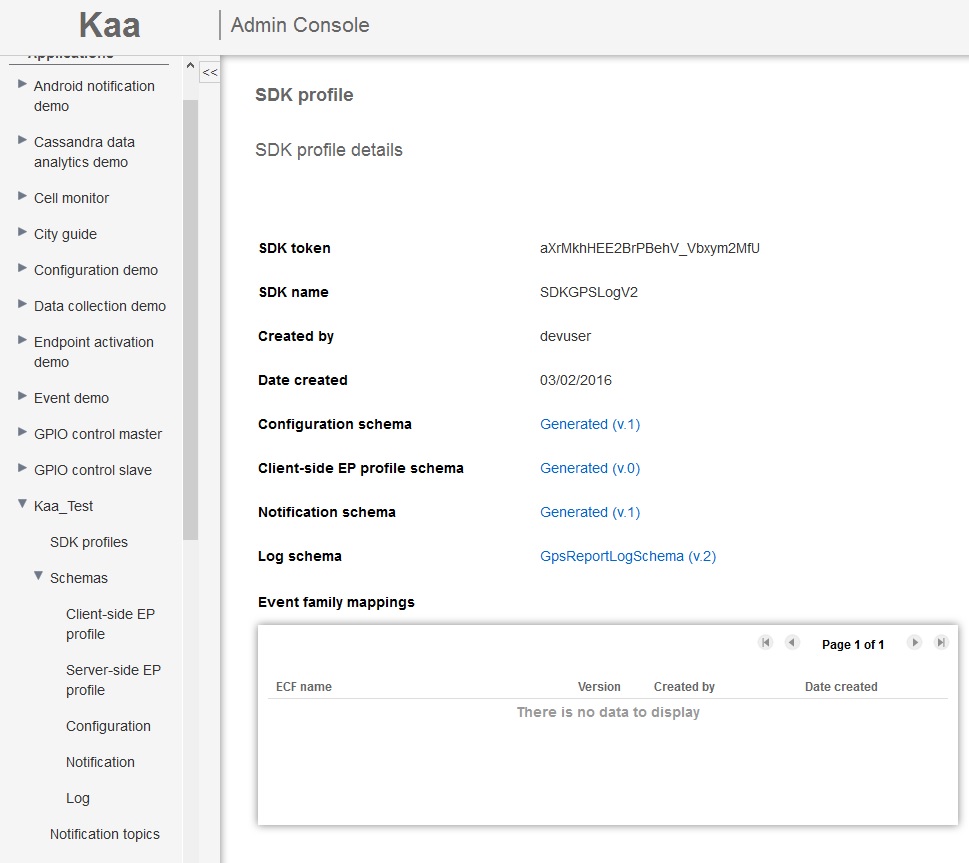
Now, the set of files contains full of codes, .h files, .c files and other stuff. But in the "tools" there is no batch file or someone useful that all these tutorials is recommending.
It only has "pub_key_generator.jar" file. In contrary to that, the demos and tutorials are talking about scripts that should be used in order to set up the client SDK.
That's why i have placed this question. Ok, i understand that my intent isn't clear. But Windows doesn't have a make command, so i need that script, in order to get the client SDK on C platform.
In the attachment, you can find the compressed tarball that i have downloaded at the SDK generation. Maybe you can look into it what's missing and what i can do with it on Windows platform.
There is a readme, which enlists the following;
PREREQUISITES
************************************
Before building the C endpoint SDK, ensure the following components are installed:
1. C compiler supporting the C99 standard <----- CHECK
2. cmake 2.8.8 or later <----- CHECK
To build the Kaa SDK for the x86-64 platform, ensure that OpenSSL libraries (ssl and crypto) are installed. <----- CHECK
INSTALL
************************************
To build the C endpoint SDK, do the following:
1. Download and untar the Kaa C SDK archive. <----- CHECK
2. Run the following commands:
mkdir build <----- CHECK (well, just make a folder in PS: "New-Item -ItemType Directory -Path build")
cd build <----- CHECK
For x86-64:
cmake .. <----- CHECK
make <----- UH NO .... Windows doesn't have it
make install
After this, i started to look around but couldn't find clues to solve this. So, what can I do here.
Op woensdag 2 maart 2016 20:33:08 UTC+1 schreef Denis Kimcherenko:
Message has been deleted
KarelG
Mar 4, 2016, 6:41:23 AM3/4/16
to Kaa project
Just discovered something,
After issuing the cmake command (as mentioned in the readme), it generates build files. However it is not possible to issue the make command after because there is no makelist file.
That's necessary to ensure that the make command would work. (Visual Studio uses it under the hood. But it doesn't build effectively because of the missing file)
Op donderdag 3 maart 2016 15:31:55 UTC+1 schreef KarelG:
After issuing the cmake command (as mentioned in the readme), it generates build files. However it is not possible to issue the make command after because there is no makelist file.
That's necessary to ensure that the make command would work. (Visual Studio uses it under the hood. But it doesn't build effectively because of the missing file)
Op donderdag 3 maart 2016 15:31:55 UTC+1 schreef KarelG:
Denis Kimcherenko
Mar 4, 2016, 7:13:35 AM3/4/16
to Kaa project
Hi,
As for Kaa 0.8.0 we have Windows installation instructions only for C++ SDK. To try Java SDK you only need to install JRE.
You are free to build C SDK on Windows by yourself, but it will require some code changes.
Regarding to the make issue, MSVC provides its own solution called nmake. To generate Makefile for this tool, run CMake as follows:
cmake -G "NMake Makefiles" <PATH_TO_CMAKE_FILE>
cmake -G "NMake Makefiles" <PATH_TO_CMAKE_FILE>
Best regards,
Denis
KarelG
Mar 10, 2016, 11:05:58 AM3/10/16
to Kaa project
Dear Mister Kimcherenko,
I have been busy lately, but thank you for your response. Although I am not sure if I have understood your answer correctly.
I believe that you want to replace the cmake .. step to the cmake -G "NMake Makefiles" .. step ?
Here below is the output of running the command
Then i replaced the make command (as mentioned in the readme) to nmake. The output is here below.
Does it mean that the original SDK file that i have generated is not complete ? I have only downloaded the tarball file from the kaa sandbox.
The source folder (src) doesn't contain unistd.h when i tried to find it (i thought that the path could be incorrect).
Any resolutions ?
Op vrijdag 4 maart 2016 13:13:35 UTC+1 schreef Denis Kimcherenko:
I have been busy lately, but thank you for your response. Although I am not sure if I have understood your answer correctly.
I believe that you want to replace the cmake .. step to the cmake -G "NMake Makefiles" .. step ?
Here below is the output of running the command
......\kaa-c-ep-sdk-aXrMkhHEE2BrPBehV_Vbxym2MfU\build>cmake -G "NMake Makefiles" ..
-- The C compiler identification is MSVC 19.0.23506.0
-- The CXX compiler identification is MSVC 19.0.23506.0
-- Check for working C compiler: C:/Program Files (x86)/Visual Studio 14.0/VC/bin/cl.exe
-- Check for working C compiler: C:/Program Files (x86)/Visual Studio 14.0/VC/bin/cl.exe -- works
-- Detecting C compiler ABI info
-- Detecting C compiler ABI info - done
-- Check for working CXX compiler: C:/Program Files (x86)/Visual Studio 14.0/VC/bin/cl.exe
-- Check for working CXX compiler: C:/Program Files (x86)/Visual Studio 14.0/VC/bin/cl.exe -- works
-- Detecting CXX compiler ABI info
-- Detecting CXX compiler ABI info - done
-- Detecting CXX compile features
-- Detecting CXX compile features - done
CMake Warning (dev) at CMakeLists.txt:36 (if):
Policy CMP0054 is not set: Only interpret if() arguments as variables or
keywords when unquoted. Run "cmake --help-policy CMP0054" for policy
details. Use the cmake_policy command to set the policy and suppress this
warning.
Quoted variables like "MSVC" will no longer be dereferenced when the policy
is set to NEW. Since the policy is not set the OLD behavior will be used.
This warning is for project developers. Use -Wno-dev to suppress it.
==================================
BUILD_TYPE = RELEASE
KAA_PLATFORM = x86-64
KAA_MAX_LOG_LEVEL = 4
==================================
EVENTS ENABLED
LOGGING ENABLED
CONFIGURATION ENABLED
NOTIFICATION ENABLED
==================================
-- Found OpenSSL: ....../software/openssl/dir/lib/ssleay32.lib;....../software/openssl/dir/lib/libeay32.lib (found version "1.0.2g")
KAA WILL BE INSTALLED TO C:/Program Files (x86)/Kaa-c
-- Configuring done
-- Generating done
-- Build files have been written to: ....../kaa-c-ep-sdk-aXrMkhHEE2BrPBehV_Vbxym2MfU/build
Then i replaced the make command (as mentioned in the readme) to nmake. The output is here below.
......\kaa-c-ep-sdk-aXrMkhHEE2BrPBehV_Vbxym2MfU\build>nmake
Microsoft (R) Program Maintenance Utility Version 14.00.23506.0
Copyright (C) Microsoft Corporation. All rights reserved.
Scanning dependencies of target kaac_o
[ 2%] Building C object CMakeFiles/kaac_o.dir/src/kaa/platform-impl/posix/posix_kaa_client.c.obj
cl : Command line warning D9002 : ignoring unknown option '-fPIC'
posix_kaa_client.c
......\kaa-c-ep-sdk-aXrMkhHEE2BrPBehV_Vbxym2MfU\src\kaa\platform-impl\posix\posix_kaa_client.c(22): fatal error C1083: Cannot open include file: 'unistd.h': No such file or directory
NMAKE : fatal error U1077: 'C:\PROGRA~2\VISUAL~1.0\VC\bin\cl.exe' : return code '0x2'
Stop.
NMAKE : fatal error U1077: '"C:\Program Files (x86)\Visual Studio 14.0\VC\BIN\nmake.exe"' : return code '0x2'
Stop.
NMAKE : fatal error U1077: '"C:\Program Files (x86)\Visual Studio 14.0\VC\BIN\nmake.exe"' : return code '0x2'
Stop.
Does it mean that the original SDK file that i have generated is not complete ? I have only downloaded the tarball file from the kaa sandbox.
The source folder (src) doesn't contain unistd.h when i tried to find it (i thought that the path could be incorrect).
Any resolutions ?
Op vrijdag 4 maart 2016 13:13:35 UTC+1 schreef Denis Kimcherenko:
Denis Kimcherenko
Mar 10, 2016, 11:44:09 AM3/10/16
to Kaa project
Hi KarelG,
I have been busy lately, but thank you for your response. Although I am not sure if I have understood your answer correctly.
I believe that you want to replace the cmake .. step to the cmake -G "NMake Makefiles" .. step ?
My fault, sorry. You understood me correctly.
Just to summarize how to build C/C++ SDK on Linux/Windows:
cmake <build_options> ..
make
2. Windows
BUT: As for Kaa 0.8.0, only C++ SDK works out of the box with MSVC compiler. To build C SDK on Windows, try MinGW.
Best regards,
Denis
KarelG
Mar 11, 2016, 6:46:50 AM3/11/16
to Kaa project
Dear Mister Kimcherenko
I moved on to C++ since it would be a better approach (and as you said, it does support Windows). But now an another issue arises.
Following the C++ guide, I have installed Boost, stored the tarball archives from Avro and Botan in a directory. Moved those two batch files to that directory
Then during the run, I got an error.
I have set the environment of BOOST correctly. In the env.bat, i have the following line,
It didn't work, as shown in the error here below
I have also tried
because that folder contains the header files. But it also didn't work... The error it gives is
Same story for the following
(I didn't have checked the directory first, but it was an obsolete command. The error is same as at the first run ...)
Here below is the dir content of boost installment;
For the completeness, here are the adaptions i've made in the env.bat and the kaa build directory that i've set up
And the directory content of D:\kaa\kaaBuild is;
(The command got invoked after the build. The new files and ect is a result from the batch file build_sdk_thirdparty.bat)
Building the SDK for windows is a pain in the butt it seems :P
Did someone have tried it ? Or am i just having a lot bad luck ?
Op donderdag 10 maart 2016 17:44:09 UTC+1 schreef Denis Kimcherenko:
I moved on to C++ since it would be a better approach (and as you said, it does support Windows). But now an another issue arises.
Following the C++ guide, I have installed Boost, stored the tarball archives from Avro and Botan in a directory. Moved those two batch files to that directory
Then during the run, I got an error.
I have set the environment of BOOST correctly. In the env.bat, i have the following line,
set BOOST_ROOT=D:\software\boost_1_55_0\
It didn't work, as shown in the error here below
CMake Error at D:/software/cmake_3.4.3/share/cmake-3.4/Modules/FindBoost.cmake:1247 (message):
Unable to find the requested Boost libraries.
Boost version: 1.55.0
Boost include path: D:/software/boost_1_55_0
Could not find the following Boost libraries:
boost_filesystem
boost_system
boost_program_options
No Boost libraries were found. You may need to set BOOST_LIBRARYDIR to the
directory containing Boost libraries or BOOST_ROOT to the location of
Boost.
Call Stack (most recent call first):
CMakeLists.txt:54 (find_package)
I have also tried
set BOOST_ROOT=D:\software\boost_1_55_0\boost
because that folder contains the header files. But it also didn't work... The error it gives is
CMake Error at D:/software/cmake_3.4.3/share/cmake-3.4/Modules/FindBoost.cmake:1247 (message):
Unable to find the requested Boost libraries.
Unable to find the Boost header files. Please set BOOST_ROOT to the root
directory containing Boost or BOOST_INCLUDEDIR to the directory containing
Boost's headers.
Call Stack (most recent call first):
CMakeLists.txt:54 (find_package)
CMake Error: The following variables are used in this project, but they are set to NOTFOUND.
Please set them or make sure they are set and tested correctly in the CMake files:
Boost_INCLUDE_DIR (ADVANCED)
used as include directory in directory D:/kuleuven/thesis/kaa/kaaBuild/avro-src-1.7.5/lang/c++
<repeated x times ...>
-- Configuring incomplete, errors occurred!
Same story for the following
set BOOST_ROOT=D:\software\boost_1_55_0\libs
(I didn't have checked the directory first, but it was an obsolete command. The error is same as at the first run ...)
Here below is the dir content of boost installment;
PS D:\software\boost_1_55_0> dir -name
boost
doc
lib32-msvc-12.0
libs
more
status
tools
boost-build.jam
boost.css
boost.png
boostcpp.jam
bootstrap.bat
bootstrap.sh
index.htm
index.html
INSTALL
Jamroot
LICENSE_1_0.txt
rst.css
For the completeness, here are the adaptions i've made in the env.bat and the kaa build directory that i've set up
@REM
@REM Copyright 2014-2016 CyberVision, Inc.
@REM
@REM Licensed under the Apache License, Version 2.0 (the "License");
@REM you may not use this file except in compliance with the License.
@REM You may obtain a copy of the License at
@REM
@REM http://www.apache.org/licenses/LICENSE-2.0
@REM
@REM Unless required by applicable law or agreed to in writing, software
@REM distributed under the License is distributed on an "AS IS" BASIS,
@REM WITHOUT WARRANTIES OR CONDITIONS OF ANY KIND, either express or implied.
@REM See the License for the specific language governing permissions and
@REM limitations under the License.
@REM
@echo off
set MSVS_HOME=C:\Program Files (x86)\Visual Studio 14.0
set BOOST_ROOT=D:\software\boost_1_55_0\
set AVRO_ROOT_DIR=D:\kaa\kaaBuild\avrocpp
set BOTAN_HOME=D:\kaa\kaaBuild\botan
set BOOST_LIBRARYDIR=%BOOST_ROOT%\lib32-msvc-12.0
set AVRO_LIBRARYDIR=%AVRO_ROOT_DIR%\lib
set PATH=%MSVS_HOME%\VC;%BOTAN_HOME%;%AVRO_ROOT_DIR%\bin;%AVRO_LIBRARYDIR%;%BOOST_LIBRARYDIR%;%PATH%
call vcvarsall.bat
And the directory content of D:\kaa\kaaBuild is;
PS D:\kaa\kaaBuild> dir -name
avro-src-1.7.5
botan-1.11.28
botan_archive
avro-src-1.7.5.tar
avro-src-1.7.5.tar.gz
botan-1.11.28.tar.gz
build_sdk_thirdparty.bat
env.bat
pax_global_header
(The command got invoked after the build. The new files and ect is a result from the batch file build_sdk_thirdparty.bat)
Building the SDK for windows is a pain in the butt it seems :P
Did someone have tried it ? Or am i just having a lot bad luck ?
Op donderdag 10 maart 2016 17:44:09 UTC+1 schreef Denis Kimcherenko:
Denis Kimcherenko
Mar 11, 2016, 7:32:37 AM3/11/16
to Kaa project
Hi KarelG,
Agree with you the building process on Windows is a little adventure :)
Regarding to Boost variables:
BOOST_ROOT - points to the root folder of Boost, where all files live (headers, libs, tools and etc.) In your case it is D:\software\boost_1_55_0
BOOST_LIBRARYDIR - points to the folder where Boost libraries locate. In your case it is D:\software\boost_1_55_0\lib32-msvc-12.0
Your env.bat looks correct.
As I understood from your description you could not build Avro library because of Boost. Am I correct?
If I got you right, one way that I can suggest you:
1. Reopen console.
If I got you right, one way that I can suggest you:
1. Reopen console.
2. Run env.bat script.
4. Re-run build_sdk_thirdparty.bat.
Hope it will help.
Best regards,
Denis
KarelG
Mar 14, 2016, 10:17:06 AM3/14/16
to Kaa project
Dear Mister Kimcherenko
Unfortunately
it is not helping. The number of dependencies required to generate a
SDK is quite large if you ask me. Maybe the developers behind Kaa would
redesign it someday, so that future users wouldn't struggle with it.
Summary: the goal is to install avro and botan.
For
avro, there is an issue between cmake and Boost. I have done the steps
that you have suggested, here below is the modified env.bat
To
figure out the exact problem, i have separate the script in two parts:
one installing avro, other installing botan. It's a long e-mail, but
please check the output correctly.
The reply consists of two parts: summary and long information
Summary: the goal is to install avro and botan.
- avro: Not possible, conflict between cmake and boost. Cmake is not able to find the boost libs however these files are available in the right folder. See the details in "long information"
- botan: Managed to install it. But not by the script only. I had to do some actions myself. See the details in "long information"
Long information: install logs + adaption + remarks + ...
@REM
@REM Copyright 2014-2016 CyberVision, Inc.
@REM
@REM Licensed under the Apache License, Version 2.0 (the "License");
@REM you may not use this file except in compliance with the License.
@REM You may obtain a copy of the License at
@REM
@REM http://www.apache.org/licenses/LICENSE-2.0
@REM
@REM Unless required by applicable law or agreed to in writing, software
@REM distributed under the License is distributed on an "AS IS" BASIS,
@REM WITHOUT WARRANTIES OR CONDITIONS OF ANY KIND, either express or implied.
@REM See the License for the specific language governing permissions and
@REM limitations under the License.
@REM
@echo off
set MSVS_HOME=C:\Program Files (x86)\Visual Studio 14.0
set BOOST_ROOT=D:\software\boost_1_55_0\
set BOOST_INCLUDEDIR=D:\software\boost_1_55_0\boost
set AVRO_ROOT_DIR=D:\kuleuven\thesis\kaa\kaaBuild\avrocpp
set BOTAN_HOME=D:\kuleuven\thesis\kaa\kaaBuild\botan
set BOOST_LIBRARYDIR=D:\software\boost_1_55_0\lib32-msvc-12.0
echo -----------------------------------------------
echo showing list of variables set;
echo MSVS_HOME:
echo %MSVS_HOME%
echo -
echo BOOST_ROOT:
echo %BOOST_ROOT%
echo -
echo BOOST_INCLUDEDIR:
echo %BOOST_INCLUDEDIR%
echo -
echo AVRO_ROOT_DIR:
echo %AVRO_ROOT_DIR%
echo -
echo BOTAN_HOME:
echo %BOTAN_HOME%
echo -
echo BOOST_LIBRARYDIR:
echo %BOOST_LIBRARYDIR%
echo -----------------------------------------------
set AVRO_LIBRARYDIR=%AVRO_ROOT_DIR%\lib
set PATH=%MSVS_HOME%\VC;%BOTAN_HOME%;%AVRO_ROOT_DIR%\bin;%AVRO_LIBRARYDIR%;%BOOST_LIBRARYDIR%;%PATH%
call vcvarsall.bat
D:\kaa\kaaBuild>build_sdk_thirdparty.bat
-----------------------------------------------
showing list of variables set;
MSVS_HOME:
C:\Program Files (x86)\Visual Studio 14.0
-
BOOST_ROOT:
D:\software\boost_1_55_0\
-
BOOST_INCLUDEDIR:
D:\software\boost_1_55_0\boost
-
AVRO_ROOT_DIR:
D:\kuleuven\thesis\kaa\kaaBuild\avrocpp
-
BOTAN_HOME:
D:\kuleuven\thesis\kaa\kaaBuild\botan
-
BOOST_LIBRARYDIR:
D:\software\boost_1_55_0\lib32-msvc-12.0
-----------------------------------------------
Building Kaa thirdparty components...
Building Avro...
-- The C compiler identification is MSVC 19.0.23506.0
-- The CXX compiler identification is MSVC 19.0.23506.0
-- Check for working C compiler: C:/Program Files (x86)/Visual Studio 14.0/VC/bin/cl.exe
-- Check for working C compiler: C:/Program Files (x86)/Visual Studio 14.0/VC/bin/cl.exe -- works
-- Detecting C compiler ABI info
-- Detecting C compiler ABI info - done
-- Check for working CXX compiler: C:/Program Files (x86)/Visual Studio 14.0/VC/bin/cl.exe
-- Check for working CXX compiler: C:/Program Files (x86)/Visual Studio 14.0/VC/bin/cl.exe -- works
-- Detecting CXX compiler ABI info
-- Detecting CXX compiler ABI info - done
-- Detecting CXX compile features
-- Detecting CXX compile features - done
CMake Error at D:/software/cmake_3.4.3/share/cmake-3.4/Modules/FindBoost.cmake:1247 (message):
Unable to find the requested Boost libraries.
Boost version: 1.55.0
Boost include path: D:/software/boost_1_55_0
Could not find the following Boost libraries:
boost_filesystem
boost_system
boost_program_options
No Boost libraries were found. You may need to set BOOST_LIBRARYDIR to the
directory containing Boost libraries or BOOST_ROOT to the location of
Boost.
Call Stack (most recent call first):
CMakeLists.txt:54 (find_package)
-- Configuring incomplete, errors occurred!
See also "D:/kaa/kaaBuild/avro-src-1.7.5/lang/c++/build.win/CMakeFiles/CMakeOutput.log".
Microsoft (R) Program Maintenance Utility Version 14.00.23506.0
Copyright (C) Microsoft Corporation. All rights reserved.
NMAKE : fatal error U1064: MAKEFILE not found and no target specified
Stop.
(I'm
not sure if you are familiar with PS - aka PowerShell - commands, what i
did is checking for the child items in a given directory (either file
or folder), filter names by wildcard and display only the name of the
file by using -name )
PS D:\software\boost_1_55_0\lib32-msvc-12.0> Get-ChildItem boost_file* -name
boost_filesystem-vc120-1_55.dll
boost_filesystem-vc120-1_55.lib
boost_filesystem-vc120-gd-1_55.dll
boost_filesystem-vc120-gd-1_55.lib
boost_filesystem-vc120-mt-1_55.dll
boost_filesystem-vc120-mt-1_55.lib
boost_filesystem-vc120-mt-gd-1_55.dll
boost_filesystem-vc120-mt-gd-1_55.lib
PS D:\software\boost_1_55_0\lib32-msvc-12.0> Get-ChildItem boost_system* -name
boost_system-vc120-1_55.dll
boost_system-vc120-1_55.lib
boost_system-vc120-gd-1_55.dll
boost_system-vc120-gd-1_55.lib
boost_system-vc120-mt-1_55.dll
boost_system-vc120-mt-1_55.lib
boost_system-vc120-mt-gd-1_55.dll
boost_system-vc120-mt-gd-1_55.lib
PS D:\software\boost_1_55_0\lib32-msvc-12.0> Get-ChildItem boost_program_opt* -name
boost_program_options-vc120-1_55.dll
boost_program_options-vc120-1_55.lib
boost_program_options-vc120-gd-1_55.dll
boost_program_options-vc120-gd-1_55.lib
boost_program_options-vc120-mt-1_55.dll
boost_program_options-vc120-mt-1_55.lib
boost_program_options-vc120-mt-gd-1_55.dll
Do you know why ? I am not familiar with cmake and boost, so ...
===
Now,
the botan, it executes correctly, the output is a large list of cl
commands to multiple cpp files. However, despite i have Python as part
of the environment, it doesn't run the python script. It ... opens the
file ?d:\kaa\kaabuild\botan-1.11.28\src\cli\cli.h(446): warning C4244: 'argument': conversion from 'std::streamsize' to 'size_t', possible loss of data
cl /MDd /bigobj /EHs /GR /Zi /FS /O2 /W3 /wd4275 /wd4267 /Ibuild\include /nologo /c src\cli\x509.cpp /Fobuild\obj\cli\x509.obj
x509.cpp
d:\kaa\kaabuild\botan-1.11.28\src\cli\cli.h(446): warning C4244: 'argument': conversion from 'std::streamsize' to 'size_t', possible loss of data
link /DEBUG /OUT:.\botan.exe build\obj\cli\asn1.obj build\obj\cli\cc_enc.obj build\obj\cli\compress.obj build\obj\cli\main.obj build\obj\cli\math.obj build\obj\cli\pubkey.obj build\obj\cli\speed.obj build\obj\cli\tls_client.obj build\obj\cli\tls_proxy.obj build\obj\cli\tls_server.obj build\obj\cli\utils.obj build\obj\cli\x509.obj .\botan.lib advapi32.lib user32.lib
Microsoft (R) Incremental Linker Version 14.00.23506.0
Copyright (C) Microsoft Corporation. All rights reserved.
LINK : .\botan.exe not found or not built by the last incremental link; performing full link
copy doc\manual\*.rst build\docs\manual
doc\manual\aead.rst
doc\manual\bigint.rst
doc\manual\building.rst
doc\manual\compression.rst
doc\manual\contents.rst
doc\manual\credentials_manager.rst
doc\manual\cryptobox.rst
doc\manual\ffi.rst
doc\manual\filters.rst
doc\manual\firststep.rst
doc\manual\fpe.rst
doc\manual\index.rst
doc\manual\kdf.rst
doc\manual\lowlevel.rst
doc\manual\mceliece.rst
doc\manual\ocsp.rst
doc\manual\passhash.rst
doc\manual\pbkdf.rst
doc\manual\pubkey.rst
doc\manual\python.rst
doc\manual\rng.rst
doc\manual\secmem.rst
doc\manual\srp.rst
doc\manual\tls.rst
doc\manual\versions.rst
doc\manual\x509.rst
26 file(s) copied.
src\scripts\install.py --destdir=c:\Botan --build-dir="build" --bindir=bin --libdir=lib --docdir=docs --includedir=include
The system cannot find the path specified.
D:\kaa\kaaBuild>python -V
Python 3.4.4
So why is it not running install.py but just opening it ? I believe that it's missing the " python " word at the start of src\scripts\install.py command.
I mean, should it not be the following ?
python src\scripts\install.py
Here is the proof that it misses the required "python" keyword:
PS D:\kaa\kaaBuild\botan-1.11.28> python .\src\scripts\install.py
INFO: Botan 1.11.28 installation complete
Also, the "missing" botan.exe (as said in the output) is literally in that folder ...
If both errors could be solved, then I think that i finally have a working SDK at C++ platform on windows !
I
have to file the changes that i have to do in this process so that the
tutorial information could be updated and that future users could have
less struggles than what I experience ;). But where can I do that ?
Should i just put it as issue on Kaa GitHub ? It's a quite list of issues :PGreetings !
PS: accidentally used e-mail instead of replying through discussion (The message didn't appear here)
Op vrijdag 11 maart 2016 13:32:37 UTC+1 schreef Denis Kimcherenko:
Reply all
Reply to author
Forward
0 new messages