
DefaultLogger.cpp.obj - Linking problem during nmake build.
253 views
Skip to first unread message

KarelG
Apr 1, 2016, 4:43:21 AM4/1/16
to Kaa project
Hi all
When building the kaa C++ SDK for Windows environment (using Visual Studio) dev tools, it throws up an error that I am not able to identify the cause myself.
I have tried to use google, but the answers didn't led to a solution. It could be that it's specific to the Kaa.
Here is an output after issuing nmake command, where the process suddenly stops at 98%.
To which Boost file does it want to point to? To libboost_log-vc140-mt-1_60.lib ?
In the cmakelists.txt file, the required modules for Boost got found (that means that i'm using the path to boost correctly), or i shouldn't be able to reach past the first checking...
In the cmakelists.txt file, i have used ....\boost_1_60_32\lib32-msvc-14.0 as library directory, which contains a walhalla of .lib files. (it also outputs "BOOST FOUND" during the cmake operation)
Is the linking done incorrectly?
Did anyone have experienced this kind of problem? If so, how can I solve it ?
Or maybe one of you can point me to the right direction so that I can solve it.
Thank you
Sincerely
- kg
When building the kaa C++ SDK for Windows environment (using Visual Studio) dev tools, it throws up an error that I am not able to identify the cause myself.
I have tried to use google, but the answers didn't led to a solution. It could be that it's specific to the Kaa.
Here is an output after issuing nmake command, where the process suddenly stops at 98%.
[ 98%] Linking CXX shared library kaacpp.dll
DefaultLogger.cpp.obj : error LNK2019: unresolved external symbol "__declspec(dllimport) private: static unsigned int __cdecl boost::log::v2_mt_nt5::attribute_name::get_id_from_string(char const *)" (__imp_?get_id_from_string@attribute_name@v2_mt_nt5@log@boost@@CAIPBD@Z) referenced in function "public: __thiscall boost::log::v2_mt_nt5::attribute_name::attribute_name(char const *)" (??0attribute_name@v2_mt_nt5@log@boost@@QAE@PBD@Z)
=== output omitted (same error from DefaultLogger.cpp.obj, lots of lines ...)
DefaultLogger.cpp.obj : error LNK2019: unresolved external symbol "__declspec(dllimport) class std::basic_ostream<char,struct std::char_traits<char> > & __cdecl boost::log::v2_mt_nt5::aux::operator<<<char,struct std::char_traits<char> >(class std::basic_ostream<char,struct std::char_traits<char> > &,class boost::log::v2_mt_nt5::aux::id<struct boost::log::v2_mt_nt5::aux::thread> const &)" (__imp_??$?6DU?$char_traits@D@std@@@aux@v2_mt_nt5@log@boost@@YAAAV?$basic_ostream@DU?$char_traits@D@std@@@std@@AAV45@ABV?$id@Uthread@aux@v2_mt_nt5@log@boost@@@0123@@Z) referenced in function "class boost::log::v2_mt_nt5::basic_formatting_ostream<char,struct std::char_traits<char>,class std::allocator<char> > & __cdecl boost::log::v2_mt_nt5::operator<<<class boost::log::v2_mt_nt5::basic_formatting_ostream<char,struct std::char_traits<char>,class std::allocator<char> >,class boost::log::v2_mt_nt5::aux::id<struct boost::log::v2_mt_nt5::aux::thread> >(class boost::log::v2_mt_nt5::basic_formatting_ostream<char,struct std::char_traits<char>,class std::allocator<char> > &,class boost::log::v2_mt_nt5::aux::id<struct boost::log::v2_mt_nt5::aux::thread> const &)" (??$?6V?$basic_formatting_ostream@DU?$char_traits@D@std@@V?$allocator@D@2@@v2_mt_nt5@log@boost@@V?$id@Uthread@aux@v2_mt_nt5@log@boost@@@aux@123@@v2_mt_nt5@log@boost@@YAAAV?$basic_formatting_ostream@DU?$char_traits@D@std@@V?$allocator@D@2@@012@AAV3012@ABV?$id@Uthread@aux@v2_mt_nt5@log@boost@@@aux@012@@Z)
kaacpp.dll : fatal error LNK1120: 40 unresolved externals
LINK Pass 1 failed. with 1120
NMAKE : fatal error U1077: 'D:\software\cmake\bin\cmake.exe' : return code '0xffffffff'
Stop.
NMAKE : fatal error U1077: '"C:\Program Files (x86)\Visual Studio 14.0\VC\BIN\nmake.exe"' : return code '0x2'
Stop.
NMAKE : fatal error U1077: '"C:\Program Files (x86)\Visual Studio 14.0\VC\BIN\nmake.exe"' : return code '0x2'
Stop.
To which Boost file does it want to point to? To libboost_log-vc140-mt-1_60.lib ?
In the cmakelists.txt file, the required modules for Boost got found (that means that i'm using the path to boost correctly), or i shouldn't be able to reach past the first checking...
In the cmakelists.txt file, i have used ....\boost_1_60_32\lib32-msvc-14.0 as library directory, which contains a walhalla of .lib files. (it also outputs "BOOST FOUND" during the cmake operation)
Is the linking done incorrectly?
Did anyone have experienced this kind of problem? If so, how can I solve it ?
Or maybe one of you can point me to the right direction so that I can solve it.
Thank you
Sincerely
- kg

Denis Kimcherenko
Apr 1, 2016, 6:20:00 AM4/1/16
to Kaa project
Hi KarelG,
I solved this problem by adding the following preprocessor definitions to my MSVC 2015 project settings:
Debug configuration
_WIN32_WINNT=0x0601
BOOST_LOG_DYN_LINK
Release configuration
_WIN32_WINNT=0x0601
BOOST_LOG_DYN_LINK
WIN32_LEAN_AND_MEAN
NOTE: The value of _WIN32_WINNT must match the version of Windows installed on your machine. Here is the list of Windows versions.
Best regards,
Denis
KarelG
Apr 5, 2016, 5:18:16 AM4/5/16
to Kaa project
Hi,
Sorry for replying now, but I have used your updated build plan (really, it should be a tutorial for future users!) and that error came up.
I should have mentioned that the output comes from issuing nmake install command after generating the makefiles.
But, in your build plan, there is no command that creates a solution file. How did you have changed the debug/release configuration ?
Do you mean by using the add_definitions command from cmake and rebuild the process after ?
Thank you for your response
- kg
Op vrijdag 1 april 2016 12:20:00 UTC+2 schreef Denis Kimcherenko:
Sorry for replying now, but I have used your updated build plan (really, it should be a tutorial for future users!) and that error came up.
I should have mentioned that the output comes from issuing nmake install command after generating the makefiles.
But, in your build plan, there is no command that creates a solution file. How did you have changed the debug/release configuration ?
Do you mean by using the add_definitions command from cmake and rebuild the process after ?
Thank you for your response
- kg
Op vrijdag 1 april 2016 12:20:00 UTC+2 schreef Denis Kimcherenko:
Denis Kimcherenko
Apr 5, 2016, 5:47:40 AM4/5/16
to Kaa project
Hi
But, in your build plan, there is no command that creates a solution file. How did you have changed the debug/release configuration ?
Do you mean by using the add_definitions command from cmake and rebuild the process after ?
It depends on what tools you use to develop your Kaa-based application.
In my case it is MSVC 2015 IDE. So I created a solution by using its GUI solution wizard. Add preprocessor definitions (described in my previous post) to the project (see the "To set this compiler option in the Visual Studio development environment" section). Switch between Debug/Release project configurations.
If you build from a command line and use CMake scripts, see the CMAKE_BUILD_TYPE option to switch between build types (Debug/Release) and add_definitions to add preprocessor definitions (described in my previous post).
Best regards,
Denis
KarelG
Apr 6, 2016, 6:41:39 AM4/6/16
to Kaa project
Hello,
i have added the following
in the cmakelist.txt, then ran the cmake commands that you have mentioned before using nmake install.
I got the above linking issue (described in the first mail) with the following
But the boost library files got precompiled as 64 bit (i have used boost_1_60_0-msvc-14.0-64.exe) since i had a 64 bit machine.... So I downloaded the 32 bit one (boost_1_60_0-msvc-14.0-32.exe) and replaced the boost files in the kaa third party directory
Then I don't get that warning LNK4272, but the same library error, described in the first mail.
My OS is Windows10 64 bit, Visual studio 2015 CE got installed as 64 bit version.
(Actually, the problem is that 64 bit system isn't well supported at Kaa. But that shouldn't be an issue, only that damn compiler is a stubborn thing.)
Do you have a clue/idea what I can do to solve this?
I appreciate your help
Sincerely
- kg
Op dinsdag 5 april 2016 11:47:40 UTC+2 schreef Denis Kimcherenko:
i have added the following
add_definitions(-D_WIN32_WINNT=0x0A00)
add_definitions(-DBOOST_LOG_DYN_LINK=1)
message("definitions set")
in the cmakelist.txt, then ran the cmake commands that you have mentioned before using nmake install.
I got the above linking issue (described in the first mail) with the following
D:\software\KaaThirdParty\debug\lib\boost_log-vc140-mt-gd-1_60.lib : warning LNK4272: library machine type 'x64' conflicts with target machine type 'X86'(there are other similar errors for the other required boost files)
But the boost library files got precompiled as 64 bit (i have used boost_1_60_0-msvc-14.0-64.exe) since i had a 64 bit machine.... So I downloaded the 32 bit one (boost_1_60_0-msvc-14.0-32.exe) and replaced the boost files in the kaa third party directory
Then I don't get that warning LNK4272, but the same library error, described in the first mail.
My OS is Windows10 64 bit, Visual studio 2015 CE got installed as 64 bit version.
(Actually, the problem is that 64 bit system isn't well supported at Kaa. But that shouldn't be an issue, only that damn compiler is a stubborn thing.)
Do you have a clue/idea what I can do to solve this?
I appreciate your help
Sincerely
- kg
Op dinsdag 5 april 2016 11:47:40 UTC+2 schreef Denis Kimcherenko:
Denis Kimcherenko
Apr 7, 2016, 5:24:47 AM4/7/16
to Kaa project
Hi,
Best regards,
First of all I must apologize because I misunderstood your first question.
That definitions I added to my MSVC 2015 application project, but in your case problem occurred on the stage of building SDK.
Instead of hard coded values of _WIN32_WINNT, CMake script for C++ SDK tries automatically detect this value.
As you wrote in the previous post _WIN32_WINNT for Windows 10 is 0x0A00. But could you check if the SDK CMake script detects the same value? (add message(STATUS "WIN NT=0x${version}") after this line and re-run cmake)
Regarding to 64-bit issue, I have experience only with 32-bit WIndows 7 and MSVC 2015, so for now I have no idea. But I created the story on Kaa Jira to follow up this item.
Best regards,
Denis
KarelG
Apr 7, 2016, 9:12:54 AM4/7/16
to Kaa project
Hi Dennis,
No problem of the misunderstanding.
I have to say, the Kaa SDK that i have is a sandbox, which is of version 0.8.0. It doesn't have these lines in the cmakelist.txt file that you have outlined in your previous message. I have added these, with the message line you have mentioned.
I have cleaned the cmake cache, to ensure that I have a clean cache (I simply deleted the whole content in the build directory)
The result of the message command is
-- WIN NT=0x10.0.10586
(The full output is added as appendix here below.)
The result is different than what I have used. I expected 0x0A00. But when running nmake install, I still get the same error, at the same file :-)
I know that you have informed me about the jira before, but i'm not familiar with that concept. Maybe I would try to place my adventure with the building kaa SDK on win 10 64 bit?
Just for future users...
Sincerely
- kg
Appendix: complete output of issuing the cmake command:
end of mail
Op donderdag 7 april 2016 11:24:47 UTC+2 schreef Denis Kimcherenko:
No problem of the misunderstanding.
I have to say, the Kaa SDK that i have is a sandbox, which is of version 0.8.0. It doesn't have these lines in the cmakelist.txt file that you have outlined in your previous message. I have added these, with the message line you have mentioned.
if (WIN32 AND NOT CYGWIN AND NOT MSYS)
# START ADDITION
if (CMAKE_SYSTEM_VERSION)
string(REGEX REPLACE "^([0-9])\\.([0-9]).*" "0\\10\\2" version ${CMAKE_SYSTEM_VERSION})
add_definitions(-D_WIN32_WINNT=0x${version})
endif()
# END ADDITION
add_definitions (/EHs)
add_definitions (
-DBOOST_REGEX_DYN_LINK
-DBOOST_FILESYSTEM_DYN_LINK
-DBOOST_SYSTEM_DYN_LINK
-DBOOST_PROGRAM_OPTIONS_DYN_LINK
-DBOOST_LOG_DYN_LINK
-DBOOST_ALL_NO_LIB)
else()
add_definitions (${Boost_LIB_DIAGNOSTIC_DEFINITIONS} -DBOOST_LOG_DYN_LINK)
endif()
I have cleaned the cmake cache, to ensure that I have a clean cache (I simply deleted the whole content in the build directory)
The result of the message command is
-- WIN NT=0x10.0.10586
(The full output is added as appendix here below.)
The result is different than what I have used. I expected 0x0A00. But when running nmake install, I still get the same error, at the same file :-)
I know that you have informed me about the jira before, but i'm not familiar with that concept. Maybe I would try to place my adventure with the building kaa SDK on win 10 64 bit?
Just for future users...
Sincerely
- kg
Appendix: complete output of issuing the cmake command:
D:\kaa\kaa-cpp-ep-sdk-bW0P-V3\build>cmake -G "NMake Makefiles" -DKAA_DEBUG_ENABLED=1 -DCMAKE_INSTALL_PREFIX=%KAA_APP_THIRDPARTY_HOME%\debug ..
==================================
A subdirectory or file avro\event already exists.
CMake Warning (dev) at CMakeLists.txt:73 (if):
Policy CMP0054 is not set: Only interpret if() arguments as variables or
keywords when unquoted. Run "cmake --help-policy CMP0054" for policy
details. Use the cmake_policy command to set the policy and suppress this
warning.
Quoted variables like "MSVC" will no longer be dereferenced when the policy
is set to NEW. Since the policy is not set the OLD behavior will be used.
This warning is for project developers. Use -Wno-dev to suppress it.
==================================
KAA_MAX_LOG_LEVEL=6
EVENTS ENABLED
NOTIFICATIONS ENABLED
CONFIGURATION ENABLED
LOGGING ENABLED
OPERATION_TCP_CHANNEL ENABLED
OPERATION_LONG_POLL_CHANNEL ENABLED
OPERATION_HTTP_CHANNEL ENABLED
BOOTSTRAP_HTTP_CHANNEL ENABLED
CONNECTIVITY_CHECKER ENABLED
KAA_THREADSAFE ENABLED
==================================
-- Boost version: 1.60.0
-- Found the following Boost libraries:
-- log
-- system
-- thread
-- date_time
-- log_setup
-- filesystem
-- regex
-- chrono
-- atomic
Looking for Avro C++ headers and libraries
-- Found Avro: D:/software/KaaThirdParty/debug/lib/avrocpp.lib
-- Include directories: D:/software/KaaThirdParty/debug/include
-- Libraries: D:/software/KaaThirdParty/debug/lib/avrocpp.lib
-- FindBotan check
-- BOTAN_HOME env is not set, setting it to /usr/local
-- Looking for botan in /usr/local
-- Include directory: D:/software/KaaThirdParty/debug/include
-- Library: D:/software/KaaThirdParty/debug/lib/botan.lib
-- WIN NT=0x10.0.10586
-- KAA WILL BE INSTALLED TO D:/software/KaaThirdParty/debug
-- Configuring done
-- Generating done
-- Build files have been written to: D:/kaa/kaa-cpp-ep-sdk-bW0P-V3/build
end of mail
Op donderdag 7 april 2016 11:24:47 UTC+2 schreef Denis Kimcherenko:
Denis Kimcherenko
Apr 7, 2016, 9:23:40 AM4/7/16
to Kaa project
Well,
If you are using 0.8.0 version, remove your ADDITION block and change this hard coded value to 0x0A00
And please give me the output of message(STATUS "CMAKE_SYSTEM_VERSION=${CMAKE_SYSTEM_VERSION}") while building SDK.
Thanks
KarelG
Apr 7, 2016, 9:47:48 AM4/7/16
to Kaa project
Hi Dennis,
that did the trick. The end of output after nmake install is here below;
Here is the message output during the cmake build:
After multiple weeks, the black beast (Kaa) finally got tamed it seems. But I'm still careful because there were lots of warning during the nmake process.
Some aren't harmful, like the switch statements with a "default" statement but no "case", but some are downcasting that can lead to data loss...
But we will see ^^
Thank you!
Sincerely
- kg
Op donderdag 7 april 2016 15:23:40 UTC+2 schreef Denis Kimcherenko:
that did the trick. The end of output after nmake install is here below;
[100%] Linking CXX static library kaacpp_s.lib
[100%] Built target kaacpp_s
Install the project...
-- Install configuration: "DEBUG"
-- Installing: D:/software/KaaThirdParty/debug/include/kaa
-- Installing: (other files)
Here is the message output during the cmake build:
-- CMAKE_SYSTEM_VERSION=10.0.10586
After multiple weeks, the black beast (Kaa) finally got tamed it seems. But I'm still careful because there were lots of warning during the nmake process.
Some aren't harmful, like the switch statements with a "default" statement but no "case", but some are downcasting that can lead to data loss...
But we will see ^^
Thank you!
Sincerely
- kg
Op donderdag 7 april 2016 15:23:40 UTC+2 schreef Denis Kimcherenko:
KarelG
Apr 13, 2016, 9:16:32 AM4/13/16
to Kaa project
Dear Mister Kimcherenko,
Unfortunately, the "black beast" is back. I have tried the quick start guide for the kaa cpp and could write my code without an error.
But during the build, that linking library issue is back. It surprised me because the previous step, when preparing the kaa client SDK, no errors got thrown. Even that linking went without problems.
So normally, the project should build an executable without a problem.
Here is an image of the error
https://lh3.googleusercontent.com/-8_6E49n00oI/Vw5CpdmYJiI/AAAAAAAAAIA/X64mXJJ-lr4dR278d-axQEtmLaOY5oaHwCLcB/s1600/temporary2.jpg
As you can see, the Boost libs is being the bad guy. Same issue as why i have started this discussion.
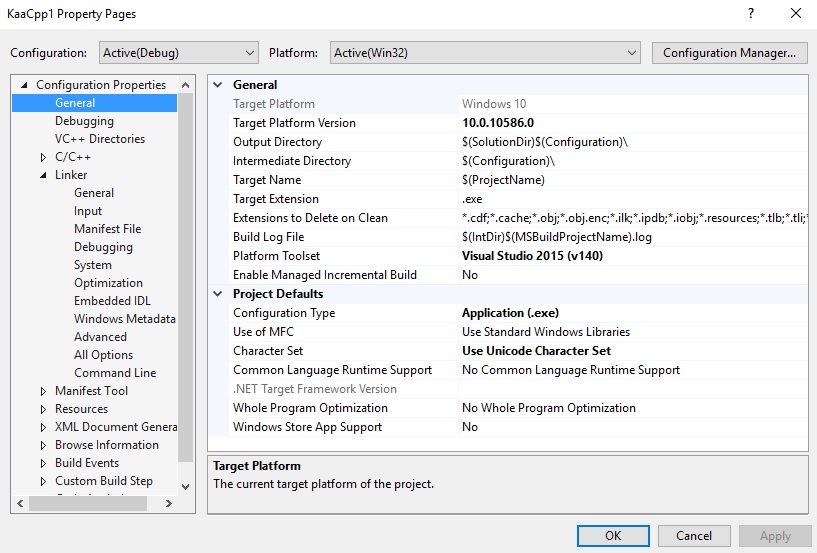
And the project properties, which targets the windows 10 (in our previous contact, we have forced cmake to use windows 10, by adding 0x0A00 hardcoded in the cmakelists.txt file.
So i have used win10 as target at my build.
https://lh3.googleusercontent.com/-zmhJtw8LWcM/Vw5BwcLvJXI/AAAAAAAAAH4/cso7QOPdOmwm9fZO2eQJX2NeSvVMoZ9qwCLcB/s1600/temporary1.jpg
At the bottom of this email, you can find a basic Kaa logging mechanism that i was trying out.
To ensure that you have all information, i have put the whole error message on pastebin. (83k characters ...)
What i have did to fix it is
-1-) changed the target platform to Win10 64 bit -> same error
-2-) changed target to windows 8 64 bit -> same error
-3-) changed target to windows 8 32 bit -> same error
Maybe i should try to rebuild the 3th party and SDK? I don't know why it doesn't want to work well - and with ease - on Windows 10 64bit.
Should i try running other platforms (not practical, because the goal is windows environment) ? cywin ?
I hope that someone has an insight to solve this issue.
Sincerely
-kg
// -------------------
Op donderdag 7 april 2016 15:23:40 UTC+2 schreef Denis Kimcherenko:
Unfortunately, the "black beast" is back. I have tried the quick start guide for the kaa cpp and could write my code without an error.
But during the build, that linking library issue is back. It surprised me because the previous step, when preparing the kaa client SDK, no errors got thrown. Even that linking went without problems.
So normally, the project should build an executable without a problem.
Here is an image of the error
https://lh3.googleusercontent.com/-8_6E49n00oI/Vw5CpdmYJiI/AAAAAAAAAIA/X64mXJJ-lr4dR278d-axQEtmLaOY5oaHwCLcB/s1600/temporary2.jpg
As you can see, the Boost libs is being the bad guy. Same issue as why i have started this discussion.
And the project properties, which targets the windows 10 (in our previous contact, we have forced cmake to use windows 10, by adding 0x0A00 hardcoded in the cmakelists.txt file.
So i have used win10 as target at my build.
https://lh3.googleusercontent.com/-zmhJtw8LWcM/Vw5BwcLvJXI/AAAAAAAAAH4/cso7QOPdOmwm9fZO2eQJX2NeSvVMoZ9qwCLcB/s1600/temporary1.jpg
At the bottom of this email, you can find a basic Kaa logging mechanism that i was trying out.
To ensure that you have all information, i have put the whole error message on pastebin. (83k characters ...)
What i have did to fix it is
-1-) changed the target platform to Win10 64 bit -> same error
-2-) changed target to windows 8 64 bit -> same error
-3-) changed target to windows 8 32 bit -> same error
Maybe i should try to rebuild the 3th party and SDK? I don't know why it doesn't want to work well - and with ease - on Windows 10 64bit.
Should i try running other platforms (not practical, because the goal is windows environment) ? cywin ?
I hope that someone has an insight to solve this issue.
Sincerely
-kg
#include "stdafx.h"
#include <iostream>
// KAA includes
#include <kaa\Kaa.hpp>
#include <kaa\log\DefaultLogUploadStrategy.hpp>
#include <kaa\log\ILogStorageStatus.hpp>
using namespace kaa;
// this uploads a log
class LogUploadStrategy : public DefaultLogUploadStrategy {
public: LogUploadStrategy(IKaaClientContext& clientContext) : DefaultLogUploadStrategy(clientContext) {}
virtual LogUploadStrategyDecision isUploadNeeded(ILogStorageStatus& status)
{
if (status.getRecordsCount() >= 1) {
return LogUploadStrategyDecision::UPLOAD;
}
return LogUploadStrategyDecision::NOOP;
}
};
// */
int main()
{
std::cout << "Kaa client started" << std::endl;
// Create a Kaa client with the Kaa desktop context.
IKaaClient& kaaClient = *Kaa::newClient();
// Set a custom strategy for uploading logs.
kaaClient.setLogUploadStrategy(std::make_shared<LogUploadStrategy>(kaaClient.getKaaClientContext()));
// Start Kaa client SDK (it also connects to the Kaa server).
kaaClient.start();
// test: create log
kaa::KaaUserLogRecord gpsLog;
gpsLog.latitude = 1.23;
gpsLog.longitude = 9.32;
// add log to kaa ... kaa log record?
kaaClient.addLogRecord(gpsLog);
// stop Kaa client SDK
kaaClient.stop();
// */
std::cout << "--= Press Enter to exit =--" << std::endl;
return 0;
}
// -------------------
Op donderdag 7 april 2016 15:23:40 UTC+2 schreef Denis Kimcherenko:
Denis Kimcherenko
Apr 13, 2016, 9:45:01 AM4/13/16
to Kaa project
HI,
In my case the list of libraries for Debug configuration is the following:
kaacpp_s.lib
botan.lib
avrocpp.lib
boost_log-vc140-mt-gd-1_60.lib
boost_system-vc140-mt-gd-1_60.lib
dbghelp.lib
ws2_32.lib
The Release configuration is almost the same, except dbghelp.lib
KarelG
Apr 13, 2016, 10:46:06 AM4/13/16
to Kaa project
Hi,
Thank you for the quick response. Yes, i have added the libraries to my project. But, I don't know from where you got those two libraries: dbghelp.lib & ws2_32.lib(I could not find information about it ...) I have added these and the errors got reduced to two errors. Wow !
What are these libraries for ? (what does it contain and do ?) Where is the information about it ?
What are these libraries for ? (what does it contain and do ?) Where is the information about it ?
Now, the other 2 errors are from the getter/setter of tss data (here below is a getter only)
Error LNK2019 unresolved external symbol "void __cdecl boost::detail::set_tss_data(void const *,class boost::shared_ptr<struct boost::detail::tss_cleanup_function>,void *,bool)" (?set_tss_data@detail@boost@@YAXPBXV?$shared_ptr@Utss_cleanup_function@detail@boost@@@2@PAX_N@Z) referenced in function "public: __thiscall boost::thread_specific_ptr<struct boost::log::v2_mt_nt6::sinks::basic_formatting_sink_frontend<char>::formatting_context>::~thread_specific_ptr<struct boost::log::v2_mt_nt6::sinks::basic_formatting_sink_frontend<char>::formatting_context>(void)" (??1?$thread_specific_ptr@Uformatting_context@?$basic_formatting_sink_frontend@D@sinks@v2_mt_nt6@log@boost@@@boost@@QAE@XZ) KaaCpp1 D:\Cproj\KaaCpp1\KaaCpp1\kaacpp_s.lib(DefaultLogger.cpp.obj)
It is from the the thread/tss.hpp header file. So i have added boost_thread-vc140-mt-gd-1_60.lib to the list too. (Somehow i have missed that)
Now, it is solved. I had to copy over the dll's though.
Still, there is a dll missing that i do not have in my third party folder: LIBBZ2.dll (see image)
Still, there is a dll missing that i do not have in my third party folder: LIBBZ2.dll (see image)

When looking for that, i stumbled upon this SO post which talks about modifying the iostreams. Not sure if it's a good approach...
Should i contact the Boost devs for this issue?
Sincerely
- kg
PS: On this page, there is a link telling you which third party libraries you have to install to use the Kaa C++ SDK. A colleague has clicked on that link, but he ended on the installation page of the Kaa server instead of the installation page for the third party components.
Where can I submit this issue ?
Op woensdag 13 april 2016 15:45:01 UTC+2 schreef Denis Kimcherenko:
Denis Kimcherenko
Apr 13, 2016, 10:58:35 AM4/13/16
to Kaa project
dbghelp.lib and ws2_32.lib Windows system libraries. The former should be used only in Debug project configuration. And the latter provides networking API.
Regarding to libbz2.dll, starting from 1.7.7 Avro has been using Boost iostreams, the latter has libbz2.dll in its dependencies.
Here is how to build libbz2 on Windows.
Denis Kimcherenko
Apr 13, 2016, 11:11:36 AM4/13/16
to Kaa project
PS: On this page, there is a link telling you which third party libraries you have to install to use the Kaa C++ SDK. A colleague has clicked on that link, but he ended on the installation page of the Kaa server instead of the installation page for the third party components.Where can I submit this issue ?
Here is Kaa bug tracking system. You are free to create there bugs, feature requests and etc.
Reply all
Reply to author
Forward
0 new messages