
District Wide ChromeCast (With 1:1 Chromebooks)

Stephen Gale
 (As you can see, the recommended distribution of AC Wireless APs is not 1 for each room)
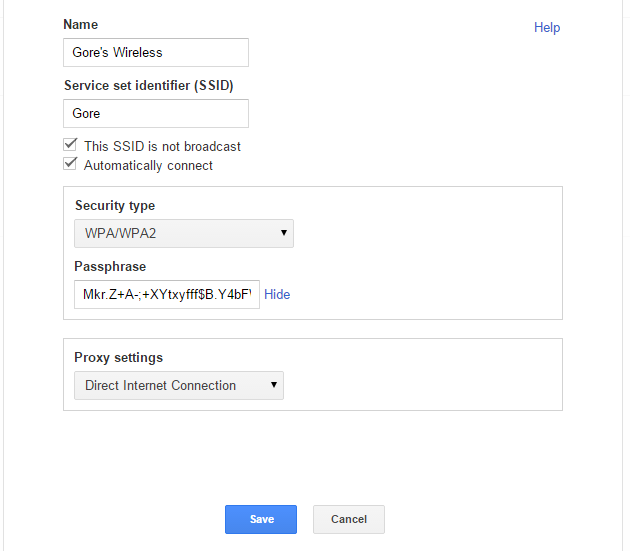
The passwords are set with random passwords generated from here and are varying in length, but never shorter than 50 random characters.
From a networking scheme, I have set our Elementary School range in the 10.100.0.0/16 network, the Middle School in the 10.200.0.0/16 network, and the High School in the 10.300.0.0/16 network. Each /16 network is then subnetted to /25 networks to keep things isolated at the classroom level. This allows 126 hosts to be connected to a classroom and 32 non overlapping classroom networks per building (assuming I did my math right).
Now that each classroom has it's own personal network that students auto-join when they are in range (and logged into their Chromebook) we can have some real fun with Chromecasts
In order for a Chromecast to work on a network, 3 things must be present. First is an internet connection. Hopefully that is the case and should go without saying. Second is MulticastDNS or mDNS. This is also commonly called Bonjour traffic. If your Wireless APs have Multicast filters, allow this one or if it requires a IP address to allow, it's 224.0.0.251/32. The third thing that Chromecast's need is referred to PlugNPlay on the Google Chromecast documentation, but again, at the Multicast filter, allow 239.255.255.250/32. I also noticed that IGMP Snooping must be OFF on all switches in order for Chromecast to work properly.
Next join a Chromecast to each classroom network, attach it to a Television or Projector (if you need a VGA converter, this one works great and they make male HDMI to Female VGA as well) and push out Google Cast to your students and teachers.
Now, when a Teacher or student comes into range of the Wireless AP, they are given Access to that teacher's Chromecast. Any student (or teacher) in that classroom can present what is on their Chromebook for the entire class.
We have also set this up with a wired lab. Same idea. Keep 100% of the traffic on the Lab Vlan and add in the Wireless to that Vlan and voila, everyone in the Lab can share their screen on the Big Screen.
I'd love to hear your feedback and any other suggestions or questions about using ChromeCast, Google Admin Console, Chromebooks or the like.

Bjorn Behrendt
--
--
You received this message because you are subscribed to the Google
Groups "Google Apps K12 Technical Forum" group.
To post to this group, send email to k12ap...@googlegroups.com
To unsubscribe from this group, send email to
k12appstech...@googlegroups.com
For more options, visit this group at
http://groups.google.com/group/k12appstech?hl=en?hl=en
---
You received this message because you are subscribed to the Google Groups "Google Apps K12 Technical Forum" group.
To unsubscribe from this group and stop receiving emails from it, send an email to k12appstech...@googlegroups.com.
For more options, visit https://groups.google.com/d/optout.
