
emacs shell not working with julia in docker container
298 views
Skip to first unread message

Christian Groll
Jan 26, 2015, 8:26:24 AM1/26/15
to julia...@googlegroups.com
I did set up Julia in a docker container. When I run it from the shell everything works just fine. However, when I start the shell inside of emacs, I can run the docker container and start Julia, but it somehow messes with the output:
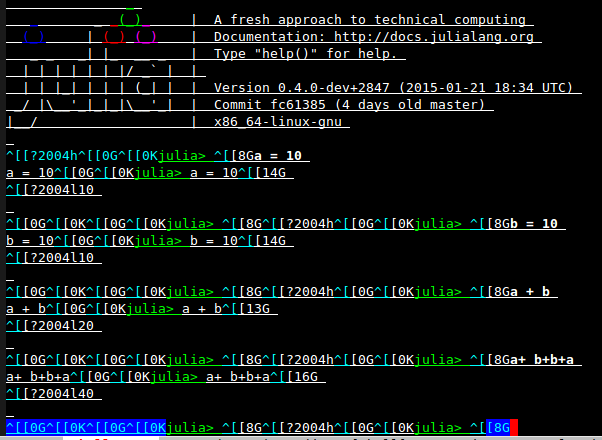
Running Julia in docker containers would allow me to easily share different Julia releases / package environments across multiple computers. In principle, IJulia / jupyter / beaker notebook / JuliaBox allow me to interactively work with Julia inside of a docker container. However, I am still searching for a way to conveniently edit .jl source files in an interactive way, which is why I hope to succeed in setting it up with emacs.
Any suggestions on how this problem could be fixed? Or is it a pure emacs problem and I should point it out on the emacs mailing list?

Kirill Ignatiev
Jan 26, 2015, 6:14:15 PM1/26/15
to julia...@googlegroups.com
On Monday, 26 January 2015 08:26:24 UTC-5, Christian Groll wrote:
I did set up Julia in a docker container. When I run it from the shell everything works just fine. However, when I start the shell inside of emacs, I can run the docker container and start Julia, but it somehow messes with the output:
This seems like a configuration problem, those garbage characters look like special shell escape codes. So try running julia with a command like
TERM=dumb julia --color=no
Maybe that will help.
Also, you say that you run julia in a shell. There is an ESS interactive mode for julia (M-x julia), which allows you to start remote julia processes by specifying the julia starting directory as "/ssh:user@host:" (see ESS's manual; also, make sure it can find julia in path; see tramp-remote-path and tramp-own-remote-path). I think that's also worth trying.
Christian Groll
Jan 27, 2015, 2:12:46 AM1/27/15
to julia...@googlegroups.com
Perfect, it works. Thanks a lot!
I now run a shell in emacs, run a docker container in the shell, and julia in the container, and I connect to it with M-x ess-remote. However, I also guess that using emacs tramp should be a better approach, as the ESS manual says:
The recommended way to access a statistical program on remote computer is to start it with tramp.
Do you by any chance know how to ssh into a container? What do I need as user and host in /ssh:user@host? Do I need to ssh into the container on its starting, or do I connect to it when it is already running? I didn't find anything about it.
Kirill Ignatiev
Jan 27, 2015, 5:15:30 PM1/27/15
to julia...@googlegroups.com
On Tuesday, 27 January 2015 02:12:46 UTC-5, Christian Groll wrote:
Perfect, it works. Thanks a lot!I now run a shell in emacs, run a docker container in the shell, and julia in the container, and I connect to it with M-x ess-remote. However, I also guess that using emacs tramp should be a better approach, as the ESS manual says:The recommended way to access a statistical program on remote computer is to start it with tramp.Do you by any chance know how to ssh into a container? What do I need as user and host in /ssh:user@host? Do I need to ssh into the container on its starting, or do I connect to it when it is already running? I didn't find anything about it.
Whatever options you use to ssh into the machine in a regular shell should be the same ones that you pass to tramp (it's really emacs's tramp that's doing the ssh connection, so try its manual). It also helps to set up a .ssh/config file, so that you can use "/ssh:remotehost:", where remotehost is an alias in .ssh/config with the right settings.
Reply all
Reply to author
Forward
0 new messages